






jonp
Members
-
Joined
-
Last visited
Everything posted by jonp
-
No, but it should work because we store all that data (including any skins) in the appdata folder. What skin were you trying to load? Keep in mind that some skins may not yet be compatible with this version of Kodi (has nothing to do with our VM). Try Aeon Nox. I know that one works.
-
I am still baffled by this as I do not have this same issue. I am able to use the Kore app right away (no USB keyboard needed). Still trying to figure out why some folks are having this issue. When openElec first starts it takes you through initial configuration, one step of which is giving it a hostname I seem to recall. Therefore if you don't press next,next,next on these options it isn't on the network until you do?? No. It defaults to the name of OpenELEC. You can change it at the welcome screen, but it should be on the network. Again, I haven't had this issue.
-
Ok, can you try this for me? Stop the VM. Edit the XML for the VM (click the VM icon and select Edit XML). Locate and remove this from the XML: Then add this: Click "Update" and try your VM again.
-
What kind of GPU are you assigning? Can you upload your diagnostics? Tools -> Diagnostics I am using an NVidia GT 730. What kind of USB device are you assigning to this VM? I don't think the VM is necessarily crashing, but rather, the USB device you're using to control it is failing to function with it properly.
-
What kind of GPU are you assigning? Can you upload your diagnostics? Tools -> Diagnostics
-
As this isn't really a defect report, but rather, a workaround to solving a current limitation, I'm going to move this thread to the KVM Hypervisor forum (and maybe sticky thread it) so folks see it there. This isn't really a bulletproof solution either, as reboots can cause the bus/device addresses to change sometimes.
-
You should have local mapping available. That is one of the advantages of using this VM is the ability to access your shares without using your network. -Will No, we do this through SMB, but it's still local. Yes, it is going through the "network layer" by using SMB, but it's not actually traversing the copper network itself. The network bridge takes care of that. All traffic going between the virtual network of the guest and the host is contained to the host. I'm curious what effect this would have on a shared MySQL DB. If I created my MySQL DB from an OE VM that uses local paths (9p), would standalone OE boxes that access media via SMB understand the paths in the existing DB? If you're asking me, I honestly have no idea. Probably easier to try and see than to discuss this theoretically ;-). That said, making this work would be of interest to me. How do you do this today with a shared MySQL DB? I don't take that approach personally, so I need some education in that department.
-
In short, no. Sleep/Standby/Hibernation support in general is a difficult thing to support. A lot of this stems back to ACPI and the lack of true standardization in the industry. Tom and I have had numerous discussions about this, and the reality is that while supporting this would be nice, it's just not realistic as there are too many edge cases to support. Just the other day there was a thread in the edk2 mailing list which talks about this. It was in response to someone trying to get a 32-bit build of Windows working as a VM with OVMF. I realize that's not the same, but ACPI is crucial to supporting sleep/standby/hibernation effectively, so many of the points made below support the difficulty in achieving this. Just thought I'd share...
-
You should have local mapping available. That is one of the advantages of using this VM is the ability to access your shares without using your network. -Will No, we do this through SMB, but it's still local. Yes, it is going through the "network layer" by using SMB, but it's not actually traversing the copper network itself. The network bridge takes care of that. All traffic going between the virtual network of the guest and the host is contained to the host.
-
-
In the wiki, I link to this post from Alex Williamson that explains, in detail, what this ACS override is actually doing. It is incredibly complex to read, but what it boils down to is that with the override applied, it is technically possible that one hardware device could accidentally write to another device's DMA space. In all my testing thus far, I have yet to see this actually occur where a major issue resulted, and no one in the forums here has reported it as well. Generally speaking, here's my stance on it: The first course of action should be to try to move the device to a different PCI slot to see if you can coax it into it's own IOMMU group, negating the need for the override in the first place. If that's not an option or doesn't work, the next step should be to review what other device(s) are in the group with your GPU. The worst device your GPU could be grouped with would be a storage controller. So if a GPU and a storage controller are in the same group, this means that it is TECHNICALLY possible for your GPU to write to the DMA of the storage controller causing silent data corruption. That said, I have never actually seen this happen and if the controller is well-behaved, this shouldn't happen. Point is, "swim at your own risk" if you choose to enable the override. Alex's post on the matter simply suggests getting hardware that has isolated root ports or purchase Xeon E5 class processor that has native ACS support, which also addresses this issue. My view is to simply make folks aware of the potential pitfalls and let them decide for themselves if it's a risk worth spending that kind of money to solve. Know that I have multiple systems with the PCIe ACS Override enabled, and so far (knock on wood), I've not witnessed any problems as a result.
-
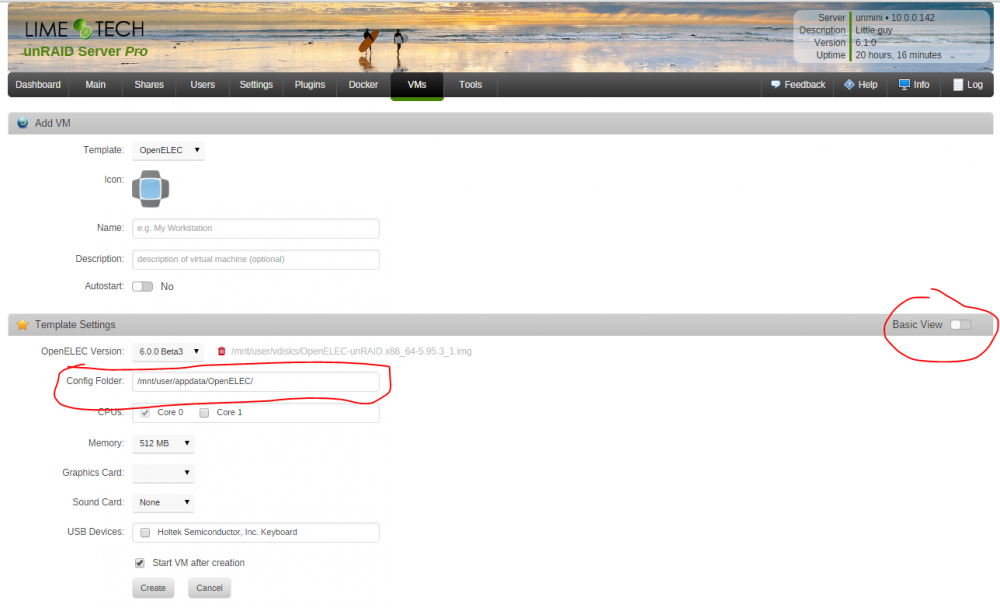
Not true. See image attached. You probably need to clear your browser cache. I am still baffled by this as I do not have this same issue. I am able to use the Kore app right away (no USB keyboard needed). Still trying to figure out why some folks are having this issue. I will add a note to the wiki guide to this affect. Good catch. Also will add this note to the wiki but I think there is a setting under the VM under display settings that can force display to a single monitor without having to physically unplug the cable. Thanks! Appreciate the feedback!
-
And then jonp's comment here: Are we really done with manually running chkdsk in another computer? That would be great! Just for the USB flash.
-
Ok, I see what you're getting at. I don't think those settings work because they would require write access to the virtual disk image for OpenELEC, which is set up to be read-only. I'll have to discuss with Eric to decide what the best solution for this would be.
-
Well, in the wiki I do make mention: Select any USB Devices you wish to use with the VM (such as a keyboard, mouse, or infrared receiver) Can you further explain what you mean here? I'm not understanding. So are you saying you want OpenELEC to hold in the boot process until it acquires an IP address? Is that the net of your request? If so, that should be a relatively simple adjustment.
-
OK, I found a Radeon HD5570 (which is probably a little older than the 560ti still), but re-created the VM with the new GPU, then seeing the video passthrough to the connected monitor. I still had to click next for all of the default settings with the USB Keyboard on the server before the Kore would connect, but once I did, Kore on my Android tablet then saw the server and connected as I expected it too and am now browsing and adding my shares. Sorry for blowing up your Template support thread! Thanks for your help and patience! Blowing it up? Not at all! You are the first person to use it for what it's actually meant! Glad it's working for you but its still weird that you had to click through using a USB device before you use the Kore app. Still not sure why that was the case, but either way, if its working, its working.
-
Most certainly sure, yes... have no issues connecting to my Plex Docker on my Media server from the same Android device(s) and my unRAID console via the browser, etc, I just removed the entire new VM, re-setup everything and no change, doesn't even appear to be getting an IP Address now from my Router, so I think time to call it a night and look at it again in the morning. -W I bet it's your default network bridge. Goto settings -> network settings and see if the network bridge is enabled. If not, stop the array and enable it. Once enabled, go to Settings -> VM Manager and make sure that the default bridge is set to br0 and not virbr0. Remove the existing OpenELEC from the VMs tab, then add a new OpenELEC VM and it will have this new bridge enabled by default. This will ensure you VM gets an IP on the network and is accessible by the Kore app. I'm been using a "br1" (which is what I changed the bridge name too in my network settings) bridge that I setup previously when playing with Win10 VM, not using virbr0. It's getting a 192.168.1.xx IP address from my router that I can ping and see on my primary network just fine. This might be a dumb question, but If I physically plug a monitor into the GPU should I be seeing "something" on that monitor when the VM is running? I'm getting absolutely nothing... Yes you should. If you have nothing on the display, that means your not successfully assigning the GPU yet. There are steps in the wiki relating to GPU pass through that you can try. I know we have had issues with the GTX 550 in the past, so the 560 may share a similar fate. It is a rather older GPU. Some things you can try are in the wiki though. If you have another GPU laying around, I'd give that a shot.
-
Most certainly sure, yes... have no issues connecting to my Plex Docker on my Media server from the same Android device(s) and my unRAID console via the browser, etc, I just removed the entire new VM, re-setup everything and no change, doesn't even appear to be getting an IP Address now from my Router, so I think time to call it a night and look at it again in the morning. -W I bet it's your default network bridge. Goto settings -> network settings and see if the network bridge is enabled. If not, stop the array and enable it. Once enabled, go to Settings -> VM Manager and make sure that the default bridge is set to br0 and not virbr0. Remove the existing OpenELEC from the VMs tab, then add a new OpenELEC VM and it will have this new bridge enabled by default. This will ensure you VM gets an IP on the network and is accessible by the Kore app.
-
No USB devices, and I tried using Kore App on my Android device and it's not finding any media center on my network even though the VM is running and I can see the "OpenELEC" has been assigned an IP address on my router. You sure your Android device is connected to the same router (over Wifi)? I can confirm in a test tonight that this works for me with a fresh setup and the Kore app just fine. I didn't have to enter a username or password at all. Just let the app search the network, it found the VM no problem. SSH access has to be enabled from within the guest if you desire that, but I don't see any reason to use SSH with OpenELEC (maybe someone smarter than I can enlighten me as to the benefit). If you have a share on unRAID with media files on it, you could literally be watching them in < 30 seconds. You have something funky going on with your network setup that's not letting the Kore app talk to the system. You could just pass through a mouse to get the initial setup done if you want to experiment. The quick and dirty way to add a media library is to go to Video -> Files -> Add Videos -> Browse -> Windows network (SMB) -> Workgroup -> YOUR SERVER NAME HERE (e.g. Tower) -> YOUR MEDIA SHARE NAME HERE (e.g. Movies, TV Shows, etc.) -> OK -> OK -> This directory contains: set to (Movies) -> Toggle additional options to your needs -> OK -> Yes.
-
Oh, and this may be your saving grace right here: http://kodi.wiki/view/Quick_start_guide In fact, first time user documentation is really solid overall: http://kodi.wiki/view/First_time_user
-
Thanks... I guess I still don't get the Kodi part... I can't seem to remote or access the OpenElec VM in any way to make any configuration changes, add my video shares, etc. Did you assign a USB device such as a keyboard or mouse? If not, to control the VM, you will need to consider using a mobile app such as Kore (for Android) or Official Kodi App (iOS). Using the app, you can connect to your VM and turn your smart phone or tablet into a remote. To add your media library to Kodi, you will follow the same process as using Kodi in general. http://kodi.wiki/view/Video_management'>http://kodi.wiki/view/Video_management The wiki on kodi.wiki is pretty darn solid, but their is a learning curve in exchange for all the features and customization available. First time setup on Kodi may be daunting for some, but for most, it's a fairly straightforward process. The docs are very solid if you look here: http://kodi.wiki/ I'll be adding more to our own wiki and working up a video on first time setup with OpenELEC to help folks, so if you're looking for more of a guided walkthrough, maybe it's best to wait for that. Proficient Kodi users should have no problem getting up and going, because once the monitor lights up, the rest of the setup process for Kodi is identical to running it on a regular system. Just add your media library over SMB the same way you would with a physical Kodi setup and you're off to the races!
-
Kodi.TV has a lot of good info on how to use it. You can also control the VM with a mobile app.
-
You can try disabling it. It may still be in a group with another device, so if disabling the Override doesn't work, re enable it and reboot.
-
That would avoid you needing the ACS Override setting.
-
If you can, move either the GPU or the SATA controller to another PCI slot.

