





HAVOC
Members
-
Joined
-
Last visited
Everything posted by HAVOC
-
Will do.
-
Thanks. My other server wont connect. Both servers are successfully backing up the flash drive.
-
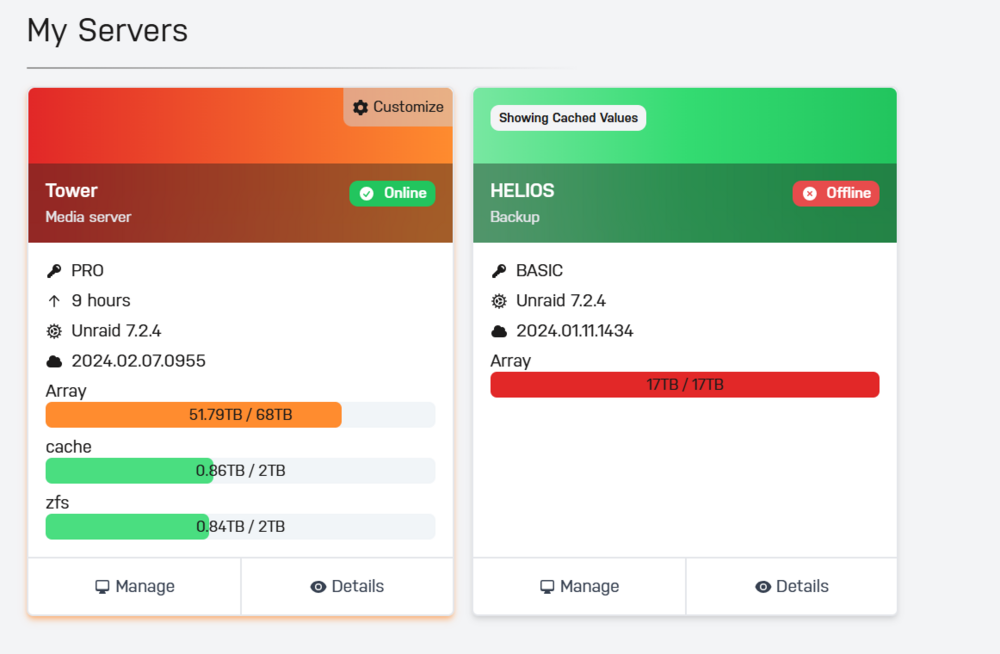
Not sure if this is an issue on my end but the Connect Dashboard shows the old software revision of Connect. Both servers have the latest plugin.
-
Worked with the restart. Thank you sir. I was pulling my hair out.
-
I cant register my server. What are you guys doing? I tried reinstalling the connect plugin, restart the server, restart the api. Not sure what else to do.
-
Yup both of my servers are not showing up under Connect. I am unable to add them.
-
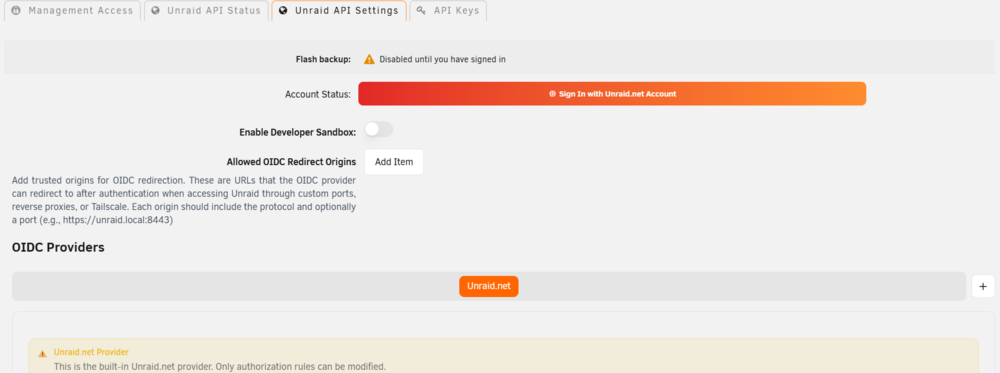
I am also having the same issue. I try to login with my credentials but the unraid API settings still says login. Frustrating.
-
Yup that was the trick sir. Thank you. root@Tower:~# zpool status pool: zfs state: ONLINE status: One or more devices is currently being resilvered. The pool will continue to function, possibly in a degraded state. action: Wait for the resilver to complete. scan: resilver in progress since Sun Mar 2 11:23:56 2025 153G / 153G scanned, 19.0G / 153G issued at 92.4M/s 19.0G resilvered, 12.48% done, 00:24:39 to go config: NAME STATE READ WRITE CKSUM zfs ONLINE 0 0 0 mirror-0 ONLINE 0 0 0 sdc1 ONLINE 0 0 0 sdd1 ONLINE 0 0 0 (resilvering) errors: No known data errors
-
root@Tower:~# zpool import pool: zfs id: 9079094678971493684 state: ONLINE action: The pool can be imported using its name or numeric identifier. config: zfs ONLINE sdd1 ONLINE root@Tower:~#
-
Its odd. Once I physically remove the drive the array it instantly comes on.
-
Here you go. Thanks in advance tower-diagnostics-20250302-0806.zip
-
root@Tower:~# zpool export zfs cannot export 'zfs': pool is busy I removed the device restarted the array and then the command worked thank you!! When I try to add the samsung ssd the server is locked up and wont come online Mar 2 07:28:07 Tower emhttpd: mounting /mnt/zfs Mar 2 07:28:07 Tower emhttpd: shcmd (842512): mkdir -m 0666 -p /mnt/zfs Mar 2 07:28:07 Tower emhttpd: shcmd (842513): /usr/sbin/zpool import -f -m -N -o autoexpand=on -d /dev/sdc1 -d /dev/sdo1 9079094678971493684 zfs Mar 2 07:28:08 Tower emhttpd: zfs: zfs verify devices Mar 2 07:28:08 Tower emhttpd: /usr/sbin/zpool status -P zfs 2>&1 Mar 2 07:28:08 Tower emhttpd: pool: zfs Mar 2 07:28:08 Tower emhttpd: state: ONLINE Mar 2 07:28:08 Tower emhttpd: scan: resilvered 104G in 00:21:16 with 0 errors on Mon Jan 27 22:34:49 2025 Mar 2 07:28:08 Tower emhttpd: config: Mar 2 07:28:08 Tower emhttpd: NAME STATE READ WRITE CKSUM Mar 2 07:28:08 Tower emhttpd: zfs ONLINE 0 0 0 Mar 2 07:28:08 Tower emhttpd: /dev/sdc1 ONLINE 0 0 0 Mar 2 07:28:08 Tower emhttpd: errors: No known data errors Mar 2 07:28:08 Tower emhttpd: shcmd (842514): /usr/sbin/zfs set -u mountpoint=/mnt/zfs zfs Mar 2 07:28:08 Tower sysDrivers: SysDrivers Build Complete Mar 2 07:28:08 Tower emhttpd: shcmd (842515): /usr/sbin/zfs mount -o atime=off zfs Mar 2 07:28:09 Tower rc.nginx: Reloading Nginx server daemon... Mar 2 07:28:09 Tower emhttpd: shcmd (842516): /usr/sbin/zpool set autotrim=on zfs Mar 2 07:28:09 Tower emhttpd: shcmd (842517): /usr/sbin/zfs set compression=on zfs Mar 2 07:28:09 Tower rc.nginx: Checking configuration for correct syntax and then trying to open files referenced in configuration... Mar 2 07:28:09 Tower rc.nginx: /usr/sbin/nginx -t -c /etc/nginx/nginx.conf Mar 2 07:28:09 Tower rc.nginx: Reloading Nginx server daemon configuration... Mar 2 07:28:09 Tower emhttpd: shcmd (842518): /sbin/wipefs -af --lock /dev/sdo1 Mar 2 07:28:09 Tower emhttpd: shcmd (842519): /sbin/blkdiscard /dev/sdo1
-
I will give it a shot. My monthly parity sync has kicked off so I’ll wait for it to complete. I’ll post results when it’s done.
-
root@Tower:~# zpool status pool: zfs state: ONLINE scan: resilvered 104G in 00:21:16 with 0 errors on Mon Jan 27 22:34:49 2025 config: NAME STATE READ WRITE CKSUM zfs ONLINE 0 0 0 sdc1 ONLINE 0 0 0 root@Tower:~# zpool import no pools available to import I reformatted my cache and restored from back up. Problem is this ZFS pool wont accept the SAMSUNG drive. It just hangs, when I remove it the array boots normally. Its odd.
-
Hello all. Spent the last 4 hours scouring the forum for the answer but have been unable to find an answer. My problem began when I bought a new ssd for my 2 drive zfs pool. Easy enough I removed the old drive and added the 2tb SSD Samsung Evo. That is when the downward spiral began. I was unable to mount the zfs pool I tried to clear the ssd but kept getting the same error invalid pool. I decided to do a newconfig so I can get rid of the pool. Once doing that I was unable to access my cache disk or unable to add back its a ZFS cache pool of one NVME drive. My main array is up but the cache is show in unassigned disks. I will add the diagnostic log. Appreciate any help. Thanks.
-
Did you try a cold reboot after applying the fix with sea tools? I believe that is needed in order for the fix to take place.
-
Thank you for the fix. I had been running P19 firmware on my dual M1015 LSI cards for the last 4 years. I upgraded to P20 firmware last week and the errors started showing up with my 2 8TB ST8000VN004. One drive is 3 years old and the other is about 4 months old. Feb 6 03:10:09 Tower kernel: sd 1:0:3:0: device_block, handle(0x000c) Feb 6 03:10:11 Tower kernel: sd 1:0:3:0: device_unblock and setting to running, handle(0x000c) Feb 6 03:10:11 Tower kernel: sd 1:0:6:0: device_block, handle(0x000f) Feb 6 03:10:12 Tower kernel: sd 1:0:3:0: [sdf] Synchronizing SCSI cache Feb 6 03:10:12 Tower kernel: sd 1:0:3:0: [sdf] Synchronize Cache(10) failed: Result: hostbyte=0x01 driverbyte=DRIVER_OK Feb 6 03:10:12 Tower kernel: mpt2sas_cm0: mpt3sas_transport_port_remove: removed: sas_addr(0x4433221104000000) Feb 6 03:10:12 Tower kernel: mpt2sas_cm0: removing handle(0x000c), sas_addr(0x4433221104000000) Feb 6 03:10:12 Tower kernel: mpt2sas_cm0: enclosure logical id(0x500605b003e678f0), slot(7) Feb 6 03:10:12 Tower kernel: sd 1:0:4:0: device_block, handle(0x000d) Feb 6 03:10:12 Tower kernel: sd 1:0:5:0: device_block, handle(0x000e) Feb 6 03:10:13 Tower kernel: sd 1:0:4:0: device_unblock and setting to running, handle(0x000d) Feb 6 03:10:13 Tower kernel: sd 1:0:5:0: device_unblock and setting to running, handle(0x000e) Feb 6 03:10:13 Tower kernel: sd 1:0:6:0: device_unblock and setting to running, handle(0x000f) Feb 6 03:10:14 Tower kernel: sd 1:0:4:0: [sdg] Synchronizing SCSI cache Feb 6 03:10:14 Tower kernel: sd 1:0:4:0: [sdg] Synchronize Cache(10) failed: Result: hostbyte=0x01 driverbyte=DRIVER_OK Feb 6 03:10:14 Tower kernel: mpt2sas_cm0: mpt3sas_transport_port_remove: removed: sas_addr(0x4433221102000000) Feb 6 03:10:14 Tower kernel: mpt2sas_cm0: removing handle(0x000d), sas_addr(0x4433221102000000) Feb 6 03:10:14 Tower kernel: mpt2sas_cm0: enclosure logical id(0x500605b003e678f0), slot(1) Feb 6 03:10:14 Tower kernel: sd 1:0:5:0: [sdh] Synchronizing SCSI cache Feb 6 03:10:14 Tower kernel: sd 1:0:5:0: [sdh] Synchronize Cache(10) failed: Result: hostbyte=0x01 driverbyte=DRIVER_OK Feb 6 03:10:14 Tower kernel: mpt2sas_cm0: mpt3sas_transport_port_remove: removed: sas_addr(0x4433221106000000) Feb 6 03:10:14 Tower kernel: mpt2sas_cm0: removing handle(0x000e), sas_addr(0x4433221106000000) Feb 6 03:10:14 Tower kernel: mpt2sas_cm0: enclosure logical id(0x500605b003e678f0), slot(5) Feb 6 03:10:14 Tower kernel: sd 1:0:6:0: [sdi] Synchronizing SCSI cache Feb 6 03:10:14 Tower kernel: sd 1:0:6:0: [sdi] Synchronize Cache(10) failed: Result: hostbyte=0x01 driverbyte=DRIVER_OK Feb 6 03:10:14 Tower kernel: mpt2sas_cm0: mpt3sas_transport_port_remove: removed: sas_addr(0x4433221107000000) Feb 6 03:10:14 Tower kernel: mpt2sas_cm0: removing handle(0x000f), sas_addr(0x4433221107000000) Feb 6 03:10:14 Tower kernel: mpt2sas_cm0: enclosure logical id(0x500605b003e678f0), slot(4) Feb 6 03:14:53 Tower kernel: sd 1:0:7:0: device_block, handle(0x0010) Feb 6 03:14:55 Tower kernel: sd 1:0:7:0: device_unblock and setting to running, handle(0x0010) Feb 6 03:14:55 Tower kernel: sd 1:0:7:0: [sdj] tag#232 UNKNOWN(0x2003) Result: hostbyte=0x01 driverbyte=DRIVER_OK cmd_age=4s Feb 6 03:14:55 Tower kernel: sd 1:0:7:0: [sdj] tag#232 CDB: opcode=0x85 85 06 20 00 00 00 00 00 00 00 00 00 00 40 e5 00 Feb 6 03:14:55 Tower kernel: sd 1:0:7:0: [sdj] tag#233 UNKNOWN(0x2003) Result: hostbyte=0x01 driverbyte=DRIVER_OK cmd_age=0s Feb 6 03:14:55 Tower kernel: sd 1:0:7:0: [sdj] tag#233 CDB: opcode=0x85 85 06 20 00 00 00 00 00 00 00 00 00 00 40 98 00 Feb 6 03:14:56 Tower emhttpd: read SMART /dev/sdj Feb 6 03:14:56 Tower kernel: sd 1:0:7:0: [sdj] Synchronizing SCSI cache Feb 6 03:14:56 Tower kernel: sd 1:0:7:0: [sdj] Synchronize Cache(10) failed: Result: hostbyte=0x01 driverbyte=DRIVER_OK Feb 6 03:14:56 Tower kernel: mpt2sas_cm0: mpt3sas_transport_port_remove: removed: sas_addr(0x4433221105000000) Feb 6 03:14:56 Tower kernel: mpt2sas_cm0: removing handle(0x0010), sas_addr(0x4433221105000000) Feb 6 03:14:56 Tower kernel: mpt2sas_cm0: enclosure logical id(0x500605b003e678f0), slot(6) Feb 6 03:40:01 Tower root: mover: started Feb 6 03:40:01 Tower root: file: //..4/... Feb 6 03:40:07 Tower kernel: md: disk1 read error, sector=396199808 Feb 6 03:40:07 Tower kernel: md: disk1 read error, sector=396199816 Feb 6 03:40:07 Tower kernel: md: disk1 read error, sector=396199824 Feb 6 03:40:07 Tower kernel: md: disk1 read error, sector=396199832 Feb 6 03:40:07 Tower kernel: md: disk1 read error, sector=396199840 Feb 6 03:40:07 Tower kernel: md: disk1 read error, sector=396199848 Feb 6 03:40:07 Tower kernel: md: disk1 read error, sector=396199856 Feb 6 03:40:07 Tower kernel: md: disk1 read error, sector=396199864 Feb 6 03:40:07 Tower kernel: md: disk1 read error, sector=396199872 Feb 6 03:40:07 Tower kernel: md: disk1 read error, sector=396199880 Feb 6 03:40:07 Tower kernel: md: disk1 read error, sector=396199888 Feb 6 03:40:07 Tower kernel: md: disk1 read error, sector=396199896 Feb 6 03:40:07 Tower kernel: md: disk1 read error, sector=396199904 Feb 6 03:40:07 Tower kernel: md: disk1 read error, sector=396199912 Feb 6 03:40:07 Tower kernel: md: disk1 read error, sector=396199920 Feb 6 03:40:07 Tower kernel: md: disk1 read error, sector=396199928 Feb 6 03:40:07 Tower kernel: md: disk1 read error, sector=396199936 Feb 6 03:40:07 Tower kernel: md: disk1 read error, sector=396199944 Feb 6 03:40:07 Tower kernel: md: disk1 read error, sector=396199952 Feb 6 03:40:07 Tower kernel: md: disk1 read error, sector=396199960 Feb 6 03:40:07 Tower kernel: md: disk1 read error, sector=396199961
-
Quick question in regards to accessing unraid through the opnevpn docker. I have it all setup through the bridged mode. I can connect with my iphone. I have no access to unraid, I can access everything else with in my network such as other pc's through rdc. Im just curious if I have to edit anything in regards to the docker settings or open vpn. Thanks
-
Same problem with no luck
-
Haha I hear you on that. Maybe a Linux wizard can chime in?
-
Thank you very much! Not sure what this error is being cause by its a seg fault in the cron jobs .... Jan 25 11:47:01 Tower crond[1357]: exit status 1 from user root /usr/bin/run-parts /etc/cron.hourly 1> /dev/null Jan 25 11:47:01 Tower kernel: crond[15712]: segfault at 4001e51c ip 4001e51c sp bf8d3ca8 error 15 in ld-2.11.1.so[4001e000+1000] (Errors) Jan 25 12:47:01 Tower crond[1357]: exit status 1 from user root /usr/bin/run-parts /etc/cron.hourly 1> /dev/null Jan 25 12:47:01 Tower kernel: crond[16274]: segfault at 4001e51c ip 4001e51c sp bf8d3ca8 error 15 in ld-2.11.1.so[4001e000+1000] (Errors)
-
Installed without a hitch I also have it installed on UNRAID 5.0.5. Its actually running encoding faster then with the previous version looking at 3 hours now instead of 7 hours.
-
Thanks I'll give it a try. On a side note I have a 1230v2 xeon while using the old version of handbrake I was getting roughly 7fps. Well that improve with version .9.9?
-
Sorry to revive this thread. Any luck with compiling the .conf file for the latest handbrake version? I installed the .conf file that clunk compiled and installed with little skill by me. The problem is it won't let me encode the bluray mkv's. Thanks in advance.
-
Awesome I will be ordering the 5x3 and a xenon E3-1230 to take advantage of the ecc memory on my board. Wish I would have known that prior to purchasing but maybe I'll build another htpc.


