




.jpg.28290fe604e024851ad06b9cae09c235.jpg)

snuffy47
Members
-
Joined
-
Last visited
Everything posted by snuffy47
-
Extended test on remaining drives attached D1 tower-smart-20210913-0759.zip D2 tower-smart-20210913-0758.zip D4 tower-smart-20210913-0758.zip D5 tower-smart-20210913-0758.zip D6 tower-smart-20210913-0758.zip D7 tower-smart-20210913-0758.zip D8 tower-smart-20210913-0757.zip
-
I started that last night but forgot to shut spin down off. Will do an extended test on all remaining drives and post - though it will likely take a day
-
Well first drive replaced Now I am not sure which one to replace or if I should wait just happy the rebuild went okay tower-diagnostics-20210911-2131.zip
-
Still easily 7 hours to go Been watching this thing like a hawk as it my first cherry on suspected failure and on top of that possible more at risk HD failures I need to call it a night I posted my log just for poops and giggles but will say I miss the ignore and no problems that has been the norm on my end Really appreciate the help on here. I implement every suggestion from my past problems just not experienced enough to understand the warnings Also want to add I have a replacement for disk 1 but I am struggling with replacing it as it is one of the newest drives in my array and damn its 8TB - will say less then 1 year old - that might be putting the cart before the mule but damn it hurts tower-diagnostics-20210911-0031.zip
-
Appreciate it ST2000DMZ08 Segate 2TB Sorry missed the rerquest for log tower-diagnostics-20210910-2054.zip
-
Well things are rebuilding..... Watching the drive I am very unsure why this is so high - its what the old drive indicated as a failure mode but the new drive is not flagging anything # ATTRIBUTE NAME FLAG VALUE WORST THRESHOLD TYPE UPDATED FAILED RAW VALUE 1 Raw read error rate 0x000f 079 076 006 Pre-fail Always Never 74902826
-
Well your suggestion worked My drives are in hand I am going to exchange 3 now One thing that popped up that I have never seen before is this which guess it means things are really messed up
-
Well I can not win for losing on this one.... Just had another crazy storm roll through and I am having problems Mounting my external drive I was using to back up some of my data the messages I get are Any help is appreciated
-
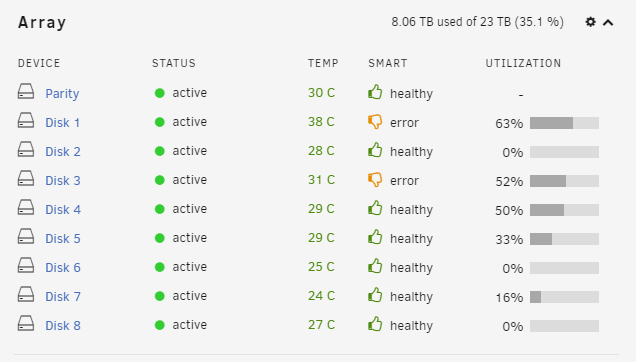
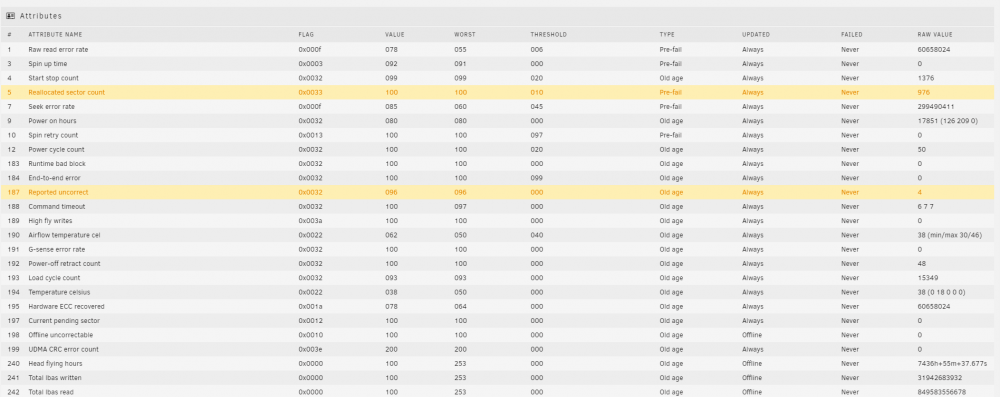
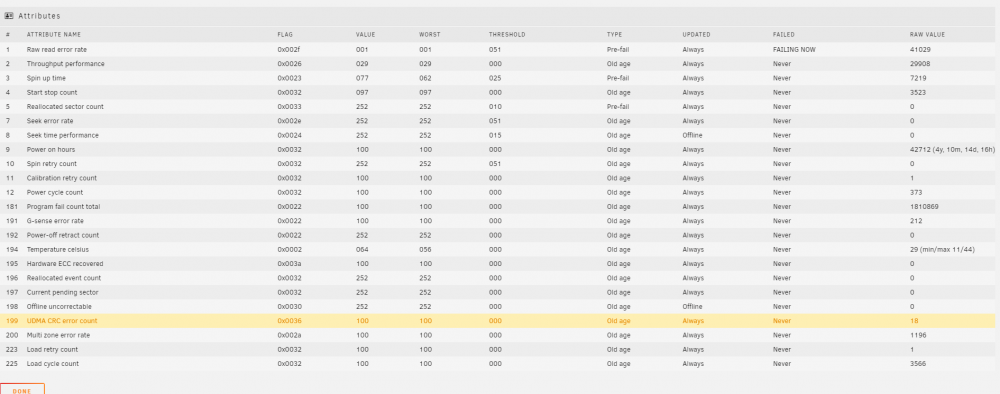
Well arent I in a mess I wasnt having any problems up to the power outage knocking my MOBO out but guess need to learn how to read the HD counts better. You get use to no problems and then you ignore things The data back up will take another day Do I toss a dart at the wall and try replacing Disk 3 first.. The 2 TB drives and 8TB I ordered wonnt be here till mid week
-
Update Not sure if it was the correct approach but I had 2 disks that would allow me to back up lets say would rather not lose files but would rather not... Crazy part is 3/4 of my data is media that falls under that category. My do not want to ever lose I keep a external back up already Order some new drives if replacement is required also as backing up files used my spares. Like I said maybe not the best idea but still not sure what is causing all the problems The RAW error reads have seemed to stop now that I canceled the parity check General Plan at this point and hoping if I am off track that the more experienced may correct 1. Back up Data 2. Check Connections on every thing and run a few days. Struggling with this as I feel there is failing hardware but maybe not 3. If problem continues change drive 3 - Hope it rebuilds - run for a few days 4. Have not went past that -
-
In Painic mode..... Have not opened up box or changed anything yet What I started was to SMART Test disc 1 and disk 3 with the intentions of testing all my drives and posting. These are attached though my server started a schedule parity check that I forgot to turn off Disk 3 is spitting out a ton of Raw Read Errors I am wondering if there is something lose ;( The 1 item I should note I do have a 5 disk 5.25" insert. I was thinking I should emliminate this out of the system as it is old but I am 1 slot shy in my server to do that Going to back things up now guess go from there RAID Forums.zip tower-smart-20210902-1327 (1).zip tower-smart-20210902-1327.zip
-
I get email notifications just not sure how well I monitor that though Do you have a recommendation as I am sure it will run over the evening when I change it.
-
Turl Well I have a disk I can replace it with so will go that route . Before I do is there anything else I should complete prior to this?
-
Howdy You are correct regarding the 2 disks. A while back I upgraded some equipment and disks. They are associated with 2 other discs but the high water setting has not started using them again. If I was going to do anything with Disk 2 currently I would like to just remove it out of the system. I have not seen anything in performance that I can think of to date though my response time for Plex Movies seemed to be slow last few days but figured that was the Parity Checks and SmaRT Test causing some of that... Happy to provide further details
-
Howdy Well that took some time but it completed - without errors is what it indicated Help is always appreciated tower-smart-20210830-1549.zip
-
Think smart test completed. tower-smart-20210829-1204.zip
-
Howdy all Well I had a motherboard board taken out in a power outage My fault my UPS was not working - dead battery..... All is fixed now however my parity check hit 3200+ errors first run and now came back with 200+ Looking for some help :) tower-diagnostics-20210828-1226.zip
-
nvm
-
Howdy Think I have things working but I thought there there would be a screen where I could see all my server temps and voltages Might have missed something not sure Currently CPU1, MB temps and fans are on GUI. In drop downs of plugin most of the stuff I want is in there with lables I created Thanks
-
Great thanks for information
-
Was looking to use the The "Clear Drive Then Remove Drive" Method if was going to shrink my array. Have no intention of removing the 8G from the system however Going to take a break from this if I reboot again and disk 1 craps out will have to do something Thanks again
-
Thanks Trurl Will see how things go and decide in couple days regarding the Disk 1 Apreciate it
-
I have copied the log of the Move - MOVE Do not see a command to remove the root folder tvshows or a resulted error in the log and the directory is empty Should have the "tvshows" root folder on Disk6 been removed after the task was completed or is this normal Thanks
-
Okay that is fair statement not sure if parity still would look at that subfolder in Disk6 as being present or not. Just the Skrink Array Wiki information says ensure drive is empty Guess my really question is if that tvshows root folder on Disk6 should have been removed after the task was completed and if not is it okay to delete is using MC.
-
Maybe I should separate this My first run was Scatter\Move - Disk6\tvshows\"there are subfolders here" TO Disk7\tvshows tvshows is a user share and is on other Disks The move seemed to work and the subfolders on Disk6 are gone and are now on Disk7 however the root folder tvshows is still present. Watching the YouTube video should have the tvshows root folder on Disk6 been removed? Would prefer to have no file structure on Disk6 what so ever.


