





brainbone
Members
-
Joined
-
Last visited
Everything posted by brainbone
-
I understand that port multipliers are, in general, actively discouraged for use with Unraid -- with most/all discussion I'm able to find about them ending in finding alternatives instead of use of them. I'd like to add some more SSD drives to an unraid box, but all PCIe/NVME/SAS/SATA are currently exhausted, and I'd like to avoid replacing the motherboard. (asrock x470 taichi w/ 8 onboard SATA and an IBM M1015 / SAS2008 SAS HBA.) Unfortunately, this puts me in the position of looking at a SAS/SATA port multiplier as a possible option, and I'm hoping there's been some success in finding something that works. I'm thinking if I could find a good multiplier/expansion, I could move some of my 15 array drives to that, opening up some non-expanded SATA ports for more SSDs. I've used IBM 46M0997 SAS Expansion cards with IBM M1015 HBAs in the past (not on unraid) with good results, but they unfortunately require a PCIe slot, which I don't have available. Does something like it exist that's known to work well with unraid and doesn't require a PCIe slot, or am I looking for a unicorn? Perhaps replacing the M1015 with a 9201-16i would be a better option? Edit: After thinking this though, I think the obvious answer is something like the 9201-16i -- not sure why I got hung up on a port expander --- probably because I have some 46M0997 sitting around. Anyone know if the 9201-16i has trouble at PCIe x4?
-
What's the correct way to re-build a drive marked as disabled that passes extended SMART test without losing the emulated data on it? I'd ideally like to pre-clear the drive as a test before re-adding it back. Are these the correct steps?: 1. Stop array 2. Set device to "No device" (this is the step that concerns me.) 3. Start the array (hopefully my disk 13 will still be emulated even after marking no-device?) 4. Preclear the now un-assigned disk 5. Stop the array 6. Set disk 13 to the pre-cleared disk 7. start the array and let unraid rebuild it. Edit: Here's my "PASSED" smart report for the drive:
-
I haven't tried, so I may be way off base, but wouldn't it be possible, and far more flexible, to pass through the WiFi adapter to a VM in Unraid (like we do for GPUs, USB controllers, etc.), and then have the VM run, say, OpenWRT or whatever else, to handle Wifi?
-
I think I'm seeing this same issue. When mover is running, Plex is for the most part frozen. Happened both before and after installing an old Geforce 1050 (using Unraid-Nvidia) for transcoding, so it seems unrelated to Unraid Nvidia. I'm not certain if this happened before I upgraded to 6.7.0 as I seldom manually ran the mover when I was on 6.5.x -- though I don't recall it happening before the upgrade to 6.7.0.
-
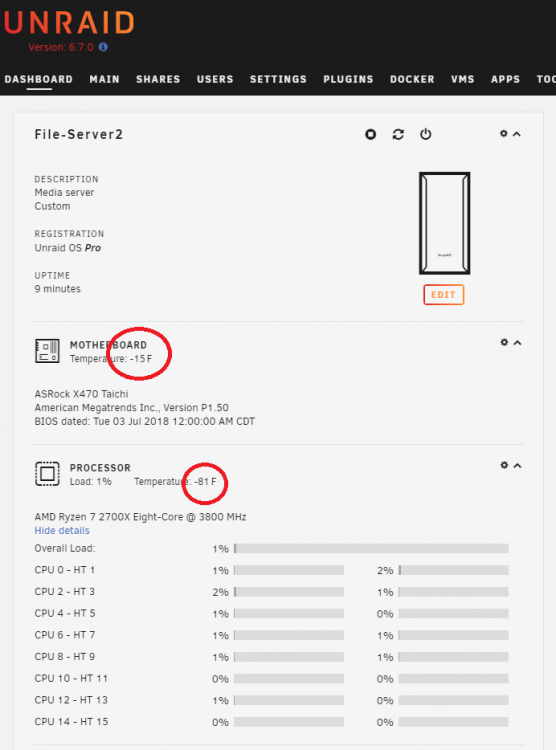
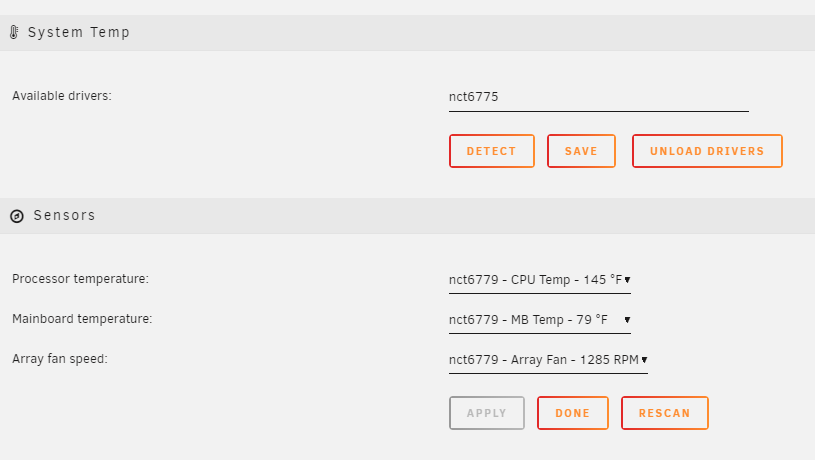
Seeing negative/wrong MB/CPU temps on dashboard on unraid 6.7.0 / Dynamix System Temperature 2019.01.12a Any idea what I'm doing wrong? (See attached:)
-
Exactly. Hence my concern. I've resorted to taping up the vents on the case and keeping all drives spun up. Currently have them at around 55°F (~ 13°C). I'll need to find a permanent solution, though my preferred solution would be to shut off select (in my case, all) chassis fans based on HDD temp, however keeping the array spun up is also needed. An unraid feature to force spinup when HDD temps are too low would be nice, however since temperature isn't available when they are spun down, it could be difficult to implement/use, requiring at least one HDD or an SSD be kept spinning as a canary. Low temp alerts in addition to high temp alerts would also be nice. (Guess I'll go create a feature request for these.)
-
Just like we used to do on extremely code days for car radiators eh? (I'm now using a sheet of plastic, since cardboard is too flammable to have that close to a boiler -- but the temps are still are still pretty cold @~40°F. I'll probably need to add some tape!) I'd like to avoid adding more hardware, but you're probably right. I may need to add a separate fan speed controller.
-
Any way to get Autofan to control more than one PWM controller and/or fan? I run one of my servers in a boiler room, next to the fresh-air intake. (Yeah, Yeah, but it is what it is.) This works great most of the time, since when the boiler runs, the make-up air from the fresh-air intake nicely cools down the server, offsetting the heat from the boiler room. Problem is, when it's -27°F (~ -33°C) outside, like it is today, the HDDs are running at 19°F (just spun up) to 28°F (spinning) (~ -7°C to -2°C), which is probably way too cold to run these HDDs. I have multiple chassis fans. I'd like to automatically spin all of them down when it's this cold. If any chassis fan is running, even the exhaust fans, too much cold air is pulled in.
-
Just updated to 6.6.4. The help entries that normally required you to click the item label to expand and see are now all expanded by default. This was not happening on 6.6.3. Can't seem to find a setting to change this behavior. Edit: Looks like if I use an incognito window to log into Unraid, things appear as they should. I suspect if I clear my cookies, cache, etc., it would work as well, but I really don't want to, and shouldn't have to, do that. Example:
-
Some guests, like pfSense w/CARP (for HA), require using e1000, not virtio, when running in KVM. In Unraid, you must switch to xml view to set e1000. Switching out of xml view will cause the change to e1000 on NICs to be reverted to virtio if saved. Please either add selection of NIC type, or at the very least don't overwrite xml selected NIC type, when in form view.
-
Running into an issue where the mouse cursor is invisible in noVnc after installing the QXL Graphics Driver on Windows guests. Looks like there is now a "Show Dot when no Cursor" option in noVnc that should solve the issue, but Unraid doesn't seem to have that incorporated in the noVnc it's using: https://github.com/novnc/noVNC/pull/1119
-
You could fork it, modify your fork, and do a pull request for that modification and see if gfjardim will merge it. That, or someone else could fork it, and everyone could start using that fork instead -- but I don't believe github allows multiple maintainers for an individual repository, and there are obvious issues with sharing credentials for a single github user account. It'd be great if a version could be created that: 1 - Allows the password for the "ubuntu" user account to be changed via an environment variable instead of having it hard-coded to "PASSWD". 2 - Changes "ubuntu" user account name to something else, like "crashplan" -- or allow it to be changed via environment variable as well. 3 - Allows the URL of the CrashPlan installation package to be modified via environment variable (best if environment variable is empty to use a hard-coded default, else use value of environment variable.) 4 - Allows XRDP installation/configuration to be optionally disabled, again via environment variable, enabling a "headless" mode. (see #5 for why) 5 - Last, but certainly not least, combines CrashPlan and CrashPlan Desktop into one container, allowing both the engine and UI to automatically update. Once that's done, it probably wouldn't be a huge issue if the repository owner didn't get around to updating it immediately.
-
It's in the folder you have mapped for /config in your CrashPlan volume mappings. For me it's /mnt/disk1/docker/appdata/crashplan/config I don't export my appdata folders, so while still SSHed into my unraid server, but disconnected from the CrashPlan bash (after the first "exit"), I just edit directly using the command: nano /mnt/disk1/docker/appdata/crashplan/config/id/.ui_info But for you, the "/mnt/disk1/docker/appdata/crashplan" portion will be different, depending on what you have entered in your volume mappings. Probably somewhere on your cache drive, if you have one.
-
Thanks, I'm a bit new to Docker -- still wrapping my head around it. (And your crashplan desktop update is working perfectly. Thanks again.) Edit: It seems the issue with the Crashplan desktop not being updated is related to Crashplan being run headless. For those that want to run Crashplan Desktop, is there any benefit to having separate containers for the desktop app and the engine that outweigh this update issue?
-
I'd like to change the password for CrashPlan-Desktop from PASSWD to something else. Will this change stick? Any issues with doing this?
-
Thanks for that. Will these changes complicate application of the "real" docker update when/if that comes?
-
This assumes I have a windows client.
-
Though no way to backup data to your crashplan account...
-
I thought crashplan clients auto updated? Just installed crashplan desktop and I'm getting the "disconnected from backup engine" error. Damn. Really wanted this to work... Any other quick and easy alternatives?

