





ghiglie
Members
-
Joined
-
Last visited
-
oops, sorry, I really dindnt' notice your message. I didn't record the data precisely. Using Sonarr/Lidarr/Prowlarr/Deluge + Plex , it's idling at 25W with disks spun down. CPU load is normally low, but it fulls at 100% with Plex transcoding (1 stream at time, tough). With NMEs getting cheaper, having thow NVMEs disks is quite... useless; it'd work better with a single one but on a single slot with X2/X4 PCI-Ex lanes (hey, mister obvious! :D). A RAID1 isn't that slow, anyway, but quite comparable to SSD on a SATA3 port. I'm at the end of trial period, I think... lol, still don't know if I'd replace the old config.
-
Updated to RC7 without any problems. I haven't any "hard test", but it's quite a shame having those NVMEs at 1x each... I pooled them (BTRFS) but performance is on the low side. Anyway, for a basic NAS with some docker apps, it's fairly good.... I wonder how the N6005 performs.
-
Besides the fan controller is not being recognized (but it's a Linux kernel limitation), so far so good. Even Plex transcoding is working normally.
-
-
Yep, it could be. This mainboard has tons of settings in BIOS, maybe there's something like a "legacy support" enabled. Now it's Parity-Sync'ing , I'll let it do its job. BTW... Could you suggest a test? I'm trying my normal operativity, but can't say if there some much more UnRAID-related test I could do.
-
Thanks @JorgeB! I tried almost all (setting the pool manually, mounting it... format here, format there... ), but I did not try that.... and it worked flawlessly! I'd try RAID0, since thx NVMEs are linked with a single lane . It's really a waste, but coherent with a low power / low budget platform.
-
Ok, now the strange thing: adding the two NVMEs makes the emhttp segfault: May 29 02:27:27 Castle emhttpd: shcmd (378): mkdir -p /mnt/cache May 29 02:27:27 Castle emhttpd: /sbin/btrfs filesystem show /dev/nvme0n1p1 2>&1 May 29 02:27:27 Castle emhttpd: ERROR: not a valid btrfs filesystem: /dev/nvme0n1p1 May 29 02:27:27 Castle emhttpd: cache: invalid config: total_devices 0 num_misplaced 0 num_missing 0 May 29 02:27:27 Castle kernel: emhttpd[18641]: segfault at 107 ip 0000149fddc0c58a sp 0000149fdd30bbe0 error 4 in libc-2.37.so[149fddb94000+169000] likely on CPU 1 (core 1, socket 0) May 29 02:27:27 Castle kernel: Code: 48 8d 3d 91 27 11 00 e8 c4 ba ff ff 0f 1f 40 00 48 85 ff 0f 84 bf 00 00 00 55 48 8d 77 f0 53 48 83 ec 18 48 8b 1d 6e d8 14 00 <48> 8b 47 f8 64 8b 2b a8 02 75 5b 48 8b 15 fc d7 14 00 64 48 83 3a If cache is set to a single disk, so it defaults to XFS, all starts normally.
-
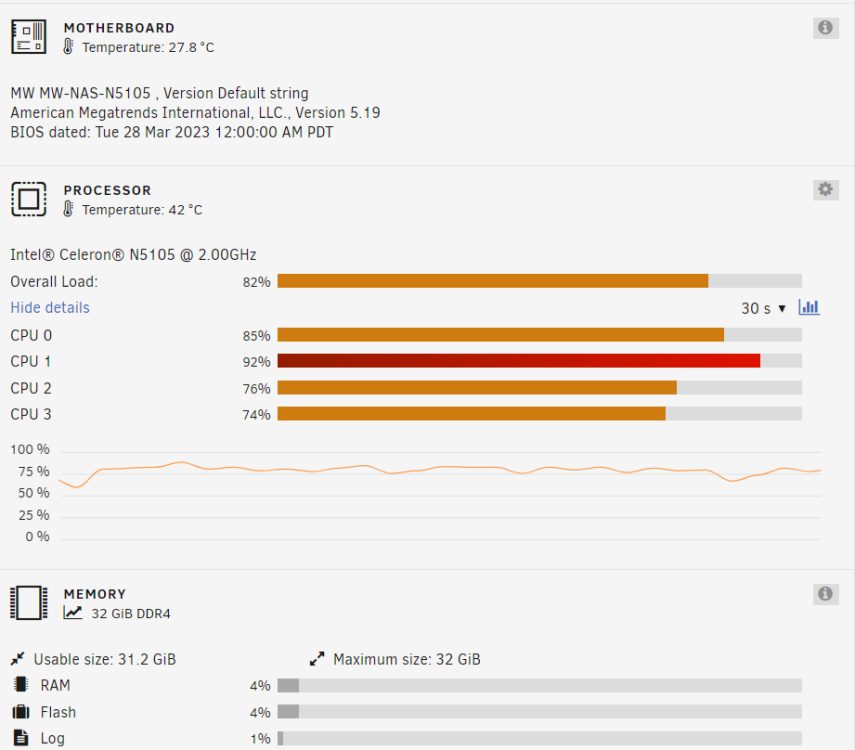
Preclearing 3 disks, I still have two Samsungs apart; CPU temp seems not bad:
-
So, got the RAM! A kit of Crucial got at the door today, plugged the picoPSU-160-XT with a 90W brick, and I'm ready to go. First boot took a bit of time, but then onboard beeper gave me confort. The mainboard came with v1 BIOS, definitely vast as AMI OEM ones... lots and lots of configuration options! I kept it at defaults. So, start from USB with UNRAID: 32Gb, all disks shows up, even all 4 NICs...! I Attaching my diagnostics. castle-diagnostics-20230527-2059.zip
-
Uh, it looks like I found the waking process! It seems it's been an rclone job, launched by Custom scripts. It looks like it was looping on retrying... Anyway, I put up the HBA and some spare HDDs. Long live the H97!
-
Hi @ConnerVT ! I got a N5105 mainboard, it has a CW-N5105-NAS rev. 1.0 watermark on it. Looks well built, I was expecting... well, worse, as construction. I was looking at that passive board for a Home Assistant baremetal install, but I've ended up staying quiet on a UDOO X86 that would be out of use. If you don't notice high temps, stressing it a bit more with some VMs wouldn't be that bad. Surely I'll exercize the mainboard for some time; I spare some disks, but I'd need a proper casing... I'll see where it gets! My current build is still solid, but a bit power hungry... but definitely efficient when it comes to PhotoPrism imports, Plex decoding, *arr stack management. I'm having a problem with drives not staying spun down, but I'll keep at least as this platform gets totally trustable. I really hope I'm not getting into that tunnel too - I could manage it, but I was to point my efforts elsewhere. BTW, the mainboard costed 160€ at the door. As for now... My SoDIMM banks is not working, so I'll have to grab a memory kit for the weekend
-
Hi there! Today I'm receiving a Topton/CWWK motherboard; I've read a lot about it on Brian Moses' blog putting together his DIY NAS 2023 Edition; then, after some aliexpress-fu, I found a discussion on ServeTheHome Forums about various use cases. Since I'm here as a UNRAID proud user, I'd like to check it with you specifically. You can find the specs in Brian's blog pages. I'll post my tests ASAP, in the while what do you think of it? I know it's very limited, but it looks perfect for low power build. Feel free to ask! Thanks all, Marco Curret testbed: CW-N5105-NAS v.10 (black mask, w/ BIOS string: MW-NAS-N5105 v5.19) 32Gb Crucial DDR4-3200MHz CL22 kit (CT2K16G4SFRA32A) 2 x Crucial P5 500Gb 4 x Samsung EcoGreen 1.00TB (HD103SI) 1 x WesternDigital Green 1.00TB (WD10EARS-00Y)
-
Upgraded to RC6, but unluckiliy no free solution... I think I've messed up something. How can I "reset" my system and star new? I can save my appdata, but what about the array? Thanks all! Marco
-
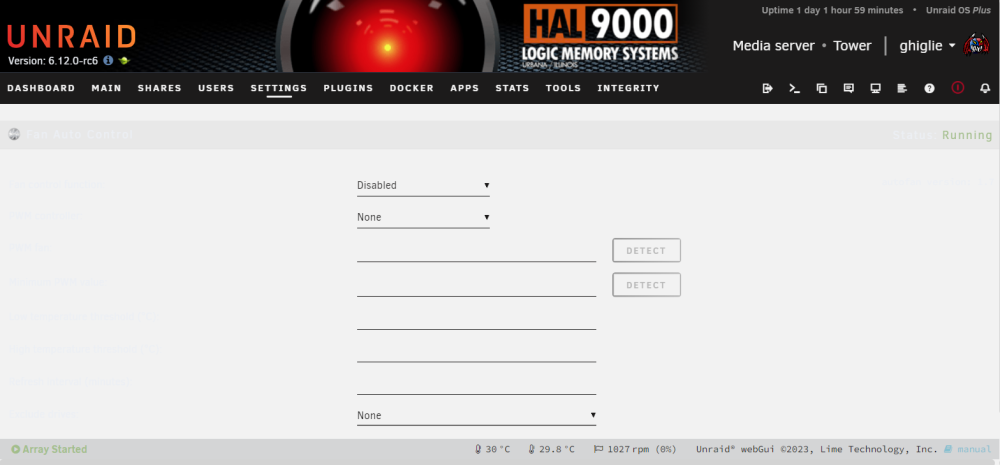
Hi there! These day my Unraid Server is acting... strange! As you can see, AutoFan is enable and running, but the setting page is blank: It's logging anyway: May 19 11:18:35 Tower autofan: autofan process ID 26891 started, To terminate it, type: autofan -q -c /sys/devices/platform/it87.2608/hwmon/hwmon3/pwm2 -f /sys/devices/platform/it87.2608/hwmon/hwmon3/fan1_input Did I mess something?
-
Yet done, it was my first try! I'm noticing that the wake order is always the same: sdf, sdd, sdg, sdc, sdh : May 16 19:08:17 Tower emhttpd: spinning down /dev/sdc May 16 19:08:18 Tower emhttpd: spinning down /dev/sdg May 16 19:08:19 Tower emhttpd: spinning down /dev/sdh May 16 19:08:20 Tower emhttpd: spinning down /dev/sdf May 16 19:08:21 Tower emhttpd: spinning down /dev/sdd May 16 19:09:09 Tower emhttpd: read SMART /dev/sdf May 16 19:09:16 Tower emhttpd: read SMART /dev/sdd May 16 19:09:31 Tower emhttpd: read SMART /dev/sdg May 16 19:09:31 Tower emhttpd: read SMART /dev/sdc May 16 19:09:40 Tower emhttpd: read SMART /dev/sdh "BTW, what is this task? /usr/local/emhttp/plugins/dynamix.my.servers/scripts/UpdateFlashBackup update"




