





Endda
Members
-
Joined
-
Last visited
-
Thanks so much!
-
I have since removed the flags in that field (in an attempt to actually repair it) and got this response so that seems to be what was needed?
-
so I did this on the cache drive. and this was the result. . . is that all that is needed. . .or do I need to add a modify flag to the command?
-
thanks for the suggestion. here is what the webui gave me tower-diagnostics-20240716-2042.zip
-
For a while over noticed the log file getting full and I'm having difficult figuring out what is filling it up. I just found a command to expand it to 512MB, but I doubt that will fix the issue (and it needs to be executed after each reboot). So I'm hoping to help analyze the server to figure out what is causing it
-
delete button doesn't do anything with the latest update
-
there's been a lot of hub bub about the update so i just wanted to make sure thank you
-
all good to update to stable unraid 6.9.0 with this docker?
-
all good to update to stable unraid 6.9.0 with this docker?
-
perfect. no idea how that happened switched over and updated well
-
What's the latest version of Sonarr from this build? I've been having issues with the way mine handles episodes with TBA names. I went to the /r/sonarr subreddit to get support and compared version numbers with others. Sonarr devs are asking me why I'm on a "2 year old alpha build" But I'm not seeing any updates for this when I go and check for updates via the Docker tab I'm using the tag/repo "lsiodev/sonarr-preview"
-
updated before seeing the 'do not update' in the changelog. temporarily removed for now (my mistake)
-
is setting the docker container to /tmp and the plex server settings to /transcode the way to get this build transcoding to RAM. I read those details recently but I'm not sure if it relates to the LSIO container or a different one
-
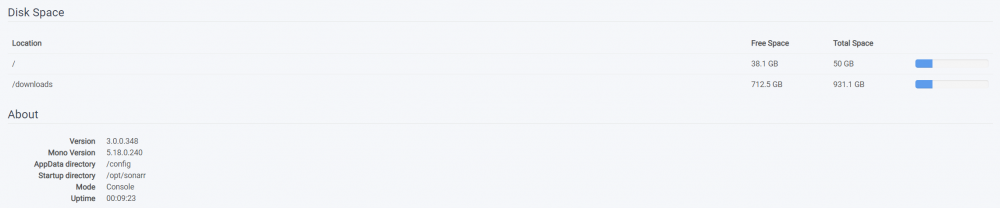
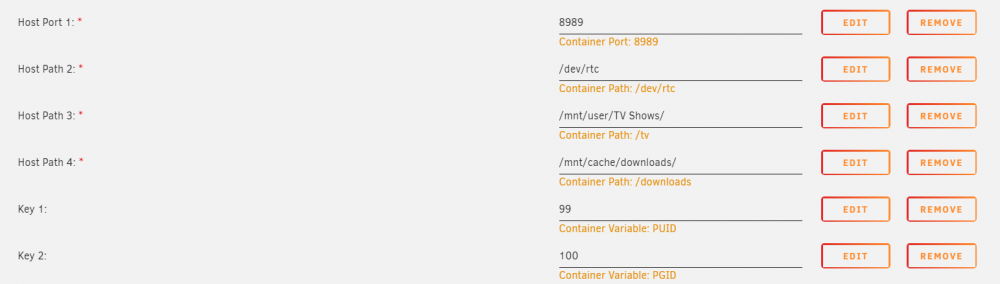
I seem to be having some strange issue with my /tv folder mapping that is preventing Sonarr from creating new folders or something. So I recently replaced a 4TB drive with an 8TB drive and the rebuild process took about a week. During that time, something happened and both Sonarr as well as Radarr threw up lots of missing titles. I knew they were there, as I had just watched one of them days before, but I suspect it was stored on that drive that I had updated. Even though unraid tells me the contents of the disk is emulated, I was unable to access the disk and (like I said) things on it were not accessible from Sonarr/Radarr. During this rebuild process I also noticed Sonarr/Radarr being unable to import newly added things. It was find with replacing items that I already had (and it already had access to) but importing new items from Sabnzbd were throwing up an error. I assumed it was because of the disk that was being rebuilt so I waited. once the rebuilding of the data was complete, I restarted unraid and sonarr/radarr were able to see those things that it had previously marked as missing the thing is, during this time I noticed that in the System section of Sonarr/Radarr, it was not showing the media folder for them. here, you can see the folders I have mapped right now in the sonarr UI (attached image 003 screenshot). but in unraid's docker editor page (attached image 004 screenshot), you can see I have the /tv folder mapped as well (it just isn't showing up in the sonarr UI and I think that is causing the importing issues here's a snippet from the log of when it attempts to import a new item. . . ____________ [v3.0.0.348] System.IO.DirectoryNotFoundException: Could not find a part of the path. at System.IO.File.Move (System.String sourceFileName, System.String destFileName) [0x000e3] in <04750267503a43e5929c1d1ba19daf3e>:0 at NzbDrone.Common.Disk.DiskProviderBase.MoveFileInternal (System.String source, System.String destination) [0x00000] in M:\BuildAgent\work\63739567f01dbcc2\src\NzbDrone.Common\Disk\DiskProviderBase.cs:232 at NzbDrone.Mono.Disk.DiskProvider.MoveFileInternal (System.String source, System.String destination) [0x00076] in M:\BuildAgent\work\63739567f01dbcc2\src\NzbDrone.Mono\Disk\DiskProvider.cs:170 at NzbDrone.Common.Disk.DiskProviderBase.MoveFile (System.String source, System.String destination, System.Boolean overwrite) [0x000e1] in M:\BuildAgent\work\63739567f01dbcc2\src\NzbDrone.Common\Disk\DiskProviderBase.cs:227 at NzbDrone.Common.Disk.DiskTransferService.TryMoveFileTransactional (System.String sourcePath, System.String targetPath, System.Int64 originalSize, NzbDrone.Common.Disk.DiskTransferVerificationMode verificationMode) [0x0008f] in M:\BuildAgent\work\63739567f01dbcc2\src\NzbDrone.Common\Disk\DiskTransferService.cs:490 at NzbDrone.Common.Disk.DiskTransferService.TransferFile (System.String sourcePath, System.String targetPath, NzbDrone.Common.Disk.TransferMode mode, System.Boolean overwrite, NzbDrone.Common.Disk.DiskTransferVerificationMode verificationMode) [0x003cc] in M:\BuildAgent\work\63739567f01dbcc2\src\NzbDrone.Common\Disk\DiskTransferService.cs:312 at NzbDrone.Common.Disk.DiskTransferService.TransferFile (System.String sourcePath, System.String targetPath, NzbDrone.Common.Disk.TransferMode mode, System.Boolean overwrite, System.Boolean verified) [0x0000e] in M:\BuildAgent\work\63739567f01dbcc2\src\NzbDrone.Common\Disk\DiskTransferService.cs:196 at NzbDrone.Core.MediaFiles.EpisodeFileMovingService.TransferFile (NzbDrone.Core.MediaFiles.EpisodeFile episodeFile, NzbDrone.Core.Tv.Series series, System.Collections.Generic.List`1[T] episodes, System.String destinationFilePath, NzbDrone.Common.Disk.TransferMode mode) [0x00129] in M:\BuildAgent\work\63739567f01dbcc2\src\NzbDrone.Core\MediaFiles\EpisodeFileMovingService.cs:119 at NzbDrone.Core.MediaFiles.EpisodeFileMovingService.MoveEpisodeFile (NzbDrone.Core.MediaFiles.EpisodeFile episodeFile, NzbDrone.Core.Parser.Model.LocalEpisode localEpisode) [0x0005f] in M:\BuildAgent\work\63739567f01dbcc2\src\NzbDrone.Core\MediaFiles\EpisodeFileMovingService.cs:81 at NzbDrone.Core.MediaFiles.UpgradeMediaFileService.UpgradeEpisodeFile (NzbDrone.Core.MediaFiles.EpisodeFile episodeFile, NzbDrone.Core.Parser.Model.LocalEpisode localEpisode, System.Boolean copyOnly) [0x0017c] in M:\BuildAgent\work\63739567f01dbcc2\src\NzbDrone.Core\MediaFiles\UpgradeMediaFileService.cs:76 at NzbDrone.Core.MediaFiles.EpisodeImport.ImportApprovedEpisodes.Import (System.Collections.Generic.List`1[T] decisions, System.Boolean newDownload, NzbDrone.Core.Download.DownloadClientItem downloadClientItem, NzbDrone.Core.MediaFiles.EpisodeImport.ImportMode importMode) [0x0028e] in M:\BuildAgent\work\63739567f01dbcc2\src\NzbDrone.Core\MediaFiles\EpisodeImport\ImportApprovedEpisodes.cs:111 ____________ I think this was due to some corruption. I used the webui to check my disks and fixed 2 of them that reported errors. I'm no longer having issues importing items with these (I still don't see the tv/movie folder in sonnar/radarr webui though, but maybe that's normal) thanks for the great work everyone!
-
oops, I'm sorry for asking in the wrong place. I figured if I asked there then they would just tell me to switch to their docker instead of LS.IO's I'll see what they say. . .

