moose
Members
-
Joined
-
Last visited
Everything posted by moose
-
Thank you JorgeB for the great answer and details! I will follow the recommendations. I will also save this detail for future use.
-
I would like to create a fresh unraid install with default settings but maintain my disk configuration, shares and user accounts, permissions, etc. I don't want to keep any dockers, plugins or custom unraid settings that aren't out of the box. Which files should I keep on the flash and what does each file do? I know I need to keep the .key file. Is there already a doc with explanation of files, directories, etc. in \config? \config\*.key \config\super.dat \config\shares \config\pools \config\smbpasswd \config\secrets.tdb \config\passwd \config\flash.cfg \config\disk.cfg \config\network.cfg \config\ident.cfg \config\drift \config\plugins\dockerMan\templates-user \config\plugins ... ... ...
-
I have multiple unraid pro licenses. I am actively using one on v7.3.2 The other 2 licenses are on earlier versions. If I wanted to wipe the existing usb flash drive and install the current unraid version without any previous dependencies (factory fresh), what files on the usb flash drive do I need to keep, copy to the usb flash drive before booting? I know I need the *.key file in /config
-
Sorry for the very long time gap in replying. The issue ended up being the M1015 HBA card was bad. I ended up purchasing a new 9305-16i HBA card and got everything up and running.
-
It this still for sale?
-
ok. Will need to wait until later today after work. Thank you.
-
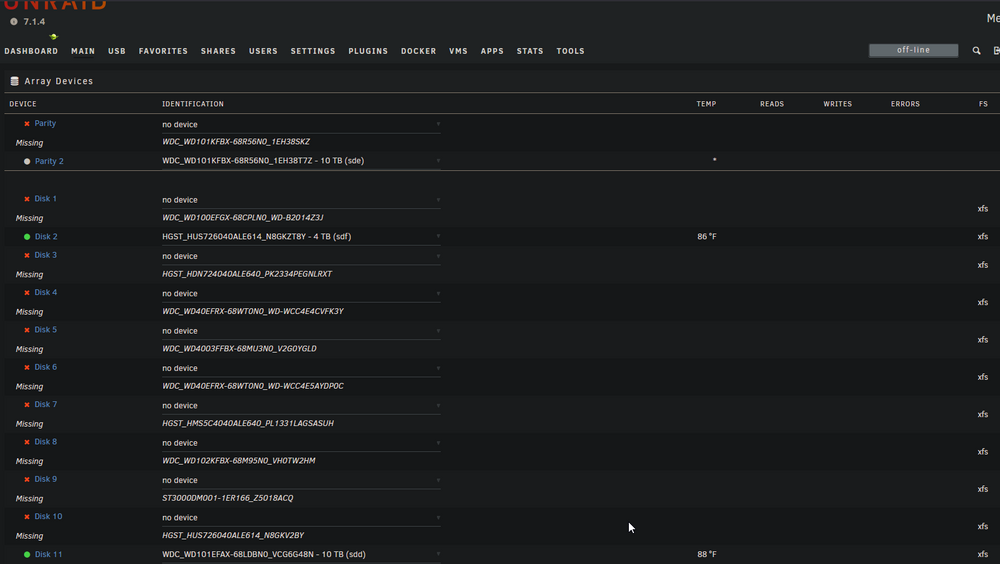
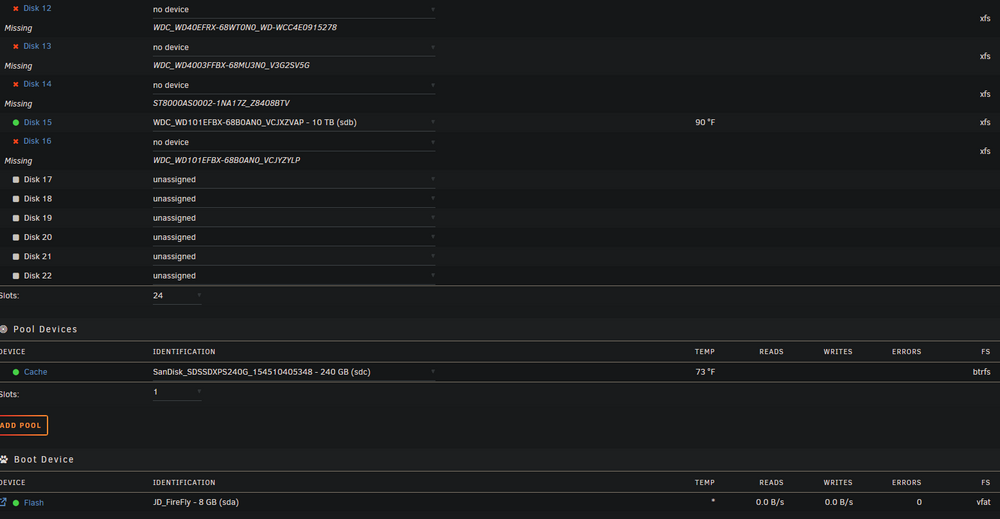
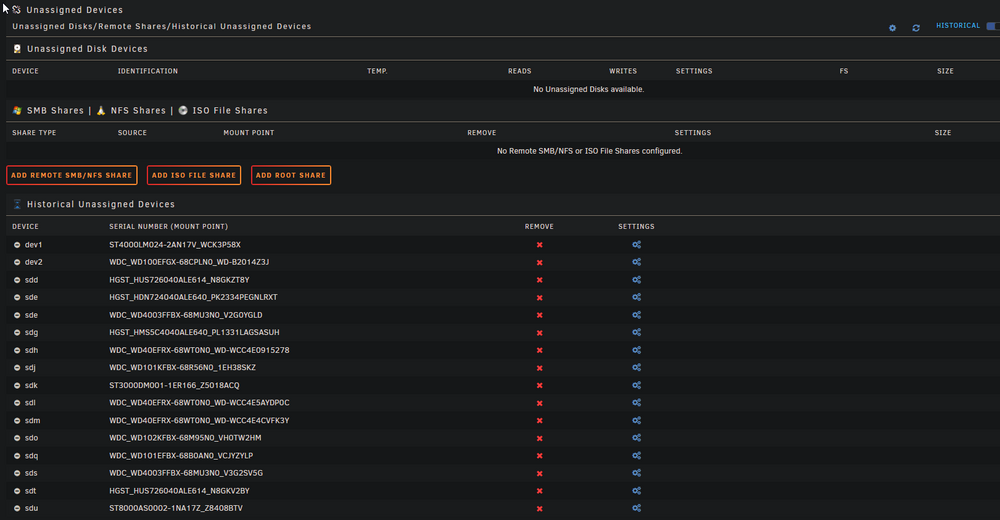
screenshots attached.
-
diagnostics attached. diagnostics-20251015-0945.zip
-
I had a motherboard failure, purchased a new MB (same model X9SCM-F), reinstalled same PCI cards (in different PCI slots due to new CPU cooler), same cabling and parity/data disks in same slots. Upon rebooting, I have 14 of 18 disks missing but all 14 missing disks are listed in 'unassigned devices' and I'm not able to select those unassigned drives in the 'array devices' pull down where it shows 'no device'. What steps should I follow to correctly assign the missing disks to 'array devices' that are currently shown in 'unassigned devices'? I have a screenshot of all correctly assigned drives. (when array was working before I replaced the MB.) Thank you.
-
Thank you @Random.Name I will check this out.
-
Does anyone know if a plugin exists (or docker container exists) that can measure the kilowatt-hours (kWh) that a unRAID server consumes? This would be helpful to measure average cost to operate over various periods (hour, day, week, month, year, custom). In unRAID "Settings/UPS Settings" I see a LOADPCT variable that is dynamically being measured and updated ~ every few seconds. I think if this was recorded with respect to time and calibrated with my known UPS capacity, kilowatt-hours could be calculated for user defined time intervals. Users could input their cost per kWh and have a good estimate of what it costs them to operate their unRAID server. I think you can buy a third party device for this but why not make it free for all in unRAID? If I knew how to develop this I would try. Anyone know if something already exists or how someone could create this?
-
Thank you JorgeB. I ran extended tests on disk 13 again and it started failing, disk 5 also started throwing read errors and was disabled. Disk 5 also failed extended tests. I ended up replacing both disk 5 and 13. The data rebuild completed on the new 5 and 13 disks. I am up and running with no issues! Thank you for the help!!
-
Will do. Thank you JorgeB and trurl for your help! Very appreciated! I ran another extended SMART test on disk 13 and it failed, so I ended up replacing both disk 5 and 13. The data rebuild on both disks completed successfully. The problem is fixed and I'm up and running again! Thank you!!
-
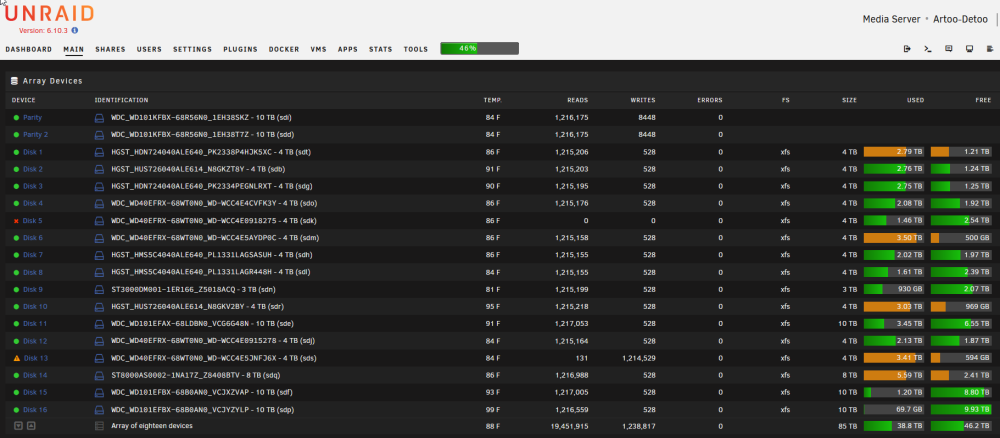
The extended test on disk 5 failed. Attached are new diagnostics with the array started. artoo-detoo-diagnostics-20220915-2230.zip
-
Yes, all was done with the system on. I enabled Smart attributes 1 and 200 or 1 for all WD disks (some WD did not have SMART attribute 200). I was able to do a clean shut down through the GUI. I rebooted and disk 5 is disabled (disk 13 is emulated and ready for data rebuild). I ran a short self test on disk 5 and it passed, now am running an extended test on disk 5. Attached are new diagnostics. I will wait for the extended test to complete and advice before proceeding. Array is not started. artoo-detoo-diagnostics-20220915-2103.zip Edit: The extended test failed for disk 5. The SMART report is attached. artoo-detoo-smart-20220915-2133.zip
-
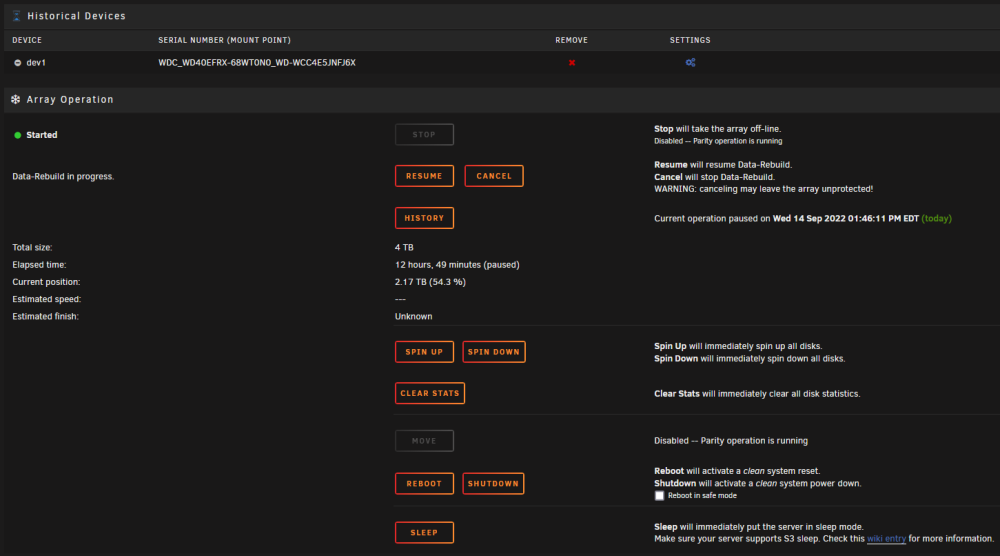
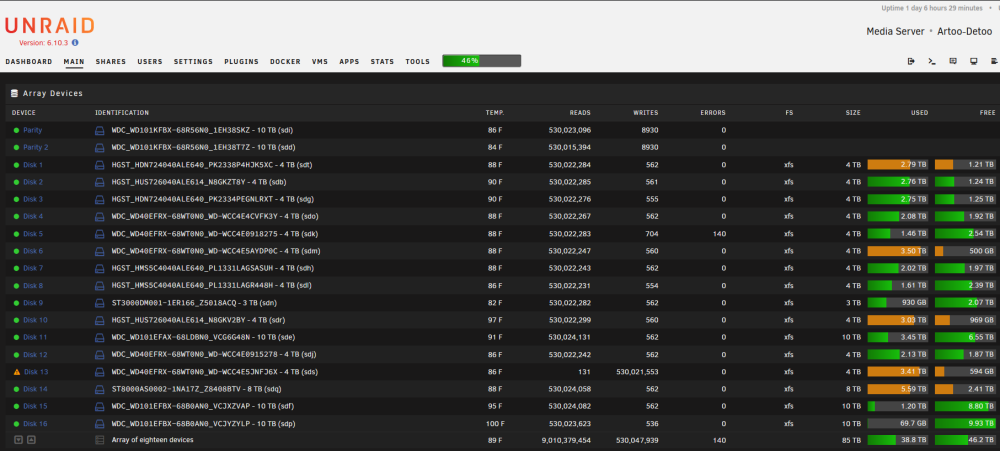
I was rebuilding a disabled disk (#13) and into the disk rebuild process I noticed another data disk (#5) with read errors. I paused the rebuild operation and then ensured the breakout cable was seated into the disk 5 cage and I also pulled disk 5 from the cage and re-seated it. Now when I attempt to resume the disk rebuild or cancel the disk rebuild, nothing occurs, the rebuild operation remains paused. I've attached diagnostics and a screenshot of the GUI interface. Any recommendations? artoo-detoo-diagnostics-20220914-2109.zip
-
Sorry for the delay in responding. Attached are diagnostics. I did not start the array, just booted and generated diagnostics. (Disk 13 is disabled. Disk 3 was also having issues and I thought it was also disabled when I shut down the server but now disk 3 shows as ok.) artoo-detoo-diagnostics-20220912-2030.zip
-
I didn't know Unraid won't disable more disks that there are parity drives. This would have kept me from panicking and shutting it down. @JorgeB I didn't save diagnostics before I shut down the server. If Unraid won't disable more disks than there are parity drives, I can boot the server and produce diagnostics. The server state should be ~ the same as it was when the 2 data disks were disabled due to read errors, correct?
-
I have an array with 2 parity disks and 16 data disks. I had 1 data disk have read errors and become disabled. I performed short/long tests on the disk and it was fine so I rebuilt the data disk, moved the server to a new location due to home remodel. Everything was fine for several days then I had 2 different data disks have read errors and get disabled. I shut server down thinking cabling may be the issue and I was afraid a 3rd data disk may have read errors and get disabled. Server is still shut down. I though I would recheck all cabling before restarting and risking a 3rd data disk disable before I can rebuild the 2 data disks that are currently disabled. I have a LSI controller (flashed to IT mode) and SAS breakout cables. My question is what happens if with 2 parity disks, more than 2 data disks get disabled due to read errors (which might be cabling)? Since the seemingly only way to correct a disabled disk is to rebuild it, 2 parity disks and 3 or more disabled data disks seems like a data loss?
-
Thank you for the clarification jonathanm!
-
FWIW, I have the same scenario as strike. Using the binhex preclear docker, I successfully precleared a 4TB and 8TB drive. I stopped the array, assigned the new drives and started the array. Both drives are "clearing" and should be complete in ~ 24 hours. I would have thought unRAID would have known the drives were already precleared. Anyway it's just going to take a bit longer for the second "clearing" cycle to complete, no big deal for now. Merry Christmas to all! edit: Another oddity on the second clearing topic. A few days earlier, I precleared 2 new 10TB drives using the binhex preclear docker, preclear worked fine. The 2 10TB drives were then assigned as parity replacements (1 10 TB at a time for a dual parity configuration). I didn't have any issue with unRAID clearing these drives for a second time, meaning unRAID did not clear these 2 10TB drives a second time when I added them as new parity drives and rebuilt/re-synced array parity. I'm also on 6.8 stable.
-
Thanks all!
-
Would you mind providing a link to that bug report? Honestly I tried to find it on my own but could not...
-
Thanks j0nnymoe for enlightening me!
-
Is anyone running v5.10 or is the general recommendation to go to v5.9 max? I'm running v5.9.29 and haven't had any issues so far...