





meatball
Members
-
Joined
-
Last visited
-
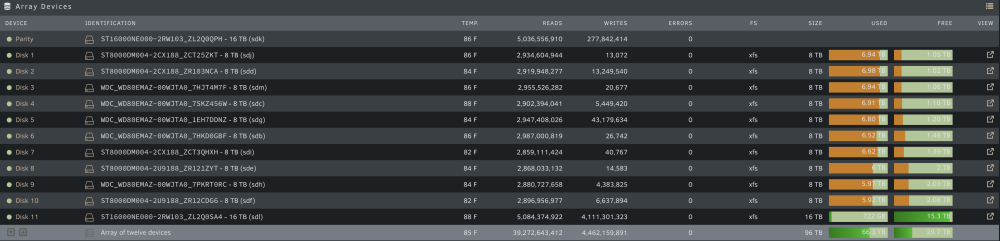
Update- you were right of course. It would've been hard for me to screw that up any more than I did. Unbelievable. Anyway after 4 days, new config rebuilt the parity (without the the unmountable disk/extra drive slot) and then formatted the old parity and added plus the new disk it to the array as intended. Thanks for jumping into help.
-
agreed, it makes no sense as I understood it. Lesson learned. Ultimately it's not going back in the array anyway but you'e right, formatting it first would've saved me a lot of headaches.
-
thanks a lot. it's re-synching the parity (without disk 12). I'll add the 16TB to disk 11 once it's finished. Appreciate your help very much.
-
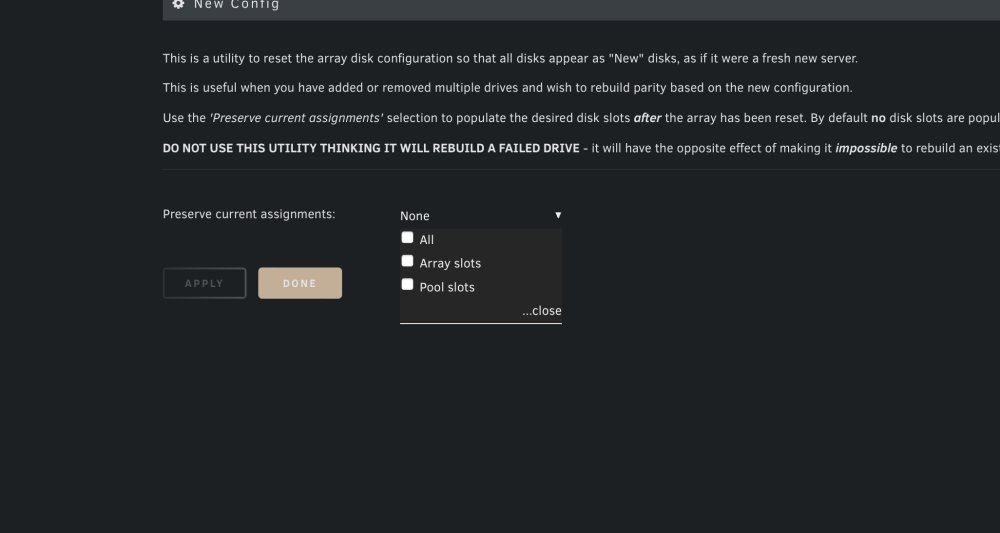
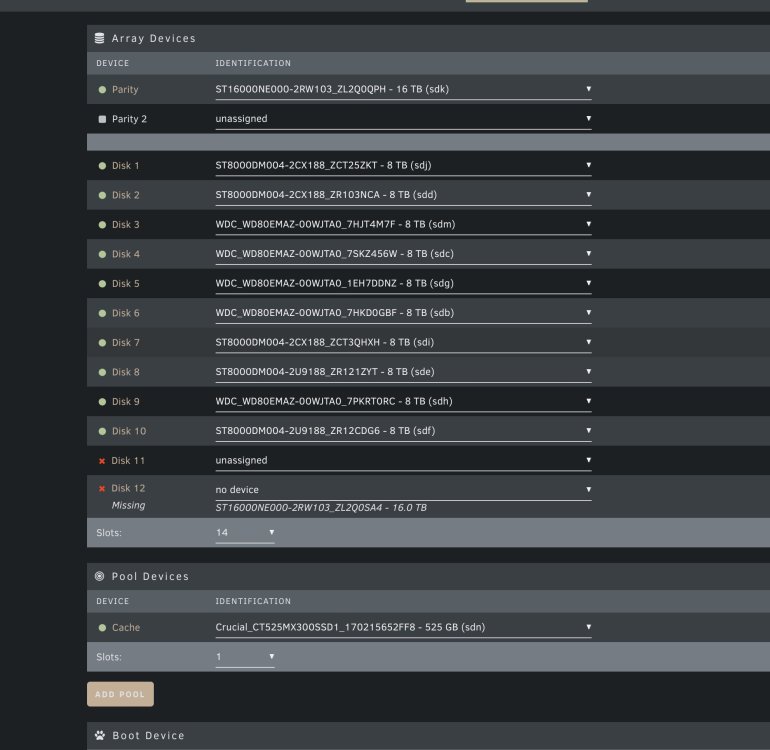
this is the part that didn't understand, is the idea to remove disk 12, and then run the new config on the array without a disk in 12? Basically dont preserve any of the array or the pool? Thanks a lot
-
I basically did several things that were precisely what I shouldn't of done . What was weird is I read is that I shouldn't first format a drive that was previously used for parity. I probably misunderstood.
-
thanks a lot for jumping in. I'll do this and report back. I looked at this option previously but was nervous about doing more damage. I'll get it done and report back, thanks a lot.
-
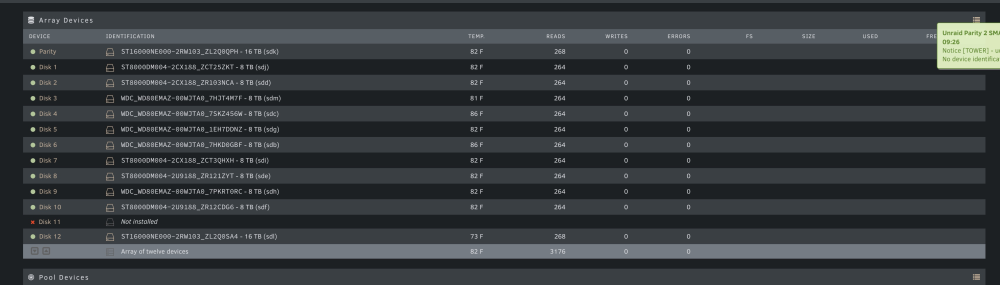
So I definitely screwed up on quite a few levels. I upgraded my parity drive from 8TB to 16TB which was fine. So I thought I could add the old parity to the array like you would for any other disk. I've since learned obviously it has no data system so it's not going to work and building into the array now means unraid expects the drive to nee there. My next mistaken was buying a new drive to replace the bay where I stupidly added the old parity drive. Obviously a mistake, unraid is looking for the old parity that was built without a data system. To make matters worse, I added another virtual bay (there are 12 total in the machine, I added a 13th) and added the new 16TB drive there. It rebuilt the drive fine but it's clearly not being added to the array volume. Here's a screenshot of the array in macitence mode ( I can't get into maintenance mode with the old parity drive in bay 11). I'm trying to figure out how to clear bay 11 from the parity disk it's expecting and adding the 16tb drive currently in bay 12 to bay 11 (again bay 11 is the last bay in the machine as there's 12 total bays). I've researched "Unmountable drives" quite a bit but it always seems to be about replacing a dying disk that's unmountable. I've attached the logs in case it gives any insight (unfortunately I've rebooted several times). Any guidance or suggestions would be very appreciated. I'm at a total loss as to where to go from here. Thanks a lot. tower-diagnostics-20230420-0937.zip
-
Hi- I noticed you posted this fairly recently so figured I'd ask - did you ever figure out what was causing the lack of memory error? I'm getting the same thing and have been digging the diagnostic logs trying to figure out what's causing it.
-
I've used JD2 for some time and actively run it on several different machines. This is the first I've run into this. To be clear I'm speaking of 6 maybe 7 links. I've seen link grabber grab as many as 20 on the desktop version of J2. Maybe the docker version is limited in the number of links you can submit simultaneously? Not a huge deal, just wanted to ask.
-
For some reason I can't submit more than a couple links for download. the clipboard will just sit there and the only option is to cancel it out. Has anyone run into this/found a resolution? Any suggestions are welcomed. Thanks a lot.
-
Just wanted to thank you this. This has been outstanding. Plex, Emby and on a couple IPTV clients. Great work!


