haptizum
Members
-
Joined
-
Last visited
Everything posted by haptizum
-
New to this install. Everything installed fine. Only issue I am having is I can't delete files. I am getting a "Server replied "423 Locked" to DELETE http://ipaddess_of_host" and I am not sure what to do.
-
That is what it said to do on the linuxserver page, and a few people on this thread said it had to be that way. No worries I'll just use a virtual appliance instead of the Docker. https://github.com/linuxserver/docker-openvpnas
-
It has privileged mode enabled. The issue is when I have it in host mode I can't connect to the webUI, but if I put in it bridged mode I can.
-
I can't connect to this docker with Host mode on. It only works in bridged mode. Also, privliged mode is enabled.
-
I want to connect to my Docker from my Windows client. What is the username for the Docker? I know the password is "deluge".
-
Awesome, thanks!
-
So I have the docker setup on my unRAID and I have the client on my Windows PC. I want to transfer about 25GB of files to it. Since it's on a local network should it take 3 hours to transfer? Via SMB it would take 15 minutes at most. Is it because it going through WebDAV? I moved some files to where my profile is located /mnt/user/nextcloud/username/files but the files won't show up in my nextcloud. Also, should I use the client locally at home or just upload files via SMB to /mnt/user/nextcloud/username/files and use the client for things like my laptop and phone which I use outside of my local network?
-
That worked. Thanks!
-
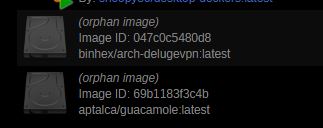
I am already in advanced view. That is the only way I can see these orphaned images. There isn't any option to remove them in this view.
-
How do I remove orphaned docker imaged? See image attached.