





joedotmac
Members
-
Joined
-
Last visited
Everything posted by joedotmac
-
I went ahead and rebuilt the Windows 11 VM, deleted the previous problematic install. So far on the rebuild, five reboots in no video issues.
-
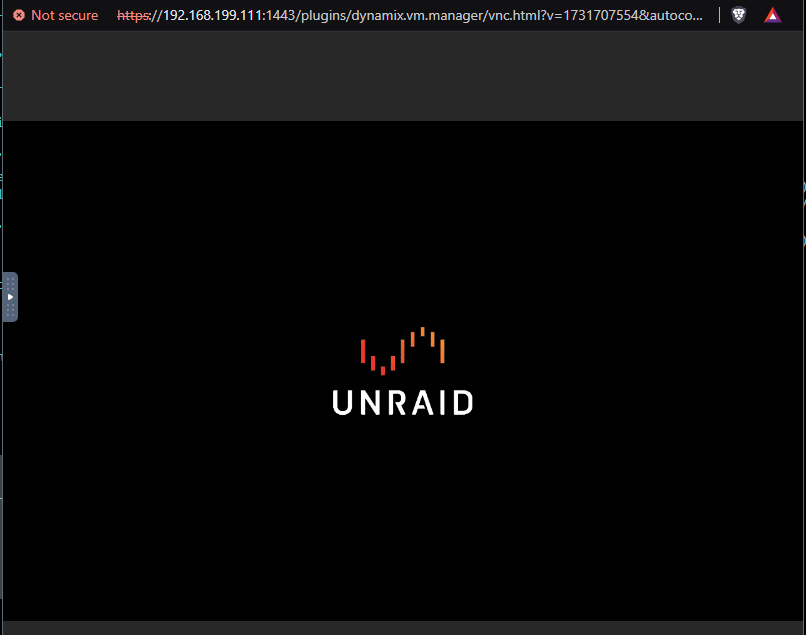
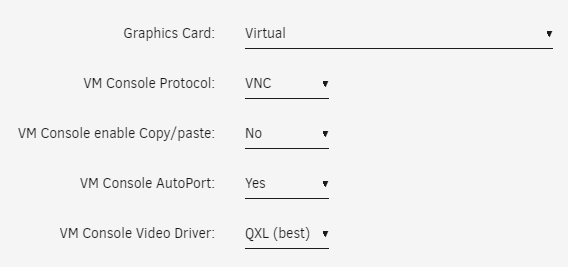
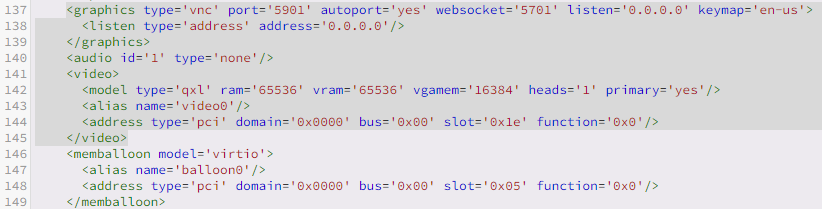
VM standard configuration using Windows 11 template/configuration selections. Worked fine for days, twenty reboots. Now receiving Unraid splash screen at VM startup, able to see Windows spiny wheel for about 10 seconds, then persistence of Unraid splash screen remains. No way to operate the VM visually. "Unknown" any changes that would have invoked the behavior. Checked another working Linux VM for unique configuration possibilities. Nothing stands out. Did notice a couple things in the VM log, associated with video, I'm not certain would or wouldn't be issue. Thanks in advance for any ideas.

-
Thanks for the help. I shut down the server, reseated all SATA and power cables. Powered on the server performed an extended SMART test. Zero errors were reported. Performed the rebuilding drive process. https://docs.unraid.net/unraid-os/manual/storage-management/#rebuilding-a-drive-onto-itself The rebuild completed. No issues observed now going forward. Thanks again.
-
I have an array drive that's disabled and showing emulated currently. Is it possible to move the data from the "emulated" drive to another good working with the unbalance plugin and then simple remove the disabled drive from the array?
-
I did exactly this, in tips and tweaks modified the CPU scaling governor from "power saving" to "on demand" and its resolved the issue.
-
I now have this same symptom going from 6.8.3 to 6.9.2. Tried the various things presented here in this thread with no real notable difference. Windows VM's are so unusable, I've shut mine down for now.
-
I figured it out. Added the drive back to the cache slot, then the grayed out selection for number of slots was now selectable, changed to one slot, and xfs is now available as a format option. Thanks
-
I ran into the issue described in the thread where btrfs formatted cache drive trim operations are not occurring. This results in the cache drive space filling up. It's mentioned in the thread there's a fix possible with a kernel update which hasn't yet been implemented. The current fix is to change the format of the cache disk from btrfs to xfs. I have a full backup of the data, performed a rsync -av to an unassigned drive with everything that was on the cache drive. I'm hung up around step 5,6 and the result. Unable for the system to make available the xfs option for the cache drive. How does someone eliminate the two empty slots of my cache drive configuration so that xfs is available as a format selection? I can change the amount of slots for the array disks, but the cache drive section has three slots and the option to change the available slots to a single cache drive is grayed out. The selection currently indicates three, and I'm using a single cache drive.
-
I did these instructions exactly. Now upon restarting the array the system complains "Unmountable: No file system (no btrfs devices)" I stop the array go into the drive config and the xfs as a format option is non-existent. Only options are auto, btrfs and btrfs-encrypted. xfs is nowhere to be found. I'm hesitant to remove the drive from the config and re-add the blank xfs formatted cache drive.
-
Upgrading to 6.X there's a mention in the release notes for CPU scaling configuration for Haswell and Ivy Bridge processors. http://lime-technology.com/wiki/index.php/Upgrading_to_UnRAID_v6 More Tips CPU speed and power saving workaround The newer Linux kernels have automatic CPU frequency step down when more CPU speed is not needed, saving power and heat. But, if your CPU is an Intel Haswell or possibly an Ivy Bridge, including most Xeon's, then there is a frequency scaling issue with the intel_pstate driver, and it needs to be disabled. It's nothing serious, just means the CPU won't power down to lower frequencies when idle, so you may pay a little more in power costs. It will not hurt you in any other way. To regain the CPU frequency stepping down, there are several things you can do. You can install the Tips and Tweaks plugin and change the CPU Scaling Governor. You can edit syslinux/syslinux.cfg on the flash drive, and insert intel_pstate=disable in the append lines. Easy way to edit syslinux.cfg - browse to your unRAID Main screen, click on your Flash drive, and drop down to the Syslinux Configuration section! Make sure you click on the Apply button. You will want to change these: append initrd=/bzroot append initrd=/bzroot unraidsafemode To these: append intel_pstate=disable initrd=/bzroot append intel_pstate=disable initrd=/bzroot unraidsafemode You can monitor the current CPU frequency for each core on the Dashboard. What's not stated in the first bullet is what selection to change the CPU Scaling Governor to? Choices are: OnDemand, PowerSave, Conservative, Performance, Scheduled. Which would be the correct selection for the intent?
-
Any change in your symptoms? I share some of the exact same errors. Errors started occuring in 6.3.2 and continued with 6.3.3. Segfaults, out of memory statements that abend processes. Processes like Dynamix fan control, segfault followed by the Dynamix fan process abending. I can go in and restart the plugin. I've noted other errors with Dynamix plugins and like you removed all of them, add them back in errors come back after 6 to 18 hours. I'll also get qemu processes that fall over, VM's stop running. I didn't see much of anything in your diag file since it was only about an hour and ten minute snapshot. Post one of a longer run next time around.
-
Call off the hounds...... Just found the hyperlink in the settings screen. Sorry was thinking in the plugins/installed page by clicking the logo it would popup a selection to launch the web UI directly. Thanks
-
Upon trying to run the plugin GUI: Plugins -> Click on unBALANCE icon The result is immediate navigation to the settings page and actual settings to enable, disable, port number, etc. Unable to launch the app as described in method #2 for access. Was able to launch the unBALANCE GUI by navigating the the host ip, port using the browser URL. - Method 2 Go to Plugins > Installed Plugins Click on unBALANCE Click on Open Web UI Any ideas to why there's no prompt when selecting the icon?
-
Thanks for the effort on this binhex. This docker container works like a champ!


