levster
Members
-
Joined
-
Last visited
Everything posted by levster
-
I ran in MariaDB the following: mysqlcheck -u root -p --all-databases and there were no warning. I think that that means that the MariaDB is OK.
-
I tried through the backup restore to the one from a week ago. Same error. Is there another way to check the database?
-
6.8.0 of unRaid MariaDB log is showing : I just downgraded to 6.8.0 and still the same error message. However, the log files are now "clean", with no repeating loops. MariaDB log
-
Upgraded to 6.8.1 last night and got this this AM. Nothing else was changed to the server:
-
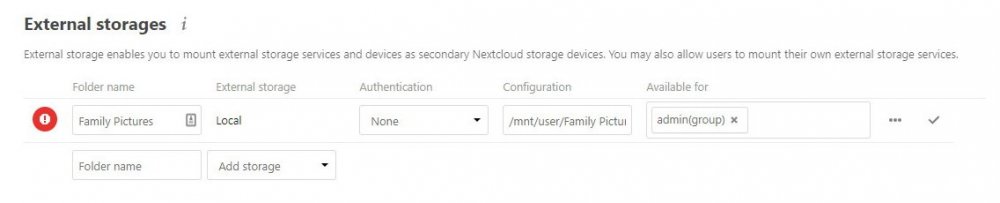
I think that I figured it out for both Local and SMB shares. Now, which should I use? Is there a difference how Nextcloud handles these? Thanks.
-
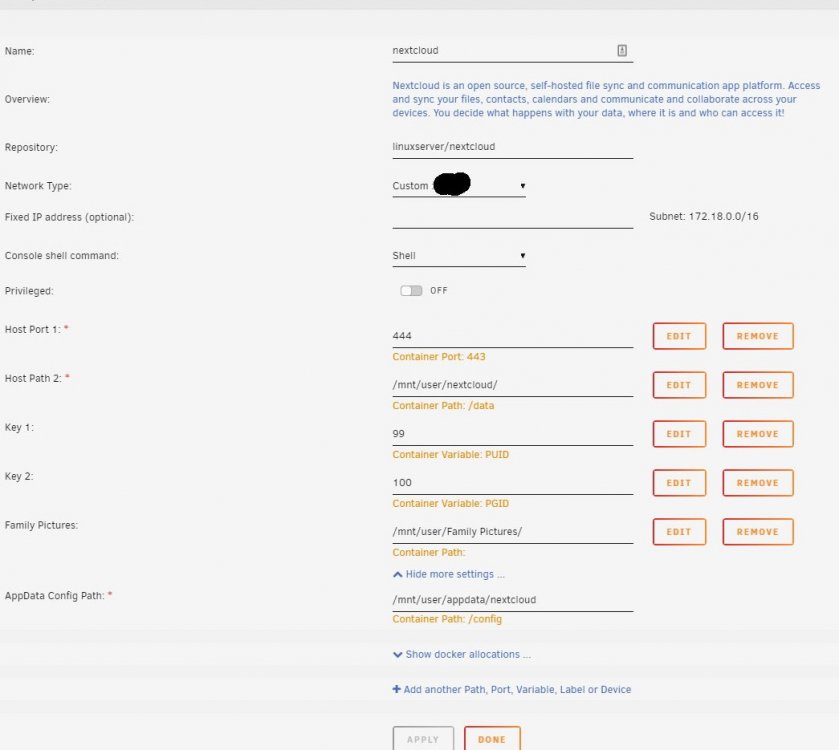
I tried to add a local unRaid share as an External Storage and keep getting stuck. Am I missing something? The Configuaration is: /mnt/user/Family Pictures
-
Thanks. That's what I am in a process doing now. I was hoping to avoid the re-installation headache; but, I guess sometimes you need to start with a clean slate.
-
Thanks!
-
Misery likes company. I am glad that I am not the only one. Please let me know if you find a way around this. Lev
-
What is the correct way to "remove" the nextcloud, leaving MariaDB and Letsencrypt intact, and not compromising the nextcloud data? I hope that reinstalling the docker afterwards may fix the problem.
-
If I try to go though the GUI update I get stuck here: I've attached the updater file from the nextcloud folder, if it helps. What is a way to issue occ command to repair the installation, if there is such a thing? updater.log
-
I tried running from the command line and was getting the message above: I ran a backup/restore and restored 2 week old backup. This allowed me to at least use my current installation to sync. So, for the time being, it works, but does not let me update. I would love to have the ability to update but have seemed to get my install stuck at some point. Any idea how to get it "unstuck"?
-
17.0.1 I think that was may have triggered this was a parity sync started for some reason about a week ago. I needed to reboot the server, triggering that. I thought that Nextcloud finished updating.
-
I am having issues upgrading my Nextcloud to 17.0.2 The webui is reporting the following for some time now: And when I try to go though the terminal I get stuck on the occ upgrade command with the following: Also, after a while on the GUI I get the following: Anything I can do to get out of this loop? Now, I cannot access the Nextcloud at all, stuck at the GUI update page which does not allow to proceed. Thank you.
-
Here is the log from the Letsencrypt. Also, slightly modified docker config page. letsencrypt.txt Tower_UpdateContainer_updated.pdf
-
I'll do it in a few hours. Thank you.
-
This is not a new install and has been running well for over a year, perhaps longer. I mainly use it to sync various devices to a central server. However, when I do send a link to a friend, I've always encountered this issue. It's more of a nuisance than a true hindrance, but I was wondering how to completely fix it.
-
Yes. still the same issue - This site is not secure, message.
-
When I try to open the url remotely, such as yourname.duckdns.org, I get the following: I can click through it, but how do I correct it so that it doesn't show up?
-
I was wondering, in addition to the first warning, will the others also be addressed: If not, from where should the occ db:convert-filecache-bigint and occ db:add-missing-indices be run?
-
So, it seems that if you choose the beta version on the update page, you are offered the 17.0.0 as the update. Ran that. All is OK... for now...
-
I noticed that there is a 17.0.0 release as of 9/30/2019. However, my version is 16.0.5 and is being reported as the latest stable and up to date. Am I missing something?
-
Has this issue been resolved? I've been trying to add a HD so that my VM will be able to use it, as per Spaceinvaders excellent video, to no avail. Stuck at updating... I tried changing the Primary vDisk to manual and, as someone suggested, changed the name of the vdisk folder name. Nothing seems to work. Can't modify the original VM. Thanks, Lev I am not sure if this had anything to do with it, or not, but the drive I was trying to add was a USB connected one, and appeared at the bottom of the VM modification page. Once I checked that one of, the VM updated immediately and the drive as detected in the VM.
-
I posted in general topic, but I think that it actually belongs here. I noticed that my Nextcloud was no longer responsive and when trying to get into through WebUI I receive the following message: I'll attach the log of my system just in case. Any idea of what is going on? Thanks. PS. I am also attaching the error file from the nextcloud/log/nginx folder. It has some "errors" that I am not sure what to do about. tower-diagnostics-20190509-1331.zip error.log
-
Thank you very much. I'll give it a go. Lev