levster
Members
-
Joined
-
Last visited
Everything posted by levster
-
Can someone please take a look at my logs. After my last parity check, Parity disc 2 showed an error. I am not really sure as to how to proceed. Any help would be appreciated. Thanks! Lev tower-diagnostics-20220906-2135.zip
-
I have just ran a CLI upgrade (sudo -u abc php updater.phar) and now cannot access the nextcloud Web UI. Any suggestions? Here is what I see on the Log: s6-rc: info: service legacy-services: stopping s6-svwait: fatal: supervisor died s6-rc: info: service legacy-services successfully stopped s6-rc: info: service init-services: stopping s6-rc: info: service 00-legacy: stopping s6-rc: info: service init-services successfully stopped s6-rc: info: service init-mods-end: stopping s6-rc: info: service 00-legacy successfully stopped s6-rc: info: service init-mods-end successfully stopped s6-rc: info: service init-mods-package-install: stopping s6-rc: info: service init-mods-package-install successfully stopped s6-rc: info: service init-mods: stopping s6-rc: info: service init-mods successfully stopped s6-rc: info: service legacy-cont-init: stopping s6-rc: info: service legacy-cont-init successfully stopped s6-rc: info: service fix-attrs: stopping s6-rc: info: service fix-attrs successfully stopped s6-rc: info: service s6rc-oneshot-runner: stopping s6-rc: info: service s6rc-oneshot-runner successfully stopped s6-rc: info: service s6rc-oneshot-runner: starting s6-rc: info: service s6rc-oneshot-runner successfully started s6-rc: info: service fix-attrs: starting s6-rc: info: service 00-legacy: starting s6-rc: info: service 00-legacy successfully started s6-rc: info: service fix-attrs successfully started s6-rc: info: service legacy-cont-init: starting cont-init: info: running /etc/cont-init.d/01-envfile cont-init: info: /etc/cont-init.d/01-envfile exited 0 cont-init: info: running /etc/cont-init.d/02-tamper-check cont-init: info: /etc/cont-init.d/02-tamper-check exited 0 cont-init: info: running /etc/cont-init.d/10-adduser cont-init: info: /etc/cont-init.d/10-adduser exited 0 cont-init: info: running /etc/cont-init.d/20-config cont-init: info: /etc/cont-init.d/20-config exited 0 cont-init: info: running /etc/cont-init.d/30-keygen cont-init: info: /etc/cont-init.d/30-keygen exited 0 cont-init: info: running /etc/cont-init.d/40-config cont-init: info: /etc/cont-init.d/40-config exited 0 cont-init: info: running /etc/cont-init.d/50-install cont-init: info: /etc/cont-init.d/50-install exited 0 cont-init: info: running /etc/cont-init.d/60-memcache cont-init: info: /etc/cont-init.d/60-memcache exited 0 cont-init: info: running /etc/cont-init.d/70-aliases cont-init: info: /etc/cont-init.d/70-aliases exited 0 cont-init: info: running /etc/cont-init.d/90-custom-folders cont-init: info: /etc/cont-init.d/90-custom-folders exited 0 cont-init: info: running /etc/cont-init.d/99-custom-files cont-init: info: /etc/cont-init.d/99-custom-files exited 0 s6-rc: info: service legacy-cont-init successfully started s6-rc: info: service init-mods: starting s6-rc: info: service init-mods successfully started s6-rc: info: service init-mods-package-install: starting s6-rc: info: service init-mods-package-install successfully started s6-rc: info: service init-mods-end: starting s6-rc: info: service init-mods-end successfully started s6-rc: info: service init-services: starting s6-rc: info: service init-services successfully started s6-rc: info: service legacy-services: starting services-up: info: copying legacy longrun cron (no readiness notification) services-up: info: copying legacy longrun nginx (no readiness notification) services-up: info: copying legacy longrun php-fpm (no readiness notification) s6-rc: info: service legacy-services successfully started s6-rc: info: service 99-ci-service-check: starting s6-rc: info: service 99-ci-service-check successfully started usermod: no changes ------------------------------------- _ () | | ___ _ __ | | / __| | | / \ | | \__ \ | | | () | |_| |___/ |_| \__/ Brought to you by linuxserver.io ------------------------------------- To support LSIO projects visit: https://www.linuxserver.io/donate/ ------------------------------------- GID/UID ------------------------------------- User uid: 99 User gid: 100 ------------------------------------- using keys found in /config/keys [custom-init] no custom files found exiting... [ls.io-init] done.
-
OK. Good idea. Will do. Thanks! Lev
-
Squid, thanks! It's just odd that I keep getting errors on that particular drive already several times.
-
Just finished the SMART test on parity 2 disk. Report attached. So, do you think that I need to swap it out? Lev tower-smart-20220220-1025.zip
-
You think that the issue is with the drive itself? If that is the case, I'll swap it out after the parity check finishes. In the meantime, I will run the test on it.
-
My Nextcloud stopped responding and I decided to reboot the server, I guess as it was still writing something, which triggered a parity check. Now, I am seeing errors in one of the parity disks. Can someone suggest a course of action, if one is needed? Thank you, Lev tower-diagnostics-20220219-1450.zip
-
Hi, I am currently on 23.0.0 and for the last week or so I had the message to upgrade to 23.0.1 I always dread these upgrades as they almost never run smooth. This time, although I do get the alert that an upgrade is available under the notifications, when I go to the overview section I do not have the option to upgrade. Running docker exec -it nextcloud updater.phar also reports No update available. Am I missing something? Thanks, Lev
-
I think that I initially posted this in a wrong forum, but hope that some one here can help. Recently, my Plex will no longer start, issuing the following errors in the log. Can some one please shed some light on this? The only thing that recently changed was that I had to reinstall Nextcloud / MariaDB / Swag. 2021-12-20 10:14:35.307027 [info] Host is running unRAID 2021-12-20 10:14:35.341963 [info] System information Linux Tower 5.10.28-Unraid #1 SMP Wed Apr 7 08:23:18 PDT 2021 x86_64 GNU/Linux 2021-12-20 10:14:35.380399 [info] OS_ARCH defined as 'x86-64' 2021-12-20 10:14:35.414630 [info] PUID defined as '99' 2021-12-20 10:14:35.459881 [info] PGID defined as '100' 2021-12-20 10:14:35.523322 [info] UMASK defined as '000' 2021-12-20 10:14:35.558381 [info] Permissions already set for '/config' 2021-12-20 10:14:35.590722 [info] Deleting files in /tmp (non recursive)... 2021-12-20 10:14:35.631281 [info] TRANS_DIR defined as '/config/transcode' 2021-12-20 10:14:35.673787 [info] Starting Supervisor... 2021-12-20 10:14:35,881 INFO Included extra file "/etc/supervisor/conf.d/plexmediaserver.conf" during parsing 2021-12-20 10:14:35,882 INFO Set uid to user 0 succeeded 2021-12-20 10:14:35,884 INFO supervisord started with pid 8 2021-12-20 10:14:36,887 INFO spawned: 'plexmediaserver' with pid 65 2021-12-20 10:14:36,889 INFO spawned: 'shutdown-script' with pid 66 2021-12-20 10:14:36,890 INFO reaped unknown pid 9 (exit status 0) 2021-12-20 10:14:36,932 DEBG 'plexmediaserver' stdout output: Error: Unable to set up server: sqlite3_statement_backend::prepare: malformed database schema (49798) for SQL: PRAGMA cache_size=2000 (N4soci10soci_errorE) 2021-12-20 10:14:36,932 INFO success: shutdown-script entered RUNNING state, process has stayed up for > than 0 seconds (startsecs) 2021-12-20 10:14:36,934 DEBG fd 8 closed, stopped monitoring <POutputDispatcher at 23392433582960 for <Subprocess at 23392433431360 with name plexmediaserver in state STARTING> (stdout)> 2021-12-20 10:14:36,934 DEBG fd 10 closed, stopped monitoring <POutputDispatcher at 23392433430880 for <Subprocess at 23392433431360 with name plexmediaserver in state STARTING> (stderr)> 2021-12-20 10:14:36,934 INFO exited: plexmediaserver (exit status 255; not expected) 2021-12-20 10:14:36,934 DEBG received SIGCHLD indicating a child quit 2021-12-20 10:14:37,937 INFO spawned: 'plexmediaserver' with pid 72 2021-12-20 10:14:37,987 DEBG 'plexmediaserver' stdout output: Error: Unable to set up server: sqlite3_statement_backend::prepare: malformed database schema (49798) for SQL: PRAGMA cache_size=2000 (N4soci10soci_errorE) 2021-12-20 10:14:37,990 DEBG fd 8 closed, stopped monitoring <POutputDispatcher at 23392433884080 for <Subprocess at 23392433431360 with name plexmediaserver in state STARTING> (stdout)> 2021-12-20 10:14:37,990 DEBG fd 12 closed, stopped monitoring <POutputDispatcher at 23392433634464 for <Subprocess at 23392433431360 with name plexmediaserver in state STARTING> (stderr)> 2021-12-20 10:14:37,990 INFO exited: plexmediaserver (exit status 255; not expected) 2021-12-20 10:14:37,991 DEBG received SIGCHLD indicating a child quit 2021-12-20 10:14:39,995 INFO spawned: 'plexmediaserver' with pid 77 2021-12-20 10:14:40,037 DEBG 'plexmediaserver' stdout output: Error: Unable to set up server: sqlite3_statement_backend::prepare: malformed database schema (49798) for SQL: PRAGMA cache_size=2000 (N4soci10soci_errorE) 2021-12-20 10:14:40,039 DEBG fd 8 closed, stopped monitoring <POutputDispatcher at 23392433430880 for <Subprocess at 23392433431360 with name plexmediaserver in state STARTING> (stdout)> 2021-12-20 10:14:40,039 DEBG fd 12 closed, stopped monitoring <POutputDispatcher at 23392433634560 for <Subprocess at 23392433431360 with name plexmediaserver in state STARTING> (stderr)> 2021-12-20 10:14:40,040 INFO exited: plexmediaserver (exit status 255; not expected) 2021-12-20 10:14:40,040 DEBG received SIGCHLD indicating a child quit 2021-12-20 10:14:43,045 INFO spawned: 'plexmediaserver' with pid 82 2021-12-20 10:14:43,089 DEBG 'plexmediaserver' stdout output: Error: Unable to set up server: sqlite3_statement_backend::prepare: malformed database schema (49798) for SQL: PRAGMA cache_size=2000 (N4soci10soci_errorE) 2021-12-20 10:14:43,091 DEBG fd 8 closed, stopped monitoring <POutputDispatcher at 23392433884080 for <Subprocess at 23392433431360 with name plexmediaserver in state STARTING> (stdout)> 2021-12-20 10:14:43,092 DEBG fd 12 closed, stopped monitoring <POutputDispatcher at 23392433634224 for <Subprocess at 23392433431360 with name plexmediaserver in state STARTING> (stderr)> 2021-12-20 10:14:43,092 INFO exited: plexmediaserver (exit status 255; not expected) 2021-12-20 10:14:43,092 DEBG received SIGCHLD indicating a child quit 2021-12-20 10:14:44,094 INFO gave up: plexmediaserver entered FATAL state, too many start retries too quickly Thanks, Lev
-
I noticed that I cannot connect to my Plex server this am and am seeing errors in the logs: 2021-12-19 13:38:32,228 DEBG fd 8 closed, stopped monitoring <POutputDispatcher at 22591429194032 for <Subprocess at 22591429194512 with name plexmediaserver in state STARTING> (stdout)> 2021-12-19 13:38:32,228 DEBG fd 12 closed, stopped monitoring <POutputDispatcher at 22591429397712 for <Subprocess at 22591429194512 with name plexmediaserver in state STARTING> (stderr)> 2021-12-19 13:38:32,228 INFO exited: plexmediaserver (exit status 255; not expected) 2021-12-19 13:38:32,228 DEBG received SIGCHLD indicating a child quit 2021-12-19 13:38:35,233 INFO spawned: 'plexmediaserver' with pid 81 2021-12-19 13:38:35,282 DEBG 'plexmediaserver' stdout output: Error: Unable to set up server: sqlite3_statement_backend::prepare: malformed database schema (49798) for SQL: PRAGMA cache_size=2000 (N4soci10soci_errorE) 2021-12-19 13:38:35,284 DEBG fd 8 closed, stopped monitoring <POutputDispatcher at 22591429647232 for <Subprocess at 22591429194512 with name plexmediaserver in state STARTING> (stdout)> 2021-12-19 13:38:35,284 DEBG fd 12 closed, stopped monitoring <POutputDispatcher at 22591429397376 for <Subprocess at 22591429194512 with name plexmediaserver in state STARTING> (stderr)> 2021-12-19 13:38:35,284 INFO exited: plexmediaserver (exit status 255; not expected) 2021-12-19 13:38:35,284 DEBG received SIGCHLD indicating a child quit 2021-12-19 13:38:35,233 INFO spawned: 'plexmediaserver' with pid 81 2021-12-19 13:38:35,282 DEBG 'plexmediaserver' stdout output: Error: Unable to set up server: sqlite3_statement_backend::prepare: malformed database schema (49798) for SQL: PRAGMA cache_size=2000 (N4soci10soci_errorE) 2021-12-19 13:38:35,284 DEBG fd 8 closed, stopped monitoring <POutputDispatcher at 22591429647232 for <Subprocess at 22591429194512 with name plexmediaserver in state STARTING> (stdout)> 2021-12-19 13:38:35,284 DEBG fd 12 closed, stopped monitoring <POutputDispatcher at 22591429397376 for <Subprocess at 22591429194512 with name plexmediaserver in state STARTING> (stderr)> 2021-12-19 13:38:35,284 INFO exited: plexmediaserver (exit status 255; not expected) 2021-12-19 13:38:35,284 DEBG received SIGCHLD indicating a child quit 2021-12-19 13:38:36,285 INFO gave up: plexmediaserver entered FATAL state, too many start retries too quickly Any ideas? Thanks, Lev
-
So, it took quiet a bit of troubleshooting, but I finally got it working... How do I fix the: The "Strict-Transport-Security" HTTP header is not set to at least "15552000" seconds. Thanks, Lev
-
Do you think that it could have something to do with me uninstalling / reinstalling and configuring with nextcloud/mariaDB/swag dockers? I am having trouble with those as well.
-
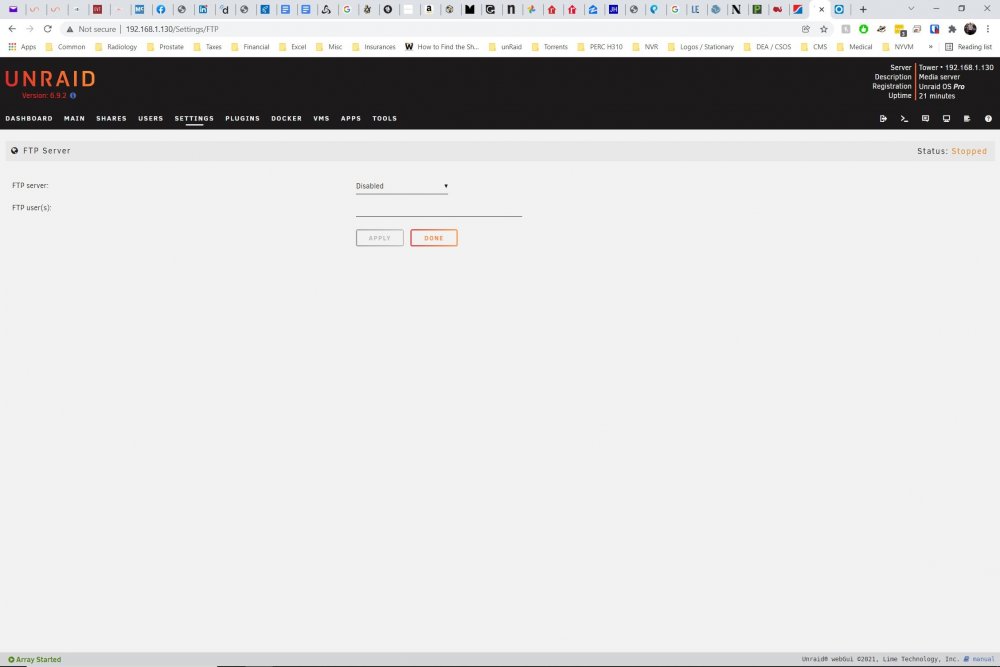
Yep. Every time I do that, and set it to disabled. I can set it to disabled, work back and worth within the server, and it stays turned off. However, it reverts to enabled upon restart.
-
Is there a way to disable the ftp server in such a way that it is no longer - self enabled?
-
I will, a little later today, unplug the server from the network and reboot it. That should eliminate anything triggering the ftp, correct? Would a flash problem trigger the ftp?
-
So, if I understand you correctly, there is no way for me to fix my issue without reinstall?
-
So, short of scraping the entire build and restarting from scratch, do I have any options to make the server work?
-
I closed all of the tabs on all PCs pointing to the unraid and still the problem of very long boot up times persists. Is there any way to check to boot process without taking out the flash from the tower? Just in case it helps, I'll attach the latest diagnostics report. Will the reinstall of the unraid files onto the USB help? Thank you, Lev tower-diagnostics-20211208-0023.zip
-
Can some one please check over my configs? I am getting blurry eyed and am missing something. Prior to installing the swag I was able to log into nextcloud instance. Once swag was installed and the \cache\appdata\nextcloud\www\nextcloud\config\config.php and \cache\appdata\swag\nginx\proxy-confs\nextcloud.subdomain.conf were updated as per spaceinvader I cannot loginto the Nextcloud from the browser. By the way, I did not do anything on Claouflare. Would that make a difference? I never used it with Letsencrypt. nextcloud.subdomain.txt config.txt
-
This part is going to be tough to do. My server is pretty tough to get at. Is there any other way to check the flash?\ I copied everything off of the flash by regular copy in Windows. Hope that carries all files over.
-
Yes, I probably have, from several PC. True. But none are ftping I am not even sure what that is. What should I look for?
-
I do not think that I have any ftp users. I am the only one who's using the server.
-
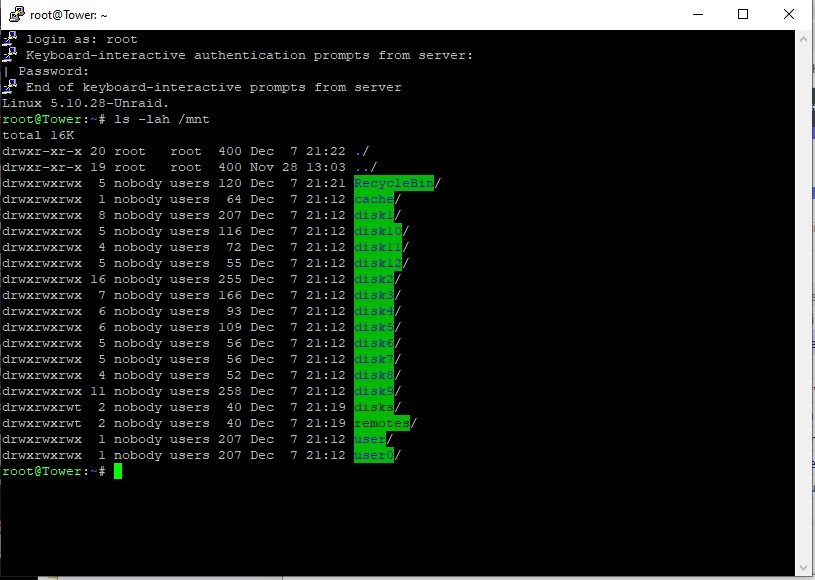
I have no one else logging into or using the server. It took over 800 sec to come up the ftp is again enabled. It seems that every time I try to add MariaDB to the docker - I loose my shares!!! Log for_ mariadb.pdf
-
Looks like it is still spinning it's wheels. Taking a very long time to come up. Once up, the ftp was back to enabled. I know that I disabled it... Also, it seems that my shares all of a sudden just drop out. When I tab over to the Shares all I see are my disks. I'll attach a second diagnostic which is right after the share disappeared. tower-diagnostics-20211207-1823.zip tower-diagnostics-20211207-2112.zip
-
Thank you!