levster
Members
-
Joined
-
Last visited
Everything posted by levster
-
I am not sure. I always upgraded via the GUI so not sure what that is. How do I update the container to the latest?
-
Here is the screen capture: root@Tower2:~# docker restart nextcloud nextcloud root@Tower2:~# docker exec -it nextcloud bash root@00091b0a1eca:/$ cd /config/www/nextcloud root@00091b0a1eca:/config/www/nextcloud$ sudo -u abc php7 occ upgrade sudo: php7: command not found root@00091b0a1eca:/config/www/nextcloud$ Sorry if I missed a step, but I was trying to follow it... I am sure that I screwed up somewhere but am not sure where...
-
At the command: "sudo -u abc php7 occ upgrade", I get the following response: "sudo: php7: command not found"
-
Trying to update to the latest and am getting the following while downloading: Verifying integrity Parsing response failed. <html> <head><title>504 Gateway Time-out</title></head> <body bgcolor="white"> <center><h1>504 Gateway Time-out</h1></center> <hr><center>nginx/1.10.1</center> </body> </html> <!-- a padding to disable MSIE and Chrome friendly error page --> <!-- a padding to disable MSIE and Chrome friendly error page --> <!-- a padding to disable MSIE and Chrome friendly error page --> <!-- a padding to disable MSIE and Chrome friendly error page --> <!-- a padding to disable MSIE and Chrome friendly error page --> <!-- a padding to disable MSIE and Chrome friendly error page --> any idea how to proceed past this?
-
I noticed the following under the Admin page of my nextclod: Security & setup warnings It's important for the security and performance of your instance that everything is configured correctly. To help you with that we are doing some automatic checks. Please see the Tips & Ticks section and the documentation for more information. The PHP OPcache is not properly configured. For better performance we recommend to use following settings in the php.ini: opcache.enable=1 opcache.enable_cli=1 opcache.interned_strings_buffer=8 opcache.max_accelerated_files=10000 opcache.memory_consumption=128 opcache.save_comments=1 opcache.revalidate_freq=1 How do I implement this? I can't seem to locate this php.ini file. Thank you, Lev
-
Hello, I recently went in to my admin page and saw that there was a stable update available. I am always a bit weary of these as in the past have had issues after upgrades. This time when following the prompt, I see that the version which is listed is different from the suggested. Please see attached pages. It should be 11.0.5 but shows up as 12.0.3. If I go into "production" then I see 11.0.5. Am I missing something? Before proceeding, can someone please shine some light on this? Thanks, Lev nextcloud update.pdf Admin - Nextcloud.pdf
-
I'm not sure if this is the correct place to ask this or not, but... I updated the Nextcloud from the WebUI admin page, as I've done in the past to the latest stable release and am now stuck at the "the Nextcloud instance is currently in maintenance mode, which may take a while", and has been there for nearly 12 hours. Is it normal for it to do so for so long and if not what are the troubleshooting steps that I need to take at this time? Thank you, Lev I changed the config.php to maintenance - false, and it seemed to immediately fix the issue. Strange.
-
I'll def give it a try. Thank you, Lev PS. I think that the use of "filters" is a feature of full version.
-
I wish that there was a way to revert to an older APK. I could live with the older functionality till they work out the bugs.
-
I just checked it out and there does not seem to be a way to separate video and photo files into separate folders, and on different schedules. I would hate to upload a large video file over cellular - too much data and it would chew up the battery. I'll keep checking in to it. Thank you for advice. Lev
-
This may not be the most appropriate forum for this question, but, I have asked it on the "official" developer forum on https://github.com/nextcloud/android/issues and the reply was less than adequate. I have issues with the android version of the Nextcloud app, specifically it's Auto upload feature, which was introduced in version 1.4.2. It made uploading separate photo and video files cumbersome as you could no longer separate them by folders or specify wifi or cellular. I liked the ability to upload large video files over wifi only for data use issues. Prior to the new Android 7.0, I was able to downgrade the nextcloud APK to 1.4.1 and run it without any issues. Since upgrading to the new Android version that does not seem to fix the issue. No matter which older version of the APK I install there is that Auto upload feature. I've posted this question on the developer support site and received an answer: I understand that the underlying code is probably improved, but the update fixed an issue that I never had. This to me is analogous as using Windows Vista over XP. Possibly good idea, with terrible implication. Does anyone know of a successful downgrade process on android 7.0? Thanks, Lev
-
Thanks. Just did it. I'm always weary of updating and then braking the installation. Lev
-
I see a great explanation on how to update nextcloud to the latest version https://forums.lime-technology.com/topic/48383-support-linuxserverio-nextcloud/?do=findComment&comment=493083. However, what do you normally do regarding mariadb? The Docker page says that there is an upgrade. Do you just ignore that? Thanks, Lev
-
Fantastic! Thank you. Just did it. Lev
-
So, just to be clear, can I update from the Nextcloud app itself, or do I reinstall from the apps page?
-
I would like to update but am afraid of breaking the delicate installation. Could you please elaborate on what you meant by your statement?
-
THANK YOU VERY MUCH! I guess I should pay more attention to the syntax. I am on the main user page. Looks very similar to owncloud. Lev So far I've been able to add a total of 4 users; however, when I try to add additional users, nothing happens. No error messages. The page just sits there. I can do pretty much anything else with NC, but clicking "create" does nothing. PS. I think I answered my own question. I created that user with a complex password, and when changing it to something simpler was greeted with an error message - too simple password. I think that NC did not like the simple password and did not notify me of "why" it did not want to create the user.
-
THANK YOU VERY MUCH! I guess I should pay more attention to the syntax. I am on the main user page. Looks very similar to owncloud. Lev
-
Will remove it from the "bind-address=0.0.0.0"
-
I changed the binlog format to mixed, but did not remove the "#" in front of it. Did not notice that. Thank you. I'll redo all now.
-
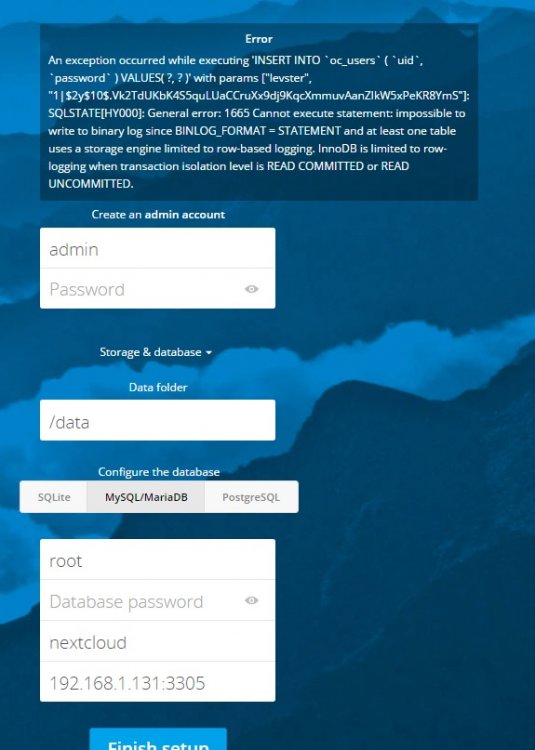
When you say you copied the entire prompt, you did edit it before using right? Changing $MARIADB-ROOT-PASSWORD to your actual password? EDIT: Also there's an error in my instructions should be chmod rather than chown, which I've now changed. Uh oh....[emoji10] I feel a little bit embarrassed... I left the string as is... If it makes you feel better, you're not the first.... OK, so I removed both MariaDB and NC. Reinstalled MD with the correct parameters, and a new password. When running the I used the correct, matching password. Installed NC. Now, when I try to go to the WebUI, I get "This site can’t be reached 192.168.1.131 refused to connect." I see the correct NC logo on the tab, but the page does not load. I am confused. I did not really change anything else. I really do not know what else to suggest. I just did a fresh install to check the instructions inside of five minutes. Definitely working. Have you checked the logs of both containers and cleared your browser cache? I guess I just needed to wait a few minutes, because subsequently I was able to get to the create admin screen. Now, new error message
-
When you say you copied the entire prompt, you did edit it before using right? Changing $MARIADB-ROOT-PASSWORD to your actual password? EDIT: Also there's an error in my instructions should be chmod rather than chown, which I've now changed. Uh oh....[emoji10] I feel a little bit embarrassed... I left the string as is... If it makes you feel better, you're not the first.... OK, so I removed both MariaDB and NC. Reinstalled MD with the correct parameters, and a new password. When running the I used the correct, matching password. Installed NC. Now, when I try to go to the WebUI, I get "This site can’t be reached 192.168.1.131 refused to connect." I see the correct NC logo on the tab, but the page does not load. I am confused. I did not really change anything else.
-
When you say you copied the entire prompt, you did edit it before using right? Changing $MARIADB-ROOT-PASSWORD to your actual password? EDIT: Also there's an error in my instructions should be chmod rather than chown, which I've now changed. Uh oh....[emoji10] I feel a little bit embarrassed... I left the string as is... Sent from my SM-G935V using Tapatalk
-
Yes, I went past this prompt; however, the original password used during the setup of Mariadb was not accessible. I had to leave the password blank and hit enter to get to this prompt. Sent from my SM-G935V using Tapatalk I'm confused, you'd only see this screen if the password was correct when you entered it. Well, I guess I'm just as confused. I could not pass it with the original password, and I tried it twice, wiping out the entire Mariadb and Nextcloud containers, including the leftover folders. Sent from my SM-G935V using Tapatalk Only other thing I can think of is once you set the MariaDB root password in the template on the initial pull you can't change it afterwards by changing the template. It ONLY works that initial time. EDIT: The other problem I've seen with this is people not including the semi-colons at the end of the mysql commands here. I copied the entire prompt, including the ";". I saw that as an issue in one of the previous posts... I just checked the MariaDB install and the password is there. I am using "root" as the Database user. Password created during the initial MariaDB install, nextcloud as the Database name. IP as shown on the MariaDB IP:port on the Docker page.
-
Yes, I went past this prompt; however, the original password used during the setup of Mariadb was not accessible. I had to leave the password blank and hit enter to get to this prompt. Sent from my SM-G935V using Tapatalk I'm confused, you'd only see this screen if the password was correct when you entered it. Well, I guess I'm just as confused. I could not pass it with the original password, and I tried it twice, wiping out the entire Mariadb and Nextcloud containers, including the leftover folders. Sent from my SM-G935V using Tapatalk