






Jcloud
Members
-
Joined
Everything posted by Jcloud
-
Not sure, you have a different setup than I was trying to write general code for. If you used my repos but still did a docker container per daemon, like you were doing before then yes, I think it could be made to work. The command in my code, and very close the suggestion you gave in forums (btw, thank you): FOR Single nodes: find "${DATADIR}/log" -type f -mtime +"${DEL_LOGS_DAYS}" -iname "*.log" -delete & FOR Multiple nodes: find "${DATADIR}/${NODE_DIR}$i/log" -type f -mtime +"${DEL_LOGS_DAYS}" -iname "*.log" -delete & So the default ${DATADIR} is /storj/ The more I stare at the command and how your directory is laid out, I'm not sure it will work. To manually fire it off I would change it to: Substitute /WhatEverIsThePath for what it needs to be, sorry if I've dumb this down too much. find /WhatEverIsThePath/storj10/Node_1/log -type f -mtime +1 -iname "*.log" -delete Toss that in CA user scripts, correctly modified, and you should be good to go - you could even continue to use Storj container if you wished. EDIT forgot to address, your other question CA updates might be looking for an old image or container name perhaps? Might want to check those settings to see if they are OK. The repo you just changed to, zugz/StorjMonitor, does not yet auto-build and that's why you haven't seen updates. I DO NEED to figure out how to do auto-builds, but I think I might have to delete zugz/StorjMonitor again and re-setup to do so. Presently I've been visiting the official github page, to see if I need to update my repo or not - there have been no code changes for 11 days now.
-
Everything was pushed at the time of the post. Perhaps I need to do something for versioning and or flagging as "latest?" However that won't change the webui. You can either delete StorjMonitor container and image, then pull the template and the docker image. Another way would be to force-update the image in webui; stop the container; Edit the template for StorjMonitor then add the two following variables on your template: Variable1 key: DEL_LOGS Variable1 value: TRUE Variable2 key: DEL_LOGS_DAYS Variable2 value: 1 Based on your forum posts you'll want to set the value of DEL_LOG_DAYS to 1; this is specifying how many logs days of logs to keep (don't use 0, minimum good value is 1, default is 7 or a week, valid values are positive integers).
-
Made an update to the custom StorjMonitor repository, for those that want to try - added nuhll's request for log purging. By default log purging is off. The webui template has also been updated for NAT Tunneling, and this log purge: TRUE/FALSE (enable/disable), number of days to keep. File purge, only fires off once, at the start of the container.
-
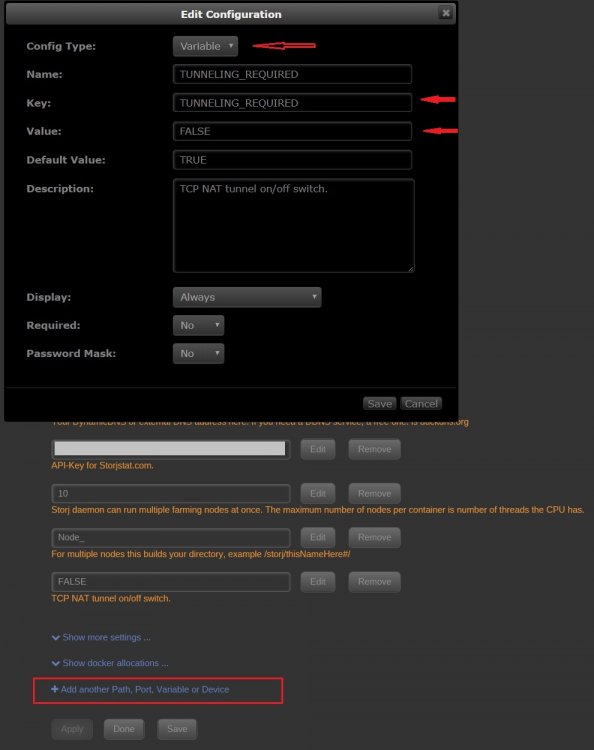
I haven't updated since Thursday, but I think something is up with network. I've been running the official repo and haven't been getting updates either; peers - yes, few Allocs, but no "received.' I've also noticed that that my rating on storjstat.com flat-lined, where as before it was more like 45-degree slope, on the graph. Locally I just remade the image, but moved back the install location of storjMonitor script (testing). I haven't seen any new upstream changes. Also, double-checking, you caught the change in webui template. Up-stream changed the environment variable MONITORKEY to STORJ_MONITOR_API_KEY. An upstream fix was also made for tunneling, maybe it's on and that's messing you up? Can try adding this to your template and see if it helps:
-
You have a point, I've been "gun-shy" over deleting data, my brain is flagging it as a danger-zone, and with last few days -- my confidence is a bit torn up. A point of information: While /storj/log is the path inside the container, /storj (the parent directory) is mapped outside of the container - this is why your contract data, and logs, are not deleted whenever the container image is updated or deleted. The /storj path is mapped in the template, and a requirement of template/container.
-
Storj.io has a process of auditing the monthly usage, because of this, logs might be useful to some. Storj.io is also a slow, and in my opinion, inconsistent with their monthly payout process. I was thinking I might be better if the script killed logs older then a month or two. My perspective, may be partially skewed as you're talking of cleaning GB of data, while my user share is 19TB free space . However the growth of this data space is real issue, I won't deny that. I'm also going to take my time on log deletion, because we're talking about deleting files on unRAID host. I don't want to nuke something important, community members or mine. Thanks for the code snips, agree, I think an ON/OFF switch is a good idea. Perhaps a second variable to set how many days of logs to keep, instead of a hard-set number. My /storj/ folder totlal is only 37G, logs and data; log folder is only 407M. root@HYDRA:/mnt/user/storj# du -h -s 37G . root@HYDRA:/mnt/user/storj# du ./*/log -h -s 0 ./Node_1/log 0 ./Node_10/log 0 ./Node_2/log 0 ./Node_3/log 0 ./Node_4/log 0 ./Node_5/log 0 ./Node_6/log 0 ./Node_7/log 0 ./Node_8/log 0 ./Node_9/log root@HYDRA:/mnt/user/storj# du ./log -h -s 407M ./log
-
Yes, MONITORKEY has been changed to STORJ_MONITOR_API_KEY Okay, now I know what you're looking at, and what to focus on. You're right, what I gave you before won't work for that, I thought you were talking about something else.
-
Hi Phithor, there seems to have been a SNAFU or FUBAR with with my stuff the last few days. A this time I would recommend deleting the container, and its image, from unraid and download the container again; I'm hoping that will fix your issue, but I think that's the first place to start. Please note the Storj templates have changed to work with the up-stream variables, so it should look a little different from the old template -- might be best to go back to CA Apps and grab it from there. My "Storj" docker template appears to be working again; work is a little slow so I'm going to try and remotely test my StorjMonitor repo/container.
-
Is the container's /var/log directory filling up, or are you refering to /storj/storj1/log folder(s) that are increasing in space?
-
The webui template for Storj (oreandawe/storjshare-cli) has been updated for the Storjstat.com monitor script, and as best as I can tell, is working. The template and container/repo zugz/r8mystorj also updated; for the time being please consider it experimental -- I haven't tested it yet, but did notice the ticker for downloads +1 in the process of updating the container image. I still haven't managed to correctly configure auto-builds, for up-stream updates; I need to work on that this weekend (if time permits).
-
Technically, yes. But if/when the template is back to working order the line-item for the API key is what inserts it back into the container -- so from what the user experiences it should act like, "No, the changes don't vanish." Make sense, or did I make it more confusing?
-
Yeah I was noticing that too on mine; I need to get on the ball, I'm not sure what's going on with my Container anymore. However, I have noticed a significant change to the Docker and Entrypoint file on the Original -- I think this broke my container; that's the bad news. The good news is: I think contributor of push totally stole (lol) my storjstats code saw my idea; tweaked it; and storjstat.com script totally part of the official container now. Also Nuhll code snip that I commented on, actually looks more like the merged code, but that is my template and screenshot is my repo. I'm confused. It's broken. Tonight's Plan (right after this post): Revisit the Storj template, update it for the storjstat.com API.DONE Making the assumption these people are more competent with the work. Nuke my repo, pull from official, rewrite for multiple nodes DONE(as this is NOT in the official docker). I hear you Nuhll, I'll see about Docker logs, and check for mine. However here's a tip I pulled a year ago out of the forums: Run the following command from unRAID host, to delete all logs from your docker image file. (the short-term fix; or for CA user scripts plugin) logs=$(find /var/lib/docker/containers/ -name '*.log');for log in $logs; do cat /dev/null > $log;done
-
@nuhllI'm still half a sleep, coffee needs to kick in, but glad it's working. I think you have my old code, or I uploaded an old version. A number of the points you brought up are issues I fought with before I posted. I think I need to clean up my repo and stream line my updating process, and stop being lazy with the online documentation on github. For example you listed And you're right it doesn't increment there, and I updated (at some point, again maybe you got my old version before I caught it -- sorry ): i=1; j=4000; while [ "$i" -le "${NODE_COUNT}" ]; do mkdir -pv "${DATADIR}/${NODE_DIR}$i/share" "${DATADIR}/${NODE_DIR}$i/log"; if [ ! -f "${DATADIR}/${NODE_DIR}$i/config.json" ]; then j=$(( j + 1 )); storjshare create --storj "${WALLET_ADDRESS}" --storage "${DATADIR}/${NODE_DIR}$i/share" --size "${SHARE_SIZE}" --rpcport "$j" --rpcaddress "${RPCADDRESS}" --logdir "${DATADIR}/${NODE_DIR}$i/log" --outfile "${DATADIR}/${NODE_DIR}$i/config.json" --noedit; fi; i=$(( i + 1 )); done; I didn't make the changes I said I would yesterday, my night walked away from me. Nuhll I'll go over your notes, my finished code, compare notes and try to clean house. I'll try and get on all of this ASAP. Sorry I'm such a noob software dev everyone -- thanks for putting up with my learning project.
-
Oh okay, I think I know what to change there in the Docker and entrypoint file. I'll make the change tonight and push it.
-
Can you give me a screen shot of your Storj webui template you use, that works. And an example of storj2 on new container template webui?
-
I'm sorry for your data loss, and if it is because of trying to use this container my apologies. I accidentally did that to all 11 of my nodes while working on this container. LOL Oops, there went a month of contracts. Sorry, it is easy for me to laugh at myself after the fact. I'll do my best to get this to work and not lose data. It should be installed but if you want to check for it: Get inside the container docker exec -ti StorjMonitorContainerNameHere /bin/sh Can we go in the StorjMonitor folder (this is inside the container): cd /StorjMonitor If that works, great! Check for files, type command: ls -al This should produce a list like this: /StorjMonitor # ls -al total 24 drwxr-xr-x 1 root root 218 Apr 25 03:45 . drwxr-xr-x 1 root root 212 Apr 19 07:32 .. drwxr-xr-x 1 root root 138 Apr 19 05:31 .git -rw-r--r-- 1 root root 1170 Apr 19 05:31 README.md drwxr-xr-x 1 root root 16 Apr 19 05:31 bin drwxr-xr-x 1 root root 152 Apr 19 05:31 node_modules -rw-r--r-- 1 root root 760 Apr 19 05:31 package.json -rwxr-xr-x 1 root root 125 Apr 19 05:31 storjMonitor-install.sh -rw-r--r-- 1 root root 34 Apr 19 05:31 storjMonitor.bat -rw-r--r-- 1 root root 2131 Apr 25 03:45 storjMonitor.js -rwxr-xr-x 1 root root 21 Apr 19 05:31 storjMonitor.sh /StorjMonitor # Check to see if StorjMonitor API key is inserted and correct, type command: head storjMonitor.js The last line of the output should read: var token = "YOUR-TOKEN-HERE"; //api token can be create under "Nodes" -> "API-Key" Where "YOUR-TOKEN-HERE" should read a sting of letters and numbers, your Storjstat.com API-key. IF it actually reads "YOUR-TOKEN-HERE" then it didn't get it from the webui template (and I don't know why that would be) AND this needs to be fixed! To fix the error, run this command: (Take note) Leave "YOUR-TOKEN-HERE" as "YOUR-TOKEN-HERE" Change "MONITORKEY" to your API-key (recommend using copy/paste here) sed -i "s/YOUR-TOKEN-HERE/MONITORKEY/" /StorjMonitor/storjMonitor.js EXAMPLE sed -i "s/YOUR-TOKEN-HERE/H8WvafR770FPK2zA8ZTs7NTX2QH3GB5xC9curPDs/" /StorjMonitor/storjMonitor.js Verify the change worked, run command (again): head storjMonitor.js If you want to run the storjMonitor script manually then run: ./storjMonitor.sh I hope that helps.
-
Yeah I tried that too in testing, before I posted, and got the same errors. I think it has to do with encryption, and/or storj configuration, not knowing about other nodes because it didn't build it. I see that error whenever the container is empty. Did the container create new directories in your /storj area? If so the container just created new nodes (I think based on your description). I think the container isn't initially setup (logic in my shell-script) to handle what you were doing before. The webui had the ports removed, because I changed it to host (yup my fault) -- if you change it to bridge, then at bottom you can click on "Add ports, variable, path" and add the port field back in. That's all I can do for now -- late to employment.
-
@MrChunky since you were able to see and resolve your issue, could you put up the steps you did to check and fix your issue? Please. I'm thinking @phithor may have the same permission issues you resolved -- or at least I'd like to check for it. Thanks for your time.
-
"Slow node" perhaps? Honestly, IDK. EDIT: Hmm have an idea about that since you you're on bridge. I need to look at if it would a change on my end or something you can tweak.
-
Are you running container as bridge or host mode? And yes, definitely odd. Also, for S's and G's, double check your firewall to make sure it includes those ports. EDIT: I'd also look at the different config.json files of node0,5, and a working one like 1 -- if these were imported from another container. But, my gut feeling says firewall, or at least starting there.
-
The suggestion makes a certain amount of sense. I must admit, as for the layout of files, I've just been following the 'defaults' (if you want to call it that) of the original source container. I'm easy though, if the consensus is "move it," I can do that.
-
On empty nodes I've totally seen this, and I think that's normal; once the empty node got data it went away. However, the one that has data in it I don't like, and I don't know what's going on with that.
-
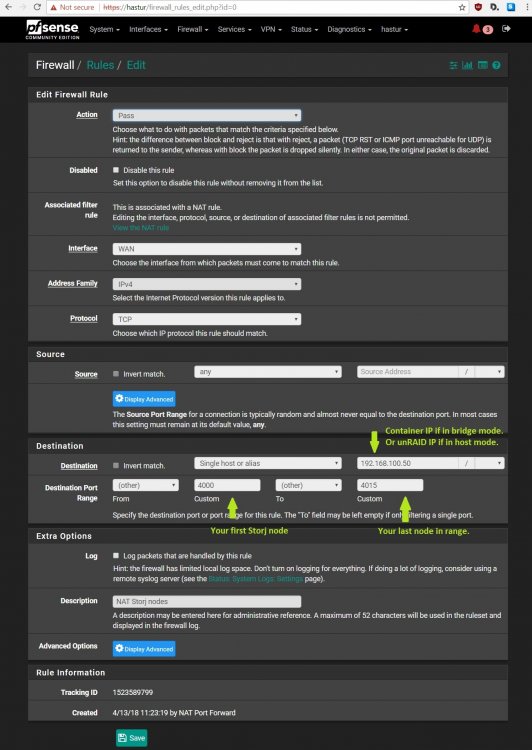
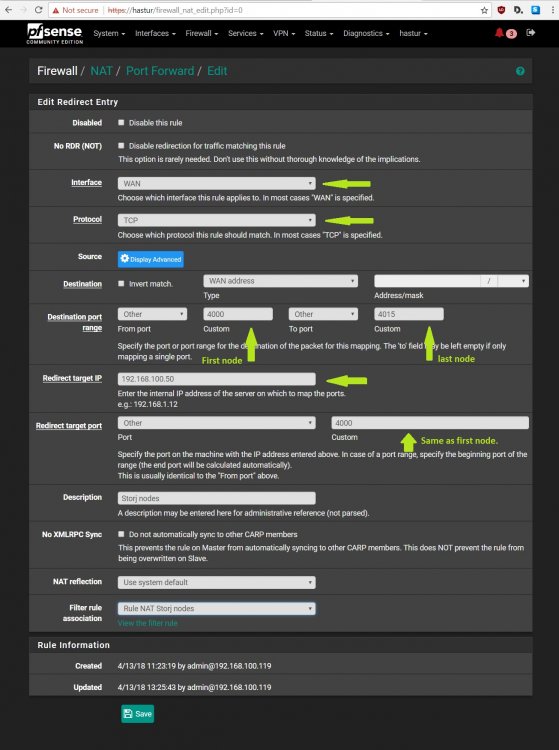
In case people want, or need, to compare their firewall rules versus mine - for trouble shooting or any reason. Seen a number of folks mention pfsense, and other firewalls. Pfsense requires a, "Firewall rule" and a, "Port forward rule" if you have a NAT network. I also had an issue earlier today were overly aggressive SNORT service settings blocked traffic to storjstat.com -- called that one my fault, I was tinkering with it the night before. (oops)
-
So I've noticed something very odd with my repo, the first node seems to be ignoring the config file ┌─────────────────────────────────────────────┬─────────┬──────────┬──────────┬─────────┬───────────────┬─────────┬──────────┬───────────┬──────────────┐ │ Node │ Status │ Uptime │ Restarts │ Peers │ Allocs │ Delta │ Port │ Shared │ Bridges │ ├─────────────────────────────────────────────┼─────────┼──────────┼──────────┼─────────┼───────────────┼─────────┼──────────┼───────────┼──────────────┤ │ e0e9ce647217d368e554024bc6519bbb9a328d17 │ running │ 23h 59m… │ 0 │ 205 │ 93 │ 40ms │ 40001 │ 6.62GB │ connected │ │ → /storj/share │ │ │ │ │ 14 received │ │ (Tunnel) │ (1%) │ │ ├─────────────────────────────────────────────┼─────────┼──────────┼──────────┼─────────┼───────────────┼─────────┼──────────┼───────────┼──────────────┤ │ 945c7da42cf0b06b5c4ed3c709ccca6658967b75 │ running │ 23h 59m… │ 0 │ 114 │ 90 │ 19ms │ 4001 │ 1.36GB │ connected │ │ → /storj/Node_1 │ │ │ │ │ 0 received │ │ (TCP) │ (0%) │ │ ├─────────────────────────────────────────────┼─────────┼──────────┼──────────┼─────────┼───────────────┼─────────┼──────────┼───────────┼──────────────┤ Also storjstat lists that node as some IP address. Not sure what's going on there. Going to try and investigate, but in meantime keep an eye on those nodes and don't nuke your old storj container just yet. Update: After running regular Storj container the port went back to UPnP (which is my normal status for 4000) and back to port 4000. Stopped the container and started my custom container, and seems to be running fine again. Hmmm more oddity. I think I need to get that auto-builds going.... Perhaps something changes in the backgound in the node.js structure? IDK, "typing out-loud" here. EDIT2: So I found something in my /stor/config.json file (node_0) that I struck out as different from other nodes. // doNotTraverseNat: true requires you to have an external ip address. // You can use a proxy to gain an external IP address. // doNotTraverseNat: false Enables NAT traversal strategies // first UPnP, then reverse HTTP tunnel // if that fails. Disable if you are public or using dynamic DNS "doNotTraverseNat": true, where as all the other nodes are FALSE, and also don't allow for tunnels (and I know why - command flag when making a node). So I changed the above line to false and now PORT 4000 reports TCP.
-
You don't NEED(I can't stress that enough) to do anything on my part, but if you want to: (Give me 12-hrs from this post to double check that ETH address before you send - I'm at work, I don't want you send it off into the ether) Address confirmed. 0xe09a2b205d3a76196a88505f059c78df7d7c556f Honestly, I've felt my work to be sub-par in comparison of the rest of the unRAID Community. I'm also, super critical of my own work/self. But hey, I'm glad it's working well for someone other than just me, based on feed-back so far. LOL I'm just in it for the learning experience, mostly. Storj tokens have some potiental for fiat gains.



