






Jcloud
Members
-
Joined
Everything posted by Jcloud
-
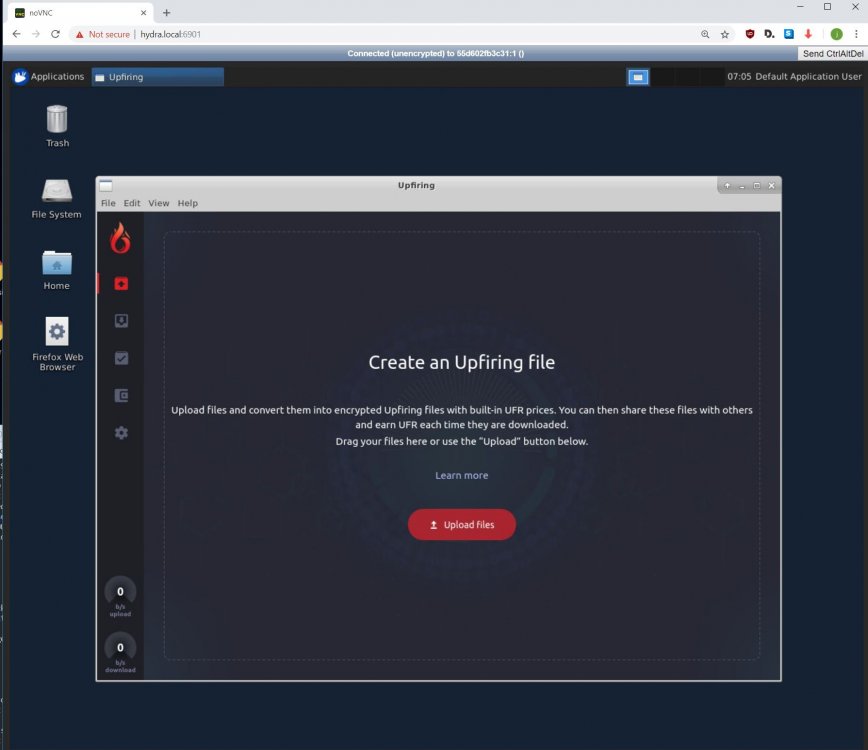
I'm presently working on a rough build, based on Ubuntu - because that's what I've been able to figure out, so far. I'm not sure I like it, seems to have lots of extras, but I want to make something that works first, then worry about making a slim-lined version. The image is weighing in at 1.43GB; when I compare that to some of the other gui-images I've downloaded it's fairly similar in size. I still have a number of items to test and work out before I release it. For the curious folks, I found and modifying, this docker: https://github.com/ConSol/docker-headless-vnc-container as the GUI-platform. And a screen shot of the docker, first build that runs (still needs testing).
-

From the album: Community Created Banners
-
Upgraded from 6.6.5 to 6.6.6 without issue. Log file looks clean; up-time of ~12 hours, so far.
-
Well the upstream code hasn't changed in six months, my additions are simply shell script code for the entrypoint. From what I can tell v3 protocol is still being developed, otherwise why blog about a whitepaper? If/when v3 becomes live I'll see if they change/update this container or just build a new one - if they update the container, things should update easy enough. If storj makes a new v3 container I'd look into making a template, and/or repo for Unraid support. Fundamentally my container is fork of https://github.com/zannen/docker-storjshare-cli. I don't think the container presently does support v3, but when the storj team (or 3rd-party) releases a v3-storj client or container I'd be happy to look into it. If people find it before I do, welcome track me down.
-
I saw this too, but I traced it to temp sensor plug-in, and/or the modprobe line in my go file -- so the temp sensor is seen.
-
Issue: Unable to add or remove vdisks, in Form view, of //TOWER/VMs/UpdateVM. Symptom: I'm able to click on red circle with minus-sign, "Remove 2nd vDisk," Doing so the vdisk drops away from the page, as it should -- Click on "Update." Everything appears to work, however editing the VM again the 2nd vdisk location is back. Adding a vDisk is the same, it appears to work but going back into the VM settings and secondary vDisk is missing. If I open a terminal window, browse domain folder the vdisk image was not created. Troubleshooting steps: Cleared browser cache. All other "Form view" functions appear to be working properly. Able to remove the secondary vDisk in XML view (XML edit working). hydra-diagnostics-20180910-2005.zip
-
Linux 4.18.6-unRAID. root@HYDRA:~# numactl --hardware available: 1 nodes (0) node 0 cpus: 0 1 2 3 4 5 6 7 8 9 10 11 12 13 14 15 16 17 18 19 20 21 22 23 24 25 26 27 28 29 30 31 node 0 size: 128796 MB node 0 free: 27195 MB node distances: node 0 0: 10 root@HYDRA:~# numastat qemu Per-node process memory usage (in MBs) for PID 42539 (qemu-system-x86) Node 0 Total --------------- --------------- Huge 0.00 0.00 Heap 0.05 0.05 Stack 0.05 0.05 Private 36961.88 36961.88 ---------------- --------------- --------------- Total 36961.98 36961.98 root@HYDRA:~# Per request.
-
Reproducible: yes. Issue: When updating a VM, I'm unable to add a second vdisk to an existing virtual machine. Steps to reproduce issue: From ://TOWER/VMs choose an existing/built VM and click "edit." In ://TOWER/VMs/UpdateVM?uuid=foo click the plus sign in "Primary vDisk Location" area ("add another vdisk" tool-tip). For 2nd vdisk keep default values, provide any nominal disk size. Click on Update button. Error message: "VM creation error" "Internal error: Cannot parse <address> 'function' attribute" <OK> Error occurs with VMs created prior to rc1, as well as VM generated by rc1. EDIT: Sorry, I missed that others had reported this error, I'll look harder next time. I would delete this post but I can't. hydra-diagnostics-20180905-0055.zip
-
You are correct, you won't be missing ANY functionality with Basic. If you decide to expand the number of disks in your system beyond six, for cache pool and drive array, upgrading your license is an available option.
-
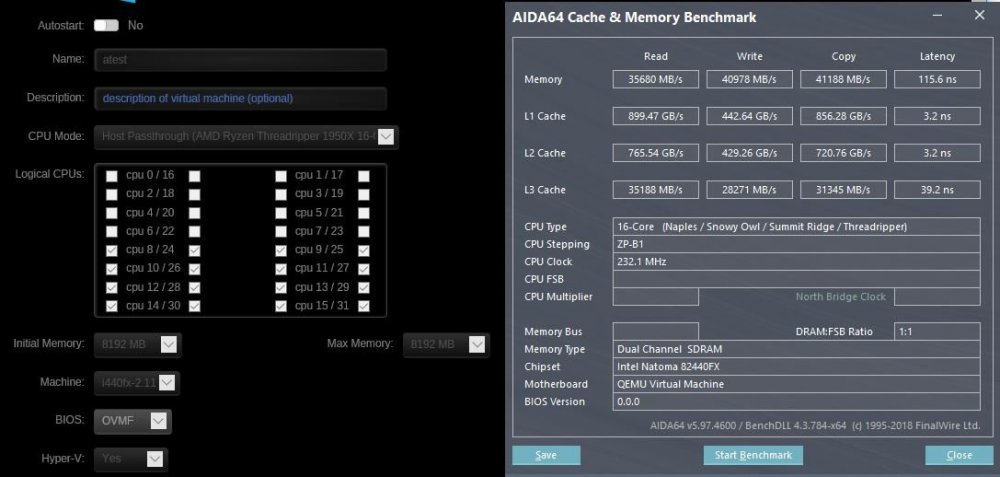
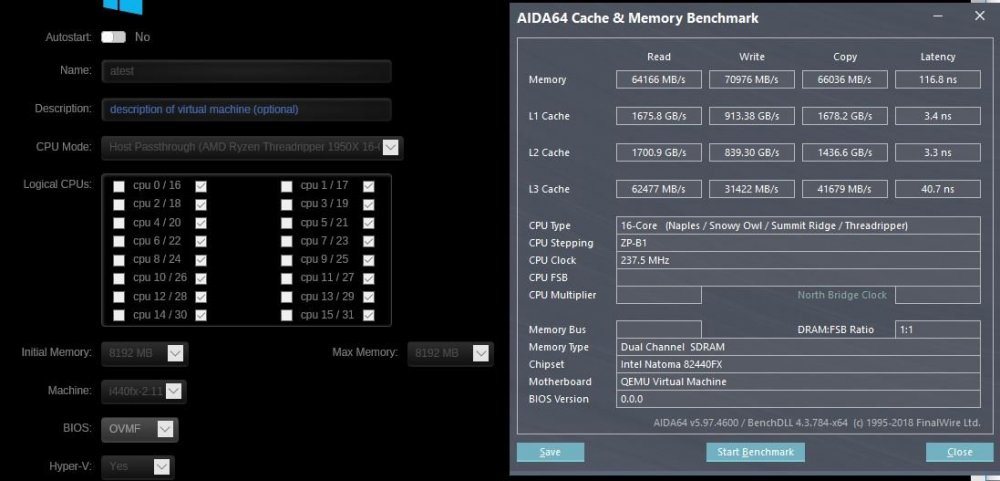
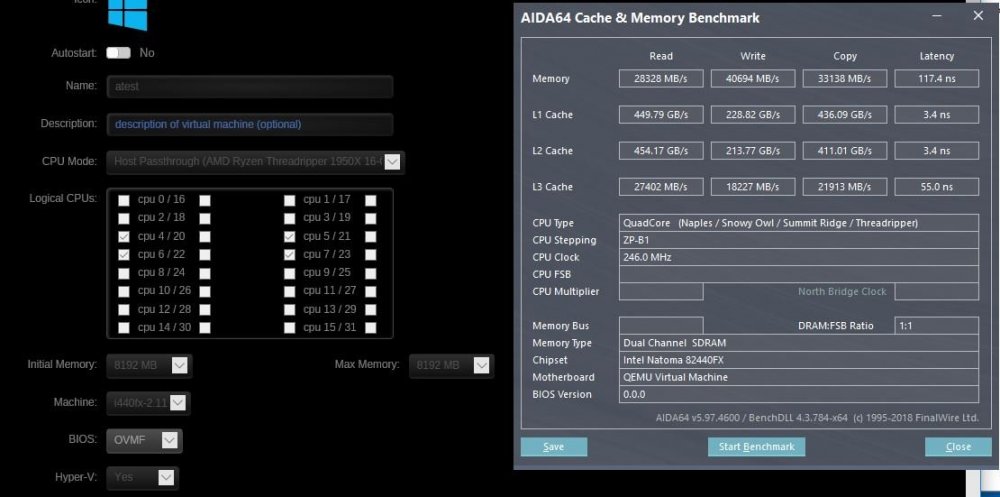
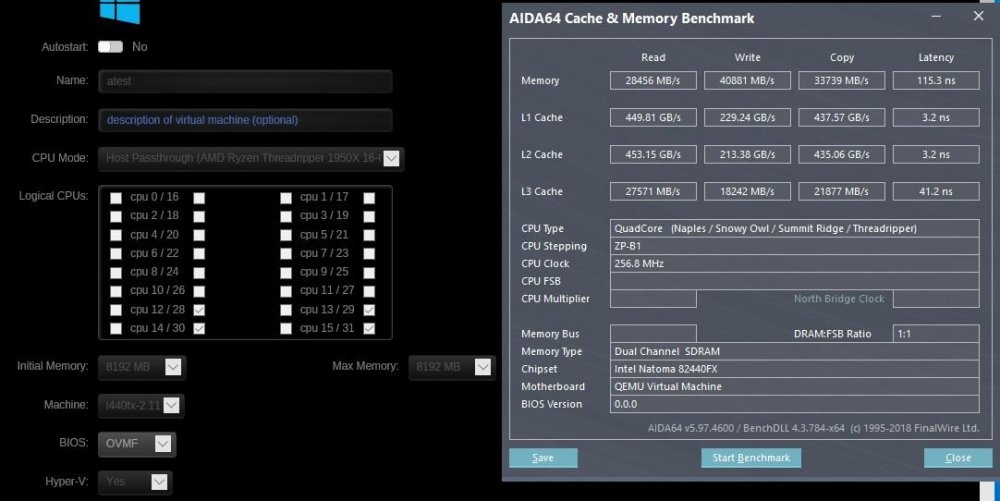
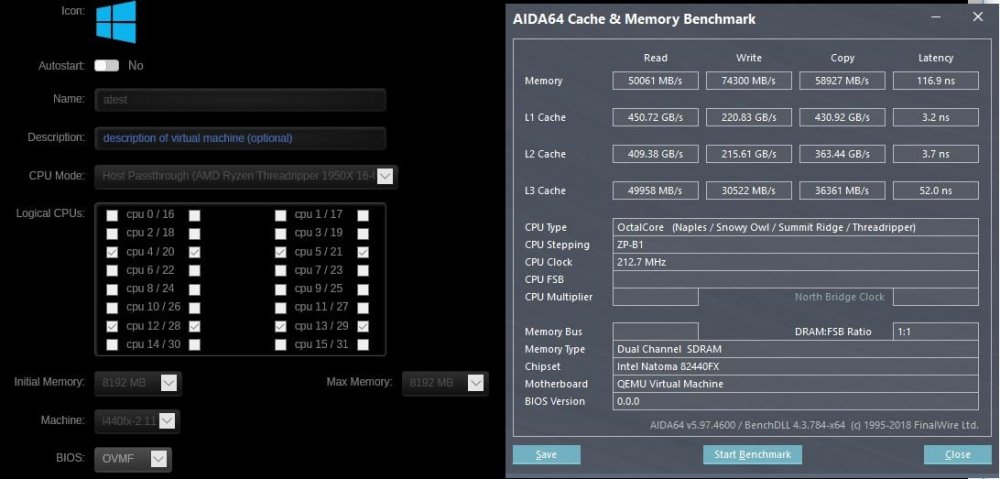
Would more data points, from the other users be useful to you @eschultz? Since bastl posted his methods I could try reproducing the experiment (same CPU but different mobo) and post results. Or would posting results at this stage be noise? EDIT: Well I'm noise simply by asking, so I may as well have some data. Ran the same tests as @bastl, was able to reproduce similar benchmark numbers (yay science!), I learned my current vm pin-outs are least optimized. Easy enough to change and try out for a while.
-
You have permission to take anything from my UCD page, if there's anything there you want. If my pictures are too messy, but you see something of interested, I'd take requests to redo cabling/pictures.
-
It's possible to do the same thing with the other image, it's just a lot more clunky. StorjMonitor container was in response to the community wanting less clunky and a few features; Storjstat.com monitor script (which the authors of the last repo added shortly after I did), and log deletion to be specific. I'm glad my instructions were comprehensible!
-
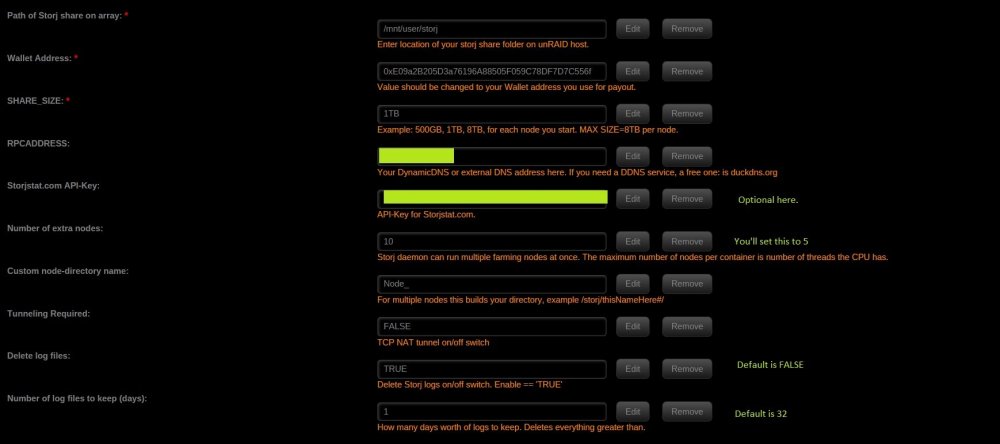
Go to Community Apps plug-in do a search for, "StorjMonitor" and grab that; the template is going to look similar but have more options. Before this will really work well, you'll want to open each ../storj/Node_*/config.json file with nano, vi (or notepad++ something which handles UNIX carriage-returns): change: "doNotTranverseNat": false, ----> "doNotTraverseNat": true, For each Nod_#/confi.json file I recommend changing "rpcPort": 4005, to 4001 rpcPort for Node_1/config.json becomes 4001 rpcPort for Node_2/config.json becomes 4002 rpcProt for Node_3/config.json becomes 4003 . . . way less network ports needed that way. Hope that clarifies things. If something is still unclear just ask.
-
One thing I've ran into, related to this topic, is that some games don't like the network share system we do with unRAID - especially if it has cheater-protection app on it. For example ARK runs fine, but if you try and use their cheater-protection ARK will go APE-S*&^ bonkers trying to load. The solution here, is the same as for Battle.net, make a vDisk for it, or passthrough an entire drive. Just FYI.
-
Remember how the original storj template, the author would recompile it every eight hours, I've basiclly taken it one step before that. Or, if changes are made to the repository code Docker hub will see this and re-compile the container. It auto-updates. Not a huge deal as neither I, nor upstream authors have made any changes for about a month. Storj is CPU and hard drive base, no gpu needed.
-
If you have the Community Apps plug-in search for QDirStat - it's WinDirStat/GrandPerspective clone.
-
Good line-item to note there. I wasn't able to play around much with that feature yet, as I have no Sia-coin to for the collateral portion of contract. For those interested in bleeding-edge I've finally gotten around to making an automated build repo for my Storj. Bad news is, I can't make repo zugz/r8mystorj be automatic without first deleting it - which might be confusing. So, if you want the automated repo, in your Docker template change, "zugz/r8mystorj:latest" to "zugz/r8mystorj-auto" Second, I'm a bit stunned: there have been 1.7K pulls of my repo! I know this count includes repeated pulls (ie not unique users; just total pulls) but dang, I'm impressed by the number.
-
Woops you are correct sir. Will edit that in a few.
-
Do you still have, "--restart=always" (no quotes) in the "Extra Parameters," field on the webui template? If no, go ahead and add it back and see if that helps you out.
-
For each node that is bridge go into its config.json file; look to see if "doNotTraverseNat" is set for true or false - if its on false, set it to true. Repeat this for all effected nodes, then stop your container, restart the container, and then check status again. If after making the changes, the nodes go from tunneled to broken, then your firewall needs to be opened up for the entire port range used by all your nodes, from 4000-40xx where xx is the number of nodes you're running.
-
Nope not that I what I can tell. Also the value of the market, and the fact they have have no corporate customers, I wouldn't worry about it. Should be possible to use the Docker container as a blockchain miner using CPU resources. That is a limit setup by Sia, I'm sure it's part of their ICO to create value in the token, it's pay-up or mine for the quantity. Also, I think the cash/tokens are used as collateral if you fail as host in your contract. Yeah the template doesn't change auto-magically, you do have to make the changes manually. Correct, it will only list the four ports, because those are the only ones "exposed," by the Dockerfile, but since you've added the port field on the container; then listed 4000-4010 (or whatever is the range which covers your number of nodes) it will work - Should list (TCP) for all of them, if you see (UPNP) then in the config file for effected node change: (from false) "doNotTraverseNat": true, docker exec yourStorjContainerName storjshare stop dcea81e7741aeb8db49174ac5821d9035xxxxxxx docker exec yourStorjContainerName storjshare start dcea81e7741aeb8db49174ac5821d9035xxxxxxx
-
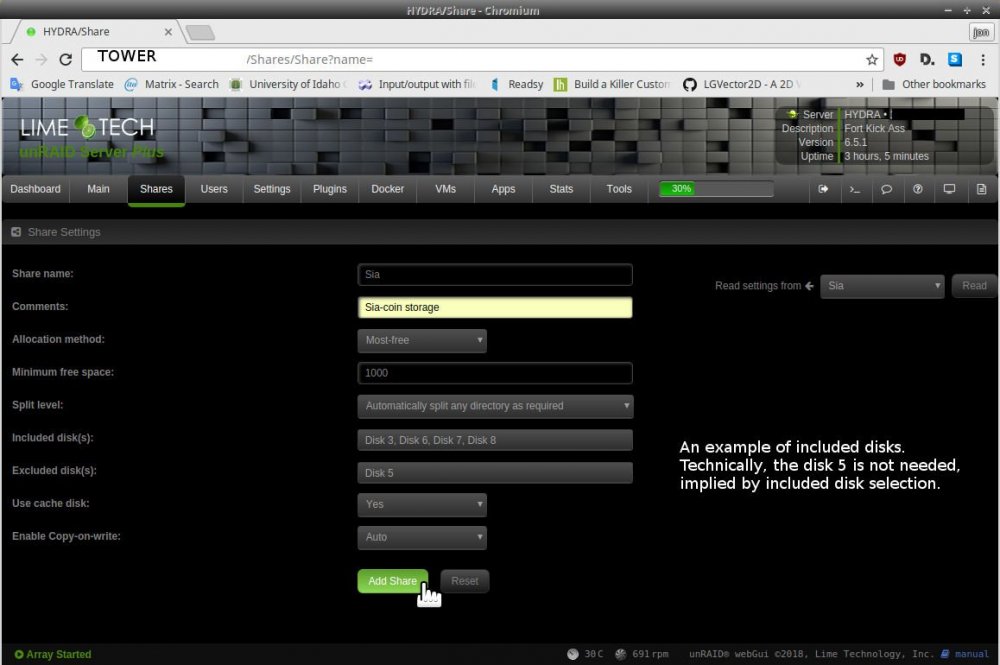
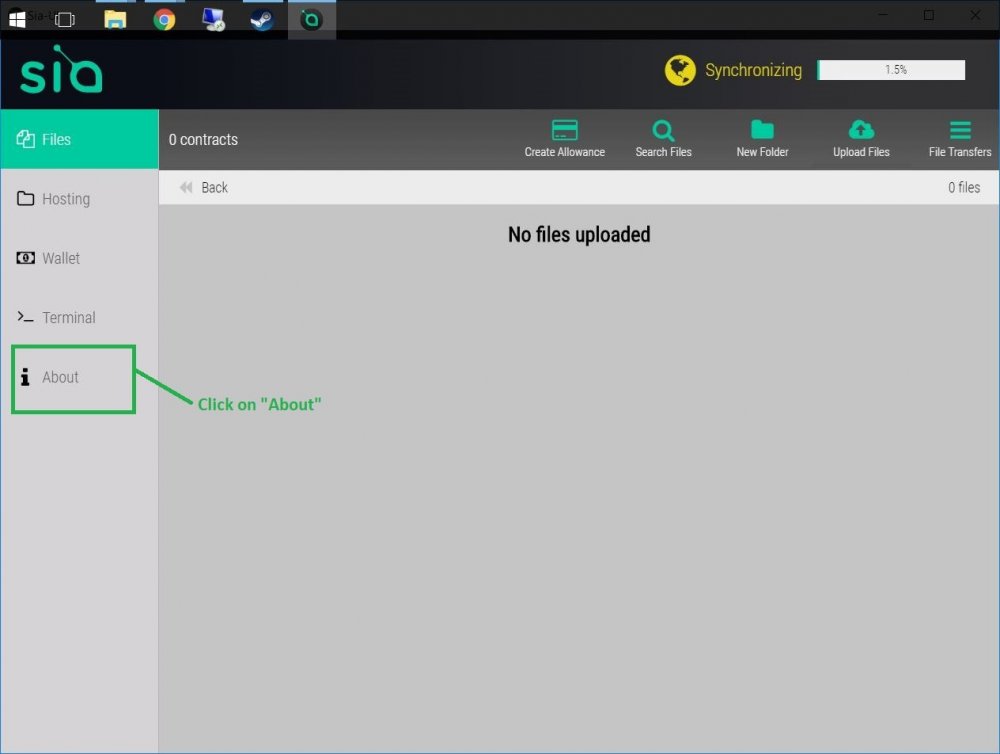
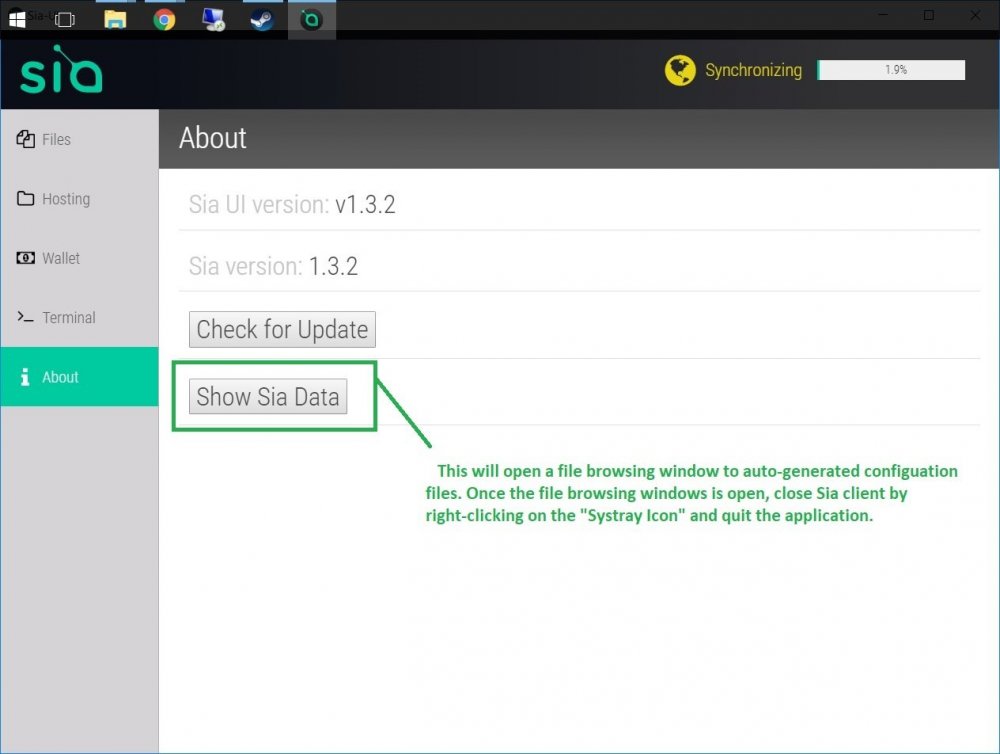
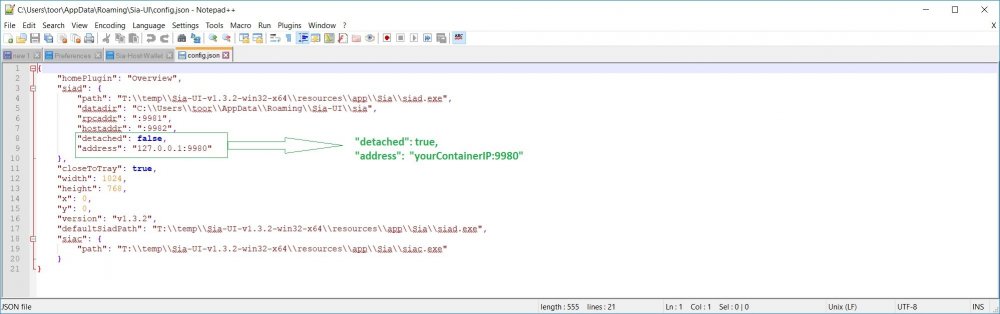
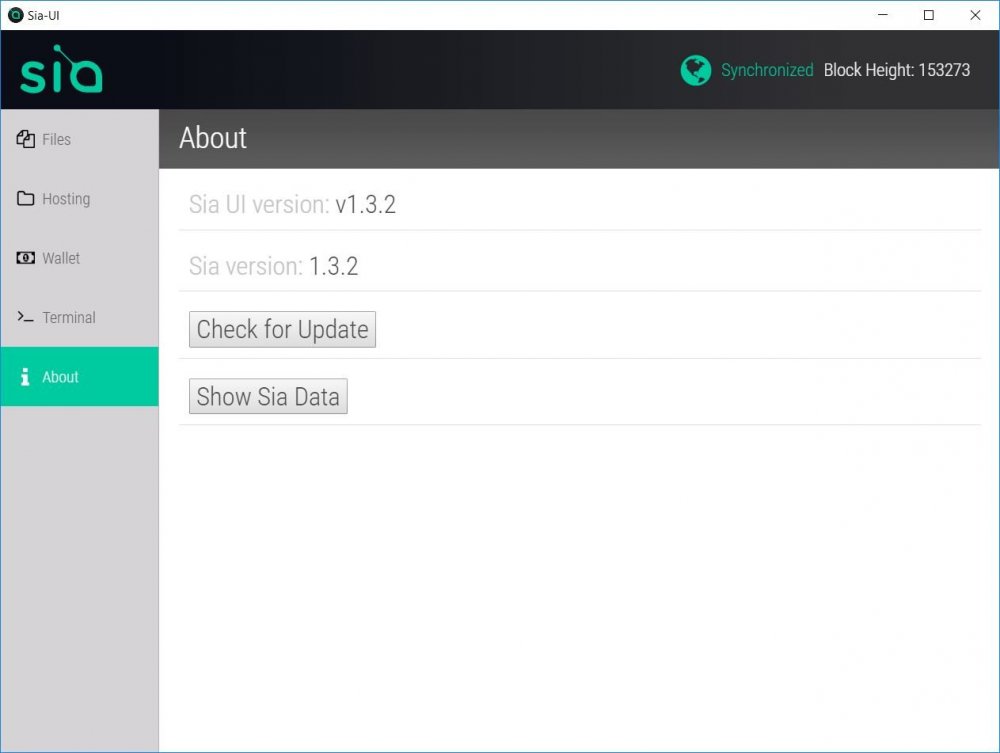
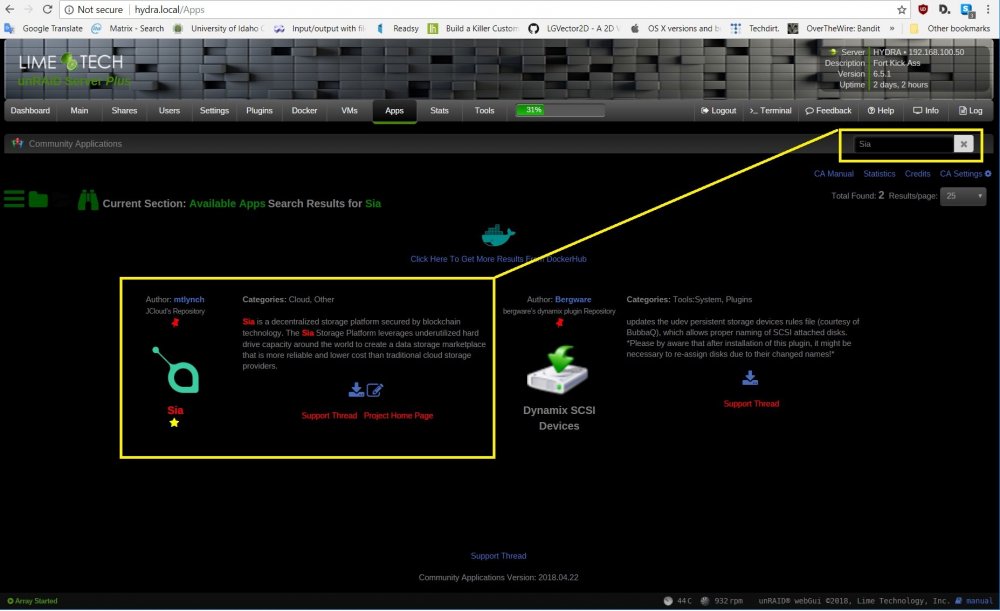
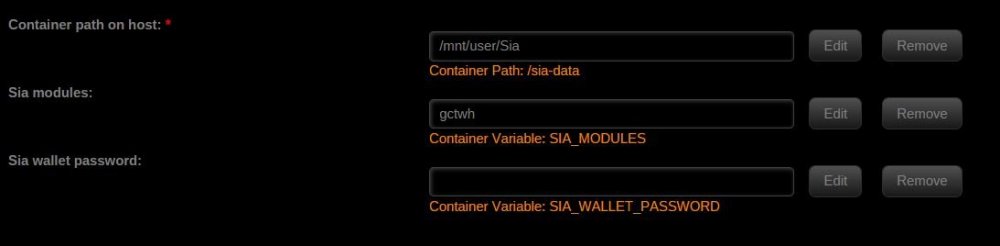
Sia-Coin Sia-coin website: https://sia.tech/ Sia-coin client utilities: https://sia.tech/get-started Docker hub site: https://hub.docker.com/r/mtlynch/sia/ Original Docker install instructions: https://blog.spaceduck.io/sia-docker/ Repository site: https://github.com/mtlynch/docker-sia Template site: https://github.com/Jcloud67/Docker-Templates Sia-coin, from their website, “Sia is a decentralized storage platform secured by blockchain technology. The Sia Storage Platform leverages underutilized hard drive capacity around the world to create a data storage marketplace that is more reliable and lower cost than traditional cloud storage providers.” *** DISCLAIMER *** I have no affiliation with Sia-coin or Mr. Lynch. I was asked if Sia was possible? I found someone already invented the wheel, I just made the hub-cap. I do not guarantee, nor will hold any responsibility, for loss or corrupted data; or that Sia-coin (Sia), Bitcoin (BTC), or any other “crypto-currency” will gain or maintain their current fiat value. *** Please, with any and all, “ICO’s,” “exchanges,” “tokens,” and cryptos’ do exhaustive research before any transaction. *** SETUP: 1. User share for Docker data, I just called it, “Sia”: Example 2. Punch hole in firewall for outside to your docker's ip address, TCP ports 9981 and 9982. DANGER! : Sia also uses TCP port 9980 for command & control, do NOT expose 9980 outside of your network! Failure to follow this rule can result in wallet and Sia host hijack. 3. Download the Sia client from download URL, if you want a GUI experience. 4. Setup Sia template and docker container on unRAID using CA store. 5. For GUI clients, running on a VM or on the LAN: Start the Client and Click on "About" After closing Sia client, and the file manager opened to Sia's configuration files, edit the config.json file Change "detachted": false, to "detached": true, In the "address" line change "127.0.0.1" to your IP address of your Sia container. Save config.json file. When you Restart Sia, it should connect to your docker: Repost - encase someone doesn't start from the from front.
-
Yeah that's the official docker container.
-
I just did a search for "Storj" and found my template in CA store. I would try deleting the container (your contracts should be on storage array and be untouched) and image in webui, then click on Add container scroll through and find the saved entry for Storj, and rebuild. - That's what I would try first, it would be much easier, and should be just as effective. Then go back to auto-updates plugins & containers; disable and re-enable auto update for Storj. I've had terrible luck try to take multiple containers and have them run under a single daemon. FYI: the code tweak was a bug for new users, and the multiple node creation routine.
-
Pushed an update, minor bug fix. Multiple node config files would be made with NAT traversal techniques (show up as UPNP). Only effects newly created nodes, so if your node reports UPNP, and want to stop this: Made the change to each affected /foo/storj/Node_#/config.json file then restart the container.





