






Jcloud
Members
-
Joined
Everything posted by Jcloud
-
If the consensus is bridge mode is better, I don't have a problem changing it back. Sorry folks. For a "online poll" of this give this post an upvote (not the like) and if there's a bunch I'll change it. Fuuuu... Um, yeah. Is that node running from a different container, or was this from consolidating multiple containers/paths into my new container? Are the file and directory permissions the same on root folder as it is with the sub folders? Perhaps that's what is going on? @MrChunky @phithor Sorry to have broke stuff; we'll try and get this sorted out. Perhaps the config of being on a host versus bridge before is causing some breakage? You could try changing the webui template from HOST to bridge, then at the bottom click on ADD "port, variable, directory" select PORT ... make it the same as your other container.
-
Non-technical way: Technical way, from your console: docker exec NameOfYourContainer ps -a You should see the process running there. As for the output it generates, that is gone, a by-product of making go in the background. Yes, I've done NOTHING to Storj and StorjMonitor code, all I've done is shell-script code to install storjMonitor, handle the API-key, and start/stop multiple nodes in same Storj daemon.
-
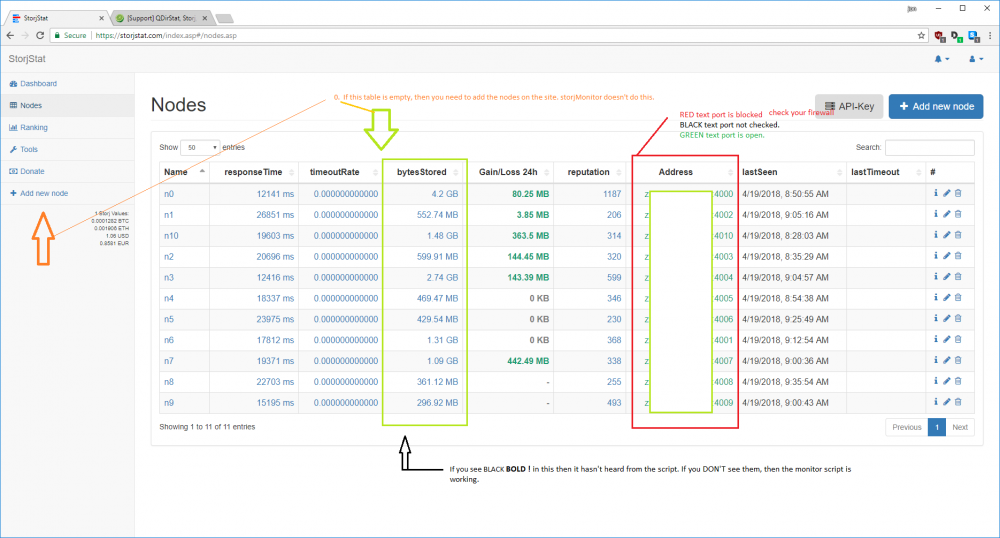
IT'S FINISHED! *For now. @nuhll @L0rdRaiden @MrChunky -- you asked for it, here's the initial release. Be on the look-out in Community Apps for a new container, StorjMonitor (( https://hub.docker.com/r/zugz/r8mystorj/ )). The container has the following features: Base container you all know: Storj DAEMON + CLI tools. Installed, storjstat.com monitoring script AND a place for users to put API-key in the template on webui! Now supporting building and launching of multiple farming nodes, AND a place for users to put it in the template on webui! Redone webui template, from lessons learned in past two months; afield to put in your DDNS address (don't have to edit your configs after build anymore) Changed default network type from Bridge to Host (seemed to work out better for most and/or preferred) . . . Should be able to do either way, if done correctly. To start the storjstat.com monitor script, once the container has started: Auto-runs now (removed previously listed steps). ~~~~~~~~~~~~~~~~~~~~~~~~~~~~~~~~~~~~~~~~~~~~~~~~~~~~~~~~~~~~~~~~~~~~~~~~~~~~~~~~~~~~~~~~~~~~~~~~~~ For users already running multiple nodes, using a single container, the extra node directories will be "Node_#" -- which is what I was using before. If you are using something different like, "node#," you will want to rename your directory names. I think I could make this it's own custom field in the template (DONE); honestly I've been trying keep the features down on initial release because of debugging errors, and my newbie coding coding skills -- I think I've hit all the major requests though. EDIT: I've noticed the storjMonitor.sh doesn't seem to stay up for long if the interactive session to container is closed -- making this better is on my to-do list. EDIT2: I changed the nohup line based on my web searches, and trying it out now on personal system. EDIT3: Current "to-do" list Link repo and docker hub, for updates. Running storjMonitor on container startup. Done, just need to update the template. Should be in a few. Not breaking (n+1) version(s).
-
That happened to me as well, about two weeks ago. Still don't know what I did to set it off. I had to make the VM all over, and used Windows build 1607 ISO then Windows Upgrades to current; if I used the 1709 build ISO I was right back to code 43. While I'm not certain I think it was the "Windows Upgrade Assistant" application which patched in 1709 that caused my headache.
-
I'm well into broken code. I know how to insert the monitor into the container; and I'll share that here since there are many interested parties. I know how to build the new container from repo, and it builds -- but doesn't run. \:( I'm working on it, but for now I'm stumped. For the In-term: How to Add StorjMonitor Into Existing Storj Container Pre-requests: Your Storjstat.com API-Key (this can be copy/paste from web page and terminal) shell terminal STEP1 - Get inside the container. Run the following command from your unRAID host: docker exec -ti Storj /bin/sh Your prompt should change to "/#" --- EXAMPLE: root@HYDRA:/# root@HYDRA:/# docker exec -ti Storj /bin/sh / # STEP2 -- Inside container download pre-reqs for StorjMonitor and script itself. Run the following lines in order. apk add --no-cache g++ gcc git make bash python export MAKEFLAGS=-j8 git clone https://github.com/calxibe/StorjMonitor.git STEP3 -- Run the install for StorjMonitor. cd /StorjMonitor chmod +x storjMonitor-install.sh ./storjMonitor-install.sh STEP4 -- Setup StorjMonitor for your API-Key. In this step, be sure to replace MONITOR_KEY with your API-Key string. sed -i "s/YOUR-TOKEN-HERE/MONITOR_KEY/" /StorjMonitor/storjMonitor.js; EXAMPLE: sed -i "s/YOUR-TOKEN-HERE/H8WvafR710FPK2zA46Td7STT24HsGB5xc9cZrODs/" /StorjMonitor/storjMonitor.js; STEP5 -- Run time StorjMonitor Prepare for running in background: nohup ./storjMonitor.sh & Start the script: ./storjMonitor.sh daemon -F & Leave the container: exit END OF INSTRUCTIONS. Note: since this is adding to the container, and not part of the container's repo, any time an update is run these changes will be removed! Personally I'm going to try turning off automatic updates for this Docker Container; use storjstats to check my user version level, and see just how often it actually changes. And yes, optimal solution is a working repo of this just built-in, I think it will get there. EDIT: I'm onto working code now; I have a running docker container of Storj and StorjMonitor! Trying to remove a few quarks and perhaps add a multiple-nodes feature. Afterwards its pushing it to the repo and documentation here.
-
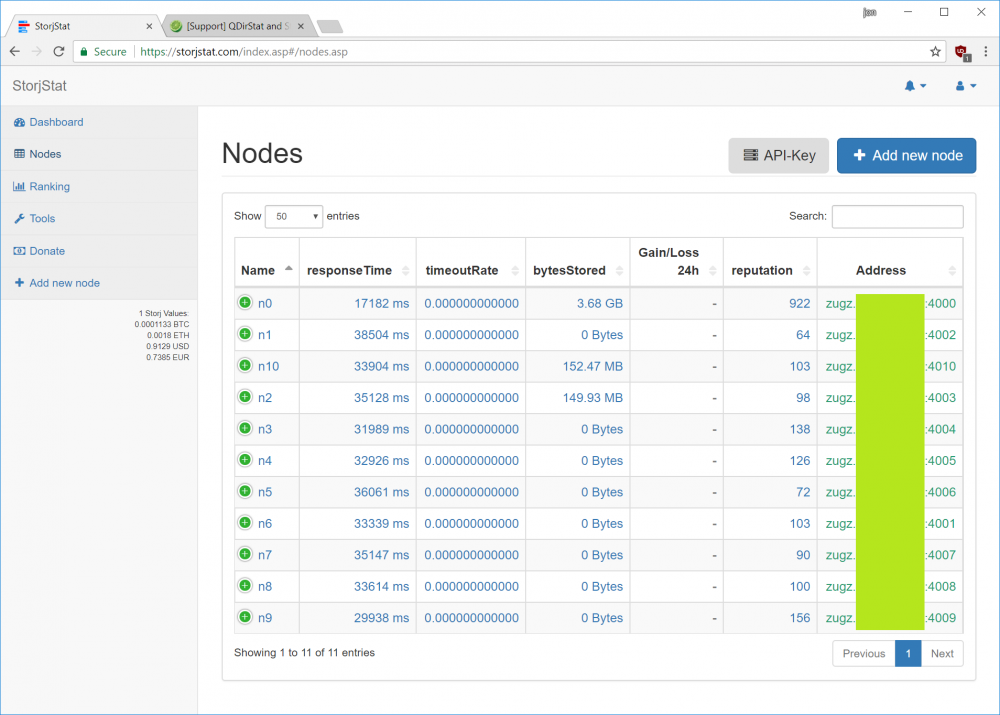
I'm about waist deep at the moment. It's on my general radar and I'll spend time and energy on it. I'm also on the Linuxserve.io discord so I've started making the hookups for asking for help in real-time. Really I just need to spend more time tinkering, and less time gaming. When I get the repo working probably have a few more options for working with multiple nodes and load them back up on updates. UPDATE: I *think* I know what to do now, and starting to tinker with fake code. Then I'll move onto broken code, and finally working code. UPDATE2: I know how to insert it into the container and make it work. Now to just figure out how to automate all of this - (I'm such a newb lol) Also realized I borked my firewall configs, at some point, nuked settings - storjmonitor says I have open ports now. . ..Woops.
-
I was the same way when I first started, now I'm like 10%, maybe 15%, "I know what I'm doing." But, that's why I started this was to learn how to use, and work with these. There's actually I lot of good resources In our community forums -- I found them once but I don't think I bookmarked them. Doh! Third reading of your posted instructions, it does look easy. I think I can manage it - once I figure out a few of the steps that come before it. The project will definitely get some time this weekend.
-
LOL It's not my docker, but I hear what you're saying. I'll try and do something with-in the month, unless someone beats me to the punch. Life has been a distraction lately haven't had much time to work on projects. HAHAHA! (emphasis on 'seems' mine) -- I'm sure your not wrong, once one know's how to run and slipstream containers.
-
No clue on that one, perhaps an uninstall and reinstall of your graphics drivers? (pot-shot in the dark) Good luck, and have fun with your VMs.
-
I have, it's always mounted int he VM and I've tried searching manually for drivers both in the root of the CD and each of the subfolders where the .INF files are located. In both cases it doesn't seem to find drivers for these devices. Oh okay. How about the hard way then? If you double click on device to bring up properties; click on the "Details" tab; under "Property" select "Hardware Ids." Under "Value" you should see a string, something like "USB\VID_0BB4&PID_0306&REV_0112" copy that string and paste it into a web browser search engine, you should get some kind of a hit. Follow the search engine results down to identify device; once you know what device it is you should be able to grab the drivers for it and install. While searching, DO NOT install some third-parties driver installer packages, or all-in-one driver setup/install, that's a great way of getting adware/malware on a Windows box.
-
If you have the Redhat virt-io driver disk mapped, you could try looking for drivers on the root of that disk image, perhaps it's one of the devices for your VM like the memory-balloon driver or such.
-
Thinking about this at work, since I've been away from box for a few days, I think this works for when one updates the template, but doesn't actually work for the automatic updates. Which I think is why I thought, "it worked 50% of the time." So, my mistake. I think I was looking at CA userScript plugin, making a "stupid" scheduled task, about 10 minutes after the update Window, which would kick off loading the multiple nodes.
-
I've been trying to work on this too, I don't have a great working solution yet. My first attempt at doing this (seems to work about 50%) is outlined here
-
adfsafds Arg forums and cutting/pasting. @L0rdRaiden check that command line, Linux is case sensitive (Sorry, you know that) also it's the the path with respect to *inside* the container so try changing: --storage /mnt/user/Storj/Node_1 to: --storage /storj/Node_1 This will make it the config file go to (in unRAID host) to: /mnt/user/storj/Node_1 I know, sorry, it's command-line version of "Inception" (the movie; or 13th Floor for you purists )
-
Away from my unRAID box for a while. I believe (I reserve the right to be 100% wrong lol) when you first start the VM the there's a key-press to enter inside the guest emulated bios, from there should be able to change boot order. Might have to start the VM, Open the VNC window then back in the webui force a restart of VM; that way the "monitor" is already up and you can try hitting that key-press. Where as on the first boot, could be missing it in the time it takes to bring up the VNC window.
-
Your VM is not finding a bootable disk so the the guest bios is trying to PXE-boot (network boot). Does that disk image have anything on it, or are you trying to build a new VM? If it's a new disk, I don't see your boot media/ISO disk. Edit your VM template and provide it an ISO for install disk. If vdisk1.img had an OS on it, which one is it?
-
Hrmm perhaps run the Fix file permissions on webui (under tools I think), perhaps permissions are off because of using samba versus what Docker container wants. Couldn't hurt (making a pot-shot in the dark here)
-
No don't do that, just leave your current share in original folder think of it as "Node0" and just start/make node1. Linux is CaSe SENsiTIVe, so are storj is lower case (on mine at least), and is Node2 folder capitalized on your system? If so, it's okay, if not that needs to change. I'm assuming since you moved your first node, that in your /user/mnt/storj location (unRAID user share for storj) you ran mkdir Node2 to make the new folder, before running the really long create command. Also, I saw your -rpcaddress is 0.0.0.0 if you're using dynamicDNS you can remove the "0.0.0.0" and put in your dDNS address -- if you're drawing a blank on this, don't worry about it for now. At work, can't make the answer now. I'll do screen shots later tonight and edit this post. I'll see what this weekend/ next week looks like.
-
This looks like something fun to play with. Thanks for taking the time to make the write-up. For me this begged the question, (I looked on webgui, but not forums yet) "is there a way to fork the unRAID log to an optional syslog server?" Secondary question, is there necessarily a reason for this? I.e would such log data (unRaid host) be useful? Log data is always useful.
-
I honestly haven't tried that, but I can tonight, after work (~4hrs), I'm only up to ten nodes -- and I thought that was plenty. Confirmed. You can not start more nodes than one has system cores. root@HYDRA:/mnt/user/storj# docker exec Storj storjshare start --config /storj/Node_32/config.json failed to start node, reason: insufficient system resources available I also took this experiment to watch the Container in my Netdata Docker Container. With each additional farming node the CPU usage stays the same, but each node adds ~50MB to allocated memory.
-
I honestly haven't tried that, but I can tonight, after work (~4hrs), I'm only up to ten nodes -- and I thought that was plenty.
-
Not soon, and given how templates are done, I'll either have to make a repo and do changes, or it will be a shell/bash script on the side (which is what I'm starting with now as it fits my comfort level of tweaking without making fubars). So long as you don't over-write files you should be fine, but IT IS YOUR THUMB DRIVE, so I need to do due diligence with a warning to be careful. Backup your Thumb drive; etc. In the end, do what you feel comfortable in doing, just take it step-by-step. If you're not comfortable writing the script file, manually making files and what not, I highly recommend (as does all the mods on forums) the user-script editor plugin/app from the Community Applications plugin installer.
-
Yeah definitely could be used with the CA scripts and added to the array start. One thing I saw with that, is if you tinker with it, like shut it down/restart, or update it, then it doesn't hit that condition. But yes, you have the right idea for sure! I would also agree that using the CA Scripts and other available tools plugins is a good idea.
-
I just wrote the template, the actual container is not my work. I haven't copied the repository yet, I still have much to learn. However.... How-To: add a script to template, which will enable reloading your nodes after container upgrade or rebuild: ---------------------------------------------------------------------------------------------------------------------------- Two Main tasks: Write the script file. In this case my example is the MOST BASIC form of the script. Where and what to change in docker template. Script file: ** First off, please be careful as this will be in your USB flash drive (/boot/ directory) ** In your /boot/ directory (encourage even having in some kind of script subfolder of choice) make a file, in my case I called it, storjmn.sh Inside the file: #!/bin/bash docker exec Storj storjshare start --config "/storj/Node_1/config.json" docker exec Storj storjshare start --config "/storj/Node_2/config.json" docker exec Storj storjshare start --config "/storj/Node_3/config.json" docker exec Storj storjshare start --config "/storj/Node_4/config.json" docker exec Storj storjshare start --config "/storj/Node_5/config.json" docker exec Storj storjshare start --config "/storj/Node_6/config.json" docker exec Storj storjshare start --config "/storj/Node_7/config.json" docker exec Storj storjshare start --config "/storj/Node_8/config.json" docker exec Storj storjshare start --config "/storj/Node_9/config.json" docker exec Storj storjshare start --config "/storj/Node_10/config.json" docker exec Storj storjshare save For those not familiar with shell scripts, first line is required, and each line is a single command as if you had typed it in and pressed enter. The body should look familiar, substitute Node_# for your corresponding folders, and number of nodes you run. The last line saves the state, so if you shutdown the container, and restart it, you can reload the state via: docker exec Storj storjshare load Next step for script file have to make it executable, in command line as root, or sudo-er privileged, chmod 744 /boot/yourLocation/yourSriptName.sh For the docker template: That's ;/boot/yourScriptLocationANDname.sh ^------>> Note that leading semi-colon, don't miss it, "or you're going to have a bad time." For those that are curious, the template/webui is a wrapper for command typed in the text-based console. When you use a semi-colon you're effectively ending command-line1, and starting command-line2 -- in this case the script to load our nodes. Now, this DOES NOT WORK in extra parameters (which is executed at run-time of the container), I've tried - breaks stuff, "And that's my famous ping-pong ball trick!" -- South Park the Movie

-
You make it sound like I lost a child. The good news was that I mined all of what was lost, so only thing I lost was time, and cash spent on electric bill; even did the mining with two GPU's so I didn't even have specific-btc hardware costs. It was a while ago too, before BTC hit $1K, the first time. In my testing I've done it both single increments and L0rd's separation -- to be honest IDK if I've seen a difference in functionality myself.





