





GyroDragona
Members
-
Joined
-
Last visited
-
Have you considered making this docker since I responded to this question? It’s a distance based voice chat for Among Us. All the info for it is in the link I first provided about it.
-
I said what it is for in my post though? It is a for voice that that is proximity based. It also says what it does at the link I provided. 😧
-
Would you be willing to make a docker setup for unraid for crewlink? https://github.com/ottomated/CrewLink-server It is a proximity chat server for Among Us.
-
Oh, I specifically went with Java 11 because it is the only current Long Term Support version that is out right now. I'll give it another go with Java 11 and the steps you used and see if things work out any differently this time around.
-
Ya, of course that's fine. It's your time. I'm not going to tell you how to spend it. Frankly I'm thankful that you spend any of your time making these dockers for us much less supporting them. I'm working with a fresh docker for testing getting a Java update in place so it would not interfere with the ones I already have going so it's not causing me any immediate problems. Have a good weekend.
-
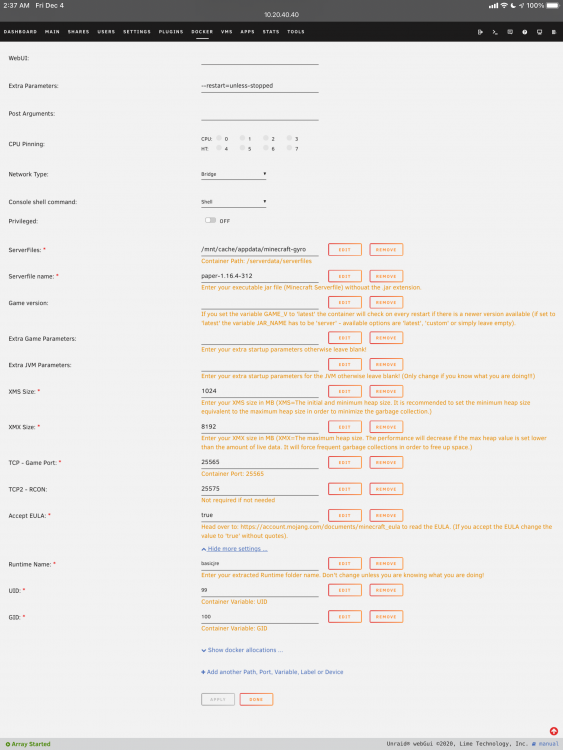
I went to https://www.oracle.com/java/technologies/javase-jdk11-downloads.html and got "Linux x64 Compressed Archive" droped into SSH and navigated to the runtime directory (where I put the downloaded file), ran "tar -xf ./jdk-11.0.9_linux-x64_bin.tar.gz" tried changing "Runtime Name" to "jdk-11.0.9". I did check that the ownership and permissions were correct after unpacking Java 11 and they look correct. As soon as I change "Runtime Name" it breaks the server. Even if I change it back to "basicjre" It will refuse to fully boot anymore even when it is the only change that is made to a already working server. I can't seem to figure out why. I'm doing it with a fresh Docker setup. logs.txt latest.log The logs and screenshot are after I changed the setting back. You should be able to replicate my problem by starting with a fresh docker from your docker install, have it boot fully at least once with default settings then do the steps I did to install Java 11. I left the original runtime in place so I could switch between them during testing. I could extract the archive (and not yet change "Runtime Name") and still have it work fine. As soon as I change it then it will no longer function even if I change it back.
-
I love your Minecraft container. I have had a couple containers running for about a month now. I am running Paper on both containers but it seems paper is going to be cutting of Java 8 support and moving to the next LTS version of Java 11 (there is also Java 17 LTS coming Sep 2021 later). I was wondering if there was a container update or an easy(-ish) way to update the version of java in the container. I did notice you keep it within the "runtime" directory but I am unsure how one might update what is in there and have the container use the newer version by default. Relevant info: https://papermc.io/forums/t/java-11-mc-1-17-and-paper/5615
-
If you change the default directory for ServerFiles from the default "/mnt/cache/appdata/minecraft" to say something like "/mnt/cache/appdata/minecraft/dan" the Minecraft docker will fail to launch. I spent 4 hours trying to figure out why if I moved it to a sub directory the server started having problems. Made a new one with a subdirectory within the minecraft one with a new docker setup just for it to not even launch. I couldn't tell you why though.
-
Same thing for me actually. I noticed him mentioning that it needs to be run as root. It seems to be set to out of the box from what I can see in the settings for the docker but it's still a no go.
-
Thank you very much. Got it up and going.
-
What is the proper format setup? I can not find info for it anywhere. To be clear, just the format its self is needed.

