





trumpets
Members
-
Joined
-
Last visited
Everything posted by trumpets
-
Thanks. You are right. Tried on a different browser and the video problem is fixed.
-
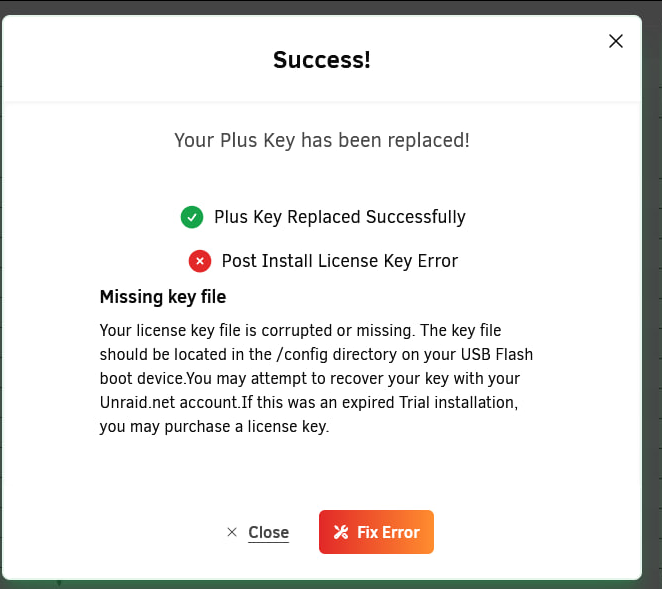
I tried to upgrade my OS to 7.0 today and after upgrading, my dockers won't start and getting errors about bad parameters. Comparing the errors in the logs to help requests in the forum indicates that I may have a failing flash drive. So far running the USB creator on the new drive and copying the config directory and booting the system, I was able to reach the Success message. Since it says the Plus Key was replaced Successfully and I wasn't sure about the key error, I clicked on the Close button instead of the Fix Error. Now when I check the Registration, I see this "Transfer License to a New Flash: Eligible" message . Other than the link going to Learn More, I don't have any clue if there is an error somewhere that still needs to be fixed. The array is started and doing parity check and the dockers and VMs are running. But when I try to check the logs or open a terminal, I get a screen like this: Thank you for any advise.


-
When logged into the server, I noticed that the bottom shows: Array Started•Starting services... The Starting services message does not disappear even after days. Then when creating new shares, it just reloads the create share settings with the default blank options. The logs shows the following error. Jan 20 23:01:04 Tower root: Failed to write /mnt/disk2/675561905.tmp Jan 20 23:01:04 Tower root: Fix Common Problems: Error: Unable to write to disk2 Jan 20 23:12:33 Tower emhttpd: error: shfs_mk_share, 6455: Input/output error (5): ioctl: /test2 Jan 20 23:12:33 Tower emhttpd: shcmd (3524): rm '/boot/config/shares/test2.cfg' Please advise what can be done. Thank you tower-diagnostics-20250120-2255.zip
-
Stopped the array and Disk2 shows up as missing though the same drive shows up in the Unassigned Disk Devices as a 4.14GB drive. I now have an invalid configuration and cannot start the array.



-
Update: After moving some of the directories and files, the move aborted with a read failed error. 😞 Checking on the directories shows files with ?xxxx filenames and not viewable (blank) from the shared folders on windows. Also, noticed that there is 1 Unassigned Disk Drive showing as sdh which has the same serial number as Disk2 but tagged as sdg tower-diagnostics-20240429-1723.zip Disk2 is currently empty so it should be ok to be removed which was the original intent anyway.
-
We replaced the motherboard and disk2 appears to be working fine and though Disk1 is disabled and running emulated, it appears to be accessible and we have started to move the files from Disk1 to Disk5. <fingers crossed>
-
Replaced the sata cables and after bootup, it shows the drives as unbootable: Unsupported or no file system tower-diagnostics-20240429-1408.zip

-
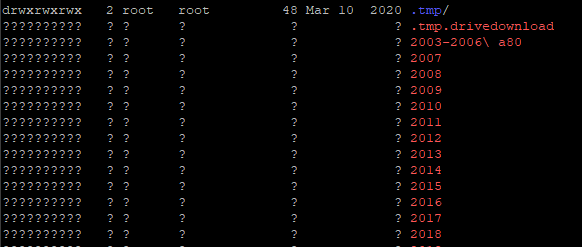
I would like to request for advise on how to go about recovering my data. I have a very old system that was running on reiserfs which I have decided to migrate recently. I added 2 new drives which are now formatted as xfs. But somehow during moving from disk2 (2TB) to disk4 (4TB) (using MC), there was a problem and got errors. Stopped the server and reseated the cables and cleaned the memory as well and seem to have copied everything. Next was moving disk1 to disk4. I left it alone but when I got back, it appears that disk4 got filled up while disk1 seems to have failed. Tried to replace the disk1 with a temporary 3TB and let it rebuild the parity. But when I checked on it, the read-check was paused. I restarted the read-check and left it. When I got back to check, the disk1 was again disabled. I can access some share over windows but some I can mount but the drive appears empty. I can see the files and folders when logged in via ssh and view /mnt/diskx but some folders I cannot change into while some files have ? in their name and are 0 sizes. When I try to download the diagnostics, it starts to create the zip but then the window just closes without prompting to download the file. I was able to get the file direct from the usb instead. Thank you. tower-diagnostics-20240427-1314.zip
-
Had to reboot first before able to change to ipvlan. Have also updated to 6.12.4 Seems to be working fine now.
-
If that Unraid server is purely for backup and not being accessed by anyone on the network, would running it on a different network work for you? eg. Your main network is 192.168.0.x Setup this backup server as 10.10.10.x Then those that you would give access to that backup server would have a dual ip address in both ranges.
-
My server have been shutting down randomly the past week. Today, after starting the server, it started the parity check. While it is still running the check, I went ahead and fixed a swag docker problem via ssh. After a while, the gui appears to have frozen. There was no response when clicking on any of the icons. Thinking that it might be due to the parity checking causing a high load, I left the system to finish the parity check. However upon returning and noting that the load has dropped, I am still unable to login. The login page does not load. After a long while I end up with a "500 Internal Server Error" screen. But the server is still running. I can still map and access shared folders. Docker servers are working and responsive. Please advise. Thank you nebula-diagnostics-20230907-2116.zip
-
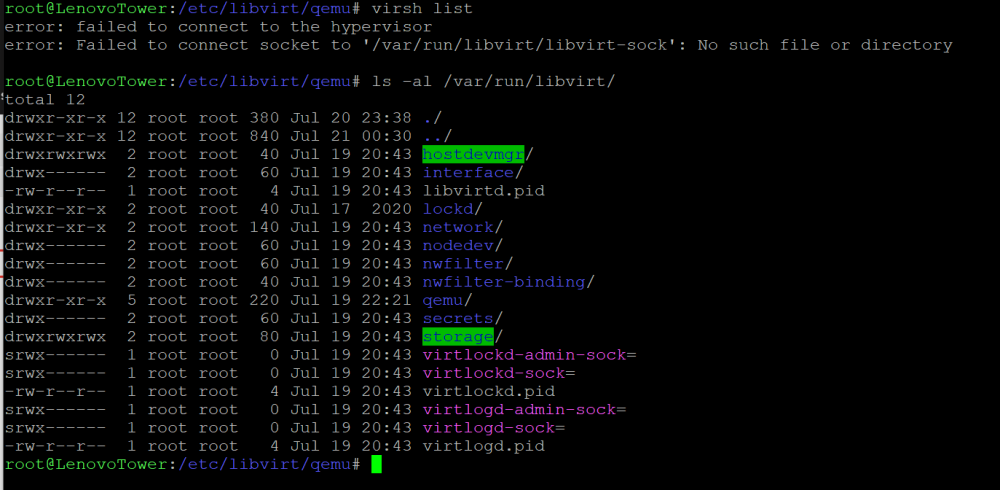
Doing additional search on the forums, the missing hypervisor may be related to the VM Backup plugin which was installed yesterday. Have removed the plugin but will need to wait for the end of the day to be able to reboot when there are no users. https://forums.unraid.net/topic/87207-error-failed-to-connect-to-the-hypervisor/page/2/
-
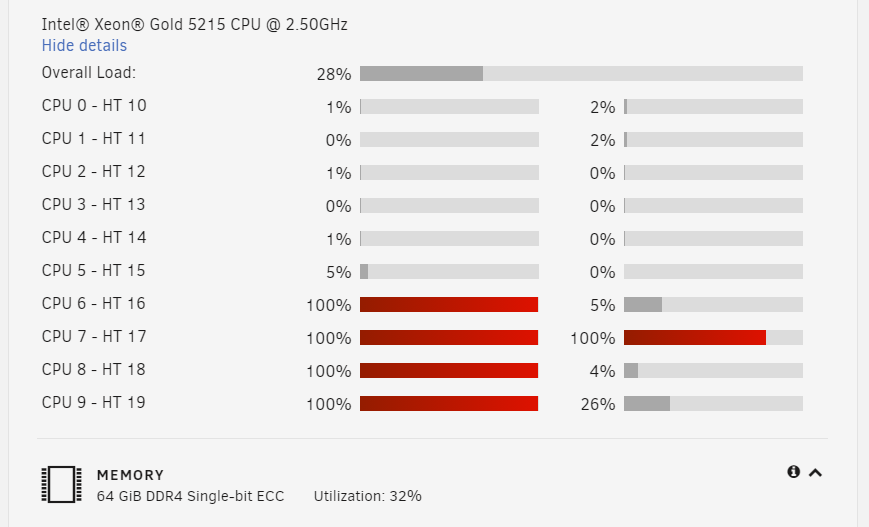
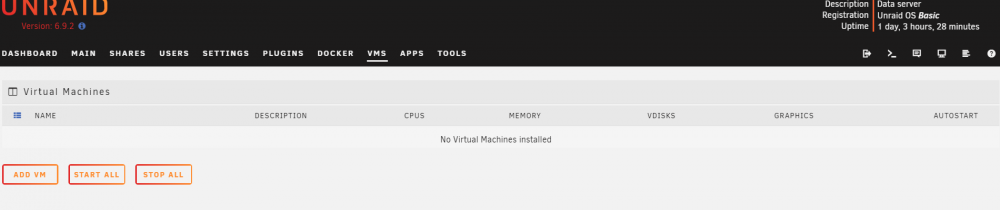
We have a Windows Server 2012 VM running on Unraid for more than 6 months without any problems. Last July 15, it seems that the Windows Server had an update and seems to have hanged. So we tried logging in with F8 and was able to get it to restart. Checking history of the updates indicated that the updates failed. After disabling the updates and letting it run, we noticed that the CPUs allocated to the Windows Server VM are now running at 100% even when no users are on the server. When logged into the VM, cpu is at 50%. Saturday night, we rebooted the server and after the restart, it run a parity check that resulted with no errors. Monday, users are able to use the system yesterday even though the CPUs are at 100%. Due to a holiday today, there were no users and the Windows Server is working. However, upon logging in to Unraid, the VMs seems to have disappeared. Going to the VMS tab, it says No Virtual Machine installed. Aside from the Windows Server, there are 2 other VMS, a Centos that is still running and accessible and an Ubuntu that is disabled. Have not rebooted the system. Attached screenshots of the dashboard and VM gui. Appreciate any advice. lenovotower-diagnostics-20210720-2351.zip
-
I am having a similar problem. Actually, I was able to initially install from APPS and it worked the first time around. After a few days, there was a new update and I tried to update. However, the update seems to have been corrupted. So I tried to uninstall. But cannot install anymore. Then while looking through the ssh, I noticed that /mnt/user is now showing ? ? ? . From the Unraid Shares GUI, all the shares have disappeared. Stopping and restarting the array did not help. It came backup after a reboot of the system. I tried to clean the containers and tried to install again. But after install, the docker version shows "apply update". Clicking on WebUI opens another tab showing Unraid's Main screen. Thank you for any suggestions



