





thatnovaguy
Members
-
Joined
-
Last visited
Everything posted by thatnovaguy
-
I appreciate your reply. I finally figured it out. Wireguard was somehow meeting everything up. No clue how but disabling it fixed everything lol. Sent from my SM-G998U using Tapatalk
-
I'm not sure how the hell it's doing it but Wireguard was messing up my connections. Turned it off and plex, stuff behind a reverse proxy, docker updates/installs, etc. everything works as it should.
-
Uninstalling didn't help, unfortunately.
-
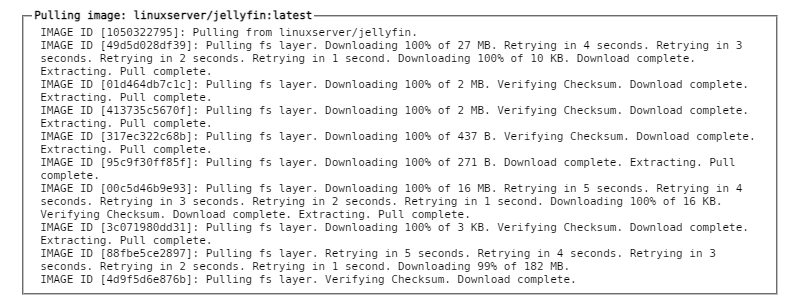
For most of 2 years now I've used the same network setup and unraid settings but recently I've been having trouble on the networking end of things. I've been unable to access my applications hosted behind a reverse proxy, unable to remotely access my plex server, as well as unable to install or update docker images. Docker images will almost complete updating then be unable to finish downloading, or they'll just completely timeout. Things I've tried: I've tried turning off NIC flow control and NIC offload but that didn't seem to accomplish anything. I had been running 6.9.1 but updated to 6.9.2 thinking it might help, but nothing changed. I've bypassed my pihole thinking it might be causing issues somehow. I've replaced my cable modem thinking it might be failing. (To be fair after I cycled it's power our over-all dl speed dropped significantly though replacing it did not help with the server.) I've gone through all my forwarded ports and practically every setting on my unifi setup but everything is correct. I'm out of ideas. Any help will be greatly appreciated. Logs attached. htpc-diagnostics-20210711-1827.zip
-
Aaand I feel foolish. Thanks lol. Outside of that error is there anything that could be causing my network issues?
-
I've been having trouble with my plex server of late and I've been pulling my hair out thinking it was a problem with plex when it might be an issue with the server itself. Today I found the warning message: Jul 5 17:32:10 HTPC nginx: 2021/07/05 17:32:10 [error] 12529#12529: *19268 connect() to unix:/var/tmp/binhex-plexpass.sock failed (111: Connection refused) while connecting to upstream, client: 192.168.1.160, server: , request: "GET /dockerterminal/binhex-plexpass/token HTTP/1.1", upstream: "http://unix:/var/tmp/binhex-plexpass.sock:/token", host: "192.168.1.186:85", referrer: "http://192.168.1.186:85/dockerterminal/binhex-plexpass/ That error is repeated in my server log over and over. Any idea what's happening here? I've been having trouble updating/installing docker images lately as well. Logs attached. htpc-diagnostics-20210705-1806.zip
-
I've been having this problem for roughly 3 weeks now. I'm not getting any updates, though. Is this a problem on the docker side or the duckdns side?
-
I searched my logs but it's not finding database corruption. Would it be safe to upload my server log? Edit: My docker is acting like it doesn't have network access. I had it set as host originally but changed it to custom and set a custom ip address and it still acts as though there's no network access.
-
My Plex server has become inaccessible after last night’s update. Has anyone else had this problem? According to the docker logs everything should be fine.
-
Hi, so after a couple of years of happily running your docker with no issues I recently ran into problems. The web ui doesn't load and I'm getting a repeating warning in the logs. Is it that my vpn isn't working? Sun Dec 8 10:25:35 2019 OpenVPN 2.4.8 [git:makepkg/3976acda9bf10b5e+] x86_64-pc-linux-gnu [SSL (OpenSSL)] [LZO] [LZ4] [EPOLL] [PKCS11] [MH/PKTINFO] [AEAD] built on Oct 30 2019 Sun Dec 8 10:25:35 2019 library versions: OpenSSL 1.1.1d 10 Sep 2019, LZO 2.10 Sun Dec 8 10:25:35 2019 Restart pause, 5 second(s) 2019-12-08 10:25:40,174 DEBG 'start-script' stdout output: Sun Dec 8 10:25:40 2019 NOTE: the current --script-security setting may allow this configuration to call user-defined scripts 2019-12-08 10:25:40,174 DEBG 'start-script' stdout output: Sun Dec 8 10:25:40 2019 TCP/UDP: Preserving recently used remote address: [AF_INET]x.x.x.x:1194 Sun Dec 8 10:25:40 2019 Socket Buffers: R=[212992->212992] S=[212992->212992] 2019-12-08 10:25:40,174 DEBG 'start-script' stdout output: Sun Dec 8 10:25:40 2019 UDP link local: (not bound) Sun Dec 8 10:25:40 2019 UDP link remote: [AF_INET]x.x.x.x:1194 2019-12-08 10:26:40,219 DEBG 'start-script' stdout output: Sun Dec 8 10:26:40 2019 [UNDEF] Inactivity timeout (--ping-restart), restarting 2019-12-08 10:26:40,219 DEBG 'start-script' stdout output: Sun Dec 8 10:26:40 2019 SIGHUP[soft,ping-restart] received, process restarting 2019-12-08 10:26:40,219 DEBG 'start-script' stdout output: Sun Dec 8 10:26:40 2019 WARNING: file 'credentials.conf' is group or others accessible Sorry I'm not the best at this.
-
Awesome, Thank you both!
-
Hey all, I'm running into a bit of a strange problem. After macinabox does it's thing I have to edit the vm template to point to the proper destination on the vdisks as it still sets the xml to /user/mnt/domains instead of my custom location as set in the docker. Anywho after doing that and adding back all the proper bits at the end when I boot the vm drops into the efi shell. It won't boot to clover at all. Any ideas what I'm doing wrong? xml below <?xml version='1.0' encoding='UTF-8'?> <domain type='kvm' xmlns:qemu='http://libvirt.org/schemas/domain/qemu/1.0'> <name>MacinaboxCatalina</name> <uuid>4ab7e3ed-4a8e-4d0d-83d5-f2ced9f9fa3c</uuid> <description>MacOS Catalina</description> <metadata> <vmtemplate xmlns="unraid" name="Windows 10" icon="default.png" os="Catalina"/> </metadata> <memory unit='KiB'>8388608</memory> <currentMemory unit='KiB'>8388608</currentMemory> <memoryBacking> <nosharepages/> </memoryBacking> <vcpu placement='static'>4</vcpu> <cputune> <vcpupin vcpu='0' cpuset='4'/> <vcpupin vcpu='1' cpuset='10'/> <vcpupin vcpu='2' cpuset='5'/> <vcpupin vcpu='3' cpuset='11'/> </cputune> <os> <type arch='x86_64' machine='pc-q35-3.1'>hvm</type> <loader readonly='yes' type='pflash'>//mnt/user/VDisks/MacinaboxCatalina/ovmf/OVMF_CODE.fd</loader> <nvram>/mnt/user/VDisks/MacinaboxCatalina/ovmf/OVMF_VARS.fd</nvram> </os> <features> <acpi/> <apic/> </features> <cpu mode='host-passthrough' check='none'> <topology sockets='1' cores='4' threads='1'/> </cpu> <clock offset='utc'> <timer name='rtc' tickpolicy='catchup'/> <timer name='pit' tickpolicy='delay'/> <timer name='hpet' present='no'/> </clock> <on_poweroff>destroy</on_poweroff> <on_reboot>restart</on_reboot> <on_crash>restart</on_crash> <devices> <emulator>/usr/local/sbin/qemu</emulator> <disk type='file' device='disk'> <driver name='qemu' type='raw' cache='writeback'/> <source file='/mnt/user/VDisks/MacinaboxCatalina/Clover.qcow2'/> <target dev='hdc' bus='sata'/> <boot order='1'/> <address type='drive' controller='0' bus='0' target='0' unit='2'/> </disk> <disk type='file' device='disk'> <driver name='qemu' type='raw' cache='writeback'/> <source file='/mnt/user/VDisks/MacinaboxCatalina/Catalina-install.img'/> <target dev='hdd' bus='sata'/> <address type='drive' controller='0' bus='0' target='0' unit='3'/> </disk> <disk type='file' device='disk'> <driver name='qemu' type='raw' cache='writeback'/> <source file='/mnt/user/VDisks/MacinaboxCatalina/macos_disk.img'/> <target dev='hde' bus='sata'/> <address type='drive' controller='0' bus='0' target='0' unit='4'/> </disk> <controller type='usb' index='0' model='ich9-ehci1'> <address type='pci' domain='0x0000' bus='0x00' slot='0x07' function='0x7'/> </controller> <controller type='usb' index='0' model='ich9-uhci1'> <master startport='0'/> <address type='pci' domain='0x0000' bus='0x00' slot='0x07' function='0x0' multifunction='on'/> </controller> <controller type='usb' index='0' model='ich9-uhci2'> <master startport='2'/> <address type='pci' domain='0x0000' bus='0x00' slot='0x07' function='0x1' multifunction='on'/> </controller> <controller type='usb' index='0' model='ich9-uhci3'> <master startport='4'/> <address type='pci' domain='0x0000' bus='0x00' slot='0x07' function='0x2'/> </controller> <controller type='pci' index='0' model='pcie-root'/> <controller type='pci' index='1' model='pcie-root-port'> <model name='pcie-root-port'/> <target chassis='1' port='0x10'/> <address type='pci' domain='0x0000' bus='0x00' slot='0x02' function='0x0' multifunction='on'/> </controller> <controller type='pci' index='2' model='pcie-root-port'> <model name='pcie-root-port'/> <target chassis='2' port='0x11'/> <address type='pci' domain='0x0000' bus='0x00' slot='0x02' function='0x1'/> </controller> <controller type='pci' index='3' model='pcie-root-port'> <model name='pcie-root-port'/> <target chassis='3' port='0x12'/> <address type='pci' domain='0x0000' bus='0x00' slot='0x02' function='0x2'/> </controller> <controller type='pci' index='4' model='pcie-root-port'> <model name='pcie-root-port'/> <target chassis='4' port='0x13'/> <address type='pci' domain='0x0000' bus='0x00' slot='0x02' function='0x3'/> </controller> <controller type='virtio-serial' index='0'> <address type='pci' domain='0x0000' bus='0x02' slot='0x00' function='0x0'/> </controller> <controller type='sata' index='0'> <address type='pci' domain='0x0000' bus='0x00' slot='0x1f' function='0x2'/> </controller> <interface type='bridge'> <mac address='52:54:00:66:d2:12'/> <source bridge='br0'/> <model type='e1000-82545em'/> <address type='pci' domain='0x0000' bus='0x01' slot='0x00' function='0x0'/> </interface> <serial type='pty'> <target type='isa-serial' port='0'> <model name='isa-serial'/> </target> </serial> <console type='pty'> <target type='serial' port='0'/> </console> <channel type='unix'> <target type='virtio' name='org.qemu.guest_agent.0'/> <address type='virtio-serial' controller='0' bus='0' port='1'/> </channel> <input type='tablet' bus='usb'> <address type='usb' bus='0' port='1'/> </input> <input type='mouse' bus='ps2'/> <input type='keyboard' bus='ps2'/> <graphics type='vnc' port='-1' autoport='yes' websocket='-1' listen='0.0.0.0' keymap='en-us'> <listen type='address' address='0.0.0.0'/> </graphics> <video> <model type='qxl' ram='65536' vram='65536' vgamem='16384' heads='1' primary='yes'/> <address type='pci' domain='0x0000' bus='0x00' slot='0x01' function='0x0'/> </video> <memballoon model='virtio'> <address type='pci' domain='0x0000' bus='0x03' slot='0x00' function='0x0'/> </memballoon> </devices> <qemu:commandline> <qemu:arg value='-usb'/> <qemu:arg value='-device'/> <qemu:arg value='usb-kbd,bus=usb-bus.0'/> <qemu:arg value='-device'/> <qemu:arg value='isa-applesmc,osk=youknowthisbit'/> <qemu:arg value='-smbios'/> <qemu:arg value='type=2'/> <qemu:arg value='-cpu'/> <qemu:arg value='Penryn,kvm=on,vendor=GenuineIntel,+invtsc,vmware-cpuid-freq=on,+pcid,+ssse3,+sse4.2,+popcnt,+avx,+aes,+xsave,+xsaveopt,check'/> </qemu:commandline> </domain>
-
Not attempting to necro but is there a list of nvme drives that are safe to use? My 660p seems to be a dud.
-
It's all good! Life happens.
-
Restarted my pc and it suddenly works! Thanks for the great utility!
-
I'm running into a problem pointing my pc to the steamcachedns using the powershell command. PS C:\WINDOWS\system32> Resolve-DnsName steamcache.cs.steampowered.com -server 192.168.1.117 Resolve-DnsName : steamcache.cs.steampowered.com : This operation returned because the timeout period expired At line:1 char:1 + Resolve-DnsName steamcache.cs.steampowered.com -server 192.168.1.117 + ~~~~~~~~~~~~~~~~~~~~~~~~~~~~~~~~~~~~~~~~~~~~~~~~~~~~~~~~~~~~~~~~~~~~ + CategoryInfo : OperationTimeout: (steamcache.cs.steampowered.com:String) [Resolve-DnsName], Win32Except ion + FullyQualifiedErrorId : ERROR_TIMEOUT,Microsoft.DnsClient.Commands.ResolveDnsName I have no clue how to go about fixing it, lol.
-
Got a reply, said they'd have it fixed in a future version. Link here
-
Ok, thanks so much for your help!
-
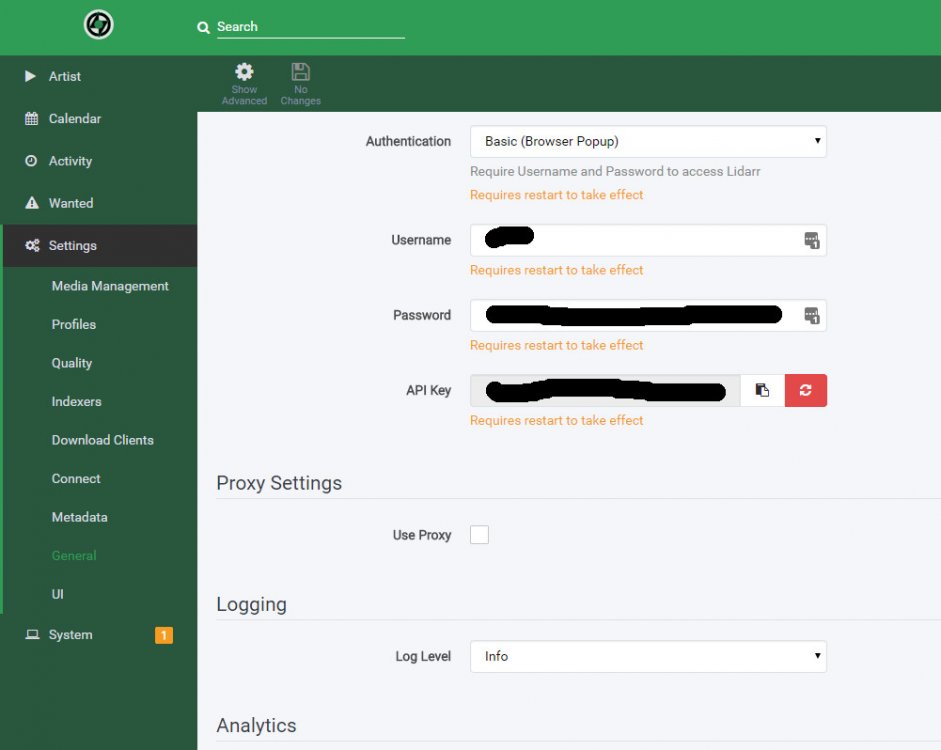
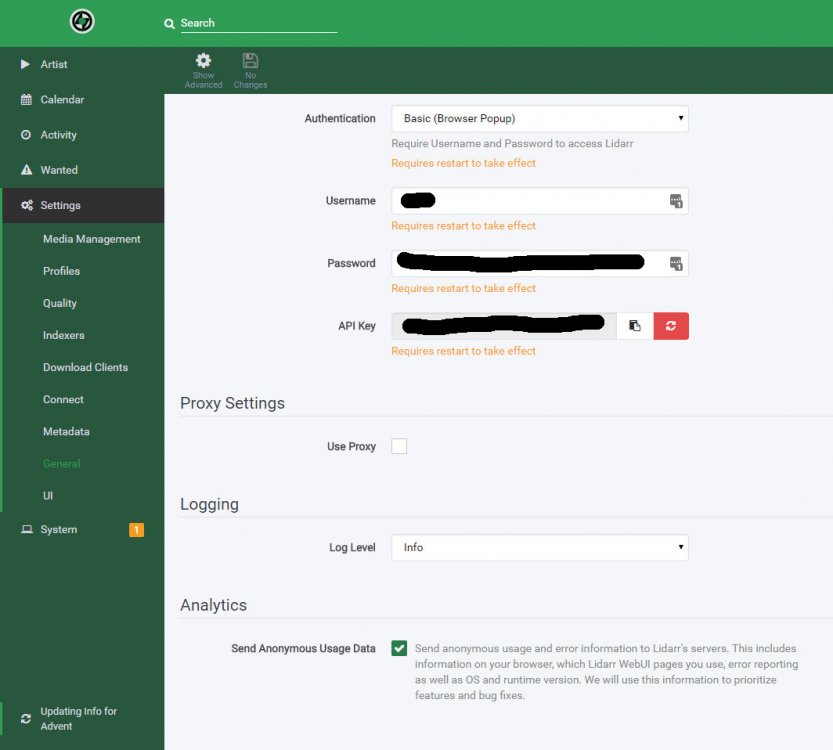
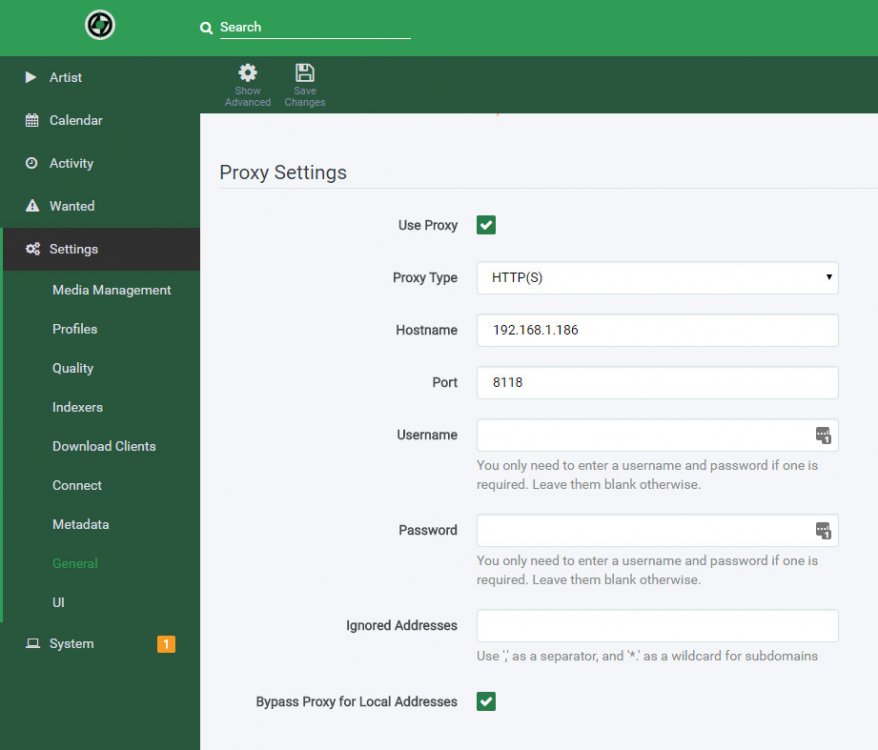
Here's how the gist in screen shots. Any changes made to the proxy forms are ignored once I click save. Before: During: After:
-
I can't seem to get it to route through my proxy (which is your deluge docker). After inputting the settings and saving it resets to look as though I never changed anything. Is there an xml I can edit to ensure it routes properly?
-
Not sure if I overlooked it, but is there anyway I could run this behind privoxy?
-
Actually I remembered the one thing I did change was the disk interface from ide to sata.
-
That's honestly beyond me. I actually just loaded it up like a normal vm. I didn't even edit my xml for anything and just used the gui to make changes.
-
Thanks so much for this, I've gotten Chromium running with gpu and usb keyboard/mouse combo passed through. Runs wonderfully!




