





phil1c
Members
-
Joined
-
Last visited
-
Easy enough. Thanks for confirming.
-
@scolcipitato Could you point me in the right direction for my question here?
-
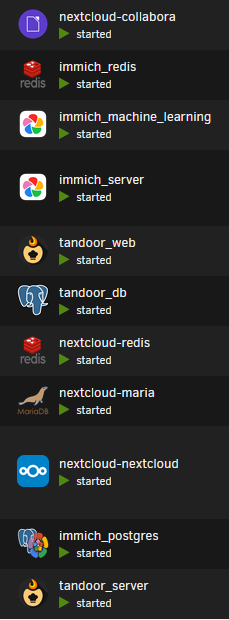
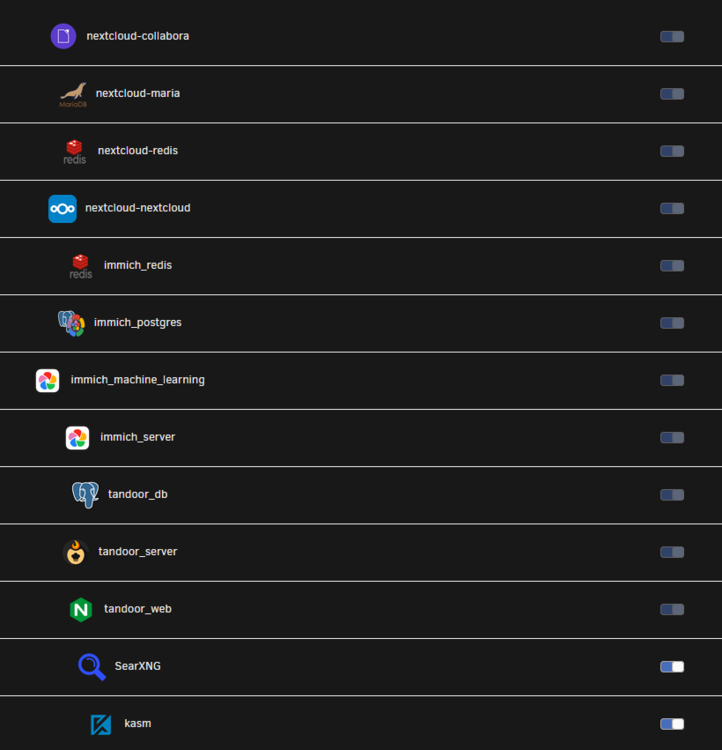
I'm transitioning certain containers to compose stacks. I use folders to sort by the primary function of groups of containers (ie: media related, system utilities, network utilities, documentation, etc). When using labels in my compose files, I assign all if the containers of a stack to the folder corresponding with the overall function (ex: my nextcloud stack has a mariadb container, a redis container, a container for Collabora, and the nextcloud container; these all get assigned to my "file management" folder). I'd like to be able to keep those containers sorted next to each other within the folder. However, I can't rearrange any of the containers in a compose stack when they're added via labels. Is there some other way besides the normal drag-n-drop to rearrange these containers in each folder? Containers from compose stacks in a folder: Edit Folder page. Note the grayed-out "Included" toggle for compose containers. They cannot be dragged to move.
-
Thanks for taking a stab at it! I made the changes and encountered some additional issues and had a couple suggestions so I made a comment on that PR. We can discuss further over there to avoid cluttering up this forum.
-
Sorry, I was being very specific: bond0.43 uses macvlan drivers. docker network inspect bond0.43 [ { "Name": "bond0.43", "Id": "48d92dd914b3319138296b5016da749e795767b808632b2a87c37eb851444d9c", "Created": "2024-07-17T08:00:11.865073653-04:00", "Scope": "local", "Driver": "macvlan", ....
-
Bond0 is a bonded group of 2x 1gbe network connections using 802.3ad mode. Bond0.43 is a subinterface for accessing VLAN43 where I segment all dockers and VMs on this machine. Docker uses macvlan for custom network types. If there is something else you want to know about my network, let me know. I understand that this may be a bug with Dockerman, but still happy to help satisfy curiosities to determine a root cause.
-
Ok. I commented out all references to the external bond043 network. I wiped the docker.json and brought the stack up and it worked! I now have proper WebUI links. Of course, I'd like to keep my dockers on that separate external network. How else do you need me to troubleshoot to help determine the root cause? For reference, my compose file and override file (which do generate the correct webui URL) look like this now: docker-compose.yml services: makemkv: container_name: pluginMakemkvTest # networks: # - bond043 ports: - 5910:5900 - 6090:6080 privileged: true environment: - TZ=America/New_York - WEBPAGE_TITLE=MakeMKVplugin - VNC_PASSWORD= - ENABLE_STARTUP_SCRIPTS=yes - UMASK=000 - PUID=99 - PGID=100 volumes: - /mnt/user:/media:rw - /mnt/cache-unprotected/Downloads/:/downloads:rw - /mnt/cache-protected-refresh/appdata/dockgeMakemkvTest:/config:rw image: binhex/arch-makemkv #networks: # bond043: # name: bond0.43 # external: true docker-compose.override.yml services: makemkv: labels: net.unraid.docker.managed: 'composeman' net.unraid.docker.icon: '${ICON_URL}' net.unraid.docker.webui: 'http://[IP]:[PORT:6080]/vnc.html?resize=remote&host=[IP]&port=[PORT:6080]&autoconnect=1' net.unraid.docker.shell: 'bash'
-
Do you have a moment to look at my update posts detailing my further investigation into the issue I'm facing?
-
I found this post and followed the instructions to force the recreation of the docker.json file to manually fix this. You can take a look at my previous post to see the steps I tried already.
-
Ok, I found the matching override files as you described above and made the relevant changes, as below: services: makemkv: labels: net.unraid.docker.managed: 'composeman' net.unraid.docker.icon: '${ICON_URL}' net.unraid.docker.webui: 'http://[IP]:[PORT:6080]/vnc.html?resize=remote&host=[IP]&port=[PORT:6080]&autoconnect=1' net.unraid.docker.shell: 'bash' After making the changes, I followed the instructions here to force the update of the plugins docker.json file to grab the new webui URL. This worked as I temporarily set the url to google just to make sure the change was occurring and that it was a link (successful: webui link opened a tab to google . com), after which I returned it to the value above. However, still the url was not "rendered" into an actual link. The override file is as described above and the docker.json shows the following: "pluginMakemkvTest": { "running": true, ... "url": "http://[IP]:[PORT:6080]/vnc.html?resize=remote&host=[IP]&port=[PORT:6080]&autoconnect=1", "icon": "/state/plugins/dynamix.docker.manager/images/pluginMakemkvTest-icon.png", ... }, and 'docker inspect pluginMakemkvTest' shows the following: "net.unraid.docker.managed": "composeman", "net.unraid.docker.shell": "bash", "net.unraid.docker.webui": "http://[IP]:[PORT:6080]/vnc.html?resize=remote&host=[IP]&port=[PORT:6080]&autoconnect=1", So the value from the override is being correctly passed to the docker manager, it's just not being parsed into a url, it's being taken wholesale as a text string. Out of curiosity, I changed the webui url again (in the override file) to the exact same "webui URL" of a totally unrelated but running container, forced the recreation of the docker.json file, and spun up the compose stack. Still, the webui URL does not parse: docker.json "pluginMakemkvTest": { "running": true, ... "url": "http://[IP]:[PORT:8989]", "icon": "/state/plugins/dynamix.docker.manager/images/pluginMakemkvTest-icon.png", docker inspect "net.unraid.docker.managed": "composeman", "net.unraid.docker.shell": "bash", "net.unraid.docker.webui": "http://[IP]:[PORT:8989]", I'm not sure what's relevant here, so I'll add: Looking at the docker.json file, all of my running containers with webui URLs have a properly parsed url. All of the non-running containers show the raw text used to create the URL. Running container from docker.json "librespeed": { "running": true, ... "url": "http://actual.IPv4.address:80", Non-running container from docker.json "DiskSpeed": { "running": false, ... "url": "http://[IP]:[PORT:8888]/", The icon URL correctly pulls the url from the .env variables EDIT: Adding here: when i inspect the rendered HTML of the Docker tab page, I do see the updated URL ("http://[IP]:[PORT:8989]") as the url for the webui link, so the url string is going from override file > docker manager > compose plugin docker.json AND rendered Docker tab webpage. Is there something that is supposed to trigger docker manager to parse the webui URL into an actual link upon starting a container that isn't occurring when using the compose plugin? Happy to do more digging/troubleshooting to help sort this out.
-
Ok, so for now I can either manually incorporate the changes made there or wait for Unraid to merge the changes, correct? Have you used these changes? I see a comment that it breaks editing existing containers (here) : is this true? Thanks for the suggestion. I added quotes and yet still nothing. I inspected the rendered HTML of the page to see what link was created and I have the following: When I check on a similar container created using the unraid UI, I see the following: function onclick(event) { addDockerContainerContext('binhex-makemkv', '096fa2b590ee', '/boot/config/plugins/dockerMan/templates-user/my-binhex-makemkv.xml', 1, 0, 0, false, 'http://10.43.64.31:6080/vnc.html?resize=remote&host=10.43.64.31&port=6080&autoconnect=1', .... You can see the link was "rendered" (for lack of a better term) from the webUI URL entered in the container template, same as above. When I check on the compose-stack-created single container, i see the following: unction onclick(event) { addDockerContainerContext('pluginMakemkvTest', '096fa2b590ee', '', 1, 0, 3, false, 'http://[IP]:[PORT:6080]/vnc.html?resize=remote&host=[IP]&port=[PORT:6080]&autoconnect=1', As you can see, in the case of the compose stack container, the "webUI URL" is entered directly as typed into the "UI Labels" field. This does not change if I add quotes, remove them, enter the webUI URL into the UI Labels field, nor if I leave the UI Labels field blank and only leave the For some reason, the compose created container isn't actually "generating" the webUI from the given template. I'm on 6.12.10 if that makes a difference.
-
I'm testing switching to compose and I have a couple questions that I haven't been able to address from previous posts: I understand that the way network names are displayed (ie: some very long string of characters) is due to dockerman. Is there anything in the works to address this other than overriding "network_mode" in the compose.yml? The test container (single container stack) that I've spun up doesn't show port mappings in the Unraid UI either. Is there a way for me to address this? I have the following webui label added to the compose.yml: net.unraid.docker.webui=http://[IP]:[PORT:6080]/vnc.html?resize=remote&host=[IP]&port=[PORT:6080]&autoconnect=1 However, when I select the container icon and click "WebUI" no new page/tab attempts to open. Is there something else I must do to make container webui links work? I have already attempted to restart the entire server hoping it was an issue with webUI URLs "sticking" as I'd seen mentioned in other posts but. Additionally, if I create a matching container from the Unraid GUI with the same webui url it works without issue. Any help would be appreciated. My stack is as follows services: makemkv: container_name: pluginMakemkvTest networks: - bond043 ports: - 5900:5900 - 6080:6080 privileged: true environment: - TZ=America/New_York - WEBPAGE_TITLE=MakeMKVplugin - VNC_PASSWORD= - ENABLE_STARTUP_SCRIPTS=yes - UMASK=000 - PUID=99 - PGID=100 volumes: - /mnt/user:/media:rw - /mnt/cache-unprotected/Downloads/:/downloads:rw - /mnt/cache-protected-refresh/appdata/dockgeMakemkvTest:/config:rw labels: - net.unraid.docker.icon=https://raw.githubusercontent.com/binhex/docker-templates/master/binhex/images/makemkv-icon.png - net.unraid.docker.webui=http://[IP]:[PORT:6080]/vnc.html?resize=remote&host=[IP]&port=[PORT:6080]&autoconnect=1 image: binhex/arch-makemkv networks: bond043: name: bond0.43 external: true
-
Bump. Any way to do what I'm asking?
-
I would like to use the name of the docker container in the "WebUI" field instead of [IP] or [PORT:xxx] so that I could write a webui value of "https://[NAME].local". I have tried [name], [NAME], and [Name] and none have worked. Is something similar to container name an available option for variables in the WebUI field? And are their other variables available?
-
Just installed Unmanic for the first time just now and I'm trying to get everything setup. For reasons I don't know there are no plugins available and "Refresh Repositories" displays a message that it completed the refresh but still nothing. I've tried wiping appdata and deleting and reinstalling the docker container but no change. Any advice on how to get the plugins to show up?
