





Everything posted by brickfireio
-
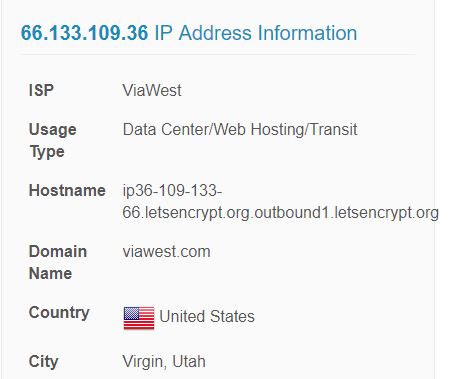
No thats not my NAT rule. Thats my permit inbound traffic rule. The source IP (lets encrypt) is accessing my webserver. The rule allows IPs originating from North America.
-
Assuming the ip is correct, your router seems to be not forwarding the request on port 443 to the container properly I thought so too but I just checked my firewall logs.

-
Brought to you by linuxserver.io We gratefully accept donations at: https://www.linuxserver.io/donations/ ------------------------------------- GID/UID ------------------------------------- User uid: 99 User gid: 100 ------------------------------------- [cont-init.d] 10-adduser: exited 0. [cont-init.d] 20-config: executing... [cont-init.d] 20-config: exited 0. [cont-init.d] 30-keygen: executing... using keys found in /config/keys [cont-init.d] 30-keygen: exited 0. [cont-init.d] 50-config: executing... 2048 bit DH parameters present SUBDOMAINS entered, processing Sub-domains processed are: -d sub1.domain.com -d sub2.domain.com E-mail address entered: Different sub/domains entered than what was used before. Revoking and deleting existing certificate, and an updated one will be created usage: certbot [SUBCOMMAND] [options] [-d DOMAIN] [-d DOMAIN] ... Certbot can obtain and install HTTPS/TLS/SSL certificates. By default, it will attempt to use a webserver both for obtaining and installing the cert. certbot: error: argument --cert-path: No such file or directory Generating new certificate Saving debug log to /var/log/letsencrypt/letsencrypt.log Obtaining a new certificate Performing the following challenges: tls-sni-01 challenge for domain.com tls-sni-01 challenge for sub1.domain.com tls-sni-01 challenge for sub2.domain.com Waiting for verification... Performing the following challenges: tls-sni-01 challenge for domain.com tls-sni-01 challenge for sub1.domain.com tls-sni-01 challenge for sub2.domain.com Waiting for verification... Cleaning up challenges Failed authorization procedure. sub1.domain.com (tls-sni-01): urn:acme:error:connection :: The server could not connect to the client to verify the domain :: Connection refused, sub2.domain.com (tls-sni-01): urn:acme:error:connection :: The server could not connect to the client to verify the domain :: Connection refused IMPORTANT NOTES: - The following errors were reported by the server: Domain: sub1.domain.com Type: connection Detail: Connection refused Domain: sub2.domain.com Type: connection Detail: Connection refused To fix these errors, please make sure that your domain name was entered correctly and the DNS A record(s) for that domain contain(s) the right IP address. Additionally, please check that your computer has a publicly routable IP address and that no firewalls are preventing the server from communicating with the client. If you're using the webroot plugin, you should also verify that you are serving files from the webroot path you provided. - Your account credentials have been saved in your Certbot configuration directory at /etc/letsencrypt. You should make a secure backup of this folder now. This configuration directory will also contain certificates and private keys obtained by Certbot so making regular backups of this folder is ideal. /var/run/s6/etc/cont-init.d/50-config: line 127: cd: /config/keys/letsencrypt: No such file or directory [cont-init.d] 50-config: exited 1. [cont-finish.d] executing container finish scripts... [cont-finish.d] done. [s6-finish] syncing disks. [s6-finish] sending all processes the TERM signal. [s6-finish] sending all processes the KILL signal and exiting.
-
Yes, port 443 is open and forwarded to server.
-
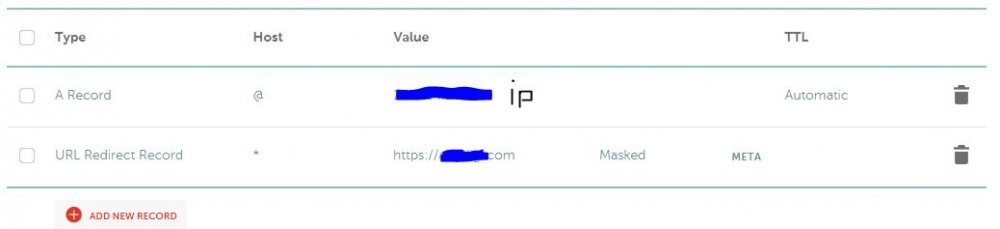
Ok. I know this is beyond the scope of support for this docker, so any help would be appreciated. I have a domain with namecheap and an A record pointing to my IP address. Would having a URL redirect record https://mydomain.com suffice? Reason I'm asking is because I'm getting a "connection refused" error and even though my ISP blocks port 80, I thought redirecting to https would force port 443 (which is open on my server)
-
Has anyone been able to configure letsencrypt when ISP blocks port 80? 443 is open but unable to open 80. Any known workarounds? Is port 80 definitely needed?
-
thanks I'll read through the manual
-
thanks. so..once a connection is configured it will automatically select that connection when logging in. so i can no longer reconfigure that connection from the gui. however, the user-mapping file in appdata didnt seem to update with the connection configuration... how can I change the connection settings then?
-
In your successful RDP connection, do you see the following warning?
-
Is there an error log in the config directory, or is there just the docker log. I'm having trouble connecting to rdp but can't find the error.
-
thanks @binhex
-
another question for you @binhex Some of my torrents are stuck and I'm seeing this in the log Any idea what's causing this?
-
Hey - I'm getting this error but I don't recall changing any of the ports Docker Application binhex-rtorrentvpn, Container Port 3000 not found or changed on installed application

-
What would prompt that IP to change? I have a tracker that needs a static IP.
-
Under "Additional BitTorrent Features" in settings, there is an "IP/Hostname to report to tracker" Is this field populated by default? If so, how does it determine the IP?
-
Hey @binhex. Thanks again for this docker, its awesome. I'm wondering if you have any suggestions with my issue. Are you aware of a way to have rtorrent download torrents labeled "movies" (from couch) to one folder and labeled "tv" from sonarr to a different folder? I believe this setup would prevent couch from incorrectly trying to process tv shows added by sonarr. Any suggestions/input would help Thanks!
-
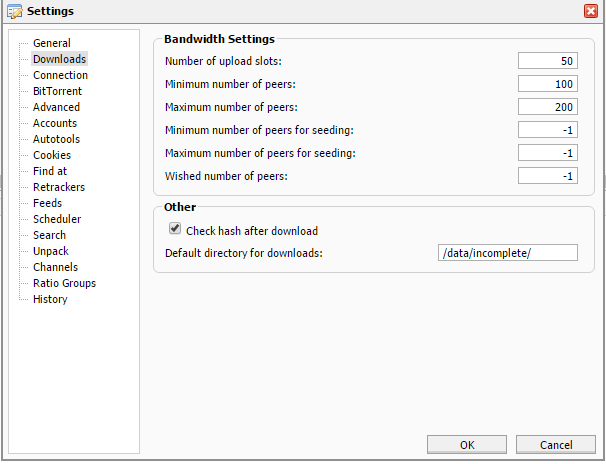
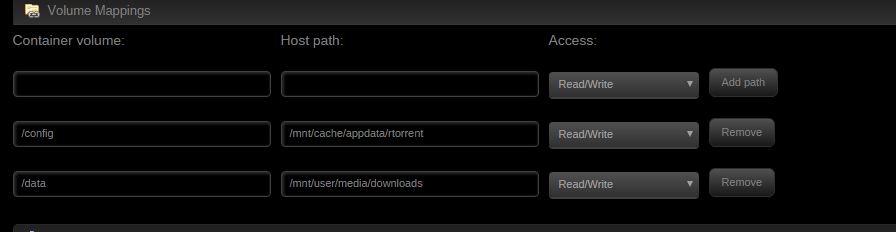
have you configured autotools by any chance? (see attachment), if you have then you need to make sure its set to /data/<folder of your choice> Negative, autotools are disabled ok so does /data/incomplete exist on your unraid host and can you see incomplete downloads in there? "/data/incomplete" doesn't specifically exist on my host but i mapped the /data folder to /mnt/user/media/downloads. however, i do see /incomplete within /mnt/user/media/downloads. I do see something interesting though. I downloaded a movie and it went to /mnt/user/media/downloads/incomplete. Great. I'm currently trying to download a tv show and its going to the docker img according to find /var/lib/docker/btrfs -type f -size +50000k -exec ls -lh {} \; | awk '{ print $9 ": " $5 }' , but it also has a label "TV" whereas the movie did not have a label. Ill see if that has anything to do with it. ok so it probably is related to adding a label then, have you configured the unpack settings by any chance? (see attachment) this also allows you to define a different path, if its blank i would recommend setting this to your incomplete folder, so /data/incomplete so it wasnt related to the label, however, sonarr was incorrectly configured. sorry for the confusion and thanks for the help.
-
have you configured autotools by any chance? (see attachment), if you have then you need to make sure its set to /data/<folder of your choice> Negative, autotools are disabled ok so does /data/incomplete exist on your unraid host and can you see incomplete downloads in there? "/data/incomplete" doesn't specifically exist on my host but i mapped the /data folder to /mnt/user/media/downloads. however, i do see /incomplete within /mnt/user/media/downloads. I do see something interesting though. I downloaded a movie and it went to /mnt/user/media/downloads/incomplete. Great. I'm currently trying to download a tv show and its going to the docker img according to find /var/lib/docker/btrfs -type f -size +50000k -exec ls -lh {} \; | awk '{ print $9 ": " $5 }' , but it also has a label "TV" whereas the movie did not have a label. Ill see if that has anything to do with it.
-
have you configured autotools by any chance? (see attachment), if you have then you need to make sure its set to /data/<folder of your choice> Negative, autotools are disabled
-
http://lime-technology.com/forum/index.php?topic=40937.msg405070#msg405070 Thanks. I checked the downloads location and its pointing to the correct directory. Is there a temp folder rtorrent uses?
-
Hi binhex - This docker is awesome. Thanks for developing it. I'm having some trouble with the docker image growing full as I download torrents. Any suggestions? Thanks
-
Created new post
-
I have PCIe ACS Override on to pass through my GPU I believe. I also tried passing through one, a pair, and all four but still receive the same error.
-
00:00.0 Host bridge: Intel Corporation 4th Gen Core Processor DRAM Controller (rev 06) 00:01.0 PCI bridge: Intel Corporation Xeon E3-1200 v3/4th Gen Core Processor PCI Express x16 Controller (rev 06) 00:01.1 PCI bridge: Intel Corporation Xeon E3-1200 v3/4th Gen Core Processor PCI Express x8 Controller (rev 06) 00:02.0 VGA compatible controller: Intel Corporation Xeon E3-1200 v3/4th Gen Core Processor Integrated Graphics Controller (rev 06) 00:03.0 Audio device: Intel Corporation Xeon E3-1200 v3/4th Gen Core Processor HD Audio Controller (rev 06) 00:14.0 USB controller: Intel Corporation 9 Series Chipset Family USB xHCI Controller 00:16.0 Communication controller: Intel Corporation 9 Series Chipset Family ME Interface #1 00:1a.0 USB controller: Intel Corporation 9 Series Chipset Family USB EHCI Controller #2 00:1b.0 Audio device: Intel Corporation 9 Series Chipset Family HD Audio Controller 00:1c.0 PCI bridge: Intel Corporation 9 Series Chipset Family PCI Express Root Port 1 (rev d0) 00:1d.0 USB controller: Intel Corporation 9 Series Chipset Family USB EHCI Controller #1 00:1f.0 ISA bridge: Intel Corporation 9 Series Chipset Family Z97 LPC Controller 00:1f.2 SATA controller: Intel Corporation 9 Series Chipset Family SATA Controller [AHCI Mode] 00:1f.3 SMBus: Intel Corporation 9 Series Chipset Family SMBus Controller 01:00.0 VGA compatible controller: NVIDIA Corporation GM204 [GeForce GTX 970] (rev a1) 01:00.1 Audio device: NVIDIA Corporation GM204 High Definition Audio Controller (rev a1) 02:00.0 PCI bridge: Integrated Device Technology, Inc. [iDT] PES12N3A PCI Express Switch (rev 0e) 03:02.0 PCI bridge: Integrated Device Technology, Inc. [iDT] PES12N3A PCI Express Switch (rev 0e) 03:04.0 PCI bridge: Integrated Device Technology, Inc. [iDT] PES12N3A PCI Express Switch (rev 0e) 04:00.0 Ethernet controller: Intel Corporation 82571EB Gigabit Ethernet Controller (Copper) (rev 06) 04:00.1 Ethernet controller: Intel Corporation 82571EB Gigabit Ethernet Controller (Copper) (rev 06) 05:00.0 Ethernet controller: Intel Corporation 82571EB Gigabit Ethernet Controller (Copper) (rev 06) 05:00.1 Ethernet controller: Intel Corporation 82571EB Gigabit Ethernet Controller (Copper) (rev 06) /sys/kernel/iommu_groups/0/devices/0000:00:00.0 /sys/kernel/iommu_groups/1/devices/0000:00:01.0 /sys/kernel/iommu_groups/2/devices/0000:00:01.1 /sys/kernel/iommu_groups/3/devices/0000:00:02.0 /sys/kernel/iommu_groups/4/devices/0000:00:03.0 /sys/kernel/iommu_groups/5/devices/0000:00:14.0 /sys/kernel/iommu_groups/6/devices/0000:00:16.0 /sys/kernel/iommu_groups/7/devices/0000:00:1a.0 /sys/kernel/iommu_groups/8/devices/0000:00:1b.0 /sys/kernel/iommu_groups/9/devices/0000:00:1c.0 /sys/kernel/iommu_groups/10/devices/0000:00:1d.0 /sys/kernel/iommu_groups/11/devices/0000:00:1f.0 /sys/kernel/iommu_groups/11/devices/0000:00:1f.2 /sys/kernel/iommu_groups/11/devices/0000:00:1f.3 /sys/kernel/iommu_groups/12/devices/0000:01:00.0 /sys/kernel/iommu_groups/12/devices/0000:01:00.1 /sys/kernel/iommu_groups/13/devices/0000:02:00.0 /sys/kernel/iommu_groups/14/devices/0000:03:02.0 /sys/kernel/iommu_groups/15/devices/0000:03:04.0 /sys/kernel/iommu_groups/16/devices/0000:04:00.0 /sys/kernel/iommu_groups/16/devices/0000:04:00.1 /sys/kernel/iommu_groups/17/devices/0000:05:00.0 /sys/kernel/iommu_groups/17/devices/0000:05:00.1
-
Tried both methods of passing through 4port NIC, but neither were successful 1. pci-stub.ids.. in syslinux.cfg but I'm unable to reach the webgui after change 2. added the XML changes by @BobPhoenix to my VM, but receive "Requested operation is not valid: PCI device 0000:04:00.0 is not assignable" when trying to start it Any thoughts?


