





Everything posted by brickfireio
-
Got it. Thanks for the explanation @jbat66!
-
Thanks for clarifying. I was asking because @jbat66 mentions "make sure..."
-
Got it. Thanks for the explanation. Out of curiosity, why does unraid not work well with an emulated CPU?
-
@jbat66 Thanks for this! I have some new server equipment arriving soon so planning on running proxmox bare-metal and virtualizing unraid. Why do you have to pass through the hosts processor to unraid? In your example, the 4 cores you passed through would be inaccessible to proxmox and other VMs, correct?
-
I could have sworn it was there before but sorting "all apps" works as well. Thanks!
-
So this is by design? I liked the option to see more results for "New Apps"...
-
Hi - Any particular reason why the results are limited to 24? There used to be a "next page" button to show more results of the Categories.
-
So to answer my original question it sounds like you're running their elastic stack as opposed to the official kibana, logstash, and elasticsearch.
-
@trevormiller6 Are you running the other wazuh containers or just this? I have separate instances of elasticsearch, kibana, and logstash so I'm trying to integrate this container into my existing stack.
-
The "old" parameters are still in the default config for this container. Are there any plans to update the rtorrent.rc file to remove the depreciated settings? https://github.com/linuxserver/docker-rutorrent/blob/master/root/defaults/rtorrent.rc EDIT: "new" parameters aren't working, specifically max upload and download speed set to 0
-
That seems to have worked for me as well. Deleted the container. Resintallated with defaults. During setup..restored from backup config (which was in a backup of the appdata folder)
-
I have the same issue but a restore did not resolve it.
-
Yes, I edited the rc file directly as well as made the changes in the gui. Anytime the container updates, those two settings revert back to a default.
-
@Djoss I see that sound support is added, however, I don't see /dev/snd as an existing path on unraid. Is sound possible for this container on unraid, or do the instructions for "Sound Support" pertain to other docker hosts?
-
Any particular reason this container is ignoring configuration defined in rtorrent.rc? Despite setting variables in the rc file, this container defaults the global max upload and download rates.
-
I need to change the IP address of this container as well as the connected mariadb container. What's the proper procedure to do this? EDIT: Solved
-
I have a number of user-defined networks, which I then assign to containers depending on what vlan I want them to be in. I've noticed that containers use the DNS server defined in Settings->Network Settings. After some research, I found that I can define the DNS server per container. https://docs.docker.com/v17.09/engine/userguide/networking/default_network/configure-dns/ Can you add a field in the Docker Settings page to define DNS as well, instead of defaulting to the DNS server defined for unraid?
-
Curious...Is it in your roadmap to make an elasticsearch container?
-
Thank you! That worked
-
Linux 4.18.14-unRAID. Last login: Sun Oct 14 14:10:34 -0400 2018 on /dev/pts/2. root@Tower:~# ip route show default via 192.168.1.1 dev br0 proto dhcp src 192.168.1.2 metric 218 172.17.0.0/16 dev docker0 proto kernel scope link src 172.17.0.1 192.168.1.0/24 dev br0 proto dhcp scope link src 192.168.1.2 metric 218 192.168.20.0/24 dev br0.20 scope link metric 1 192.168.70.0/24 dev br0.70 scope link metric 1 192.168.122.0/24 dev virbr0 proto kernel scope link src 192.168.122.1 I had to manually add 192.168.20.0 and 192.168.70.0 via the Network Settings page.
-
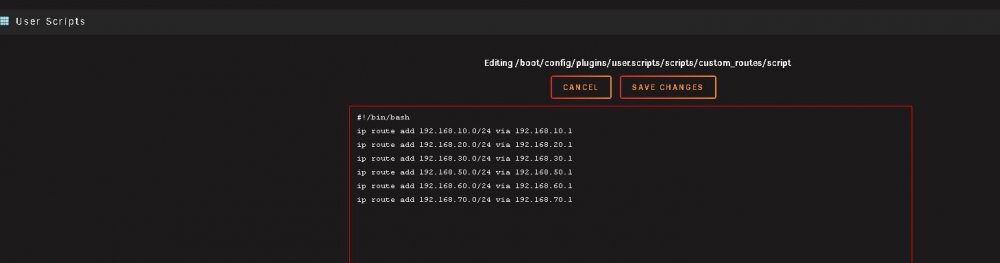
Sorry for the confusion. The gateway you mentioned was an example fro @Delarius. My specific script is attached above, but I can attach another copy. All of these networks exist..
-
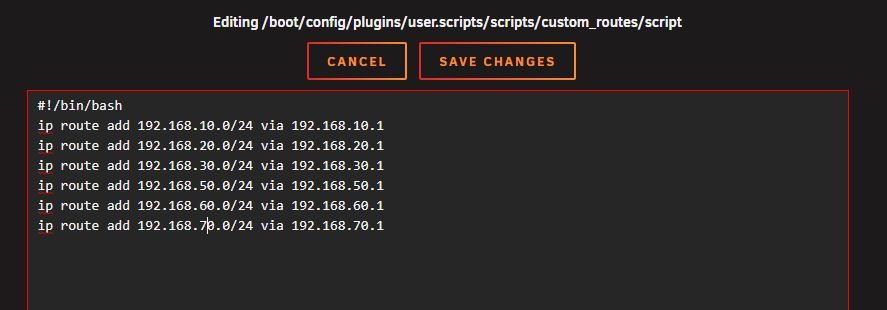
The command doesn't seem to work properly. I receive the following message: Error: Nexthop has invalid gateway.
-
Thanks @bonienl I'll use the custom scripts plugin with the command @Delarius mentioned. Does the attached script look right? Currently, the custom routes entered in the GUI are associated with the gateway name, i.e. br0.10. Does that need to be included in the script as well?

-
Maybe this is a bug then? The changes are made on the Network Settings page of the GUI. It's nice being able to add them there, the only issue is they don't persist. Perhaps someone from unraid can confirm if this is a bug or could be a feature request... EDIT: Also thanks to everyone for the help so far
-
Yes. I add the custom routes in the network settings page. They do not persist after rebooting. Is that normal? I figured they would persist.



