





tidusjar
Members
-
Joined
-
Last visited
Everything posted by tidusjar
-
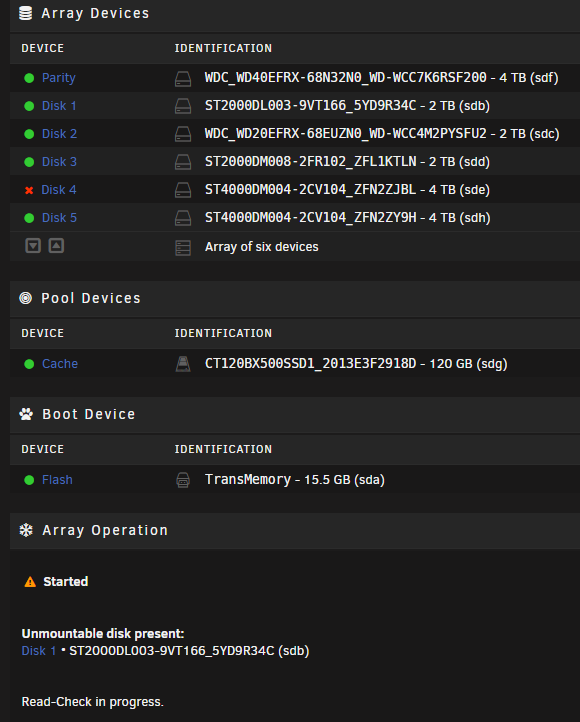
Apologies. I’ve not replaced any drives. I didn’t even realise disk 1 was being rebuilt. When I noticed this error I did remove the disk and then re-add it which may have caused that? attached is the new diagnostics server-diagnostics-20211102-2128.zip
-
So I’ve now replaced both disks cables and still no luck. any other suggestions?
-
Hi all, I've got the following error on the Main tab for one of my disks, but then another disk is showing as "Device is Disabled". This is all after a powercut I had yesterday. Attached is my diagnostics after starting the array Any idea what I need to do to resolve this? My disk/hardware knowledge is not great server-diagnostics-20211101-1109.zip
-
You are on a very very old version of Ombi. please update
-
Actually the GitHub is https://GitHub.com/ombi-app/ombi you can also find all of the links on the ombi settings page
-
I was just stating that there was an issue yesterday. If anyone is still having issues I'd encourage them to reach out on GitHub or discord. I do recall there were issues a few months ago, but they have all now been resolved.
-
Yesterday Plex where having issues with their authentication service where no one could login
-
Radarr removed the legacy APIs. It's been fixed in ombi develop
-
It's possible you are hitting sqlite database locks. Reach out on discord and we can assist in working out what's going on
-
That 'asshole' would be me. Please keep in mind that I have a full time demanding job, a child, a 10 month old and a wife outside of what I do in ombi. All of my free time is pretty much dedicated to working on the product. V4 was released as it's more stable than v3 and I needed to release.it at some point or I never would have. If you are not happy with it then I suggest your stick to v3 and if you want the voting feature ported faster, then you submit a PR or be able to contribute in some other way.
-
V3 is still usable. I'll be merging down once I have finished a few things off
-
Once the missing column is present in the database everything should be fine.
-
Yeah this is my fault, I messed up the migrations side of things when adding support for other databases and it's very difficult to fix. You could just delete the OmbiExternal.db and then restart Ombi, that would also fix the issue.
-
This is coming from sonarr, you need to setup your root folders correctly in sonarr.
-
Does your user have any roles?
-
Logout and clear cache. What happens then?
-
Hi Tim, if the reset password is taking you to the plex site that means that the account you are attempting to log in with is a Plex account and not a local ombi account.
-
Hi, Sorry for the lack of replied on here. So I have fixed the database locked issue in the develop branch, but you can easily fix it by just deleting your `Schedules.db` file and restarting Ombi.
-
I am on here apologies, I'm just busy these days! Please feel free to raise a feature request, you can find the details on how to do this on Ombis GitHub page.
-
Yep its still working. The errors you posted are saying the connection is being refused , we are trying to connect to radarr but can't.
-
It's because Ombi has scanned your Plex library at the time the movie was there. Currently Ombi does not check any deltas between anything deleted in Plex compared to what ombi has cached. There is an open issue about this and I plan to solve it in the near future.
-
The error you have posted shouldn't cause any issues. It's just failing to load a tv show banner.
-
Hey guys, have an issue, so i've got pip-10.0.1-x86_64-1.txz, python3-3.6.2b-x86_64-1.txz and python-2.7.14a-x86_64-1.txz enabled but I cannot seem to use pip. Below is an example python3 pip python3: can't open file 'pip': [Errno 2] No such file or directory I have rebooted the server, not sure how to get this working.
-
How would I install pip? I've executed the get-pip.py script and that worked successfully
-
Oh god.... Now I feel stupid, I was Googling everything... Wow. Thanks!

