





hammsandwich
Members
-
Joined
-
Last visited
-
I just want to to close this out and say the new kernel in Unraid 7 has more aggressive voltage/frequency curves, and my CPU negative CO became unstable in the new release. Testing in Linux distros with older kernels and Windows confirms this finding; everything was 100% stable with my old settings in these other distros. I had to basically remove my PBO settings and run the CPU stock, and things have been 100% stable since.
-
The fact my old BIOS was taken down from the download page ended up being a deciding factor on moving to a newer BIOS. I would like to take advantage of newer kernel features and drivers, and updating my BIOS seemed like a logical step. I may try to revert to the old driver to test idle power efficiency at some point however.
-
Increasing voltage did not help. System crashed 3 more times during parity rebuild. I found some additional threads indicating my AGESA version is incompatible with the new AMD P-State driver in the new kernels. I took the gamble and upgraded my BIOS to 8.01, which unfortunately also reset everything to default and will not let me reload my old BIOS profiles. However, after getting standard settings reconfigured, Unraid has been rebuilding for over 12 hours so far. Will keep updating as I test further. Interesting that parity workload seems to the triggering factor.
-
Ok, getting the following after hard crashing. Sep 17 15:16:12 zenhammer kernel: mce: [Hardware Error]: Machine check events logged Sep 17 15:16:12 zenhammer kernel: mce: [Hardware Error]: CPU 9: Machine Check: 0 Bank 5: bea0000000000108 Sep 17 15:16:12 zenhammer kernel: mce: [Hardware Error]: TSC 0 ADDR ffffff81afa9e2 MISC d012000100000000 SYND 4d000000 IPID 500b000000000 Sep 17 15:16:12 zenhammer kernel: mce: [Hardware Error]: PROCESSOR 2:a20f10 TIME 1758136507 SOCKET 0 APIC 3 microcode a20102dAgain, these only appear in the syslog following the reboot, which is odd. I ran an extended preclear on new parity disks, but is it possible one of them is bad? I will try giving CPU more voltage, but I also think upgrading to BIOS 8.01 with AGESA 1.2.0.8 might be a viable solution.
-
Interesting, makes some sense possibly the newer kernel is causing these issues. I had an all core static clock set previously, and dropped the clock speed while leaving voltage alone for now. My intent was to go to a power efficient PBO setup, negative CO with c states to try to save more power. I am looking at the bug report linked in the post and some people noted a BIOS updated helped with stability. Looking at my board an ASRock X470 Taichi, I am currently on BIOS 4.73, which no longer appears on the ASRock site as it was beta bios. I will start looking into updating the BIOS and which version might be my best bet moving forward.
-
I would tend to agree with you. Since indeed do have C-States disabled, but ideally was looking to re-enable them eventually to try to reduce power consumption. But at this time, C-States has been disabled for the better part of 6 years. The only other thing I can think of is I swapped out the CPU cooler so I may try to reseat the CPU again. I am currently tailing the logs while its rebuilding parity to try to catch the error. Will post what I find.
-
Hello, I upgraded from 6.12.15 to 7.1.4 prior to doing some maintenance on my host. I needed to swap out both parity disks to larger disks so I can add more disks to the array. As part of this I also removed a secondary HDD BTRFS cache pool, as well as portions of configs that were related to Win10 gaming VM with passed through NIC, GPU, USB controller, NVMe drive etc (huge pages were enabled, ACS override still enabled). This config was rock solid since I built it in 2019. It has never crashed a single time, through quarterly parity checks, heavy CPU, disk, and GPU workloads. After my upgrade to 7.1.4, I also installed the nvidia drivers, because I intend to use the the GPU for docker and other VMs now instead of having it passed through to a VM 100% of the time. Following the upgrade and preparing for the parity driver swap, I ran a parity check. I woke up a an alert the parity check had finished, but was expected to be over 1 day with my new 20TB disks. I logged into see the array was stopped and after checking learned the server had rebooted. Looking at the logs, I saw a machine check event in the logs DURING BOOT! I found that very odd, as I never seen that before. I brushed it off as a fluke, initiated the check again, it finished. Initiated the first swap, it finished. I left it for a week to test stability, no issues. I wrote some data to the array, initiated another parity check, and it crashed again. At this point I enabled the syslog server so I can try to catch any errors. After over another week of being stable, I kicked the second parity sync for the second parity disk, and it crashed overnight again. I am very much leaning towards rolling back to 6.12.15 to rule out an OS issue, but want to give the community and devs a chance to look into this issue and maybe help others from experiencing the same problems in the future. I have found similar threads to mine, but they have gone dark with no resolution. Unfortunately last night the syslog server didnt catch anything in the logs. The last entries I see are: Sep 17 00:00:01 xxx Plugin Auto Update: Checking for available plugin updates Sep 17 00:00:03 xxx Plugin Auto Update: Community Applications Plugin Auto Update finishedThe email I received about the parity check being finished was around 12:32AM, so presumably the server crashed sometime between 12:20-12:30. In the mean time I have another parity sync running to get my array back to healthy. zenhammer-diagnostics-20250917-0939.zip
-
Anyone have thoughts on this? Really curious to figure this out so I do not have to shut down this conatiner whenever I need to start up other VMs.
-
Hello, This container is somehow utilizing huge pages on my Unraid server. I have enabled hugepages through the normal means of: append hugepagesz=2M hugepages=8194 This allocates 16GB of RAM to huge pages. Then have various VMs that leverage these hugepages via the following XML. <memoryBacking> <hugepages/> <nosharepages/> </memoryBacking> I noticed a few months back that at certain times I was unable to start 16GB worth of VMs. I began shutting down containers, which would then allow me to fully populate all 16GB of hugepage RAM, so I then began the process of narrowing down which container was causing the issue. It appears to be this Nextcloud container. I used this command to see what was grabbing hugepages: grep huge /proc/*/numa_maps When Nextcloudis running, this command outputs: grep huge /proc/*/numa_maps /proc/24581/numa_maps:145fd0a00000 default file=/anon_hugepage\040(deleted) huge dirty=3 mapmax=3 N0=3 kernelpagesize_kB=2048 /proc/24606/numa_maps:145fd0a00000 default file=/anon_hugepage\040(deleted) huge dirty=11 mapmax=3 N0=11 kernelpagesize_kB=2048 /proc/24607/numa_maps:145fd0a00000 default file=/anon_hugepage\040(deleted) huge dirty=11 mapmax=3 N0=11 kernelpagesize_kB=2048 Upon shutting down this container, there is no output to the command (if all my VMs are also off). I have started every single one of my containers one by one, and this is the only one that results in this behavior. Is this intentional? If so, I feel that it should be documented as many people use hugepages for VFIO passthrough performance. If not intended, is the proper place to for support for this issue? Thanks in advance.
-
Confirming based on your github documentation the Zen 3 platform, i.e. 5800X is currently not supported?
-
Sure thing, Just to confirm, I don't haveto manually start the daemon, just run the corefreq-cli?
-
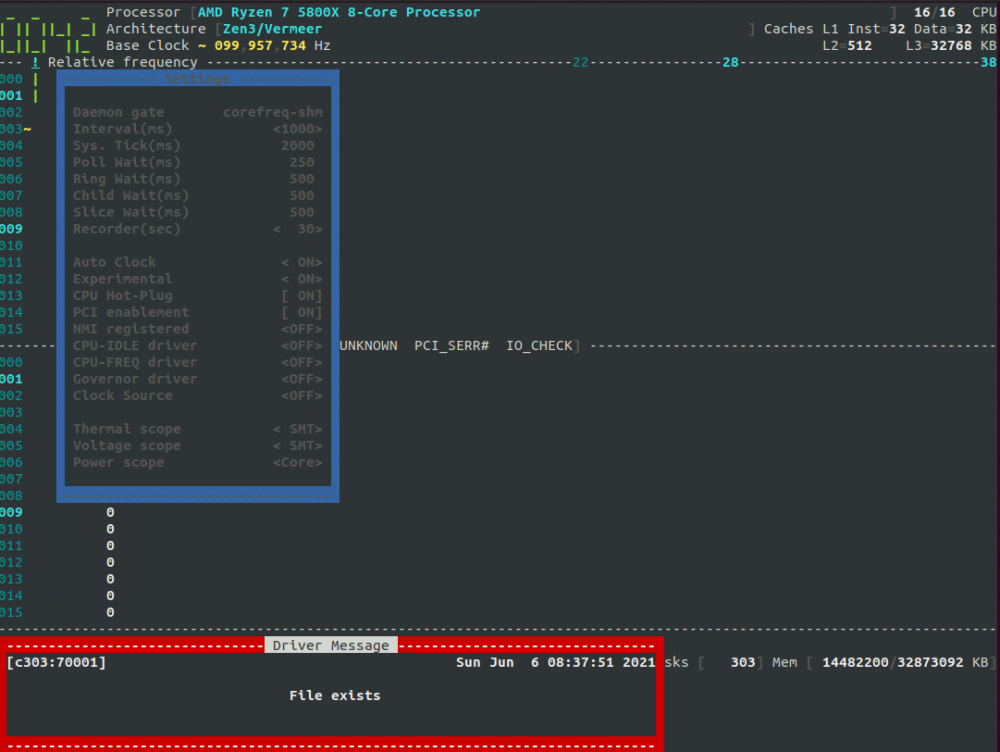
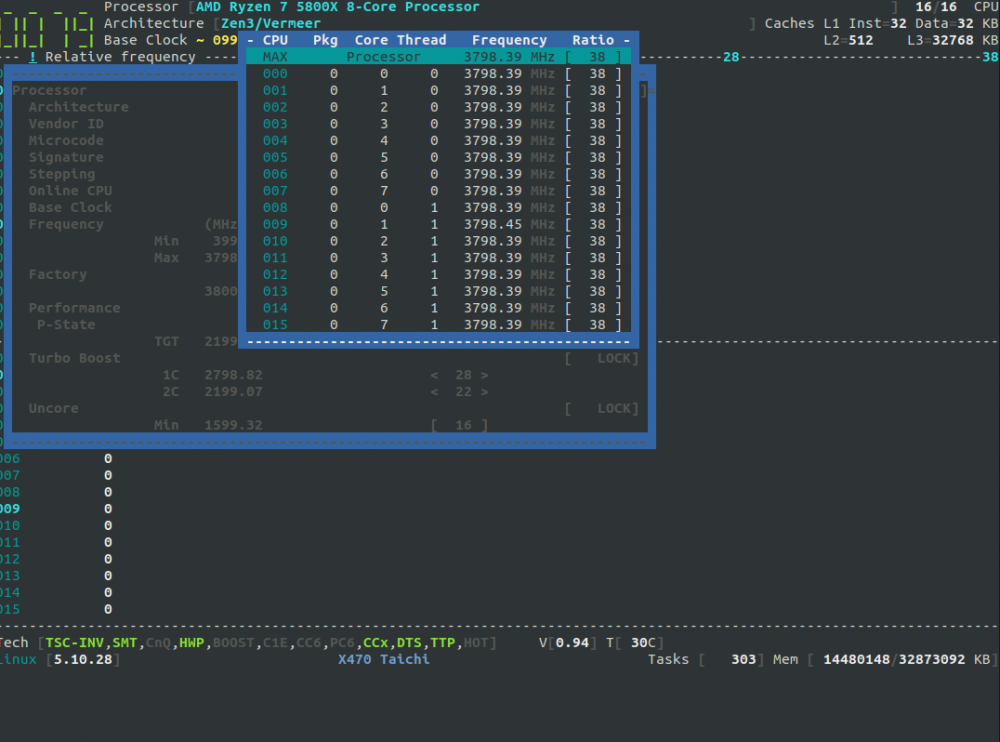
Set BIOS OC back to AUTO, only have RAM OC applied. I am unable to change my CPU Freq past 3800 Mhz on my 5800X. When I attempt to load the CPU-FREQ driver or the CPU-IDLE driver, I get this following message: Here is what my Max Freq option looks like The rest of the freq options looks similar, they all show the same freq even thought i have disabled turbo through the plugin. Uploading diagnostics... hammsandwich-diagnostics-20210606-0843.zip
-
It is not multiple accounts. but multiple share types. For example, share "ABC" is set to Public, and share "XYZ" is set to Private, with R/W perms for user "123". If I browse via Windows to \\unraid\ABC, I am immediately allowed in as an anonymous user and can read and write to share "ABC" perfectly fine. Then I want to authenticate to share "XYZ" to work on more sensitive data. I get prompted with username/password, and when entered correctly, Windows throws an error saying it cannot access different shares with multiple accounts on the same file server. I am assuming this means it is counting the Anonymous user as a user. I have been messing around this this all day and currently cannot reproduce this issue but am unable to at the moment. It is possible that changing the permissions of each share from private to public and back to private has resolved my issues... This has been going on for the past 2 years or so I have finally gotten tired of it and am trying to fix the issue.
-
I have noticed I set shares to public they work without issue. When a share is private, I cannot copy anything larger than a few MB without a transfer fail. Retry works about 1/5 times. This is prevalent on multiple Win10 machines on my network, all various versions with various hardware types. Unfortunately having a mix of Public and Private shares also does not work because Windows does not allow for multiple connections to the same SMB servers with different accounts simultaneously.
-
You are absolutely correct. After enabling additional firewall logging and reinstalling the plugin and rebooting, I am seeing Blocks on the firewall from Unraid to 8.8.8.8 on ICMP. Added to outbound rules and that helped with speed of install and booting. I plan on disabling BIOS OC this weekend to see if that resolves my VM stability issue.


