





kuhnamatata
Members
-
Joined
-
Last visited
-
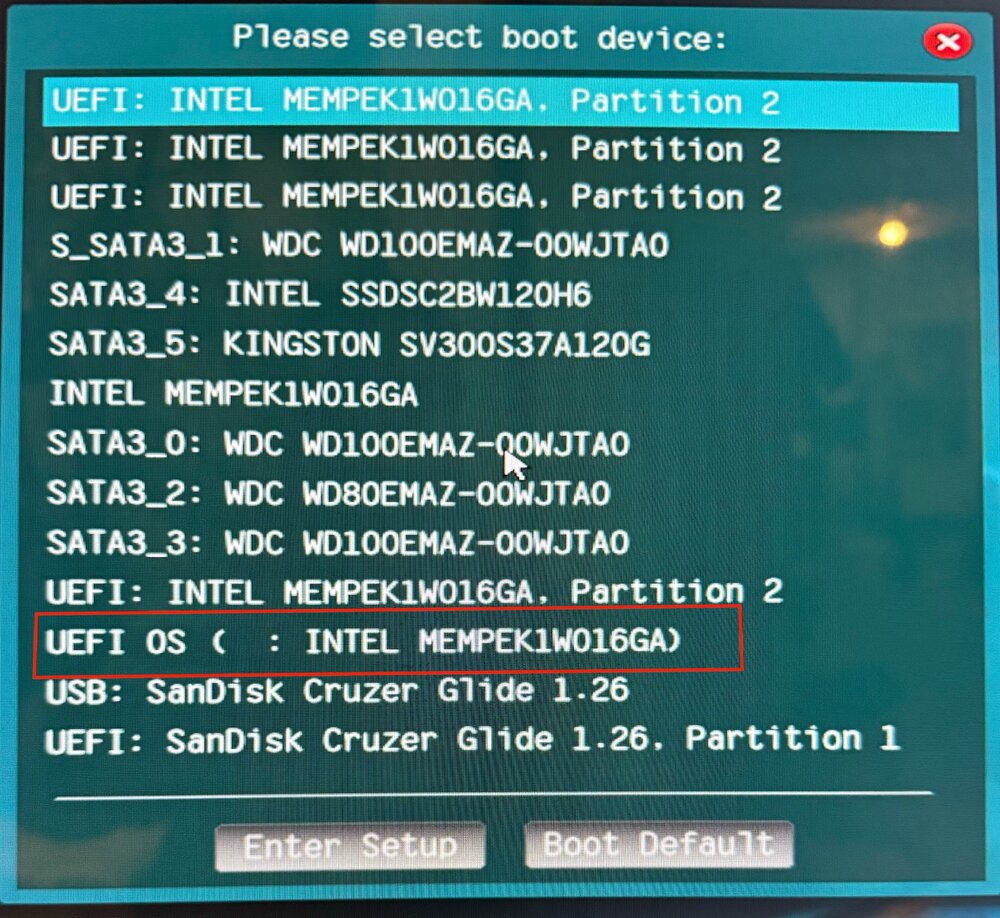
Looks like it was set to boot from UEFI: INTEL MEMPEK1W016GA. Partition 2, selected UEFI OS ( : INTEL MEMPEK1W016GA) and it booted from the internal drive
-
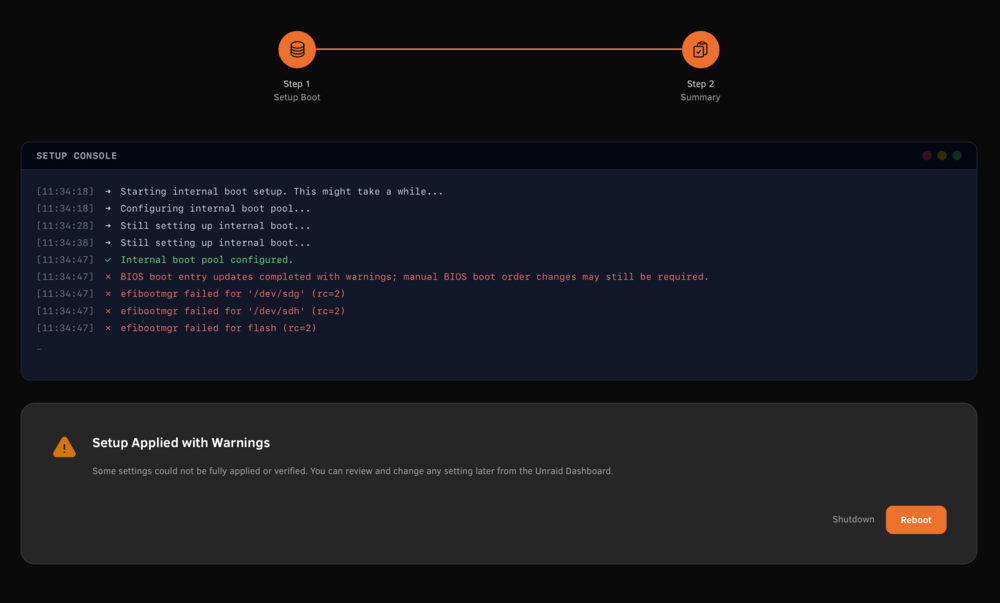
After using the internal boot wizard I get the following screen. secure boot is disabled in bios and I have tries with nvme and sata drives with the same results, after rebooting it boots from original usb stick and has unmountable message on new internal device. If I select format it fails and keeps returning to format option without formating
-
Perfect! thanks so much for the tip, didn't even think about using the nextcloud console
-
I use MariaDB for my nextcloud database and received this message (below) in my nextcloud Security & Setup Warnings after an update to 23.0.2 and was wondering if anyone knows how I can run "occ db:add-missing-indices" from the mariadb console, I get unrecognized command response There are some warnings regarding your setup. The database is missing some indexes. Due to the fact that adding indexes on big tables could take some time they were not added automatically. By running "occ db:add-missing-indices" those missing indexes could be added manually while the instance keeps running. Once the indexes are added queries to those tables are usually much faster. Missing index "properties_pathonly_index" in table "oc_properties". Missing index "job_lastcheck_reserved" in table "oc_jobs".
-
This is what I got when I ran with git show command commit f6bb1dd183b5c22ddf2f930e44ea0576c348eba5 (HEAD -> master, origin/master) commit f6bb1dd183b5c22ddf2f930e44ea0576c348eba5 (HEAD -> master, origin/master) commit f6bb1dd183b5c22ddf2f930e44ea0576c348eba5 (HEAD -> master, origin/master) commit f6bb1dd183b5c22ddf2f930e44ea0576c348eba5 (HEAD -> master, origin/master) Author: gitbot <[email protected]> Date: Mon Dec 27 14:08:03 2021 -0500 Config change diff --git a/config/plugins/fix.common.problems.plg b/config/plugins/fix.common.problems.plg index 10d8c63..0536655 100644 --- a/config/plugins/fix.common.problems.plg +++ b/config/plugins/fix.common.problems.plg @@ -2,8 +2,8 @@ <!DOCTYPE PLUGIN [ <!ENTITY name "fix.common.problems"> <!ENTITY author "Andrew Zawadzki"> -<!ENTITY version "2021.08.05"> -<!ENTITY md5 "28271a759e6b795e4595ed77d22a18eb"> +<!ENTITY version "2021.12.26"> +<!ENTITY md5 "d4f455460e7d5cf64dfe6cf2598c07ce"> <!ENTITY launch "Settings/FixProblems"> <!ENTITY plugdir "/usr/local/emhttp/plugins/&name;"> <!ENTITY github "Squidly271/fix.common.problems"> @@ -11,6 +11,9 @@ ]> <PLUGIN name="&name;" author="&author;" version="&version;" launch="&launch;" pluginURL="&pluginURL;" icon="warning" min="6.7.0" support="http://lime-technology.com/forum/index.php?topic=48972.0"> <CHANGES> +###2021.12.26 +- Check for blank or invalid characters within TLD + ###2021.08.05 - Remove Scaling governor tests - not relevant anymore
-
Ran "git show" and and it displayed config changes from this mornings nextcloud and mariaDB update
-
Found some info on the flash backup adding task, doubt that's causing my server going off-line but i'll try it
-
Thanks for taking the time to look at the files
-
I have been trying to figure out what is causing my unclean shutdowns on this server for a couple of years and finally decided to ask for help. It typically goes off line after a few days of uptime, I have attached failure log file along with an after startup diagnostics zip and would really appreciate it if anyone with more expierence could take a look at them. Latest time it went offline (not able to access through the webpage or ssh) the shares were still accessible proto-diagnostics-20220222-1732.zip proto syslog.log
-
Yup, I had the same problem and had to delete the old my-letsencrypt.xml to get it to change the icon. Thanks for posting
-
32GB (4*8GB) Maxed out my Supermicro - X10SL7-F, I run multiple VMs and dockers, typical usage 38%
-
thanks aptalca, had no clue as to what I was looking for
-
Anyone download the smc_read.zip lately listed on gridrunners YouTube video 'How to read OSK KEY....) I have downloaded it multiple times and if it doesn't say it's a corrupted file it has all the text shown in the video without the OSK key. I'd appreciate it someone else would give it a try and see if they have the same problem, I have everything set to go except for the key, Thanks
-
If you still have PLEXPASS Set to 1 in your variables you need to remove it, won't update to BETA if it's still there
-
It worked, I can now see attached hard drives Thanks so much, thought the controller card was bad


