





uiuc_josh
Members
-
Joined
-
Last visited
Everything posted by uiuc_josh
-
Oof. RTFM, indeed. Extra stupid thing is that I'd enabled syslog server for my firewall and voip. Just never got rid of the manual tail process script b/c I didn't realize the server logs were going to the same place.
-
I'm running 6.12.14. The issue was nearly every time, but I finally found the culprit. I'd (some time ago) put a user script to copy the log to the array so I didn't lose the log on a crash. It started on array start, but I guess I didn't make it stop when the array stopped... #!/bin/bash FILENAME="/mnt/user/Logs/unServer-syslog-$(date +%FT%H%M%S)" tail -f /var/log/syslog > $FILENAME So I killed that, and I think that's my issue. Is there a best practice for writing system logs to the array so you're not killing the flash drive?
-
Yes, it's still a btrfs cache pool.
-
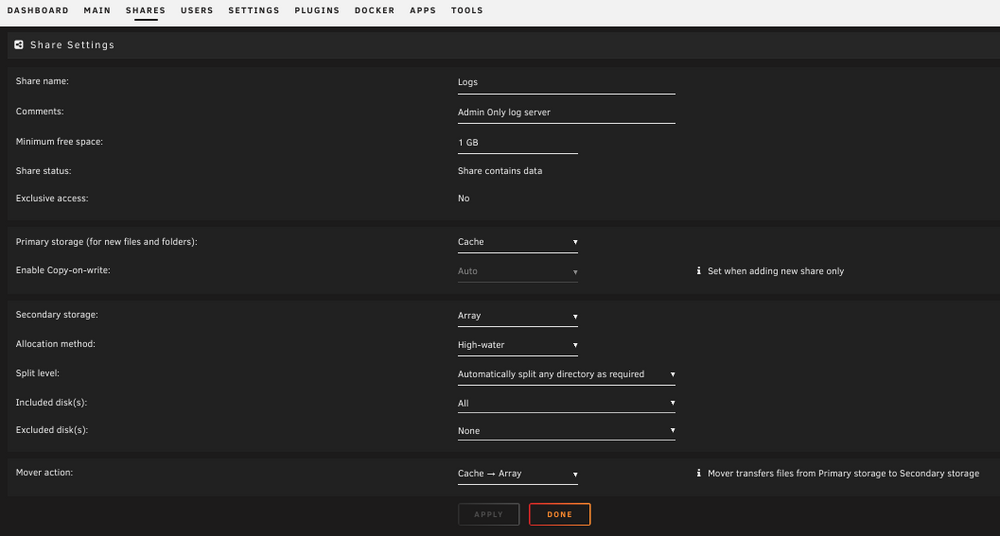
JorgeB, It saves to the cache pool (old btrfs pool), with the mover pushing files to the array.
-
Hi! This has been going on for a while, but I've just been living with it--but it needs to be fixed. When I try to stop the array, I'm getting stuck on the retry unmounting user share(s) message. When I look in the log, I get this: Jan 7 00:31:45 unServer emhttpd: shcmd (1843561): exit status: 1 Jan 7 00:31:45 unServer emhttpd: shcmd (1843563): /usr/local/sbin/update_cron Jan 7 00:31:45 unServer emhttpd: Retry unmounting user share(s)... Jan 7 00:31:50 unServer emhttpd: shcmd (1843564): /usr/sbin/zfs unmount -a Jan 7 00:31:50 unServer emhttpd: shcmd (1843565): umount /mnt/user Jan 7 00:31:50 unServer root: umount: /mnt/user: target is busy. Jan 7 00:31:50 unServer emhttpd: shcmd (1843565): exit status: 32 Jan 7 00:31:50 unServer emhttpd: shcmd (1843566): rmdir /mnt/user Jan 7 00:31:50 unServer root: rmdir: failed to remove '/mnt/user': Device or resource busy and when running lsof: root@unServer:~# lsof | grep /mnt/user tail 7695 root 1w REG 0,39 139995 10414574175015971 /mnt/user/Logs/unServer-syslog-2024-12-29T043441 Now, I have a Logs directory set to cache -> disk that I use as the log server storage location for other network devices, but it seems that pointing the unraid syslog at that directory is killing me here. I don't want to pile logs onto the Flash, so what's the best way to handle this issue? Manually stopping the array with a kill command works, but I need the shutdown process to work when triggered by the UPS. Much appreciated!! J
-
I'm seeing this same thing as well. I was traveling for a while, and don't really know exactly when this started. I've tried to re-add the directories, and plex appears to initiate a directory scan, but when the server library is opened, it gives the 'something went wrong' page.
-
I'm interested in preventing this, as I have a 2x mismatched SSD cache pool w/ btrfs that has my docker volume on it. Any tipper for success for folks in this position? Edit: Unregard. Answer was way too close the top of the 6.9.0 release notes. Josh
-
Haha, thanks Squid. Now what excuse am I supposed to use to be on the computer on the weekend? Thanks again, J
-
saarg, I think you were correct that this wasn't a calibre issue. I removed and had similar issues trying to reload. I'm not 100%, but I think some IPs from the CDN that relays some of the calibre images popped onto a threat list, so a just few of the streams incoming were getting hit by my IDS. Thanks for the help! J
-
OK--have force updated, but will give the manual remove/replace a try. Thanks!
-
Ok, so mine is stuck on 4.13 and 4.20.0 is current. I am on the latest Docker, so I'll try a different forum. The only reason I put it here is that this is the only docker I seem to consistently have this issue with (out of 8).
-
saarg, Yes--thanks for pointing that out. Sadly, it will run through the process, restart the container, but will still be on the old version and will be marked as requiring an update. I've seen this with other containers, occasionally, however with this container the downloads haven't successfully completed in several months, with weekly attempts. unRaid will show the same indications as you've pointed out whenever an image within an update doesn't completely download, but I've never had another docker fail consistently like this. So, I think something other than just a single bad update/download is at issue here. J
-
I really like this docker for my book library needs. That said, I've been stuck on 4.13 for several months, as all the docker update attempts within unRaid fail on this docker, with one or two components freezing below 100%. I have this problem intermittently with the linuxserver unifi controller docker, but no others. This (calibre) docker hasn't completed a pull in many months. I've checked my firewall/IDS logs and nothing is being blocked during the update process. There is alwyays one or two files that do not completely download. Any ideas on this one? The update always looks something like the following: Pulling image: linuxserver/calibre:latest IMAGE ID [1436953874]: Pulling from linuxserver/calibre. IMAGE ID [6b59f4d42254]: Pulling fs layer. Downloading 97% of 25 MB. IMAGE ID [875de62a65e8]: Pulling fs layer. Downloading 100% of 275 B. Verifying Checksum. Download complete. IMAGE ID [7af6c5f56812]: Pulling fs layer. Downloading 100% of 13 MB. Verifying Checksum. Download complete. IMAGE ID [c7bd6e473c84]: Pulling fs layer. Downloading 100% of 4 KB. Verifying Checksum. Download complete. IMAGE ID [862cf5bf9c91]: Pulling fs layer. Downloading 100% of 94 MB. Verifying Checksum. Download complete. IMAGE ID [9ee8bb076a0e]: Pulling fs layer. Downloading 11% of 4 KB. IMAGE ID [7ea0e6f90ec9]: Pulling fs layer. Downloading 100% of 616 KB. Verifying Checksum. Download complete. IMAGE ID [cdc6542d74b6]: Pulling fs layer. Downloading 100% of 103 MB. Verifying Checksum. Download complete. IMAGE ID [8d9f46996599]: Pulling fs layer. Downloading 100% of 2 KB. Verifying Checksum. Download complete. IMAGE ID [ecc00f389bd3]: Pulling fs layer. Downloading 100% of 185 MB. Verifying Checksum. Download complete. IMAGE ID [85b4fae8406b]: Pulling fs layer. Downloading 100% of 653 B. Verifying Checksum. Download complete. TOTAL DATA PULLED: 421 MB Stopping container: calibre Successfully stopped container 'calibre' Removing container: calibre Successfully removed container 'calibre' Command:root@localhost:# /usr/local/emhttp/plugins/dynamix.docker.manager/scripts/docker run -d --name='calibre' --net='bridge' -e TZ="UTC" -e HOST_OS="Unraid" -e 'GUAC_USER'='XXXXX' -e 'GUAC_PASS'='xxxxxxxxxxxxxxx' -e 'PUID'='99' -e 'PGID'='100' -p '8097:8080/tcp' -p '8098:8081/tcp' -v '/mnt/user/Kindle_Library/':'/books':'rw' -v '/mnt/user/Kindle_Library/0. Import/':'/import':'rw' -v '/mnt/user/appdata/calibre':'/config':'rw' 'linuxserver/calibre' 9xxxxxxxxxxxxxxxxxxx The command finished successfully!
-
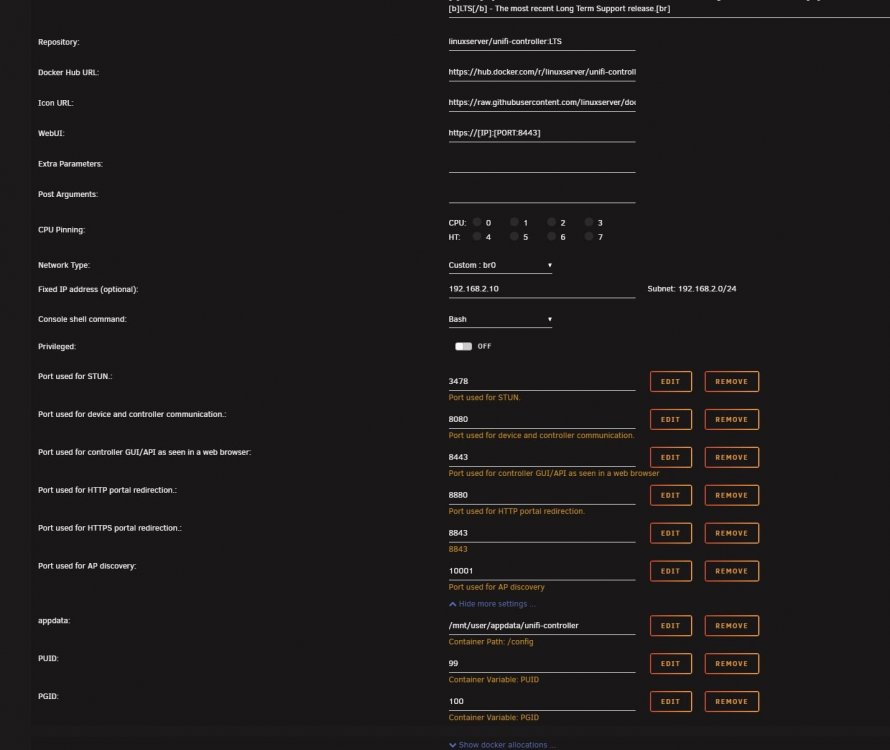
Hello, I have a weird docker-ism where my docker always shows that I'm in need of an update. The docker install is on 5.6.42. I can pull the update, but on next check, it will always say I need to pull a new version. Weird. It's not a big deal, but I've attached my docker settings and the "header" on the docker summary page. Thanks guys--if you have a free minute or know what causes this, I'd appreciate the insight! Josh PS: I have a similar cert issue that dorgan's having, except I can manually override the Chrome objections and go to the site. Not sure how to get a properly signed cert from the IP address I have the docker on like I do with the main unRaid server site.

-
Hello all! New to the world (and frustration) of Unifi. I'm experimenting with upgrading off of LTS, and attempted ijuarez's method posted in March. Every time I attempt to restore my backup file from 5.6.42 onto either 5.8 or 5.9, I get an error saying that the uploaded file is "newer" than the current controller version. Any known workarounds? Thanks! J
-
Is anyone using this with Jackett? I cannot for the life of me get it to work. I have the latest binhex/arch-medusa running (rebuilt from my Sickrage media, but not database). This worked fine, and things were up and running. My downloader is deluge-VPN, which I've always gotten to work via WebUI. Deluge also looks a a folder /downloads/jackett/ for torrents. It seems that Medusa is passing the request just fine to Jackett, but can't deal with what it gets back. Jackett has a "black hole" setting, but it doesn't actually seem to put anything in there on normal requests, just manual downloads that I tell it to put there. Apologies in advance for the jpg spam, but I'd really like to figure out why Jackett isn't pushing the torrent or magnets back to Medusa in a way that can be passed to deluge. Thanks to anyone with enough insomnia to look at this one. As I look over the stuff, I'm wondering if the issue has something to do with medusa not handling the magnet links well. That reminds me of some SR issues I think I had before, but I can't remember that cause/solution. Edit: Replying to myself here--It was a medusa side issue that they've fixed by adding explicit Jackett providers. Sadly you can't treat all of Jackett as one provider, and have to configure each separately, but it's working with Jackett. Thanks! josh


