gshlomi
Members
-
Joined
-
Last visited
Everything posted by gshlomi
-
How do I incorporate it into the plugin installation process ? I'm installing using Community Apps... Thanks Copy the .txz file to the folder /packages on your flash disk (you need to create the folder if not existing). Afterwards you can do an installation of the plugin and it will recognize the presence of the .txz file. Thanks. That did the trick...
-
How do I incorporate it into the plugin installation process ? I'm installing using Community Apps... Thanks
-
Looks like the download site isn't reachable from your location, perhaps retry later. Trying to access http://mirrors.slackware.com/slackware/slackware64-14.1/slackware64/a/inotify-tools-3.14-x86_64-1.txz manually, I'm getting redirected to http://mirror.bjtu.edu.cn/slackware/slackware64-14.1/slackware64/a/inotify-tools-3.14-x86_64-1.txz, getting a 404. Is there a way to receive the files from a specific mirror or something?
-
Can't install the plugin: plugin: installing: https://raw.github.com/bergware/dynamix/master/unRAIDv6/dynamix.file.integrity.plg plugin: downloading https://raw.github.com/bergware/dynamix/master/unRAIDv6/dynamix.file.integrity.plg plugin: downloading: https://raw.github.com/bergware/dynamix/master/unRAIDv6/dynamix.file.integrity.plg ... done plugin: downloading: http://mirrors.slackware.com/slackware/slackware64-14.1/slackware64/a/inotify-tools-3.14-x86_64-1.txz ... failed (Invalid URL / Server error response) plugin: wget: http://mirrors.slackware.com/slackware/slackware64-14.1/slackware64/a/inotify-tools-3.14-x86_64-1.txz download failure (Invalid URL / Server error response
-
Please add reply #45 for the OP. Search for the problem for over an hour now, which appeared to be me using a bond0 on my server. Thanks
-
Sparklyballs and I have talked about this at length, the long and the short of it is this. Owncloud have broken their database interface requiring a change to the MariaDB/MySQL setup, unfortunately the change that is required will affect every other database on the system. Changing MariaDB to be compatible with a fault within Owncloud just seems fundamentally wrong and is not something we will be doing, as this may have deleterious effects on other programs which use MariaDB. At the present time, you could use an older version of MariaDB like Sparklyballs version with webmin built in, which is what I'm currently doing, and if you want you could still run the up to date LS.io version on a different port for every other application. Sparklyballs is also I know looking at another possible solution which we are still testing.... Are you suggesting running multiple instances of the container, one for each application? Haven't thought of this option, actually...
-
Take a look at https://github.com/owncloud/core/issues/16008#issuecomment-98844031. Not a db expert myself, but it seems the better setting depends on the usage scenario. BTW - is there a guide to replication between mariadb containers on different servers?
-
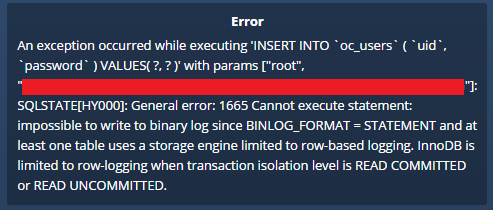
ok, following https://doc.owncloud.org/server/8.0/admin_manual/configuration_database/linux_database_configuration.html#db-binlog-label and https://github.com/owncloud/core/issues/16008#issuecomment-98539419, I've managed to configure my ownCloud installation relying on Linuxserver's MariaDB container. Maybe you should consider changing the default of the container installation ? Thanks
-
Already seen this link, but it works fine with needo's container (again, starting from scratch)...
-
Hello. Trying to setup ownCloud to work with this container. When configuring owncloud for the first time, Im getting the attached error. I've used needo's MaridaDB container before, now tried starting fresh with LinuxServer's version. Any help would be appreciated.
-
Got the same problem, have been following silently this thread waiting for a solution. For now, I hope someone will post a way to view the size of the different containers within the docker image. AFAIKT, cAsvisor isn't reporting sizes correctly...
-
-
What I meant was, that sensors-detect didn't find any ITE chip, so does it mean that the driver is not included in unRAID? Thanks
-
Driver support is built-in into unRAID itself. When you run sensors-detect, it will display the required driver(s) and these can be loaded using the modprobe command. If no proper driver is present in your system, you may want to ask LT to include it, they have done this in the past. Got the same MB. After.manually installing Perl and running sensors-detect, it only detects "coretemp". Does it mean the needed driver isn't built into unRAID?
-
trying to install the server plugin, getting the following: plugin: installing: https://raw.githubusercontent.com/petersm1/openvpnserver/master/openvpn_server_x64.plg plugin: downloading https://raw.githubusercontent.com/petersm1/openvpnserver/master/openvpn_server_x64.plg plugin: downloading: /tmp/plugins/openvpn_server_x64.plg ... done Warning: simplexml_load_file(): /tmp/plugins/openvpn_server_x64.plg:1: parser error : Document is empty in /usr/local/emhttp/plugins/dynamix.plugin.manager/scripts/plugin on line 188 Warning: simplexml_load_file(): in /usr/local/emhttp/plugins/dynamix.plugin.manager/scripts/plugin on line 188 Warning: simplexml_load_file(): ^ in /usr/local/emhttp/plugins/dynamix.plugin.manager/scripts/plugin on line 188 Warning: simplexml_load_file(): /tmp/plugins/openvpn_server_x64.plg:1: parser error : Start tag expected, '<' not found in /usr/local/emhttp/plugins/dynamix.plugin.manager/scripts/plugin on line 188 Warning: simplexml_load_file(): in /usr/local/emhttp/plugins/dynamix.plugin.manager/scripts/plugin on line 188 Warning: simplexml_load_file(): ^ in /usr/local/emhttp/plugins/dynamix.plugin.manager/scripts/plugin on line 188 plugin: xml parse error EDIT: n.m. - internet problems on my end downloaded 0 bytes file... EDIT2: OK, spoke too soon. Plugin installed successfully, but "Install Easy-RSA" doesn't work. Can't follow to status messages, as they disappear too quickly. Is there a log I can check for the error ? Thanks
-
? Any problems with port 3838? I always map the used ports on my templates, so users can opt between the security of bridge network or the easiness of host network. Not a problem, but in the old versions of the docker is was only 5555 and 8888. Now I've noticed 3838 is added. Can you point me to an explanation about bridge vs host ? What is your recommendation ? If I use bridge with specific ports, should I port forward the relevant ports at my router to my unRAID box ? Thanks Port 3838 is LAN pear discovery. I run as bridge with port 5555 mapped on my router. I don't like UPnP because it's fundamentally insecure. Thanks
-
? Any problems with port 3838? I always map the used ports on my templates, so users can opt between the security of bridge network or the easiness of host network. Not a problem, but in the old versions of the docker is was only 5555 and 8888. Now I've noticed 3838 is added. Can you point me to an explanation about bridge vs host ? What is your recommendation ? If I use bridge with specific ports, should I port forward the relevant ports at my router to my unRAID box ? Thanks
-
?
-
Hi. Thanks for your great work. Just wondering why did you add port 3838:udp to the btsync docker ? And why use bridge mode instead of host+upnp+random ports ? Thanks
-
Can you post the output for these? attached fan_input.txt pwm.txt
-
Please post the result of this command: find -L /sys/class/hwmon/ -maxdepth 5 -iname "pwm[0-9]" 2>/dev/null Here you go: /sys/class/hwmon/hwmon1/device/pwm1 /sys/class/hwmon/hwmon1/device/pwm2 /sys/class/hwmon/hwmon1/device/pwm3 Those are the three possible pwm controls from my it87 board. Ok, I need one last command output: find /sys/devices -iname "hwmon[0-9]" -exec echo {} \; -exec ls -la {} \; /sys/devices/pci0000:00/0000:00:18.3/hwmon/hwmon0 total 0 drwxr-xr-x 3 root root 0 Mar 2 19:57 . drwxr-xr-x 3 root root 0 Mar 2 07:35 .. lrwxrwxrwx 1 root root 0 Mar 2 08:10 device -> ../../../0000:00:18.3 -r--r--r-- 1 root root 4096 Mar 2 08:10 name drwxr-xr-x 2 root root 0 Mar 2 16:33 power lrwxrwxrwx 1 root root 0 Mar 2 07:35 subsystem -> ../../../../../class/hwmon -r--r--r-- 1 root root 4096 Mar 2 08:10 temp1_crit -r--r--r-- 1 root root 4096 Mar 2 08:10 temp1_crit_hyst -r--r--r-- 1 root root 4096 Mar 2 08:10 temp1_input -r--r--r-- 1 root root 4096 Mar 2 08:10 temp1_max -rw-r--r-- 1 root root 4096 Mar 2 07:35 uevent /sys/devices/platform/it87.656/hwmon/hwmon1 total 0 drwxr-xr-x 3 root root 0 Mar 2 19:57 . drwxr-xr-x 3 root root 0 Mar 2 16:34 .. lrwxrwxrwx 1 root root 0 Mar 2 16:34 device -> ../../../it87.656 drwxr-xr-x 2 root root 0 Mar 2 16:34 power lrwxrwxrwx 1 root root 0 Mar 2 16:34 subsystem -> ../../../../../class/hwmon -rw-r--r-- 1 root root 4096 Mar 2 16:34 uevent There you go, hope that helps. Got the exact same problem and the exact same results running the commands... Any chance for a solution? Thanks
-
I think I've missed something. What is the benefit of installing Powerdown and how is it different then the default operation of unRaid ? Sorry for hijacking this thread. Will gladly move the discussion somewhere else if needed...
-
Hi. Now that the APCUPSD plugin is part of the core of unraid, is it still needed to install the powerdown plugin ? Thanks
-
Can you explain what to do so it will continue working after a system restart ? Thanks
-
I'm receiving the following email notification everyday at 4:40: Subject - " cron for user root /usr/bin/run-parts /etc/cron.daily 1> /dev/null" Text - " error: skipping "/var/log/apcupsd.events" because parent directory has insecure permissions (It's world writable or writable by group which is not "root") Set "su" directive in config file to tell logrotate which user/group should be used for rotation. error: skipping "/var/log/docker.log" because parent directory has insecure permissions (It's world writable or writable by group which is not "root") Set "su" directive in config file to tell logrotate which user/group should be used for rotation. error: skipping "/var/log/syslog" because parent directory has insecure permissions (It's world writable or writable by group which is not "root") Set "su" directive in config file to tell logrotate which user/group should be used for rotation. error: skipping "/var/log/vsftpd.log" because parent directory has insecure permissions (It's world writable or writable by group which is not "root") Set "su" directive in config file to tell logrotate which user/group should be used for rotation. error: skipping "/var/log/wtmp" because parent directory has insecure permissions (It's world writable or writable by group which is not "root") Set "su" directive in config file to tell logrotate which user/group should be used for rotation. error: skipping "/var/log/btmp" because parent directory has insecure permissions (It's world writable or writable by group which is not "root") Set "su" directive in config file to tell logrotate which user/group should be used for rotation." Using ver 6b12 with a few plugins. Any idea where to start troubleshooting? Thanks