





chris1259
Members
-
Joined
-
Last visited
Everything posted by chris1259
-
Renamed \\ServerName\flash\config\network.cfg to network.cfg.old, updated from v6.7.0 to v6.7.2 and rebooted. After 4 days it appears this has fixed the issue. If the issue returns i will report back. THANK YOU!
-
I noticed that the default setting for this plugin is "Enable Recycle Bin for Deleted Files? = No", which defeats the whole purpose of having it installed. After 2 days of it set to "No", the directory replication is still there. Even after reboots. This is not a big deal and might sort itself out in future releases of the plugin or unRaid. Thanks for help everyone.
-
Settings changed to default and server rebooted. I will wait 5 days and see what happens. Thanks.
-
I tried that too. On both X:\.Recycle.Bin and X:\.Recycle.Bin\.Recycle.Bin. So i removed the plugin and rebooted. But the directory is still there. This does not happen on unRaid v6.7.0 I am left with the directory 41 times --> X:\.Recycle.Bin\.Recycle.Bin\.Recycle.Bin\.Recycle.Bin\.Recycle.Bin\.Recycle.Bin\.Recycle.Bin\.Recycle.Bin\.Recycle.Bin\.Recycle.Bin\.Recycle.Bin\.Recycle.Bin\.Recycle.Bin\.Recycle.Bin\.Recycle.Bin\.Recycle.Bin\.Recycle.Bin\.Recycle.Bin\.Recycle.Bin\.Recycle.Bin\.Recycle.Bin\.Recycle.Bin\.Recycle.Bin\.Recycle.Bin\.Recycle.Bin\.Recycle.Bin\.Recycle.Bin\.Recycle.Bin\.Recycle.Bin\.Recycle.Bin\.Recycle.Bin\.Recycle.Bin\.Recycle.Bin\.Recycle.Bin\.Recycle.Bin\.Recycle.Bin\.Recycle.Bin\.Recycle.Bin\.Recycle.Bin\.Recycle.Bin\.Recycle.Bin I then reinstalled the plugin and rebooted again. But the issue remains. It's not a big deal, it's just a bug somewhere.
-
I emptied the recycle bin which had about 15gb and 71K+ files in it, rebooted the server, but it's still there.
-
My version: 2019.04.08 I am also having this issue. I have seen this in the past and a reboot usually fixes the problem. I never brought it up as it happened rarely. As far as i can tell this happened after i upgraded unRaid to v6.7.2 from v6.7.1. I also use robocopy to sync data from 1 server to another, but i have always excluded the .Recycle.Bin directory. I wanted to ask if anyone knows a fix before i uninstall and reinstall the plugin. Thanks.
-
Thanks. I will try that after i re-run the upgrade and report back the results.
-
After 6 days the server is still stable on v6.7.0. Something that i can't track down in v6.7.1 or v6.7.2, network related, broke for me.
-
Created a new v6.7.0, copied my config onto the USB, but all issues remain. The only plug-in that was upgraded since June 18th, 2019 was Community Applications and i doubt that's the issue. There must be a hardware issue with the machine. remove host keys from C:\\Users\\Administrator/.ssh/known_hosts and now i can connect to the web GUI and ssh to the machine again. I will report back next week if everything is still working.
-
On July 8th at 1:51pm i could no longer ssh (password not accepted) to the server or log in at the physical machine. I still could not connect to the web GUI and was starting to notice weird routing issues. I power cycled all switches and the router but it did not help. I rebooted the server into GUI mode successfully, but could not connect in any way remotely. At this point i reverted back to v6.7.1. At first i was able to connect to the web GUI but it stopped working after a few mins. I can't ssh (password not accepted) either. I was able to log in at the web GUI on the physical machine. The VM's are pingable, but i can't RDP to the Windows VM. I can ssh to the Linux VM. v6.7.0 was rock solid for me. It was up for 42+ days before i upgraded. I will try downgrading to v6.7.0 as this may be a bug in an upgraded LAN driver.
-
Upgraded 2 machines from v6.7.0 to v6.7.1, then v6.7.2. One machine is fine but the other will not allow connections to the web GUI unless i reboot. This started happening in either v6.7.1 or v6.72. The first time was on June 28th, 2019 observed about 12:45pm. The second happened July 8th, 2019, 6 days after last reboot, observed around 8:39am. The first time this happened (June 28th) i could not log into the server at all. Not through the web GUI, ssh or at the physical machine. Yet all dockers, VM's and other services, such as samba, continued to work. After the reboot i grabbed diagnostic and enhanced syslogs from the tools menu in the GUI. The second time (July 8th) i could log in via ssh, or at the physical machine, but the web GUI will not load. Again, all dockers, VM's and other services are working. Before i reboot this machine, i wanted to know what service i should be looking for. Any commands that i know to check running services come back as "command not found".
-
I very recently tested both Q35 and i440 Windows 10 Ent x64 1809 VM's and found i440 to be just a little bit faster.
-
I ended not moving the dockers and would suggest having a tab open on each server to transfer the settings over manually. All the attempts to copy over the appdata directory were unsuccessful as i didn't want to remove the cache drive from the server. So no matter what i tried, i was struck with symbolic link errors, rights errors, copy errors, you name it. But thanks for trying to help.
-
Got it. I will report back the steps i took to get it working.
-
I didn't want to assume that everyone had "user" in their path.
-
i was using %username% as a variable in this case.
-
That's what i was hoping for. I see this /mnt/%username%/appdata/PlexMediaServer/. I will try what you suggested.
-
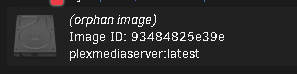
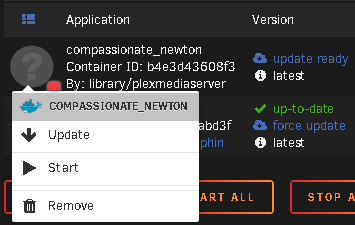
I made some headway. Open a terminal and change to the dir you want to save the image. # Display a list of installed docker images. docker ps # Use the name of the docker image and zip it up. docker export PlexMediaServer | gzip > PlexMediaServer.tar.gz # Copy it to the new server. # Open a terminal and change to the directory where you saved the tar.gz file on the new server. # Import the docker image. The name, plexmediaserver, must be in lower case. zcat PlexMediaServer.tar.gz | docker import - plexmediaserver Now checking the Docker tab in unRaid i see this. # Launch the docker container. docker run -i -t plexmediaserver /bin/bash But there is no way to connect to it or edit it.

-
Both servers are unRaid v6.6.6 Is this possible? Is everything needed contained within the docker image? Or are there additional directories/files that also need to be transferred. Thank You.

