vurt
Members
-
Joined
-
Last visited
Everything posted by vurt
-
The readme has instruction to update via command line but I would never have known to use that in this instance since I didn't know if I was experiencing the docker update error and CA reports all dockers are up to date. Also, I looked on docker hub here https://hub.docker.com/r/emby/embyserver/ when you suggested I check and confirm with the build logs. The closest thing I found was the Build Details tab and I found this: https://hub.docker.com/r/emby/embyserver/builds/bwpnuzq3qvdelxtvfvkevn5/ but didn't find what would look like an Emby version number. Clicking on the Github link brought me to Github where the latest commit was 9 months ago. So what else was a 10-day unRAID amateur suppose to do? But I'm glad Msan experienced the same thing and made that suggestion, seems like that's the point of having a forum!
-
Thank you, that did the trick, I'll have to remember that!
-
I'm new to Emby and have a question about update. I read the above posts about docker hub issues and I don't know if it's the same issue since I don't have enough Emby experience. I'm currently seeing: Version 3.0.8300.0 A new version of Emby Server is available! Version 3.0.8400 is now available for download. Please shutdown the server and update manually. With Restart and Shutdown buttons at the bottom. I've clicked on Restart but the update didn't happen so. From the Docker page of unRAID's UI, I've also clicked on Check for updates and it's telling me all dockers are fine. Am I suppose to update manually as the notice indicates? Where will I get instructions for that? Or is this the docker hub issue and auto-update will happen eventually and I should leave this alone?
-
Ah, got it! Thanks for your patience, I'll look into that!
-
Yeah I meant I clicked on "Remove" and removed that setting completely but it still didn't work. No worries I appreciate everyone's contribution to helping me with this, especially when it's kinda off-topic. Thank you for your assistance, it was more than I expected!
-
I tried removing the /storage path completely but I don't think that worked. I still have an MKV file.
-
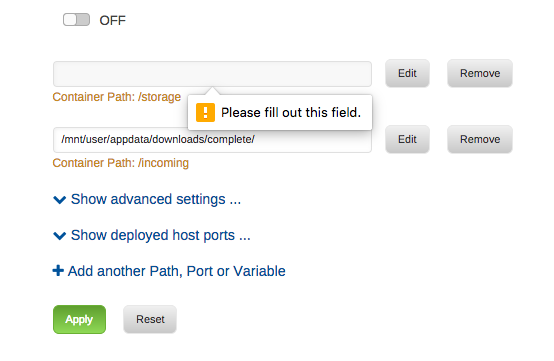
Sorry I was looking on the docker hub page, just went back to the github page and saw what you were referring to. I tried filling in the /incoming path and leaving the storage path blank but it wouldn't let me apply the setting: Should I use some kinda notation in the /storage path to indicate current director since the page won't let me leave it blank?
-
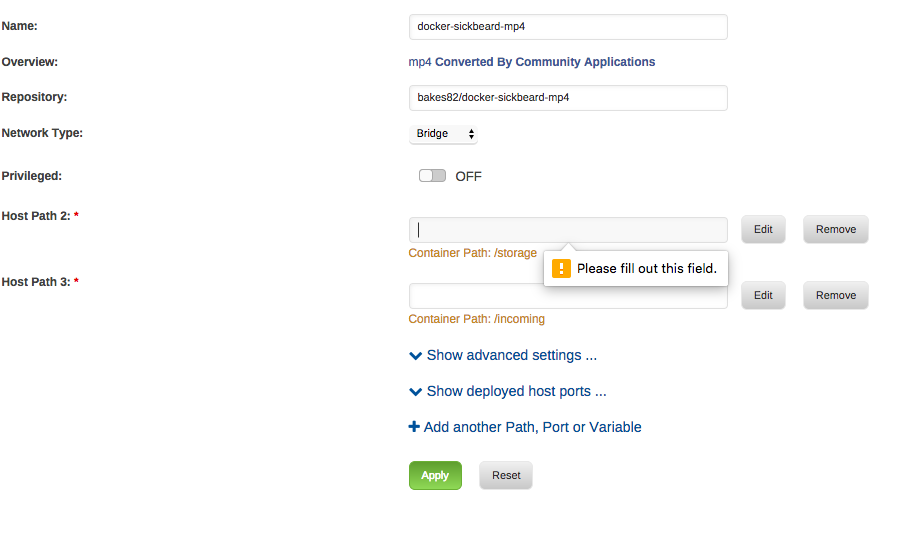
Thanks for jumping in! Where did you see the help? The docker pages are pretty bare, I didn't see any help or readme. I'm using https://hub.docker.com/r/bakes82/docker-sickbeard-mp4/ . When installing the docker, I tried to leave the directories blank but the interface wouldn't let me.
-
Thank you! I didn't know to search there and didn't know to get CA to search Docker Hub. I found the docker and installed it, seems to do the conversion job except I can't get it to leave the new file where it was found. I've PMed the developer. Thanks again!
-
I'd be overly ambitious if I tried! Which two containers are you referring to? The one I've found is Bjonness406-convert2mkv.
-
It's suppose to work with Sonarr and there are setup instructions on the github page. But I don't know how those instructions apply in an unRAID context. It also requires PIP Package installation and FFMPEG and FFPROBE binaries and I don't know how or where they should be installed in unRAID.
-
I'm completely new to this so pardon me if I'm misunderstanding. Are you saying mp4_automator is not a Docker and cannot be installed? So there's no way to get this running on unRAID? Is there something else we can do in unRAID that does the same thing, auto-convert MKV to MP4?
-
Please make a issue on github. And I'll look into it tomorrow. Thanks! Issue posted along with this comment: it might make sense to have NZBGet / SABnzbd support this rather than each PVR application. Ultimately I'm looking for a way to automate the remux process to help out my processor and limit transcoding requirements for Plex. Where that lives, I'm not sure I care too much (personally). hi, I was wondering if this was ever integrated in one or the other way? right now I'm trying to find a docker for it, but till now without much success. since I have not seen anything since my post I decided to look into it myself and came up with the attached script which is installing all dependencies for mp4_automator. currently I'm using it with a local build docker file based on need's sonar dockerfile. also it still require the manual download of the scripts itself. I'm sure the specialists here could fine tune the script. anyhow just in case someone is interested in integrate it to the docker. This came up in a search. I just got Sonarr and SAB running and I'm looking for a way to auto convert MKV to MP4. Is there an easier way to do this? Has sickbeard_mp4_automator been implemented in any of the Sonarr or SAB dockers?
-
Thank you for your quick reply! I seem to have figured it out enough for it to work. Requested a TV episode from Sonarr, that triggered SAB to download it. After the download finished, Sonarr moved the file into its sub-folder. Is there a way for SAB to do auto-convert an MKV file to MP4? Or a way for Sonarr to do that?
-
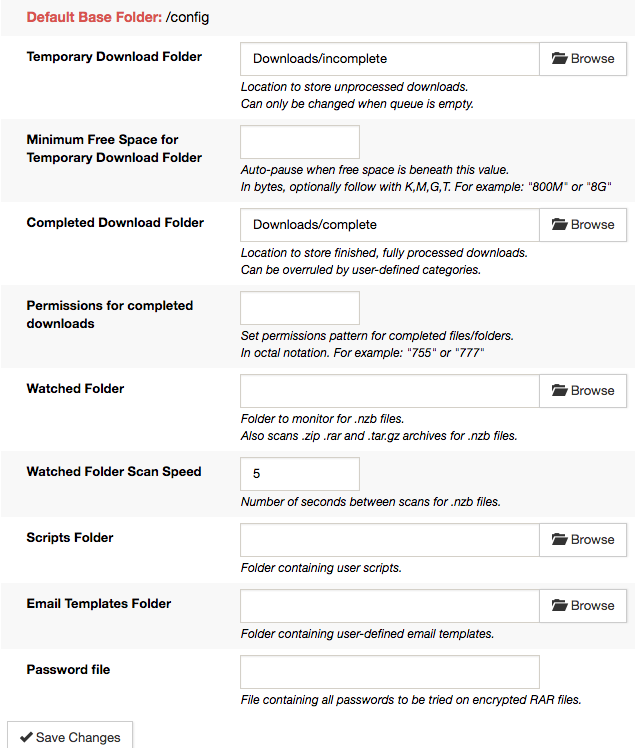
Hi everyone. I've spent about 3 days reading up and trying to get SAB/Sonarr running on unRAID and I'm still lost. The more I read the more confused I'm getting. These are the mappings I have: My SAB Folder settings says the base folder is /config, and Temporary Download Folder is "Downloads/incomplete". How does this relate to my mappings? Do I need to change the above Folder settings? Under Categories, what do I use for Folder/Path?