vurt
Members
-
Joined
-
Last visited
Everything posted by vurt
-
Sorry @binhex. "/data/_incomplete" is in the Web UI setting for Deluge. /torrent/ is the unRaid share, it's the container path for Deluge's /data/. Basically /data/ is mapped to /torrent/ on unRAID and the "_incomplete" and "completed" folder structure is already set up and working from the previous version of Deluge. These all work with the previous Deluge, but I can't tell if Deluge 2.0.3 is using them (per your suggestion that Deluge 2 doesn't know their locations) since the downloads aren't happening.
-
Hi @binhex, thanks for suggesting that. Those settings look normal from what I can tell. Inside Deluge, the folder is set to "/data/_incomplete". Inside the container, the container path for /data is set to "/mnt/user/torrent/" Both "_incomplete" and "_completed" folders are in /torrent/ from the previous version of Deluge. Permissions for "_incomplete" is 777. I tried to check Deluge's log from the console and this is what I get: sh-5.0# deluge -L warning Traceback (most recent call last): File "/usr/sbin/deluge", line 11, in <module> load_entry_point('deluge==2.0.3', 'gui_scripts', 'deluge')() File "/usr/lib/python3.7/site-packages/deluge/ui/ui_entry.py", line 143, in start_ui ui.start() File "/usr/lib/python3.7/site-packages/deluge/ui/gtk3/__init__.py", line 43, in start from .gtkui import GtkUI File "/usr/lib/python3.7/site-packages/deluge/ui/gtk3/gtkui.py", line 19, in <module> import gi # isort:skip (Required before Gtk import). ModuleNotFoundError: No module named 'gi'
-
Hi everyone. I updated Deluge to 2.0.3 and am trying to download torrents from 3 trackers (one of which is Ubuntu). I can see the swarm and according to one of the trackers, my connection is clear, it connects to me successfully. But the torrents stay at 0%, they're not downloading at all and I've left it the whole day. Each tracker is showing a few hundred (thousands for Ubutu) seeders. I then rolled back Deluge to "1.3.15_18_ge050905b2-1-04" and torrents download fine. I haven't changed any settings between the changes at all. I'm not using a VPN btw, just Deluge as a torrent client. Could updating to 2.0.3 affect writing permissions to the download directories? That's the only thing I can come up with. Can someone point me in a direction to troubleshoot this? TIA.
-
Wow new version 2 of Deluge doesn't let me torrent at all, had to roll back to 1.3 and lost all my seeding torrents.
-
I spoke too soon. The static DNS entry only works when I'm hardwired to the router. When I'm on WiFi, I run into the same problem again, router directing port 80 calls to its admin page instead of my webserver. 😕
-
Unfortunately I'm contracted to rent the router from the ISP. I've tried my previous Asus with the connection and I think it's too old to handle the speed. So I'm trying to make the best of the situation since I'm stuck with it and I can't afford a new router yet. Someone on SNBFORUMS suggested a static DNS entry in the router which I did and it works now.
-
Hi everyone. I had all my reverse proxying set up and working nicely with my old Asus RT-N66U router. But recently due to an ISP switch to gigabit connection, I now have to use a Smart / RG SR515AC router. I don't think this router supports NAT reflection or whatever it was that allowed me to access my-domain.net from within the home network. The reverse proxy works perfectly fine and my-domain.net works when I'm outside the network. I've spent three days on getting the router to do it but I might be SOL. And I've come here to find out if there are other options. Is there something I can do on the Nginx side or anything else that doesn't involve the router? I've read about editing my HOST file or running my own DNS server but seems overkill ...
-
In case anyone's setup is broken: https://emby.media/community/index.php?/topic/21888-emby-for-kodi/page-17#entry680481
-
I'm not sure why Bazarr thinks your tv shows are stored at /tv/tv shows/. What happens if you tried to add the path mapping for TV within Bazarr? You should get on Bazarr's Discord, that's what I did for help.
-
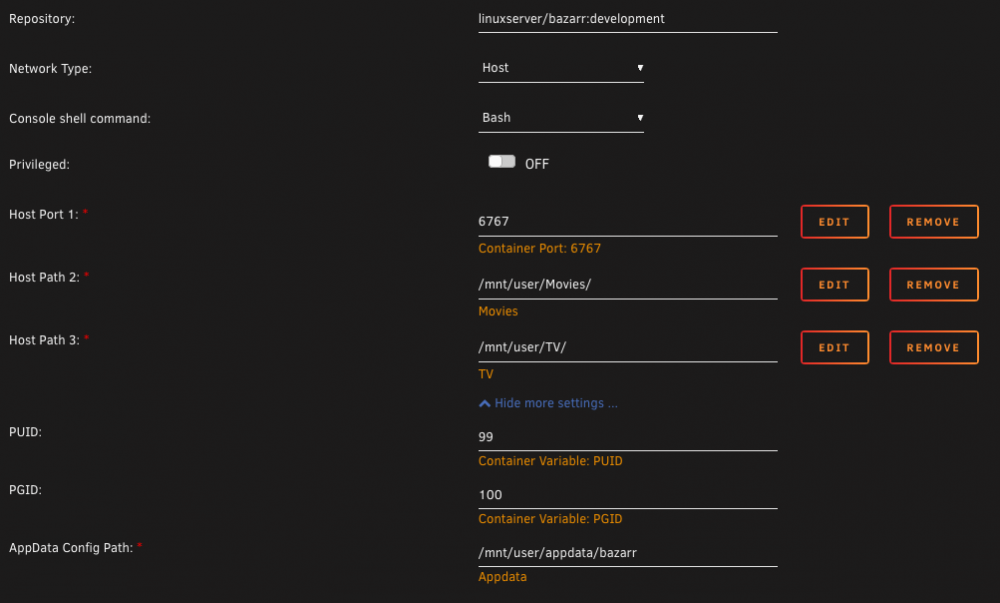
What errors are you getting? BTW the default template's Network Type isn't set and Bazarr won't start up. You need to manually set the "Network Type". Mine's at "Host" because I was trying out different things to troubleshoot, since it's working I haven't changed it. This is my docker config, I'm using the development branch.
-
<deleted>
-
Ok one of Bazarr's dev halali on Discord figured it out. I had to leave the path mappings EMPTY in Bazarr's settings. I'm really curious if anyone has ran into the same problem because all the Bazarr discussion I've found emphasized getting the paths mapped correctly. Is this doing double duty because the paths were already mapped in the docker setup?
-
I just noticed at the bottom of the unRAID WebUI (the "ticker), it still says "Array Started. Starting services..." after my unRAID has been up for 14 days.
-
I was talking to one of their devs on Discord and we were trying to find the bazarr/static folder but I don't see it in mine. All I have are /config, /db, and /log. Where is the /static folder? Maybe this is related to my earlier question.
-
Is this working for anyone? I installed the docker. The WebUI is accessible and I've set up the config, got reverse proxy working too. The Wanted list now shows 2,593 missing subtitles. But nothing is downloaded since last night. Tried a new docker install, tried to trigger it manually. Log shows: BAZARR Finished searching for missing subtitles. Check histories for more information. and History is empty. :: I went into the Wanted list and manually triggered searches for 3 episodes. Bazarr found them and I can see the SRT files on the server. But the WebUI still has the episodes in the Wanted list and Badge number shows the same. So it looks like Bazarr works when manually searching individual episodes but isn't recognizing the ones it found, and the bulk download doesn't seem to be working for me. bazarr(1).log
-
I only notice it because Firefox on a dark theme has the same issue when opening a new tab and some custom CSS in chrome fixes it. Thought the same thing in unRAID can be fixed with some CSS. But this is purely superficial and cosmetic, in the scheme of things!
-
I encountered the same problem as reported above in a few posts: Enabling a plug-in (webgui) in Deluge doesn't stick. Refreshing Deluge always show the plug-in as un-ticked.
-
Booted up unRAID after a year, updated twice smoothly. Always a bit trepidatious performing updates, thank you for the smooth transitions. On the black theme, the white header was surprisingly distracting, glad to have the option to customize it. When clicking on and changing between menu items on the header, there is a brief flash of white before the page loads. Would be nice if that can be removed because it's quite glaring on the black theme.
-
Hi, I noticed this warning in the log: nginx: [warn] could not build optimal proxy_headers_hash, you should increase either proxy_headers_hash_max_size: 512 or proxy_headers_hash_bucket_size: 64; ignoring proxy_headers_hash_bucket_size Are "proxy_headers_hash_max_size" and "proxy_headers_hash_bucket_size" set in the file proxy.conf? Should I set both values? That seems to be the common thing to do. I've seen values of "proxy_headers_hash_max_size 512" and "proxy_headers_hash_max_size 51200", same with "proxy_headers_hash_bucket_size 64" and "proxy_headers_hash_bucket_size 6400"—which should I use? Thank you
-
This seems to be working for me, give it a try. Only for CloudFlare.
-
I'm using the same docker. Could your issue be related to this: It looks like CloudFlare has changed their API and I'm trying to ascertain if this docker still works.
-
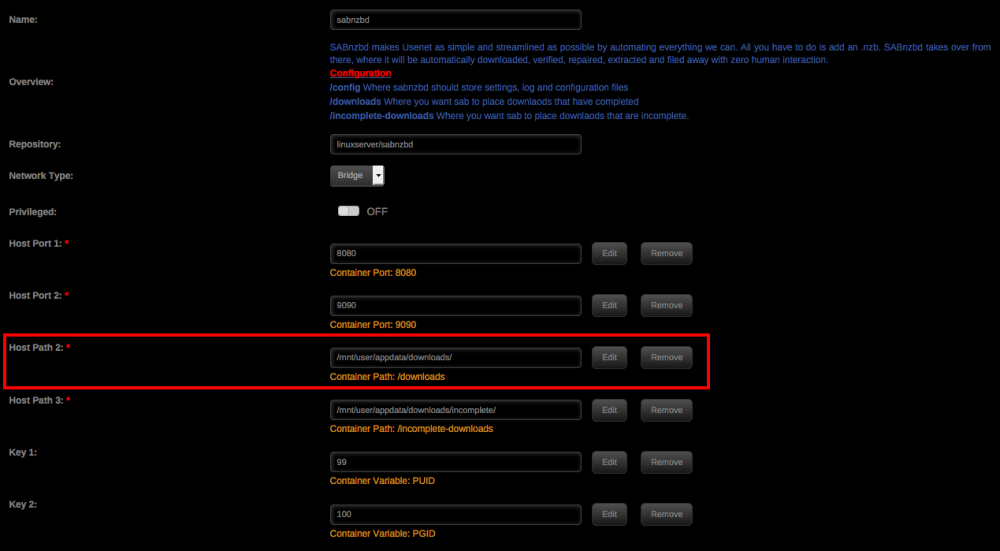
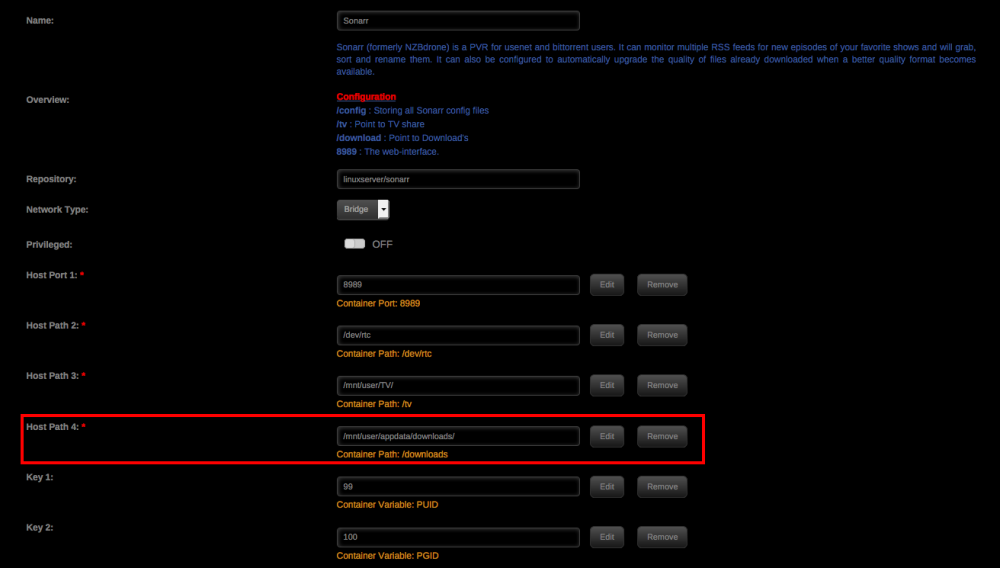
I'll take a stab before the experts show up. Sonarr > Settings > Download Client > Completed Download Handling > Is that enabled? Typically if Sonarr is not importing downloads in a new setup, it's because your download client is depositing finished downloads in one folder and Sonarr is looking for them in the wrong folder. Did you configure your Sonarr docker correctly? Sonarr's container path for /downloads should match your download client's container path for /downloads. Sabnzbd is my download client: My Sonarr:
-
If I have location ^~ /blog working, but I want to turn off auth_basic for a sub directory off /blog, eg location ^~ /blog/ghost how do I do that? Tried location ^~ /blog/ghost { auth_basic "Off"; } but it didn't work. I did turn off auth_basic for /blog, which got both /blog and /blog/ghost accessible, but I'm hoping to keep /blog restricted.
-
Not seeing any config for your wordpress? Is it /multicraft? What's the url for your wordpress, is it a sub domain or sub directory? Is your wordpress configured to work off a sub directory? I just managed to get Ghost blog kinda running and it took some research getting it to work with a sub directory instead of a sub domain and I eventually figure out part of the problem had nothing to do with reverse proxy at all and more to do with authentication. (I'm by no means an expert, I've done my reverse proxies with the same template you're using.)
-
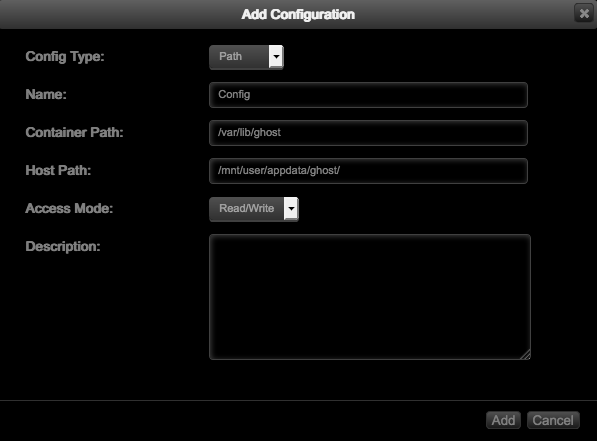
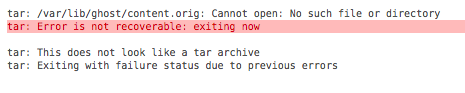
I'm not worried about losing data since this is a fresh install. I found a command that lets me change the "url" variable to "https://mydomain.net/vurtopia/"; restarted Ghost, and tried to access mydomain.net/vurtopia: Cannot GET // Trying to access http://local_ip:2368 gives me a similar error: Cannot GET / If I changed the "url" variable to "http://local_ip:2368/", I get the same half-loaded web page and login issue as before. On a separate note, I also tried mapping locations manually: but Ghost wouldn't even start: I googled a few web pages that talk about running Ghost docker behind a reverse proxy, but they seem to do it differently from what I copied from the forum here.