





vurt
Members
-
Joined
-
Last visited
Everything posted by vurt
-
Reading this, it looks like you can add a base url in ghost's config, and the config file I'm looking for is config.production.js which I found when I open up a terminal in the Ghost container: I ran a "cat config.production.json" and see this: { "url": "http://localhost:2368/", "server": { "port": 2368, "host": "0.0.0.0" }, "database": { "client": "sqlite3", "connection": { "filename": "/var/lib/ghost/content/data/ghost.db" } }, "mail": { "transport": "Direct" }, "logging": { "transports": [ "file", "stdout" ] }, "process": "systemd", "paths": { "contentPath": "/var/lib/ghost/content" } } I'm assuming "url": "http://localhost:2368/" is what I need to change, to "url": "https://mydomain.net/vurtopia/". But how do I edit the json file? There's no /ghost in /appdata where all my containers are. I usually FTP into unRAID, find the folders and files I need, and edit them. A bit lost in the CLI. There's no vi or text editor I can run.

-
Hi everyone, wondering if someone can help me out with reverse proxy for Ghost (blogging) docker that I managed to install from Docker Hub. I can access the blog locally at http://192.168.1.252:2368/. I'm trying to reverse proxy it like I've done with all my dockers. This is what I have, which semi-works: #Config for Ghost location ^~ /vurtopia { auth_basic "Restricted"; auth_basic_user_file /config/nginx/.htpasswd; include /config/nginx/proxy.conf; proxy_pass http://192.168.1.252:2368/; } (I'm just repurposing the above from what I have for Couchpotato.) I can get to the blog at mydomain.net/vurtopia but the page doesn't load fully, like its CSS is missing. And if I tried to visit mydomain.net/vurtopia/ghost to access the admin page, it brings me back to the login page after I log in.
-
Thank you!
-
Hi everyone. I'm seeing these errors that were discussed here. I read the setup guide from CHBMB but did not see anything about those headers. It seems like these headers are duplicated across letsencrypt-nginx and nextcloud, hence the error: The "X-XSS-Protection" HTTP header is not configured to equal to "1; mode=block". This is a potential security or privacy risk and we recommend adjusting this setting. The "X-Content-Type-Options" HTTP header is not configured to equal to "nosniff". This is a potential security or privacy risk and we recommend adjusting this setting. The "X-Robots-Tag" HTTP header is not configured to equal to "none". This is a potential security or privacy risk and we recommend adjusting this setting. The "X-Frame-Options" HTTP header is not configured to equal to "SAMEORIGIN". This is a potential security or privacy risk and we recommend adjusting this setting. Will commenting out the headers in letsencrypt-nginx fix the errors?
-
Finally got it to work. Thanks @dmacias and @CHBMB. I was making piecemeal edits and reverting them when they didn't work. These were the two key changes I had to make together: #Config for Nextcloud location ^~ /nextcloud { include /config/nginx/proxy.conf; proxy_pass https://192.168.1.252:448/nextcloud; } #root /config/www/nextcloud/; root /config/www; Between googling for solutions and making ad hoc edits separately at different times I don't think I got those two edits together at the same time if that makes sense. Hope this is it.
-
If I run nextcloud.server.com, I'll have to generate a new SSL cert in Letsencrypt? With the Letseyncrypt docker settings under "Subdomain(s)": www,nextcloud ? That didn't work for me This error appears in Nextcloud's error log: 2017/02/12 22:55:32 [error] 305#0: *1 FastCGI sent in stderr: "Primary script unknown" while reading response header from upstream, client: 172.17.0.1, server: _, request: "GET //index.php/login HTTP/1.0", upstream: "fastcgi://127.0.0.1:9000", host: "192.168.1.252:448" 2017/02/12 22:55:32 [error] 305#0: *1 FastCGI sent in stderr: "Primary script unknown" while reading response header from upstream, client: 172.17.0.1, server: _, request: "GET //index.php/login HTTP/1.0", upstream: "fastcgi://127.0.0.1:9000", host: "192.168.1.252:448" 2017/02/12 22:55:34 [error] 305#0: *4 directory index of "/config/www/" is forbidden, client: 172.17.0.1, server: _, request: "GET // HTTP/1.0", host: "192.168.1.252:448" 2017/02/12 22:55:34 [error] 305#0: *4 FastCGI sent in stderr: "Primary script unknown" while reading response header from upstream, client: 172.17.0.1, server: _, request: "GET // HTTP/1.0", upstream: "fastcgi://127.0.0.1:9000", host: "192.168.1.252:448" 2017/02/12 22:55:35 [error] 305#0: *6 directory index of "/config/www/" is forbidden, client: 172.17.0.1, server: _, request: "GET // HTTP/1.0", host: "192.168.1.252:448" 2017/02/12 22:55:35 [error] 305#0: *6 FastCGI sent in stderr: "Primary script unknown" while reading response header from upstream, client: 172.17.0.1, server: _, request: "GET // HTTP/1.0", upstream: "fastcgi://127.0.0.1:9000", host: "192.168.1.252:448" 2017/02/12 22:55:37 [error] 305#0: *8 directory index of "/config/www/" is forbidden, client: 172.17.0.1, server: _, request: "GET // HTTP/1.0", host: "192.168.1.252:448" 2017/02/12 22:55:37 [error] 305#0: *8 FastCGI sent in stderr: "Primary script unknown" while reading response header from upstream, client: 172.17.0.1, server: _, request: "GET // HTTP/1.0", upstream: "fastcgi://127.0.0.1:9000", host: "192.168.1.252:448" I think I figured it out differently. I think it's Nextcloud's security features against bruteforce attacks. I can get into server.com/nextcloud now. I added these lines: 'trusted_proxies' => array('192.168.1.252'), 'forwarded_for_headers' => array('HTTP_X_FORWARDED_FOR'), to my Nextcloud config: <?php $CONFIG = array ( 'trusted_proxies' => array('192.168.1.252'), 'forwarded_for_headers' => array('HTTP_X_FORWARDED_FOR'), 'memcache.local' => '\\OC\\Memcache\\APCu', 'datadirectory' => '/data', 'instanceid' => 'xxx', 'passwordsalt' => 'xxx', 'secret' => 'xxx/wUo', 'trusted_domains' => array ( 0 => '192.168.1.252:448', 1 => 'advurt.net', ), # 'overwrite.cli.url' => 'https://192.168.1.252:448', 'overwrite.cli.url' => 'https://advurt.net', 'overwritehost' => 'advurt.net', 'overwriteprotocol' => 'https', 'overwritewebroot' => '/nextcloud', 'dbtype' => 'mysql', 'version' => '11.0.1.2', 'dbname' => 'nextcloud', 'dbhost' => '192.168.1.252:3306', 'dbport' => '', 'dbtableprefix' => 'oc_', 'dbuser' => 'xxx', 'dbpassword' => 'xxx', 'logtimezone' => 'UTC', 'installed' => true, ); Letsencrypt: #Config for Nextcloud location ^~ /nextcloud { # include /config/nginx/proxy.conf; proxy_pass https://192.168.1.252:448/; } BUT now that I'm in Nextcloud, I have a new problem. I get a "This directory is unavailable" error:
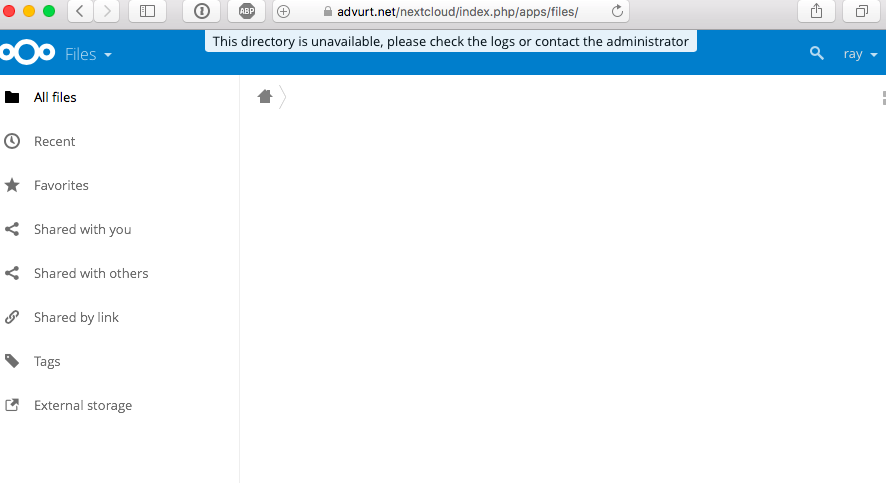
-
Currently have: #Config for Nextcloud location /nextcloud { proxy_pass https://192.168.0.190:448/nextcloud; } <?php $CONFIG = array ( 'memcache.local' => '\\OC\\Memcache\\APCu', 'datadirectory' => '/data', 'instanceid' => 'xxx', 'passwordsalt' => 'xxx', 'secret' => 'xxx', 'trusted_domains' => array ( 0 => '192.168.1.252:448', 1 => 'advurt.net', ), 'overwrite.cli.url' => 'https://advurt.net', 'overwritehost' => 'advurt.net', 'overwriteprotocol' => 'https', 'overwritewebroot' => '/nextcloud', 'dbtype' => 'mysql', 'version' => '11.0.1.2', 'dbname' => 'nextcloud', 'dbhost' => '192.168.1.252:3306', 'dbport' => '', 'dbtableprefix' => 'oc_', 'dbuser' => 'xxx', 'dbpassword' => 'xxx', 'logtimezone' => 'UTC', 'installed' => true, ); Getting a 504 Gateway Time-out. I don't understand the errors I'm getting. Initially it took forever to get to the login page, and then logging in would time out. Now I can't get to the login page at all, it simply times out. So my other reverse proxies are working, can't be Letsencrypt that's not working. It's either Nextcloud or the way I'm setting up the reverse proxy. Removing all the reverse proxy stuff from Nextcloud and Letsencrypt, gets me back into Nextcloud with 192.168.1.252:448. I'm just trying to let a friend download files from an unraid share. Is there a simpler option that uses a web interface without installing a client the way VPN would require?
-
I reinstalled MariaDB, and reinstalled Nextcloud. I've connected to Nextcloud at https://192.168.1.252:448/ and set up my admin account. Will attempt reverse proxy again.
-
Yup, after every change is saved, restarting the dockers and testing. EDIT: I'll uninstall and try a fresh start again. I don't think I'm doing anything out of the norm, this is really perplexing.
-
Just did, same file not found error, but no lag.
-
I am trying this but getting the same slow loading and time-out: #Config for NextCloud location ^~ /nextcloud { include /config/nginx/proxy.conf; proxy_pass https://192.168.1.252:444/; } I tried this, which is wrong but the site immediately returns me an error, no lag at all: #Config for NextCloud location ^~ /nextcloud { include /config/nginx/proxy.conf; proxy_pass https://192.168.1.252:444/nextcloud/; } Error: File not found The specified document has not been found on the server. You can click here to return to Nextcloud.
-
I started enquiring about this in the Letsencrypt thread but now think it might be a NextCloud issue. I've installed it and can confirm it runs fine when I access it via its internal IP of 192.168.1.252:444. But when I reverse proxy it with Letsencrypt, https://server.com/nextcloud/ takes a very long time to open. And when it finally opens and I enter my login, the webpage hangs for a while and eventually returns a 504 Gateway Time-out error. This was my NextCloud config: <?php $CONFIG = array ( 'memcache.local' => '\\OC\\Memcache\\APCu', 'datadirectory' => '/data', 'instanceid' => 'oc5tpjrjiliz', 'passwordsalt' => '7iiEZcRX0TmIANc8q1CB1ZO3pRrAhd', 'secret' => 'xNhed76LWYKrFfde7LL0W0rKz18PBHu62KoXYHmKxQg7YvU8', 'trusted_domains' => array ( 0 => '192.168.1.252:444', 1 => 'advurt.net', ), 'overwrite.cli.url' => 'https://advurt.net', 'overwritehost' => 'advurt.net', 'overwriteprotocol' => 'https', 'overwritewebroot' => '/nextcloud', 'dbtype' => 'mysql', 'version' => '11.0.1.2', 'dbname' => 'nextcloud', 'dbhost' => '192.168.1.252:3306', 'dbport' => '', 'dbtableprefix' => 'oc_', 'dbuser' => 'oc_ray', 'dbpassword' => 'V781F3CLEyYO59J6Jc7fJhprhVTzQ5', 'logtimezone' => 'UTC', 'installed' => true, ); And this is Letsencrypt: # redirect all traffic to https server { listen 80; server_name _; return 301 https://$host$request_uri; } # main server block server { listen 443 ssl default_server; root /config/www; index index.html index.htm index.php; server_name _; ssl_certificate /config/keys/letsencrypt/fullchain.pem; ssl_certificate_key /config/keys/letsencrypt/privkey.pem; ssl_dhparam /config/nginx/dhparams.pem; ssl_ciphers 'xxxxxxxxxxxx'; ssl_prefer_server_ciphers on; client_max_body_size 0; location / { try_files $uri $uri/ /index.html /index.php?$args =404; } location ~ \.php$ { fastcgi_split_path_info ^(.+\.php)(/.+)$; # With php5-cgi alone: fastcgi_pass 127.0.0.1:9000; # With php5-fpm: #fastcgi_pass unix:/var/run/php5-fpm.sock; fastcgi_index index.php; include /etc/nginx/fastcgi_params; } #Config for NextCloud location ^~ /nextcloud { auth_basic "Restricted"; auth_basic_user_file /config/nginx/.htpasswd; include /config/nginx/proxy.conf; proxy_pass https://192.168.1.252:444/; }
-
Yeah, I would have thought. Not sure then, leave it running and see if that helps after an hour or so? I also realized the internal IP of https://192.168.1.252:444/ no longer works, I assume this is because of the reverse proxy that's been set up? EDIT: I reverted the configs for NextCloud and letsencrype back to before the reverse proxy attempt, and can confirm I can access NextCloud at the internal IP with no problem. The slow loading of the login page and the timeout after logging in makes me think it's NextCloud that's the problem and not Letsencrypt. I'll try posting in the NextCloud thread. Thanks CHBMB!
-
Hmm possibly, how can I check that? I had set the NextCloud share to only use Disk 1. But I've been working on this the whole afternoon starting with fresh installs of MariaDB and NextCloud, I'd assume the disk is already spun up? If it is a disk spinning up issue, how do I fix it? Will setting up the NextCloud share to use All Disks be better? And I've accessed server.com/nextcloud/ a few times, getting to the login page, logging in, and eventually timing out with 504 error. Shouldn't this have resolved itself once the disk is spun up?
-
Thank you, that fixed it but that leads to a new issue: server.com/nextcloud/ takes a very long time to open, and when I finally get to the login page and enter my credentials, the page turns into a 504 Gateway Time-out error. This doesn't happen when I use other reverse proxies like server.com/deluge/.
-
Hi, I'm trying to reverse proxy NextCloud. I followed the install instructions here. when I try https://advurt.net/nextcloud/, I get this 400 error: 400 Bad Request The plain HTTP request was sent to HTTPS port My NextCloud config: <?php $CONFIG = array ( 'memcache.local' => '\\OC\\Memcache\\APCu', 'datadirectory' => '/data', 'instanceid' => 'xxxxxxxxxxxx', 'passwordsalt' => 'xxxxxxxxxxxx', 'secret' => 'xxxxxxxxxxxx', 'trusted_domains' => array ( 0 => '192.168.1.252:444', 1 => 'advurt.net', ), 'overwrite.cli.url' => 'https://advurt.net', 'overwritehost' => 'advurt.net', 'overwriteprotocol' => 'https', 'overwritewebroot' => '/nextcloud', 'dbtype' => 'mysql', 'version' => '11.0.1.2', 'dbname' => 'nextcloud', 'dbhost' => '192.168.1.252:3306', 'dbport' => '', 'dbtableprefix' => 'oc_', 'dbuser' => 'xxxxxxxxxxxx', 'dbpassword' => 'xxxxxxxxxxxx', 'logtimezone' => 'UTC', 'installed' => true, ); My letsencrypt site-confs/default: # redirect all traffic to https server { listen 80; server_name _; return 301 https://$host$request_uri; } # main server block server { listen 443 ssl default_server; root /config/www; index index.html index.htm index.php; server_name _; ssl_certificate /config/keys/letsencrypt/fullchain.pem; ssl_certificate_key /config/keys/letsencrypt/privkey.pem; ssl_dhparam /config/nginx/dhparams.pem; ssl_ciphers 'xxxxxxxxxxxx'; ssl_prefer_server_ciphers on; client_max_body_size 0; location / { try_files $uri $uri/ /index.html /index.php?$args =404; } location ~ \.php$ { fastcgi_split_path_info ^(.+\.php)(/.+)$; # With php5-cgi alone: fastcgi_pass 127.0.0.1:9000; # With php5-fpm: #fastcgi_pass unix:/var/run/php5-fpm.sock; fastcgi_index index.php; include /etc/nginx/fastcgi_params; } #Config for NextCloud location ^~ /nextcloud { auth_basic "Restricted"; auth_basic_user_file /config/nginx/.htpasswd; include /config/nginx/proxy.conf; proxy_pass http://192.168.1.252:444/; }
-
Also getting this error as before: [05.02.2017 20:11:24] No connection to rTorrent. Check if it is really running. Check $scgi_port and $scgi_host settings in config.php and scgi_port in rTorrent configuration file.
-
Getting a different error with the latest update: [05.02.2017 19:07:28] Bad response from server: (500 [error,list]) Link to XMLRPC failed. May be, rTorrent is down? Just removed and reinstalled. Still giving that error.
-
I'll do that, thank you!
-
Torrent downloads as normal and this happens about 15 mins after rTorrent is started from unRAID. Getting this error in the log which results in the GUI not connecting to rtorrent: - tail: cannot open '' for reading: No such file or directory This is what the GUI reports: [01.02.2017 15:00:48] WebUI started. [01.02.2017 15:00:48] No connection to rTorrent. Check if it is really running. Check $scgi_port and $scgi_host settings in config.php and scgi_port in rTorrent configuration file.
-
The Hydra UI is showing there's an update to 0.2.195. Should I update to that or ignore it and wait for the Docker to be updated? Always confused by that. Generally speaking for all dockers that show available updates within the UI, should I just wait for dockers to be updated from unRAID?
-
Thank you, I'll see how that goes! What does that line do?
-
Hi everyone. It looks like rTorrent is creating files with 644 permission and folders with 755 permission. File and folder owners are set to nobody. I can't delete or rename them even though I'm connecting via SMB with a Mac as a user with read/write access. What can I do?
-
I fixed it by changing the email time from 12 to 1am.
-
If your TV Show share has Cache enabled you'll see the directory in the Cache drive. unRAID has a mover that moves those files from Cache to the Array. How are you manually activating the mover and what are you trying to move, TV shows? I might be misunderstanding your problem but could it be a naming issue? I recently imported a bunch of TV shows into Sonarr and for a while the mover wouldn't trigger and my cache drive was filling up too (because I was manually putting my files into the Download folder for Sonarr to pick up). I couldn't get it to import manually neither. Turned out to be a folder naming problem and Sonarr wasn't recognizing the name or season and didn't know what to do with it. What I did was, double check the folder name of the TV shows, check the name of the TV show files, within Sonarr add the TV show entry to its library, and then go to manual import and point it at the folder with the files.
