





Mbur371189
Members
-
Joined
-
Last visited
Everything posted by Mbur371189
-
OK im further down the youtube rabbit hole. I noticed this during a rebuild of one of my parity drives today 12/05/2025 it finished successfully. So im guessing a backup of my flash from October wouldn't really help me. How does this sound for my attack? Get new USB stick (one that has EMP attack protection) Use USB creator (doesn't usb creator use the most recent os version? is this gonna be an issue im on 6.12.13?) Copy old config folder to new usb stick. restore apps backup via CA for dockers.
-
Hello im in a pickle. Im on 6.12.13 im running a scan disk 16gb flash. Its reading 100% full. Im unable to make a flash backup thru thru the gui. I can't create an online backup either. (No space on drive) Windows doesnt recognize the flash (freezes up file explorer) so repair isn't an option. I changed the share and copied the whole flash drive over was under 2gb. Whats my best course of action? After trying it in a windows machine it took 3 boots till I finally got it back on so now im scared lol. Thanks for any help
-
I would like to know options for configuration. I have two nics. One I use as a VPN at the port level. Sabnzbd sonarr ect and other dockers are on this one. Now NGINX is on the regular network so is overseerr. I would like overseerr to talk to the other network. Whats the best way to go about this? thanks
-
I have a weird problem maybe I am going about it all wrong. I have 2 nics. One is regular lan access. The other is on a VPN via router. I am able to assign ports to only use the VPN (Thanks UNIFI) I passed thru certain dockers thru this NIC. Whats the best way to go about this? The issue is I thought everything was working till I tried to add a mapped drive (no connection) I pinged the server (no connection) I am able to reach the server via ip address thru browsers. I can also reach my dockers. I just loose ping access at the command prompt. I am also able to reach my old mapped drives via explorer. I have never come across this behavior.
-
I have installed the Docker and reverse proxied it. Everything works as intended except for the share function. I guess I am missing something simple. If I pick a file there's no share icon on the upper right. I am under administrator with share checked in settings. If I go into share management in settings it says its lonely lol. Any ideas?
-
tower-diagnostics-20220702-1145.zip
-
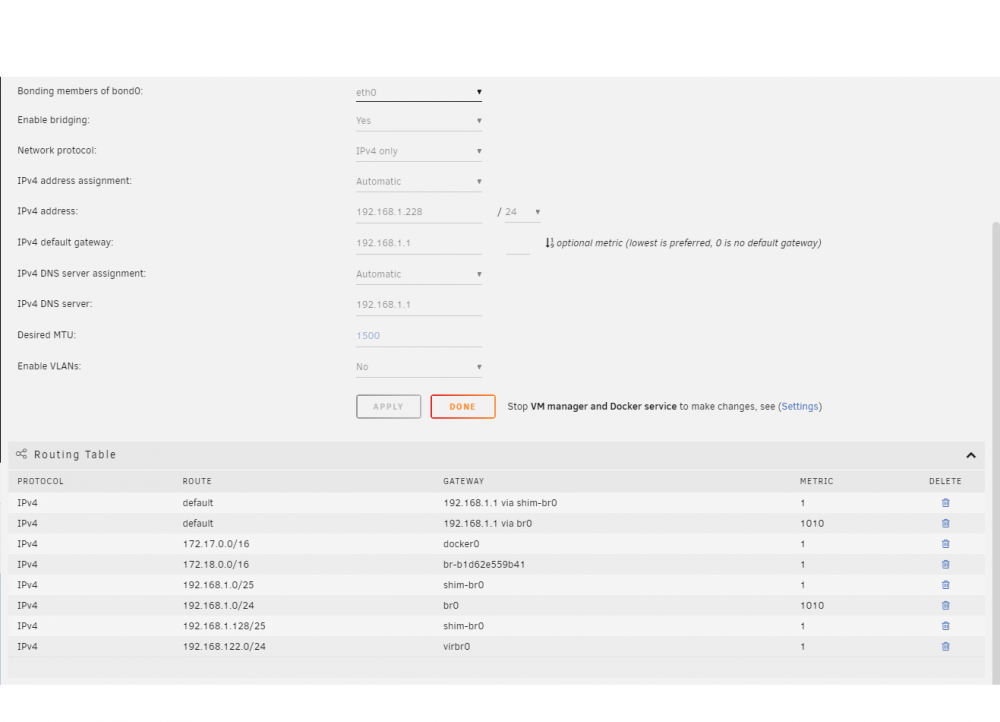
OK more Info today. I did get it to come on and its like nothing happened. I am scared now to turn it off lol. I run two servers a decent amount of dockers on both and a single Linux vm on each. One is basically a backup of the other. Therefore I think both have the same issue. This is what I found. I must have messed up with my network config within unraid. This presented itself when I rebooted. One is showing the same IP as the unraid server but a MAC address I cannot find. If I block that new mac from the router level I loose unraid GUI. Maybe somone can help looking at my network settings and see what I need to do. Thanks
-
Backround was turning off docker in settings. Machine hung lost ping never came back. Full shutdown and restart. Didnt help couldnt ping the unraid server in question from other nodes. I (could) however ping from the unraid box to other computers. I made a new usb unraid stick plugged it in same result. 6.10.2 and tried 6.10.3 machine was on 6.10.2 Had a old stick that i know works from a server I never turn on ( same result) old 6.7 Rebooted whole network (same result) I am at a loss why cant I ping the unraid box?? but i can from it out via the command line? There is nothing strange on that network no blockers. I tried the boot from safe mode in the drop down (same result) Theres only one network jack on the computer. Any help is appreciated
-
I'm having the same issue
-
Hi im wondering what the following error is shows up every minute. (((((((2020-12-30 15:57:51 TLS: tls_process: killed expiring key)))))) I have nordvpn. Thanks (((((((2020-12-30 15:57:51 TLS: tls_process: killed expiring key)))))) 2020-12-30 15:57:51,493 DEBG 'start-script' stdout output: 2020-12-30 15:57:51 VERIFY OK: depth=1, C=PA, O=NordVPN, CN=NordVPN CA5 2020-12-30 15:57:51,493 DEBG 'start-script' stdout output: 2020-12-30 15:57:51 VERIFY KU OK 2020-12-30 15:57:51 Validating certificate extended key usage 2020-12-30 15:57:51 ++ Certificate has EKU (str) TLS Web Server Authentication, expects TLS Web Server Authentication 2020-12-30 15:57:51 VERIFY EKU OK 2020-12-30 15:57:51 VERIFY OK: depth=0, CN=us6620.nordvpn.com 2020-12-30 15:57:51,743 DEBG 'start-script' stdout output: 2020-12-30 15:57:51 Outgoing Data Channel: Cipher 'AES-256-GCM' initialized with 256 bit key 2020-12-30 15:57:51 Incoming Data Channel: Cipher 'AES-256-GCM' initialized with 256 bit key 2020-12-30 15:57:51,743 DEBG 'start-script' stdout output: 2020-12-30 15:57:51 Control Channel: TLSv1.2, cipher TLSv1.2 ECDHE-RSA-AES256-GCM-SHA384, 4096 bit RSA 2020-12-30 16:57:51,002 DEBG 'start-script' stdout output: ((((((2020-12-30 16:57:51 TLS: tls_process: killed expiring key))))))
-
This works! many thanks
