WannabeMKII
Members
-
Joined
Everything posted by WannabeMKII
-
The last couple of days, fix common problems has reported an issue with 'call traces' and on checking the logs, it appears to be; Jan 30 17:59:57 TechNAS kernel: CPU: 1 PID: 0 Comm: swapper/1 Tainted: G W 4.4.30-unRAID #2 Jan 30 17:59:57 TechNAS kernel: Hardware name: HP ProLiant MicroServer, BIOS O41 07/29/2011 Jan 30 17:59:57 TechNAS kernel: 0000000000000000 ffff88011fc83dd0 ffffffff8136f79f ffff88011fc83e18 Jan 30 17:59:57 TechNAS kernel: 0000000000000132 ffff88011fc83e08 ffffffff8104a4ab ffffffff8155871e Jan 30 17:59:57 TechNAS kernel: ffff88011afba000 ffff8800c3ad6e00 ffff88011afba3a0 0000000000000001 Jan 30 17:59:57 TechNAS kernel: Call Trace: I'm guessing it's something to do with the BIOS or CPU? Is it something to be worried about, or something I can fix?
-
If this is from the regular scans (not extended), then it sounds like your default appdata destination might not match what you've set for CrashPlan. (FCP tries to avoid giving errors on permissions for appdata because of the wildly varying permissions that are contained within) This is from an extended scan. The regular scan is reporting no issues. Well, CrashPlan isn't actually running on unraid, it's running on a different machine, a machine that does have read / write access to the backup share. What would you recommend?
-
Just after a bit of help with regards to problem being reported by this plugin. The following files / folders may not be accessible to the users allowed via each Share's SMB settings. This is often caused by wrong permissions being used on new downloads / copies by CouchPotato, Sonarr, and the like: The folders in question are the files created from the backup of appdata of Couchpotato using 'CA Backup / Restore Appdata' and state 'nobody/users (99/100) 0600'. Sonarr seems OK. This will also explain why CrashPlan is unable to backup the 'backup'. Why is this happen and how do I resolve?
-
I'm going to have to revisit this tomorrow, as I tried using 'Completed download handling' and nothing appears to happen. So for now, I'm just using 'Drone Factory' to scan the directory. Thanks for the help guys, appreciated, but I may well be back to try to work this out, as I'm like a dog with a bone!
-
Trust me, unless I'm missing the obvious, I've checked and double checked all the paths. I'm guessing you know where the problem is from the screenshots? Any chance of a more obvious clue?
-
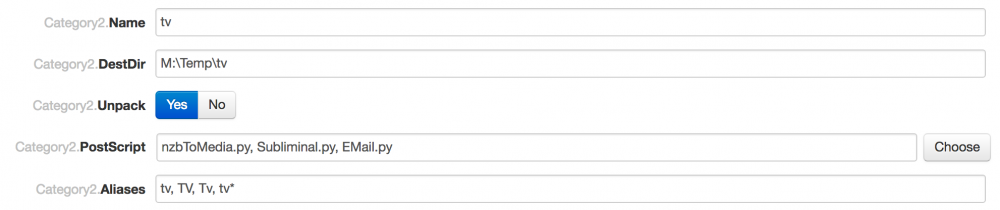
I'm having a similar issue with post processing, but my install is currently slightly different, as I run Sonarr on unraid and NZBget on my Windows 7 machine (at the moment) and use nzbtomedia. So, nzbget downloads to a local drive and folder on Win 7, it then unpacks the file and moves it to unraid on a shared folder. nzbtomedia then checks the files (video check etc) and passes the instruction to Sonarr to rename and this is the step that goes wrong, hence being here. The Sonarr log reports "not a valid *nix path, paths must start with a /". I've spend hours trying to work this out and trying different paths, but can't get it to work, so here's a few screenshots that I hope will help. Ignore dronefactory, I'm not using it. Can anymore make sense of what's going on and here I assume I'm going wrong? Thanks!