





thany
Members
-
Joined
-
Last visited
Everything posted by thany
-
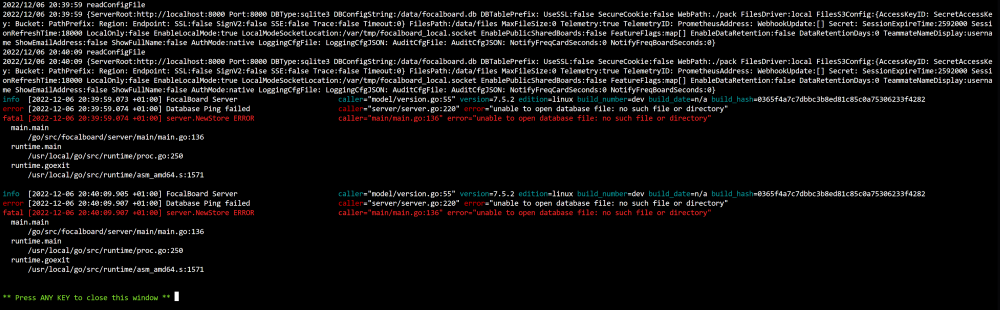
Trying to install focalboard. Clean install. I only set the appdata to the correct location. Surely if a database doesn't exist, can't it just make a new one? Or is it expecting me to magic up an existing database from somewhere?
-
My array was doing something. I have no clue what exactly. It was pulling 3.5-ish MB/s reads and writes from somewhere, simultaneously on a single disk. So my SMB shares performance was *terrible* because of this. Normally it's basically as fast as the harddisks can manage. Just now, even so much as opening a directory took seconds. The harddisks this time are not SMR, and I am indeed on 10Gb ethernet all the way. But I'm not even doing anything via the network! I'm not accessing or reading or writing anything, unless something was doing something somewhere somehow in the background, or something. What was it doing? Can I see somewhere, which files are being read & written to? This will at least hint towards if something is broken, some rogue process is bollocksing up, or whatever else. Diagnostics was captured at the time the array was being slow. Not sure if it helps anything though: unraid-diagnostics-20221206-2018.zip
-
Hi, so I'm getting this error while booting up the system. I was just looking if I've fixed every error yet, and a clean reboot revealed this oddball. I don't know what that network is. It's not mentioned anywhere else in the syslog, and my network configuration is probably as simple as it gets without DHCP. So I don't know how to fix this error. Funny thing is that everything is working, afaics. So I could just ignore this error, but then again, there has to be a reason for it to be emitted as an error, or else it would surely be a warning. Looking on the internets and on this forum for this error, I get references to docker, but I'm not sure what this is about. Said error doesn't really say *which* daemon, does it... It occurs near docker-stuff, but that's no proof of anything. Logging seems to be asynchronous, and I hope to goodness it is indeed doing stuff concurrently. So that's why I'm putting this into General for the time being. unraid-diagnostics-20221205-1652.zip
-
Sorry what? I've replaced the last disk to be replaced, and now after that neccesary reboot the network settings are gone? eth0 is back on DHCP, by which it manages to NOT even get an IP-address but one of those useless 169.* autogenerated addresses. Why has it done that?? Took me another half hour of running back and forth, figuring out how to edit the network.cfg (a good reference is missing, can someone please make sure documentation is complete?) And discovered that GUI mode is completely not-working, even though it can absolutely output a video signal, it doesn't get any further than a blinking cursor in an otherwise blank screen. Is there any documentation on that, while we're at it?
-
I can't know if it happens in safe mode, because for that I have to reboot into it. But rebooting normally also makes the shares reappear. Ergo, safe mode is not going to reveal anything we don't already know. Just tried with the next disk to replace.
-
I really doubt it's the ZFS plugin messing it up. I just rebooted the server (normally) and the shares are back. Even the one I added manually. Could this be a bug in unRAID?
-
There's just not a whole lot of data on the array yet. The thing is, I accidentally bought SMR disks and am now replacing all of them. This seemed like a good enough oppertunity to, instead of starting over with nothing, do the disk replacement procedures just to see if it all works the way I think it will work when a disk *actually* fails. I'm thinking the zfs stuff is probably unrelated. I've got a secondary zfs array on 4 separate disks, setup using that zfs plugin and zfs master. I have set up a share to that secondary array, and when stopping the main array, unRAID desperately wants to "stop" that share as well, which doesn't work because it's not on the array. I'm guessing that's what you're noticing. I did this by simply creating a symbolic directory link to the data in /mnt/user, which has also seemingly been deleted.
-
Sure, here it is. It's not because it's still rebuilding, right? Because I feel data should be accessible even during a rebuild. unraid-diagnostics-20221126-2302.zip
-
So I did the following: 1. Pull the old drive that is to be replaced. 2. Insert the new one 3. Stop the array 4. Select the new drive as part of the array 5. Start the array, letting it rebuild data No shutdowns in between, as this computer has hotswap bays, and a controller that supports it. So all goes well. All data is still there. Just how it's supposed to work. Excellent Only the shares to that data are now gone Is this intentional? How do I get them back? Or rather, how do I not lose them the next time I replace a drive? Is it safe to just recreate the shares, or will this have strange consequences? I'm on 6.11.5, and my array consists of 4 drives, using 1 for parity.
-
In this particular scenario the mover hadn't ever been invoked. It has now, and indeed shows the correct total/free space. Before the first mover invocation, I feel Unraid should already know how much space can be utilised through a share, cache or no cache. From your explanation it seems this calculation might have been designed a little too simplistically. So to put it in layman's terms: Expected situation: total space = the sum of total space of ALL drives involved in a share. Actual situation: total space = the sum of total space of any drives that happen to store files that a share provides.
-
I've just ordered new ones. Toshiba MG08 512e, I hope these are good. I filtered out SMR disks while looking for them and my supplier explicitly says they're meant for NAS. Fingers crossed, as we live in strange times. Again sorry for this debacle. Perhaps a suggestion if I may: build in some kind of check for SMR, and display a (dismissable) warning when SMR is detected. Not sure if it can be detected though.
-
Totally forgot. Here you go. These are not gathered while the problem is ocurring though. Just while the system is more-or-less idling I/O-wise. Let me know if you need more. I don't actually know. I was hoping 8TB are not produced as SMR, but only the bigger varieties like 16TB and up. EDIT: ahh crap, they might all be SMR. That's the "bad" kind of technology, right? Those fuckers! It's not neccesary for 8TB drives. Sorry to make this topic drag on. Sorry for trying to blame unRAID. Sorry for my tone. It might be my own fault, kind of. Well ,Seagate's fault afaic unraid-diagnostics-20221121-1621.zip
-
Next day. Performance is degrading again. It's not doing anything in the background. Please provide a solution.
-
Last update for the day. Gave it a reboot. Performance is back to acceptable levels. But why? Why why why? Why was it so incredibly difficult to get a harddisk, that can deliver 180MB/s do pull more than 200KB/s from it? I'm getting mentally ready to be profesionally done with unRAID. Al these absolutely monstrous weirdnesses shouldn't exist in a commercial product, especially based on a good foundation. Seriously, I NEED to know what's going on in order to evaulate if unRAID was a bad choice, or if it can be fixed so it won't happen again.
-
One more update then. Mover is done. CPU utilisation is stil abnormally high, but I can't figure out WHAT is doing that. Either way, now that the mover is done, and all harddisks have eventually spun up, you'd expect things to go quicker, wouldn't you? Well no. Even readin from the array gets me an excruciating 200KB/s if I'm "lucky". Writing to the array... Still the same problem. What is happening?! Why is everything so slooooooooow? What is unRAID *doing*?
-
I've set the sahre to "most-free" so that the mover is moving to the cached share that is still on "high water" mode. Now at least I can sort of resume copying to the share in question. Other disks have spun up, as they should. They're there to help! Use them! Not that it's going well now, mind you. It's still circling around 20MB/s 5MB/s 2MB/s (yeah it's degrading again), and stopping for many seconds on end intermittently. How can I make to GO? I've never had this type of problem with previous NAS systems. They just just worked theur arses off to their absolute maximum potential. They wouldn't just wait around, or utilise one drive to be bombarded with absolutely bloody everything while the others are resting on the bahamas. Please, mister unraid, fix this. unRAID is basically unusable in this state.
-
Well, the mover is running. Okay. But why does that get *so* much I/O priority? And can't it use one of the other disks? Mover should probably behave so that it always "gets out of the way". It's a background operation, and actually using the array for it's apparant intended use (being a NAS) is a foreground operation which should (hopefully obviously) take precedence, not yield, to background processes. But is it the mover? Don't know. It's hard to know for sure what is doing what.
-
I started copying stuff to my array, via the network. The network is fine, it's a 10Gb connection, and I was able to write at about 60MB/s. Not incredible for 10Gb, but at least it was going steadily. The share being copied to is not backed by any cache pool, and is set to "high water" mode. The source being copied from, can supply a steady 100MB/s. So I wonder: why is it seldom getting above 1 whole MB/s, but only after having copied a few TB's? why does this need 100% CPU on a single core (sometimes multiple, for fun I guess) on the unRAID server? What is it *doing*?? why is it not utilising my harddisks basically at all? (they're effectively idle according to the dashboard) why can it go quickly at the start? And then gradually degrade to such an extend? This makes no sense to me. Mostly I wonder, what the hecko do I do to make it go as fast as it should be able to go, please.
-
I have several shares. They all point to the same array (ehm, obviously they do) that is 32TB. They are all set to use all disks. They are all set without quota. They should all report the exact same amount of available space. But alas, they don't. How come? One share is reporting the total/free space of the 256GB cache pool it is using. This is the only share set up with cache, and the only share that reports incorrectly. This share has its cache setting to "Yes", so it should be able to utilise the entire 32TB array, even before the mover has invoked. And while I trust unRAID that this share *can* utilise the full 32TB, if that's the case, it should report its total/free space accordingly. Feels like a bug to me, if I'm honest.
-
In the mean time I self-diagnosed: I've changed the file /boot/config/network.cfg to reflect the "changes" that were made. Rebooted. No change functionally. Now ifconfig shows no eth1, but an eth0 instead, which invalidates my change. Okay?... Fine. So I change it again to eth0 in the config file and reboot. Network access seems to be working again. But I don't feel right making changes to a generated file. I followed your advice, JorgeB, and network (still) seems to be working, but a new network.cfg file doesn't seem to get generated... Also it feels weird that it doesn't *reset* the network settings, but rather it managed to keep all my settings (i.e. the static assigned IP-address) perfectly fine. Shouldn't these settings be gone? Edit: after filling in a description for the NIC, the network.cfg get re-generated. Contents are totally different though, but I can't find anything broken. So, yay? Not sure if this is all good & dandy now.
-
So I decided to update the UEFI. I had valid reasons to do so. The update re-enabled the onboard LAN adapter, in addition to the addin card that I was using perfectly fine. After that, unRAID at the login prompt said it was on (static assigned) 192.168.10.3, which is correct, but it wasn't pingable and it wasn't able to ping anywhere. Ok, so the network cable came unplugged. Plugged it back in and expected it to work straight away. How wrong I was. Still no ping from either side. Decided to go back into the UEFI to disable the onboard LAN adapter. Back in unRAID it again says its IP-address is 192.168.10.3, which is still quite correct. But still no ping from either side. ifconfig shows that I only have a lo0, br0, and eth1. I expected eth0, but it's eth1. I suspect that, maybe possiby perhaps, it needs to be renamed to eth0, but I have no clue if this will fix it, nor if this is even possible. Now the question is, how do I get it back to a working condition? I'm on unRAID 6.11.2, should that matter.
-
Did the setting, now all my shares are gone, except for two which have gone "unprotected" and are now empty. What the hecko? Edit: nvm I gave it a good'ol magic reboot, and shares are back again. Phew. Edit 2: anyway the setting worked a charm. I'm now able to set it up the way I wanted to. Thanks!
-
How can I create a folder on a share that is hidden to any user accessing that share via SMB, but still have that folder be visible, readable, and writable by the OS? Things I've tried so far: Make it a "dotfile". The folder remains visible and navigable. They are not even marked as "hidden" for Windows clients. Set the share to "private" and give no access to the connecting user (chown root & chmod 700). The folder is no longer navigable but still visible. If I understand the documentation well enough, it should be possible to a degree, because I've read that the "x" permission is mapped to the "hidden" attribute - it is not. Maybe this only goes for files or something. Why can't I have two different shares then, you might ask? Because the goal is to have a docker downloader that puts its incomplete downloads in one (invisible) directory and once complete, move it to another directory. When I map these two directories to two shares, when this move happens, unRAID will *physically* move the file from one share to the other, even if both shares are on the same disk, same settings, etc. This feels like a bug to me, but this is why I'm trying to achieve a similar effect through a hidden folder. So this is what I'm trying to achieve: Downloader downloads to invisible directory "incomplete" on share X Downloader is finished Downloader moves said file on share X from invisible "incomplete" to visible "complete" directory (this move should happen instantly!) So, I'm looking for some kind of way to mark a directory hidden from explorer / Windows clients. Whether the folder is still navigable, I don't care, but I do very much like it to be hidden. Not neccesarily "hidden" like the tickmark in Explorer - any method will do as long as it's not visible but still there. Bonuspoints if this possible bug that I mentioned, can be fixed. I'm on unRAID 6.11.1 - I'll update it shortly.
-
So I got another crazy idea, despite being sober What if it was possible to, when an image is stored on the array, a plugin or something automatically pulls it through an image minification process like imagemin? For those who might not know what this is: it's a process to further compress images without sacrificing quality (lossless recompression) and without losing metadata. In PNG it means to compress the image using a "stronger" compression, just like you can do with zip/7zip/rar and the likes. In JPEG a similar optimisation can be done, as well as in GIF, WebP and AVIF files (not sure though if imagemin specifically supports the latter two, but conceptually it could). I personally store a lot of PNG images on my server and for most I, or whoever created them, haven't bothered to pull them through a script like that. It's just too much hassle. But what if it could be done totally transparently? I'm thinking some kind of plugin would need to exist for this, but I don't know if it does - it's not easy to look for someting like that, as it's quite esoteric in a way, to do this on a NAS. Any thoughts on this?
-
Thanks, I'll give them a go.

