





thany
Members
-
Joined
-
Last visited
Everything posted by thany
-
Ok, so the name "historical devices" is just a bit unfortunate. It should be something like "disconnected devices". Makes more sense to me anyway, not sure why the current name was chosen.
-
I wonder what is the purpose of Historical Devices? From what I see, it lists devices that are no longer present in the system. So why would I need to keep their information around? What is the actual real-world use-case for this feature? Or alternatively I could ask, what problem does it solve?
-
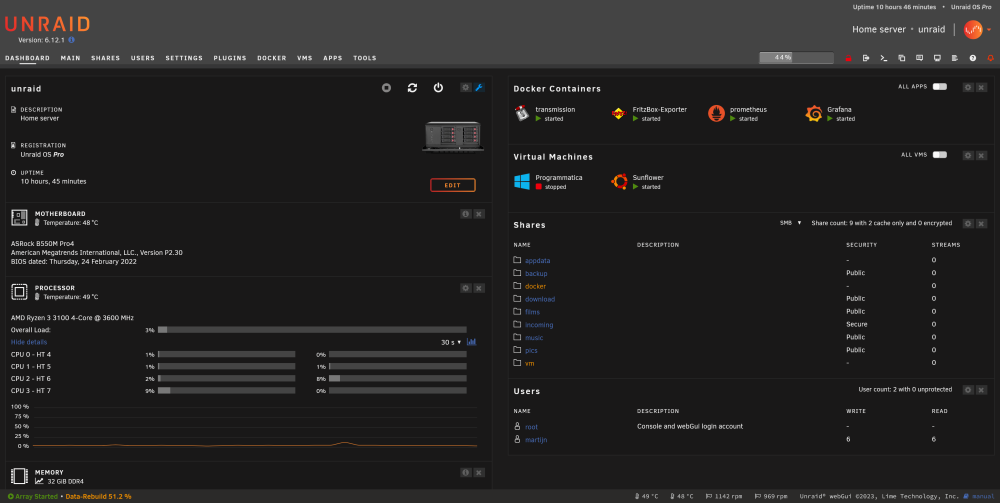
Same problem here. I'm on a 4K monitor at 27 inches, which is set to 200% in the display settings. I think there's plenty of space for an extra column: But I actually have to zoom *out* to below 100% in the browser, in order to get three columns. If we're being given a custom layout, the number of columns should also be custom. What concerns me is two things: 1) How could custom rearranging possibly work if the number of columns is not fixed. Where do things go from a column that is no longer allowed to be visible? 2) Regardless of the number of columns, why is the default layout not to fill up the available columns equally? It doesn't feel right that my left column (again, default layout!) is four times longer than the right column.
-
For now, I watched this video: I decided to go with his last approach, that is allegedly the safest: 1. Stop the array 2. Unassign the faulty device 3. Start the array in maintenance mode 4. Repair the XFS filesystem with the -L option (not sure if this is even neccesary, because of next steps) 5. Stop the array once more 6. Assign the drive back into the array where it belonged 7. Start the array The array is now rebuilding. This feels like a good sign to me, but let's see where it goes.
-
First, I'll explain what exactly happened. I hot-added a drive to the system, not to the array. I don't intent to add it at all. Everything seemed fine, except in Unassigned Devices, one o the main array drives showed up. I didn't touch it, because the array seemed to be intact. The drive I added also showed up an I mounted it. Then. I added another drive, which also showed up in Unassigned Devices. Perfect. I wanted to see what's up with one of my drives showing in UD, so I attempted to stop the array. Nothing happened. Huh. So I manually stopped my VMs, and released files still locked on my pc. Stop the array. Still nothing. Alrightythen, a reboot it is. After about 3 minutes, the system came back up again, and this time, that one disk that showed up in UD, doesn't anymore. Instead, it shows in the array as "Device is disabled, contents emulated." I guess emulated contents means it's using parity to serve the missing data. Doesn't matter, let's first solve the actual problem. In the log I was able to find: Jun 28 00:35:37 unraid kernel: XFS (md1p1): Corruption warning: Metadata has LSN (1:155054) ahead of current LSN (1:149811). Please unmount and run xfs_repair (>= v4.3) to resolve. Jun 28 00:35:37 unraid kernel: XFS (md1p1): log mount/recovery failed: error -22 Jun 28 00:35:37 unraid kernel: XFS (md1p1): log mount failed Jun 28 00:35:37 unraid root: mount: /mnt/disk1: wrong fs type, bad option, bad superblock on /dev/md1p1, missing codepage or helper program, or other error. Jun 28 00:35:37 unraid root: dmesg(1) may have more information after failed mount system call. Jun 28 00:35:37 unraid emhttpd: shcmd (38): exit status: 32 Jun 28 00:35:37 unraid emhttpd: /mnt/disk1 mount error: Unsupported or no file system So I stopped the array again, so that at least things weren't going to try and use a filesystem that can't be mounted. Then, I started the array in maintenance mode, with the intent to do a filesystem check. The check when down fairly quickly, and the result is as follows: Phase 1 - find and verify superblock... Phase 2 - using internal log - zero log... ALERT: The filesystem has valuable metadata changes in a log which is being ignored because the -n option was used. Expect spurious inconsistencies which may be resolved by first mounting the filesystem to replay the log. - scan filesystem freespace and inode maps... sb_fdblocks 2596075000, counted 2283514869 - found root inode chunk Phase 3 - for each AG... - scan (but don't clear) agi unlinked lists... - process known inodes and perform inode discovery... - agno = 0 - agno = 1 - agno = 2 - agno = 3 - agno = 4 - agno = 5 - agno = 6 - agno = 7 - agno = 8 - agno = 9 - agno = 10 - agno = 11 - agno = 12 - agno = 13 - agno = 14 - process newly discovered inodes... Phase 4 - check for duplicate blocks... - setting up duplicate extent list... - check for inodes claiming duplicate blocks... - agno = 0 - agno = 3 - agno = 2 - agno = 4 - agno = 5 - agno = 8 - agno = 9 - agno = 10 - agno = 11 - agno = 6 - agno = 12 - agno = 13 - agno = 1 - agno = 7 - agno = 14 No modify flag set, skipping phase 5 Phase 6 - check inode connectivity... - traversing filesystem ... - traversal finished ... - moving disconnected inodes to lost+found ... Phase 7 - verify link counts... No modify flag set, skipping filesystem flush and exiting. I'm not sure how to interpret this. It feels positive, but that's only because I'm not seeing anything that is yelling at me. Only thing that concerns me is that "replay the log" sentence. I have no idea how to do that. For good measure, let's also have the clarity of mind to supply the output of `blkid`: root@unraid:~# blkid /dev/sda1: LABEL_FATBOOT="UNRAID" LABEL="UNRAID" UUID="272B-4CE1" BLOCK_SIZE="512" TYPE="vfat" /dev/loop1: TYPE="squashfs" /dev/sdf9: PARTUUID="c1c50c9c-48d1-1044-a906-d698d6bb5fba" /dev/sdf1: LABEL="ssd" UUID="17022178612354483592" UUID_SUB="10143665043133095078" BLOCK_SIZE="512" TYPE="zfs_member" PARTLABEL="zfs-6a86c4c98cead86a" PARTUUID="610d4be7-859e-c04c-ac9c-64c88c2b549e" /dev/sdd9: PARTUUID="8863e506-6f9e-c548-a0d6-4dd5402ca53d" /dev/sdd1: LABEL="ssd" UUID="17022178612354483592" UUID_SUB="16910454766111439637" BLOCK_SIZE="512" TYPE="zfs_member" PARTLABEL="zfs-59bc099f2ed51ee4" PARTUUID="bb6c7dd3-52f9-1d41-ba9b-56fc0cb6b006" /dev/md2p1: UUID="3d4faa0b-eb20-42d8-9635-98fa3154070c" BLOCK_SIZE="512" TYPE="xfs" /dev/sdb1: UUID="c4c67326-2450-46d6-b0bb-8f99c9cf535c" BLOCK_SIZE="512" TYPE="xfs" /dev/sdk1: PARTLABEL="Microsoft reserved partition" PARTUUID="0eddd9a7-6a13-486b-9084-8d635e560bc1" /dev/sdk2: LABEL="Archive" UUID="32BB-D30F" BLOCK_SIZE="512" TYPE="exfat" PARTLABEL="Basic data partition" PARTUUID="68c0d2c6-c5c8-4f3f-918a-d00c7cb1b3bf" /dev/sdi9: PARTUUID="e95523c3-3274-9e41-beea-18bed5fe8502" /dev/sdi1: LABEL="ssd" UUID="17022178612354483592" UUID_SUB="4254412105164419679" BLOCK_SIZE="512" TYPE="zfs_member" PARTLABEL="zfs-b465be5a5071c8f5" PARTUUID="360de15b-cd6f-1444-ba23-05d364b8f2f5" /dev/md1p1: UUID="10f79463-d4ab-4d1b-84bd-5a04a4934de4" BLOCK_SIZE="512" TYPE="xfs" /dev/sdg1: UUID="10f79463-d4ab-4d1b-84bd-5a04a4934de4" BLOCK_SIZE="512" TYPE="xfs" PARTUUID="9d6ced82-21c9-43ba-9f30-1151fe599def" /dev/loop0: TYPE="squashfs" /dev/sde1: UUID="3d4faa0b-eb20-42d8-9635-98fa3154070c" BLOCK_SIZE="512" TYPE="xfs" PARTUUID="7dbb0b26-8bca-4cb1-9b99-05271e644bef" /dev/sdc9: PARTUUID="e324a5e9-e84b-7e43-9241-0e58097c03e8" /dev/sdc1: LABEL="ssd" UUID="17022178612354483592" UUID_SUB="4258666910141786191" BLOCK_SIZE="512" TYPE="zfs_member" PARTLABEL="zfs-2ca269b663a3f652" PARTUUID="a8895a61-69b4-d948-b0b5-4f13f1389da0" /dev/sdl1: PARTUUID="fa7a5bb3-1e71-263c-49de-d9d5243e7b88" /dev/sdj1: UUID="3d0fba2a-df71-412b-9794-e386cef8f9b9" BLOCK_SIZE="512" TYPE="xfs" PARTUUID="eef81965-07a6-441c-939e-04e281dc176d" /dev/md3p1: UUID="10b78442-e0fa-4ee8-851c-21785b3fb351" BLOCK_SIZE="512" TYPE="xfs" /dev/sdh1: UUID="10b78442-e0fa-4ee8-851c-21785b3fb351" BLOCK_SIZE="512" TYPE="xfs" PARTUUID="fe020cb4-b7dd-46c7-8039-32cd9adca459" There's that /mnt/md1p1 again: it detects an xfs filesystem, which seems positively correct. So I guess the disk is physically fine after all this. I shall also attach a diagnostics zipfile. I think it might be best to pull those two drives for now, since the trouble all started when I added the first one. Maybe this will even fix the problem magically. Currently I just want to get the array up and running again. That's priority number 1. After that, and *only* after that, I would like to do some evaluation to how this could've happened, what was the actual problem, and how can this be prevented in the future. And perhaps even come up with a plan to bake protection against this failure into unRAID itself, is at all possible. But for now, what do I do to get the array up and running again please? unraid-diagnostics-20230628-0109.zip
-
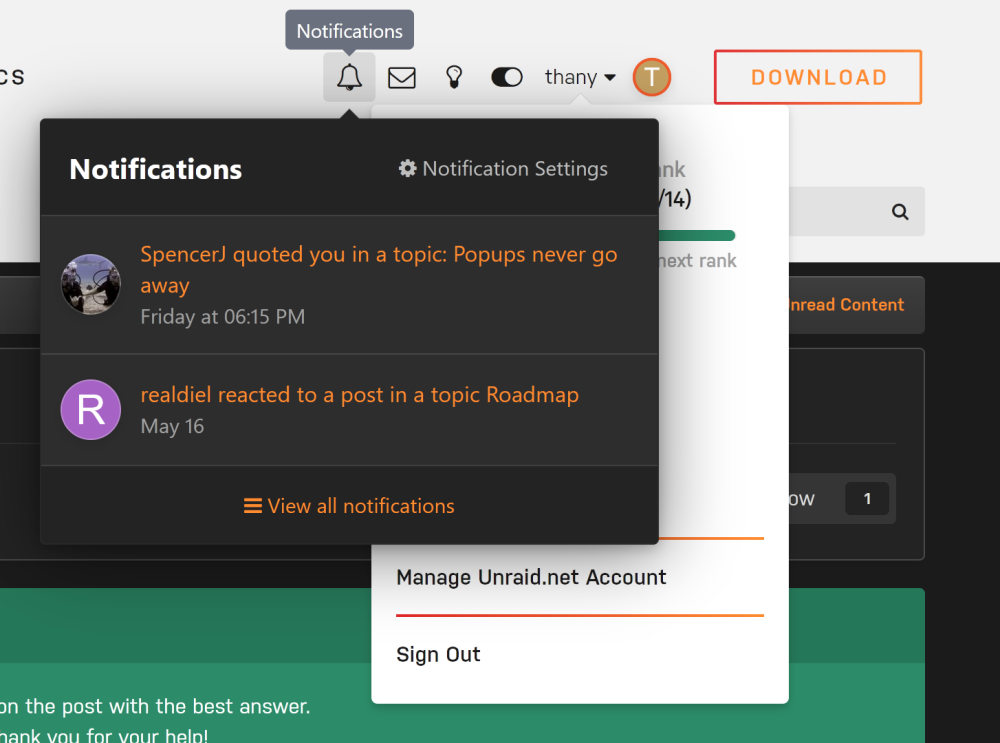
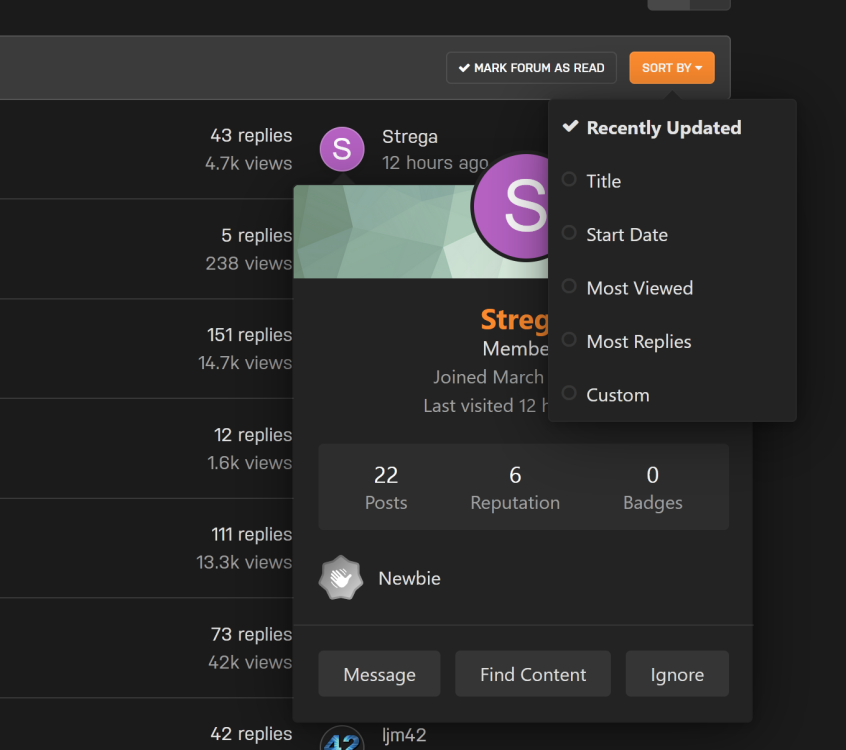
Here I'm triggering multiple popups in the header: And a user popup and sort dropdown at the same time: And here I'm able to popup multiple @-mentions at the same time:

-
It worked perfectly! The only thing that wasn't quite clear is that the array has to be stopped in order to modify anything around ZFS. I wasn't used to that, but found out quickly enough.
-
Thank you. If I'm not mistaken, it says I just create a new pool and are allowed to assign existing ZFS devices to it, which will then "import" a previously created pool. If that works, that's excellent, but I've made a data backup just to be on the safe side, just in case it decides to clear all my data as part of creating the pool The `zpool status` command reports my pool as `raidz1-0` so I think I should be fine, since `raidz1` appears to be supported. Fingers crossed.
-
Popuppy things never go away. "Start new topic" for example, shows a popup that can never be closed, and even the dropdown menu inside it, can never be closed. Even the tooltip that appears when hovering an @-mention, will forcibly stay visible until the next page reload. I think there's something in popuppery-type-of-things fundamentally bugged. It's hard to tell what exactly - the devtools console shows no errors, and this happens with or without content blockers. I'm on Firefox 114 on Windows 10.
-
I just attempted an upgrade from 6.11.5 to 6.12.1, and had to downgrade after discovering that my ZFS datasets were gone. It has my VMs and dockers on it, so they are pretty much critical to my setup, and I can't really spend too much time trying to repair it. Therefore I has opted for a downgrade (for now) to gather up some insight on what could go wrong, and how to better prepare for this upgrade. So in short, what should I do to retain my ZFS datasets? Is there a migration guide for the ZFS plugin to native unRAID ZFS? I'm sure someone must've written up something, because I'm not the only one using this plugin, and it's clearly not a 0-step in-place upgrade. I have to do *something* to keep my dataset intact, question is, what. Can someone please provide a kick in the right direction?
-
There seems to be a problem for File Activity to see any, well, activity. Clearly, I'm reading 260MB/s off of my main array. I even know which file it is. I'm just testing to see what FA makes of it. And the answer is nothing. Nothing is added in the log. Either on disk or share mode. All three checkboxes ticked. I'm on Unraid 6.11.5. unraid-diagnostics-20230226-2252.zip
-
As for unms: 1. Password strength requirement is too strict. I'm only ever going to use it on my LAN, never exposing it anywhere, so who cares even if my password is "password"? 2. OOTB I got a big fat security ohno from the browser, something about the HTTPS certificate being totally crapped out. OOTB it should just work straight away - use HTTP if you have to, but security warnings straight after a fresh install, is a terrible way to onboard users. 3. It's not detecting my one Ubiquiti device - a Wifi AP (the round PoE one, I don't know which one, but the officially-provided Windows software detected it just fine). 4. Why is the set of images that this docker is comprised of, so huge and slow to install? (and to update, presumably) Most dockers install within 5 seconds. This one took almost a minute. 5. It's constantly switching between light mode and dark mode. 6. Please don't call it unms, that's not an easily recognisable name in a list of dockers.
-
The changelog is quite dry, hard to get through, and difficult to know what each update means. If you're knee-deep into Linux, you'll know what all those packages updates mean. It's not all bad though, some pieces are written well, but still very brief and very much "wall of text"-like. A more readable changelog can be made for each major update (X.XX) showcasing the highlights in a well-written document with moving pictures and human-readable explanations of what it all means. Not everything, just the highlights, the important bits. Kind of like how VScode* does it. This makes it more inviting to read through, easier to understand what has been done, and less confusing when a "sudden" change turns out to be buried in the changelogs. Here's an example: https://code.visualstudio.com/updates/v1_74 They do also include a "raw" changelog, but most of the time those are just so dry and tough to get through, and it mostly doesn't mean anything unless you're one of the developers. * VScode is an full-featured editor primarly aimed at web development. I use it every day. You would be forgiven for not knowing this software at all. However, it's important not to confuse it with Visual Studio, which is an awful piece of rubbish that I prefer never to touch. VScode is one of Microsoft's actually good pieces of software, iyam. Just so you know.
-
+1 for this. unRAID may be closed source (well, the closed source parts are), but that doesn't have to mean closed business. I'm pretty sure Limetech is a well-oiled company that has a structured way of working, from which arises at least *some* kind of planning. I don't think we are demanding day-to-day schedules. But something like quarterly forecasts for new features or big fixes would, if nothing else, help us ascertain whether we want to go with a plugin that feels clumsy and wobbly, or instead wait for it to be implemented in the core featureset. I think that'll be a good use-case.
-
Yes! And *online* snapshots would be a must. Snapshot should then also include persisted vRAM state and probably some devices guff. A useful feature would also be to set up a snapshot to always start a VM from, and discard any changes made afterwards. The use-case for this is something like an internet cafe, a demo OS, or a place to tinker with stuff that is otherwise impossible to undo. A discardable OS, where any damage a user may have done to a system can just go *poof* and rolls back to a known working state, would be extremely useful in a plethora of contexts. I'm thinking schools, internet cafe as mentioned, some kind of public kiosk, or even something your kid will be unable to break. It would also need a function to merge snapshots, and to "delete" snapshots (which means to merge & persist them unto the regular img file).
-
1. This would be useful in corporate contexts, but I'm sure people will find other ways to do something useful with it. 2. What should happen when a file is halfway through writing and it's already hitting the quota? Should it not have started in the first place? Should one file "too big" be allowed? Or should it just terminate the write? 3. What should a share report to a client as its total capacity? The actual physical capacity, or the quota? 4. Percentile quotas might be useful. Then, the quota would allow more data to be written when the array is expanded.
-
I think I get the gist of it. Turbo write makes more sense to me. In a servery environment, it's likely that the disks are already spinning anyway. It might even make sense to keep the disks spinning forever, especially when using drives designed for NAS/server contexts. However, it also made "cache" immediately click in my head. Since cache (for me at least) goes on an SSD, and doesn't get written to spinning rust straight away, I could use that on shares that typically take small files, and/or scheduled backups and still have the main array spun down during off hours. Feels like a win-win.
-
Alright thanks, I'll have a read through it. In the mean time, "turbo write", as it seems to be coloquially called, makes *all* the difference. Before having read what it actually does under the bonnet, it feels like it should be the default. After all, other NAS systems also don't cap data transfers by setting an "incorrect" write mode internally. It's good to have this setting exposed for admins, but it might be better if it automagically did the best thing.
-
Thanks for explaining. However, it still doesn't tell me why write speed is slower than the write speed of a single disk. I cannot imagine for the life of me, what could possibly cause such a slowdown. Even if writing is quite badly designed, it should not cause a 60%+ overhead in performance. To put it differently, if this isn't an intentional limitation, then what?
-
I'll try turbo write. I still don't understand why: 1) It is so slow by default. What is the holdup? I mean if *every* component can go faster, why isn't it? 2) Turbo write isn't the default setting, if it's clearly better. If turbo must not become the default, then I wonder why anyone at all would bother putting a 10GbE card in their unRAID system... If 60MB/s "sounds about right", then 1GbE is more than anyone will ever need. Or am I mistaken?
-
It feels to me like "sometimes" just "something" is locking things up. From the server's perspective, all's well & dandy, but then I can't do anything via SMB. Also those few MB/s while it should be completely idle, and File Activity plugin showing nothing. This really feels like something terribly spooky is going on. Meanwhile it's going again.. ¯\_(ツ)_/¯
-
But it's not just one file. It's any file. Okay, tried one, and it's happily doing 220MB/s. First, another performance problem yet again. Write performance is also *terrible* atm. It started out fine(-ish) at ~60MB/s. Again, the disks can all do at least triple that, if not more. Now copying to the array is completely stuck. Yeah, so the array shows a couple of MB/s read seemingly randomly, just intermittently, like nothing's going on. Meanwhile I'm trying to copy over some large files which has grinded to a complete halt, to the point that the application doing it, is frozen. File Activity plugin shows *no files* being accessed. Where are those MBs per second coming from then?? So then, what is it reading, why is SMB access (or whatever is keeping it) being blocked, and why is it (whatever it needs to read) so terribly slow? Attached diagnostics of the current situation. Hopefully some information pertaining to this problem, is in there. unraid-diagnostics-20221218-2057.zip
-
I'm downloading a big file off my server. It started out at 270MB/s over the network. That's good. Now, a few hours later it's gotten down to 50MB/s. The CPU can do more, the disks can do more, the network can do more, the receiving end can do more. I don't understand what's holding up? What is making it slow, even though every component should be able to do more? Going off the read speed of the disks, it should be able to do 200MB/s at the very least. Even if it were reading off the very end of the disk platters, it should still be capable of 100MB/s. It's just two gigantic files, so I have to assume they are not so heavily fragmented as to impact performance. Why is it so slow? /Edit Very occasionally it's going at normal speed (250-280MB/s) but it also very quickly grinds itself down to what I'm reporting here. So it is ab-so-lu-tely capable of higher speeds, so something must be slowing it down. Something somewhere somehow. But what?? unraid-diagnostics-20221212-1207.zip
-
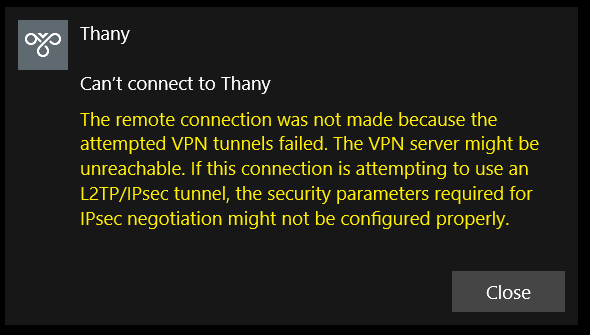
OpenConnectServer doesn't seem to be working as expected. I just filled in my FQDN (into SRV_CN) and name (into SRV_ORG). I used default settings otherwise, for both client and server. I used the same username&password that I can already use to access shares on unraid. What's next please?
-
Okay, so there's no way to see what is being accessed? Just saying I really don't like to trial&error such things. The OS does know what it being done to which device (I mean, how could it not?), but the question is how well this is exposed via tools/API, and after that, via the unRAID GUI.



