






ich777
Community Developer
-
Joined
Everything posted by ich777
-
I think it completed the startup becuase it says Full Startup: 13.68 seconds, however I could be wrong about that. @Mainfrezzer can you maybe help?
-
Just restart the container and it will pull the update, my containers are self maintaining meaning that I don‘t have to update them. If the automatic update doesn‘t work please do the following: Stop the container Delete the steam* folder from the main directory Start the container Open the container log and see if it pulls an update
-
What network equipment are you using? Are you using Unifi gear? Do you have enough free space on your usb boot device? It should be safe to reboot since the Driver plugin tries to download the new version on boot if no compatible version is found, the boot time will be a bit longer since the drivers are abour 300MB in size.
-
So to speak you want to make the container archive accessible to other user correct? Then I would always recommend doing it that way because it is way easier for you create a updated container and upload it to GitHub. I also of course understand that you have to do it first by hand to test if everything is working but as said, I would recommend that you automate everything that you can create updated containers automatically. You can find all examples here: https://github.com/ich777?tab=repositories&q=lxc
-
This is just for creating the container, the temporary container is just to create a base image and then run the scripts. Do you want to create a container for other users or what is your goal?
-
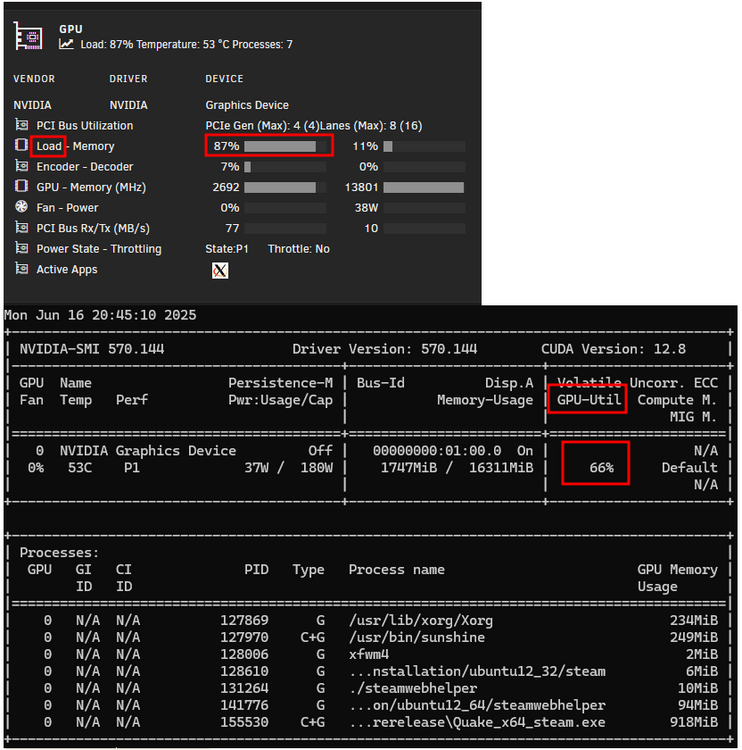
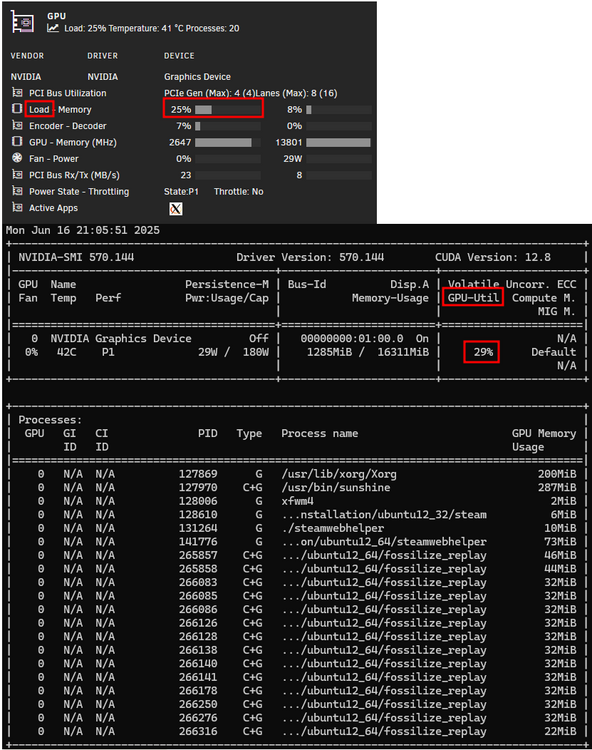
In both of your screenshots I see utilisation which doesn't match, probably because of the difference where the data was queried but you'll at least see it: I just triggered a build for the latest New Feature Branch for Unraid 7.1.3 which is Nvidia Driver version 575.57.08, the build should be done in about 5 minutes, however to get the build you must visit the driver page and it should show a new driver version at the Open Source Branch and then you have to click Download & Install again to get the new driver, after the download finished you have to reboot.
-
Sorry but this is the Nvidia Driver support thread and not for GPU Statistics, please report that in the GPU Statistics plugin support thread since this might be an issue with GPU Statistics which pulls the data actually from nvidia-smi You still haven't posted your Diagnostics or did you? It would be very interesting to see your syslog alongside with other information about your system and of course which Unraid version that you are running, I really can't help without you providing the requested information.
-
May I ask to what interval you've set the refresh from GPU Statistics? However this seems like a firmware issue to me...
-
That's weird, that shouldn't work at all...
-
Still on my todo list but I have very limited time currently. I just implemented a config editor in the GUI and you basically can limit it there with config entries.
-
I don‘t understand? What scripts?
-
But transcoding is working for some time after initial boot correct? The error usually appears when the card can't be initialised after standby or initially on boot, the latter is mostly a firmware issue from the Motherboard.
-
You have probably the Dashboard from Unraid open when you notice this, correct? GPU Statistics is also querying the state from the GPU and that‘s also what could produce that error. AMD does funky stuff with PCIe at times and that could be the reason, however it could be also be the case that something is wrong with the card however I think that it has to do with the CPU/Motherboard. This was just a refommendation since it helped other people in the past by setting it to a specific generation and not leaving it on Auto. I would always recommend leaving everything at default in terms of overclocking and not enable overclocking or at least set the memory to it‘s non overclocked speed since stability is preferred on a Server. One last thing that could cause this is the power supply if it’s not up to the task anymore. Otherwise I‘m out of ideas, on my AMD test system I had to disable CPU C-States because it would also constanly randomly crash.
-
Initially transcoding is working or isn‘t it working at all? At times I get reports about AMD CPUs/Motherboards having issues with Nvidia especially after a bit after initial boot. What you can try is to also set the PCIe gen to 3.0 in your BIOS, make also sure you are really on the latest BIOS version. Make sure to also disable ASPM for PCIe and all power saving features.
-
Nope, there is no partly support for GPUs it‘s either working or not. Possibly Sunshine/Moonlight is the coolprit?
-
No. On what Unraid version are you, please always provide Diagnostics if you need something in terms of a driver.
-
Yes this is the default. You also don‘t have a password when logging into a Docker, pretty much the same. You even can‘t login through ssh since ssh is not installed and root has no password that means by default sshd won‘t allow a connection anyways.
-
Please disable C States in your BIOS and male sure that your BIOS is up to date.
-
Next time please use the appropriate support thread: However this is your issue: ``` Jun 10 21:18:34 Laniakea kernel: NVRM: This PCI I/O region assigned to your NVIDIA device is invalid: Jun 10 21:18:34 Laniakea kernel: NVRM: BAR1 is 0M @ 0x0 (PCI:0000:0a:00.0) Jun 10 21:18:34 Laniakea kernel: NVRM: This PCI I/O region assigned to your NVIDIA device is invalid: Jun 10 21:18:34 Laniakea kernel: NVRM: BAR2 is 0M @ 0x0 (PCI:0000:0a:00.0) ``` Please make sure that you've enabled Resizable BAR support in your BIOS, your BIOS is up to date and you boot in UEFI mode.
-
I'm not aware of any issues when using a second NIC nor in brX. It is really hard to troubleshoot when removing your IP addresses since I can't tell if it's even the same subnet or not if it isn't maybe it's related to the subnet routing on your network? However this seems like a routing issue to me since nothing changes if you assign a dedicated IP to the container except that all ports are then opened up and port forwarding in the Docker template isn't needed anymore.
-
I'm very time limited currently but I'll try my best. I don't see why it shouldn't work on 7.1.3, this plugin is written in bash and should work in theory for a long time.
-
Did you also change the port number in the server config file otherwise it won't work.
-
Did you install: The container works OOB for me without me doing anything. Have you yet tried to connect with the LAN IP?
-
This is a common issue, please create a bug report if possible, there is no fix for this AFAIK.
-
Please create a post in the General subforums.





