





Fma965
Community Developer
-
Joined
-
Last visited
Everything posted by Fma965
-
run the nginx docker (by linuxserver without all the SSL letsnecrypt stuff) and map it as port 81 in docker then see if you can access the nginx web page from your ip and from your duckdns domain.
-
contact your ISP, everything else looks fine, send me a updated screenshot of your router port forwarding just to be sure.
-
yeah it could be your ISP is blocking port 80 / 443 incoming
-
don't be sorry it's good. Then your dynamic dns may not be up to date with your IP. or your unraid isn't 192.168.1.104
-
Firstly thanks for adding so much info You have your port forwards backward. should be 443 to 444 and 80 to 81 not the other way around.
-
you either have your domain not working correctly on duckdns or your router ports are not forwarded correctly or your docker ports are not correct. to clarify you need to forward port 80 and 443 to the ports of your letsencrypt docker
-
I'm aware of this i was asking specifically how to go back a version (how to find the version number string) , as you can see in my edit in the quoted post i have already found it. Thanks.
-
How can i go back to the build before last? 1.12.2.4929 1.12.2.4929 broke LG Tv support and i urgently need it working on LG never mind set the VERSION to 1.12.1.4885-1046ba85f Old version numbers can be found here https://whatpulse.org/app/plex-media-server
-
it can be any port so for example 5363 to 443 is fine, but you then need to pass port 443 on your router to 5363 aswell.
-
GUIDE UPDATED WITH CHANGE TO PORT NUMBERS TO WORK ON 6.4 Described in my post reply above.
-
i have tested this on 6.4 fine, make sure you aren't using ports 80 or 443 and instead use like port 444 and 81 and then in your router forward external port 80/443 to 81/444 on your device ip.
-
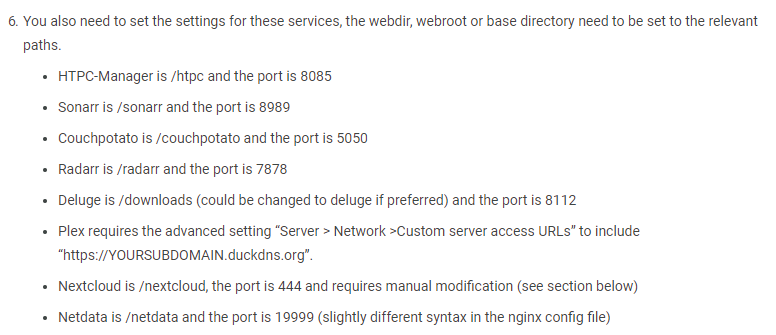
You just need to make sure you have the "URL Base" set correctly, sometimes called a webroot or base url in the settings for the application, e.g sonarr is URL Base
-
Sounds like you aren't setting the base url's correctly this location = / { return 301 /sabnzbd; location /sonarr { include /config/nginx/proxy.conf; proxy_pass http://192.168.1.2:8989/sonarr; } should be (always close a location block off with a } before doing another) location = / { return 301 /sabnzbd; } location /sonarr { include /config/nginx/proxy.conf; proxy_pass http://192.168.1.2:8989/sonarr; } so with this you have 2 ports accessible to the internet 80 and 443, with your way you would have to forward many ports (one for each service) in order to access them from outside your LAN (internet) --- @all here is the config i currently use. https://gist.github.com/Fma965/540219ade8133e65542e9ec15651fe82
-
Great, thats just a different way of doing it. Logs will be needed. Most routers allow access the same as remotely (can't think what it's called, something to do with loopback) therefore you can just access it at xxx.duckdns.org/sonarr etc.
-
I was having strange issues with rtorrent so moved to transmission vpn docker but if you still want me to test it i can do. Thanks.
-
0 info it worked if it ends with ok 1 verbose cli [ '/usr/bin/node', '/usr/sbin/npm', 'start' ] 2 info using [email protected] 3 info using [email protected] 4 verbose run-script [ 'prestart', 'start', 'poststart' ] 5 info lifecycle [email protected]~prestart: [email protected] 6 silly lifecycle [email protected]~prestart: no script for prestart, continuing 7 info lifecycle [email protected]~start: [email protected] 8 verbose lifecycle [email protected]~start: unsafe-perm in lifecycle true 9 verbose lifecycle [email protected]~start: PATH: /usr/lib/node_modules/npm/bin/node-gyp-bin:/etc/webapps/flood/node_modules/.bin:/usr/lib/node_modules/npm/bin/node-gyp-bin:/etc/webapps/flood/node_modules/.bin:/usr/local/sbin:/usr/local/bin:/usr/sbin:/usr/bin:/sbin:/bin 10 verbose lifecycle [email protected]~start: CWD: /etc/webapps/flood 11 silly lifecycle [email protected]~start: Args: [ '-c', 'node server/bin/www' ] 12 silly lifecycle [email protected]~start: Returned: code: 1 signal: null 13 info lifecycle [email protected]~start: Failed to exec start script 14 verbose stack Error: [email protected] start: `node server/bin/www` 14 verbose stack Exit status 1 14 verbose stack at EventEmitter.<anonymous> (/usr/lib/node_modules/npm/lib/utils/lifecycle.js:279:16) 14 verbose stack at emitTwo (events.js:106:13) 14 verbose stack at EventEmitter.emit (events.js:194:7) 14 verbose stack at ChildProcess.<anonymous> (/usr/lib/node_modules/npm/lib/utils/spawn.js:40:14) 14 verbose stack at emitTwo (events.js:106:13) 14 verbose stack at ChildProcess.emit (events.js:194:7) 14 verbose stack at maybeClose (internal/child_process.js:899:16) 14 verbose stack at Process.ChildProcess._handle.onexit (internal/child_process.js:226:5) 15 verbose pkgid [email protected] 16 verbose cwd /etc/webapps/flood 17 verbose Linux 4.4.0-72-generic 18 verbose argv "/usr/bin/node" "/usr/sbin/npm" "start" 19 verbose node v7.9.0 20 verbose npm v4.5.0 21 error code ELIFECYCLE 22 error errno 1 23 error [email protected] start: `node server/bin/www` 23 error Exit status 1 24 error Failed at the [email protected] start script 'node server/bin/www'. 24 error Make sure you have the latest version of node.js and npm installed. 24 error If you do, this is most likely a problem with the flood package, 24 error not with npm itself. 24 error Tell the author that this fails on your system: 24 error node server/bin/www 24 error You can get information on how to open an issue for this project with: 24 error npm bugs flood 24 error Or if that isn't available, you can get their info via: 24 error npm owner ls flood 24 error There is likely additional logging output above. 25 verbose exit [ 1, true ] Can't get Flood to work at all, looked in supervisor log but nothing of any use, dug deeper found this on the tmux session for flood. any help? upon extensive testing it seems if i use the latest version straight away, the config files don't work, if i use a older version and let that older version generate the files then it works, even after i update the docker to the latest version, maybe this will help solve the problem with flood. let me know if need any further info.
-
Want any other guides? let me know via reply or pm or email admin[at]cyanlabs.net
-
I've just added a whole new section to the tutorial with some proxy_pass directives.
-
Not on the actual docker configuration. in the server config per http://www.tecmint.com/password-protect-web-directories-in-nginx/ Yea thats what i did.
-
Hi all hope you are finding the guide useful, any questions let me know. Regarding downsides... i don't know really i mean obviously your home ip can be found by nslookup the domain, services are accessible to public (whether you protected them with a password is up to you)
-
Hi, i recently asked on the unRAID reddit what people wanted guides for, this was the top answer. i want to add further info about the nginx config but for now this should get most people up and running. http://cyanlabs.net/tutorials/the-complete-unraid-reverse-proxy-duck-dns-dynamic-dns-and-letsencrypt-guide/
-
MORE INFO : https://lime-technology.com/forum/index.php?topic=55556.0
-
ok so im using the old docker by alptaca fine, i move over this to this (no copying of files etc) and all i get is this. now if i stop this docker and launch the old one everything works fine still, i don't use A records though as i use CNAME's pointing to my own DDNS service running on a VPS edit: port 80 external is forwarded to 81 internal and 443 to 443. edit2: ok it seems letsencrypt or docker doesn't like cnames. any way around this? i'll add a A record each time certificate expires if required but if there is a automated way let me know. final edit: ok so my DDNS was being weird, switched to duckdns and all good.


