





Kewjoe
Members
-
Joined
-
Last visited
Everything posted by Kewjoe
-
A wee bit of a warning when you make a big change (PHP5 to PHP7) would be cool
-
Ya, I just got it working using TorrentPotato as well. In case anyone is trying. You paste the Cardigann (or i assume Jacket works too) URL and paste the API key from Caridgann into the Passkey field. Leave username blank.
-
anyone try to get Cardigann to work with Radarr? I have a Cardigann install for Sonarr and tried to reuse the url/api key and tried to copy it over to radarr but it fails. Wonder if i need a second Caridgann install for Radarr or if it's just a bug in this early development.
-
I'll look into it. Ooc, which forum software are you using? http://www.phpbb.com I also had a copy of SMF (same forum limetech uses) as a alternate while trying to isolate. They behaved exactly the same (didn't work until i put the ctype module in)
-
Ok I figured it out. I spent a few hours adding php5 modules to this docker (that were installed on the old docker) until I got my forum to work. I finally narrowed it down to "php5-ctype". I'm not clear why that one is needed, but without it, my forum will not budge. Any chance you can add that one? I promise not to bother you again (for a little while )
-
:'( Didn't work. Looking at your old docker versus the new docker for any packages with SQL in the name: Old: php5-mysqlnd \ php5-pgsql \ php5-sqlite \ New: php5-mysqli php5-pdo_mysql From my reading online, I believe the correct package to install is "php5-mysqlnd". Sorry to be a bother Let me know if it's possible to add that package. Thanks for helping!!
-
@aptalca thanks for adding mysql support. i will give it a spin tonight.
-
hrm, my install wasn't as "fresh" as I thought it was. I wiped it all, including the nextcloud data folder (which i didn't do before). and this time, it installed and no messages in the admin panel.
-
Hi CHBMB, have you seen this error in the admin panel? I just did a fresh install of both mariadb and nextcloud (both lsio versions). It installed nextcloud 11. Everything seems to be working great, followed your guide for reverse proxy in Nginx. I can access nextcloud. I haven't done much yet to test the functions. But I get that message in the admin panel. I did some searching and it seems a lot of people were getting that, but it was supposed to be resolved in version 11. Not sure what is causing it. I added 'has_internet_connectoin' => true, in the config.php of nextcloud, but that didn't help. I have the following in my logs, repeating several times:
-
That's the way to go try 5 different things, find out it worked and have no idea which of the 5 did it. but whatever, it's working now the majority of what i get working is done using this method.
-
Are you talking to me or Techn0mancer?
-
You should paste the nextcloud section in your default site-conf file.
-
Thanks!
-
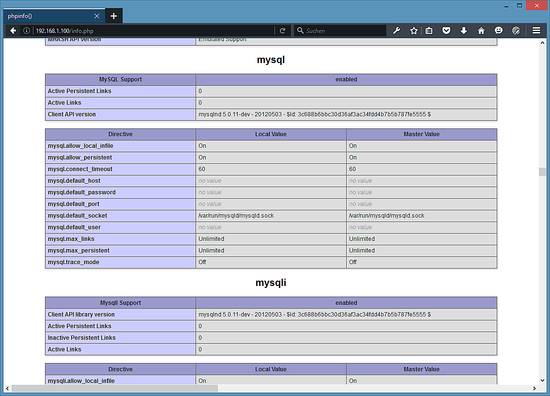
regarding PHP5 and mySQL, i see in the dockerfile you have the following: # install packages RUN \ apk add --no-cache \ certbot \ curl \ fail2ban \ php5-curl \ php5-gd \ php5-mcrypt && \ I think php5-mysqlnd would be the module I'd need added. I was reading this guide which had a section for adding mysql for PHP5 in an nginx installation: https://www.howtoforge.com/tutorial/installing-nginx-with-php-fpm-and-mariadb-lemp-on-debian-jessie/ I'm missing the MySQL and MySQLi sections in my phpinfo page (see attached example from howtoforge link
-
You should see the IP for each record in your Advanced DNS page. Do you see that IP showing up for any of the records?
-
2 things that come to mind as i also just bought a new namecheap domain and went through this yesterday: 1) You need an A + Dynamic DNS record for @ and also anything else you define. In my case that was also 'www' and 'nextcloud' 2) do you have dynamic dns setup? is that your correct WAN ip? I'm using Mace's DDClient docker to update namecheap with my IP address.
-
Ok, i tried a completely different forum software. Same one Limetech is using (SMF) and i get to the install screen and it gives me this error "Critical Error! The installer was unable to detect any database support in PHP. Please ask your host to ensure that PHP was compiled with the desired database, or that the proper extension is being loaded. " Looks like the PHP installation in this docker was not configured for any particular database. Is this something I can remedy myself? or would the base image have to be changed?
-
Ok, so looks like my PHP is in fact working. But i think going from 5.5.9 (old docker) to 5.6.29 (new docker) there is a particular module that seems to have been deprecated that is used by PHPBB (http://php.net/manual/en/intro.mysql.php). I think this is the root of my problems. I'll keep digging, but if anyone else has ideas, don't be shy
-
I'm having an issue moving from the old docker to the new one. The old one, i was running a PHPBB forum using PHP5. I used the following settings in my default file: location ~ \.php$ { try_files $uri =404; fastcgi_pass unix:/var/run/php5-fpm.sock; fastcgi_index index.php; fastcgi_param SCRIPT_FILENAME $document_root$fastcgi_script_name; fastcgi_param modHeadersAvailable true; include fastcgi_params; } my forum worked great in the old docker. When I moved to the new docker, i noticed that there is already prexisting PHP5 code in the stock default file. I commented it out and used mine. Didnt' work, there is no "php5-fpm.sock" file in /var/run. So I tried using the existing code: location ~ \.php$ { fastcgi_split_path_info ^(.+\.php)(/.+)$; fastcgi_pass 127.0.0.1:9000; # With php5-fpm: #fastcgi_pass unix:/var/run/php5-fpm.sock; fastcgi_index index.php; include /etc/nginx/fastcgi_params; } and PHP5 is not working for me. I tried a simple php test file and it's blank. my forum doesn't work, gives an error that indicates something is wrong with PHP. Any advice? Should i copy php5-fpm.sock from the old docker over the new? or will that get wiped out in a future update?
-
You can install any docker container multiple times assuming that: You name them differently You change the host port so as to not conflict with each other You leave the container port alone You set them to different appdata locations Thanks! So that's what I've done. But this second instance isn't working for me. I can connect to my first instance using Heidi no problem. This second instance won't connect. I've attached my docker logs. I don't see any issues there. mariadb-log.txt
-
If i install two instances of this, i assume i need to change the port of 1 of them? Is creating two instances even best practice? I currently have mariadb installed for my nextcloud that is working great. I wanted to install a second instance for a phpbb install i'm doing on my Nginx server. I changed the port to 3307 as to not conflict, but it won't connect. Should I be doing this under one instance? or is there something i'm missing with my two instance setup that could have muddled things up? the two instances are named differently, have different config paths and have different ports (3306 and 3307). I have two different root passwords too. One connects fine in Heidi (nextcloud instance with 3306), the other does not.
-
I just cleared data on both of my devices and reconfigured the app and dockers now work fine. Sent from my ONEPLUS A3000 using Tapatalk
-
@jbrodriguez I've been having an issue since your last update. I no longer see my dockers. I'm on 6.2 Final, i've removed and readded my server. Just says i have no dockers. They previously worked. Everything else works, just that. I don't have any VM's.
-
So, I started fresh. I used CHBMB's Mariadb/nextcloud install guide. I used kamhighway's reverse proxy guide. I added peter_sm's line. All is working fine now, yay
-
Nice! I just nuked my installation and starting from scratch with Nextcloud 10.0. I just got it setup and so far no error, but i haven't enabled reverse proxy yet. So when i do, i'll add your code and see if it works for me. Thanks!
