






bonedrums
Members
-
Joined
-
Last visited
-
If you wouldn't mind elaborating on Grist's discord the good folks over there may be able to assist you with this! https://discord.gg/rEfwdHDk
-
Hey Blaine, sorry for not getting back with you. I was not able to find a solution for this yet unfortunately. I setup a workaround for now using cloudflare's "Access" 2FA method just using my email address with a code that sits in front of the site. Most of the Grist employees and a ton of other users are in their discord though and are pretty responsive. If you wouldn't mind taking a look in the self hosted channel https://discord.com/channels/1176642613022044301/1176643552864895127 There could be an answer in here, or if not start the thread! If I get some more time and find a solution I'll update and post a guide on this container thread in the unraid forum and in discord.
-
FYI - A fix has landed in grist-omnibus and the latest version of grist-core. It’ll also be included in versioned release of grist-core (1.1.15). The latest current version is 1.1.16 so you should be covered if you updated. I found this information here: https://community.getgrist.com/t/forms-not-working-on-self-hosted-grist/5212/16
-
Apologies for the late response. This one is over my head. Would ask that you take this to https://community.getgrist.com/
-
No solution yet unfortunately Blaine. I've been working with the folks at Grist to try to resolve some issues. Will keep you posted and provide a new container in the appstore. It is working without Cloudflare/NPM just fine on its own. But I'm struggling to get it setup to get it going through NPM.
-
I also use Cloudflare and NPM... working on a simple email login to share with the community. Thanks for reaching out! More updates to follow...
-
Hey Blaine - I need to look into creating a second Docker installer in the App Store using this setup. I'll let you know once I get it finished up and provide some instruction.
-
Hey guys, I actually moved over to PfSense and Cloudflare and have had great success. Nginx Proxy Manager is wonderful!
-
When running Grist using docker, you can tell Grist to store data files in another folder using a flag like -v <host-dir>:/persist, i.e. mapping some directory to be visible as /persist in the container. I am not sure what Unraid’s method would be for creating such a mapping. I think it might only be a matter of changing /config to /persist in the Appdata line of unraid-templates/grist.xml at main · bonedrums/unraid-templates · GitHub. You can see how /persist is actually used in grist-core/Dockerfile at main · gristlabs/grist-core · GitHub – in particular, you could override GRIST_DATA_DIR environment variable instead of remapping /persist. The data files Grist actually stores are essentially SQLite files, both for documents and for the database with document metadata (/persist/home.sqlite3 in the docker setup). SQLite is totally happy to use spinning disks, and I don’t anticipate any issues with keeping data on those. The only kind of data share NOT to try is a network folder shared by multiple independent Grist instances (not that I see any reason for anyone to do that). That pattern will not work: a Grist instance assumes that all changes to its data files go through that instance.
-
It is a really cool app! For the most part, unless you have a document that has hundreds of thousands of rows with embedded media, the file sizes should only be a few Mb. I'll post on the Grist community forum though and see if there's something within Grist that will tell it to use a /data store for storing documents. I'll post back here and let you know what I find out.
-
Application Name: Grist Application Site: https://getgrist.com Docker Hub: https://hub.docker.com/r/gristlabs/grist Github: https://github.com/gristlabs/grist-core Discord: https://discord.gg/MYKpYQ3fbP Grist is a modern relational spreadsheet. It combines the flexibility of a spreadsheet with the robustness of a database to organize your data and boost your productivity. Please post any questions/issues related to this Docker config in this thread. For questions/issues about the Grist product, please visit the Grist support forum: https://community.getgrist.com Update History: - Feb 21, 2023: Updated XML Template to include a /persist directory - Jul 10, 2024: Updated instructions for using a port other than the default 8484 - Aug 5, 2024: Added link for Grist's Discord community - Mar 2, 2025: Added instructions for using ollama for Grist's AI Assistant Custom Port Configuration (example uses port 9251): 1. Change WebUI URL: Update from http://[IP]:8484/ to your desired port, e.g., http://[IP]:9251/ 2. Add Custom Port Variable: - Toggle Advanced View (upper right-hand corner). - Click "Add another Path, Port, Variable, Label or Device" at the bottom. - Add a Variable with the following details: Name: Custom Port Key: PORT Value: 9251 - Click Add. 3. Update Container Port: - Click the Remove button for the existing Container Port. - Click "Add another Path, Port, Variable, Label or Device" and add a Port with: Name: Container Port Container Port: 9251 Host Port: 9251 - Click Add. 4. Save Changes: - Click Apply. Local AI Assistant Setup on Unraid: This guide shows you how to integrate a local AI assistant using two containers: ollama and Grist. 1. ollama Container: - Installation: * Install ollama from the Community Apps store in Unraid (using joly0's Repository). - Configure for Nvidia GPU: * In Advanced View, add: Extra Parameters: --runtime=nvidia * Variables: NVIDIA_VISIBLE_DEVICES: all NVIDIA_DRIVER_CAPABILITIES: all - Install a Model: * Open the ollama container console. * Install a suitable qwen2.5-coder model for your hardware (e.g., the 7b model: https://ollama.com/library/qwen2.5-coder:7b). - Connection Info: * Note the container's IP address and port (e.g., 10.10.10.100:11434). 2. Grist Container: - Set Up AI Assistant Variables: * Model Variable: Key: ASSISTANT_MODEL Value: qwen2.5-coder:7b-instruct-q8_0 Tip: If you're unsure which model to use, open the ollama console, type "ollama list", and copy the desired model name. * Endpoint Variable: Key: ASSISTANT_CHAT_COMPLETION_ENDPOINT Value: http://YOUR-UNRAID-IP-ADDRESS:11434/v1/chat/completions
-
bonedrums changed their profile photo
-
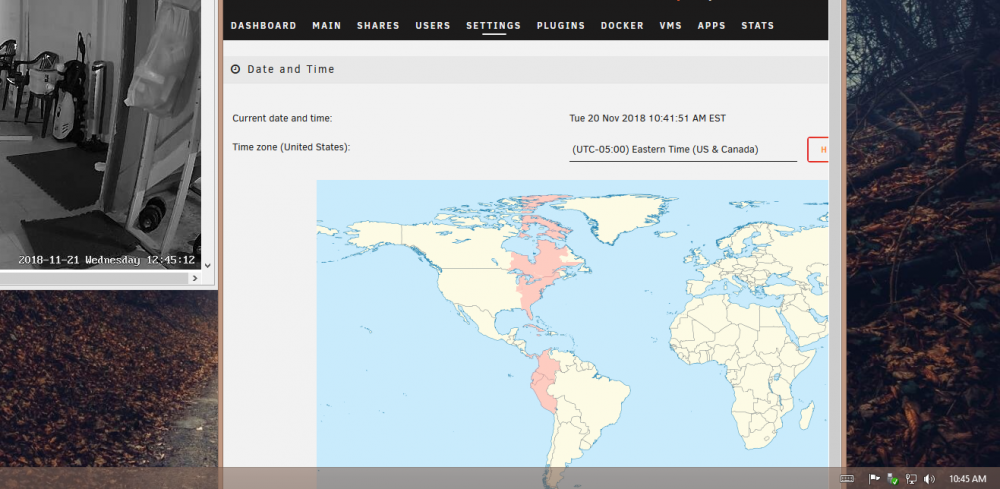
Okay the forced update showed that the time zone was correct EST (New York) but its still saying a different date and time on the camera feed. I'm curious if the camera is providing the time to the feed somehow? I'm going to see if I can connect to it using the mobile setup app that came with the camera. I'm using SV3C ProHD 1080p - SV-B06POE-1080P-A Thanks for the help!
-
My timezone is set to EST I believe in Unraid. I'm not sure what else to try. I've reinstalled the docker container, restarted it, stopped and started it and still showing a different time. I do have some yellow stuff in the log now that I look. Might this have something to do with it? Setting up systemd (229-4ubuntu21.9) ... addgroup: The group `systemd-journal' already exists as a system group. Exiting. Operation failed: No such file or directory Failed to create directory or subvolume "/var": Bad file descriptor Failed to create directory or subvolume "/home": Bad file descriptor Failed to create directory or subvolume "/srv": Bad file descriptor Thanks for your help!
-
Could anyone share with me a line to put in the config or any instruction on how to update the time stamp on the video feeds? I don't see any time zone or date/time information in any config or in the docker options. Its showing up 14 hours ahead of current time.
-
Thanks so much, also glad to support :) I couldn't get this to work so I ended up changing the conflicting container port (SABNZBD from 8080 to 9091) and reinstalled the container and it worked. Thanks again sir!


