





DaLeberkasPepi
Members
-
Joined
-
Last visited
-
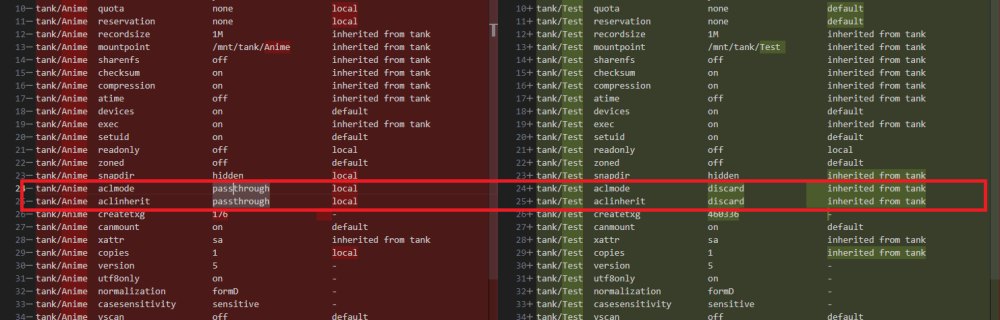
Update: it seems i found the missing bit after all..... As a last resort i tried creating a new dataset and testing with that one. And that worked for some reason. After comparing the settings between the newly created dataset and one of the old ones i noticed that the settings for aclmode and aclinherit where different: And after changing that setting on one of my existing datasets, the permissions also worked correctly on that share....
-
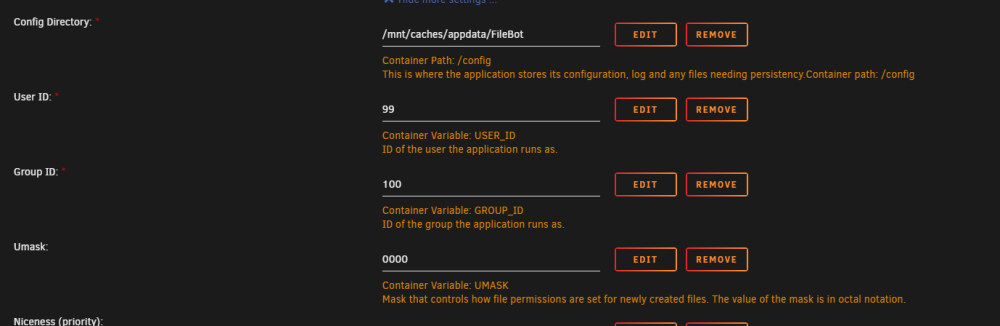
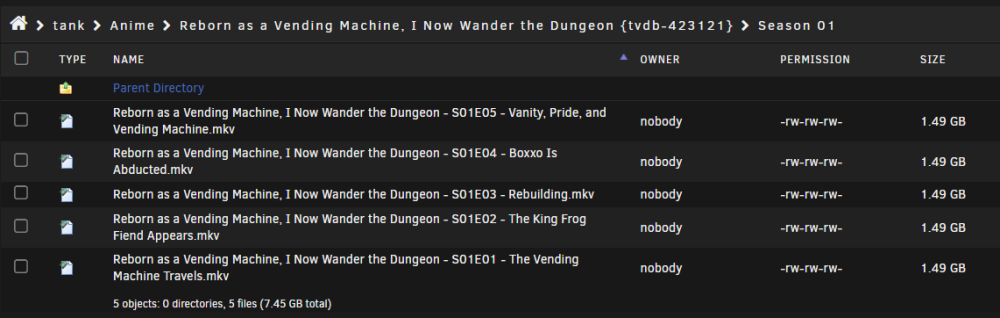
Update: The same seems to happen to dockers so it is mostly nothing directly with smb. The Docker settings seem correct and all was working a few days erlier, before i transferd my zfs pool to truenas scale because unraid 6.12.3 kept on crashing on my while replacing a disk. And in Truenas Scale i changed the permissions to posixacl but i changed them back when i switched back to unraid but maybe i missed something somwhere. Edit: it only happens for directories created from withing dockers. The files created from a running docker seem to have the proper rw settings:

-
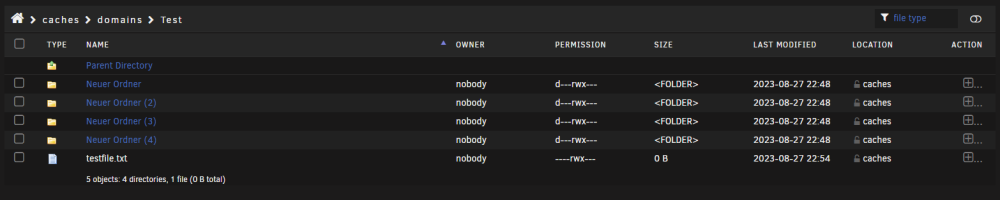
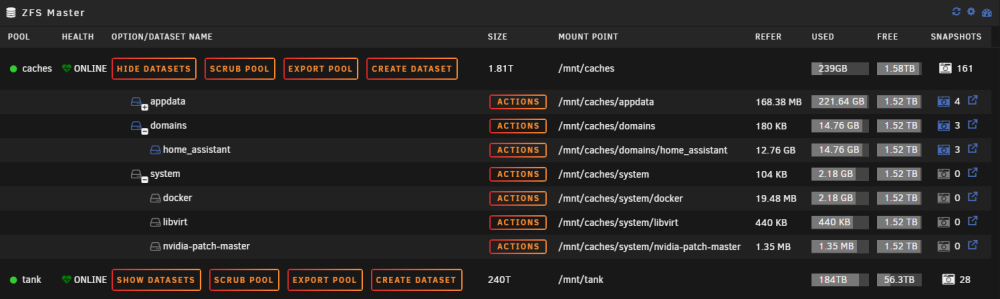
with the smb config like shown below i have following problem: whenever i try to create a folder it creates 4 folders instantly and it doesn't let me delete them (which was obvious after looking into the permissions) I've tried everything i could, i also tried every combination of smb options but only the owner changes if i omit the force user/group section. The permissions for newly created folders/files always stays the same. When i create a folder in the filebrowser in the webui everything is correct. The shares i am trying to share are both zfs pools and i already made sure there are no leftover acls (as far as i could tell) root@HomeServer:~# ls -la /mnt/caches/domains/Test/ total 15 drwxrwxrwx 6 nobody users 7 Aug 27 22:54 ./ drwxrwxrwx 4 nobody users 5 Aug 27 22:24 ../ d---rwx--- 2 nobody users 2 Aug 27 22:48 Neuer\ Ordner/ d---rwx--- 2 nobody users 2 Aug 27 22:48 Neuer\ Ordner\ (2)/ d---rwx--- 2 nobody users 2 Aug 27 22:48 Neuer\ Ordner\ (3)/ d---rwx--- 2 nobody users 2 Aug 27 22:48 Neuer\ Ordner\ (4)/ ----rwx--- 1 nobody users 0 Aug 27 22:54 testfile.txt* root@HomeServer:~# getfacl /mnt/caches/domains/Test getfacl: Removing leading '/' from absolute path names # file: mnt/caches/domains/Test # owner: nobody # group: users user::rwx group::rwx other::rwx root@HomeServer:~# zfs get acltype caches/domains NAME PROPERTY VALUE SOURCE caches/domains acltype posix local root@HomeServer:~# zfs get all caches/domains NAME PROPERTY VALUE SOURCE caches/domains type filesystem - caches/domains creation Sun Aug 13 11:00 2023 - caches/domains used 14.8G - caches/domains available 1.52T - caches/domains referenced 180K - caches/domains compressratio 3.61x - caches/domains mounted yes - caches/domains quota none local caches/domains reservation none local caches/domains recordsize 64K local caches/domains mountpoint /mnt/caches/domains inherited from caches caches/domains sharenfs off inherited from caches caches/domains checksum on inherited from caches caches/domains compression zstd local caches/domains atime off local caches/domains devices on default caches/domains exec on inherited from caches caches/domains setuid on default caches/domains readonly off local caches/domains zoned off default caches/domains snapdir hidden local caches/domains aclmode passthrough local caches/domains aclinherit passthrough local caches/domains createtxg 2048 - caches/domains canmount on default caches/domains xattr sa local caches/domains copies 1 local caches/domains version 5 - caches/domains utf8only on - caches/domains normalization formD - caches/domains casesensitivity sensitive - caches/domains vscan off default caches/domains nbmand off default caches/domains sharesmb off inherited from caches caches/domains refquota none local caches/domains refreservation none local caches/domains guid 11573844951444178803 - caches/domains primarycache all default caches/domains secondarycache all default caches/domains usedbysnapshots 144K - caches/domains usedbydataset 180K - caches/domains usedbychildren 14.8G - caches/domains usedbyrefreservation 0B - caches/domains logbias latency default caches/domains objsetid 66 - caches/domains dedup off inherited from caches caches/domains mlslabel none default caches/domains sync standard local caches/domains dnodesize auto inherited from caches caches/domains refcompressratio 1.19x - caches/domains written 104K - caches/domains logicalused 53.1G - caches/domains logicalreferenced 123K - caches/domains volmode default default caches/domains filesystem_limit none default caches/domains snapshot_limit none default caches/domains filesystem_count none default caches/domains snapshot_count none default caches/domains snapdev hidden inherited from caches caches/domains acltype posix local caches/domains context none default caches/domains fscontext none default caches/domains defcontext none default caches/domains rootcontext none default caches/domains relatime off default caches/domains redundant_metadata all default caches/domains overlay on default caches/domains encryption off default caches/domains keylocation none default caches/domains keyformat none default caches/domains pbkdf2iters 0 default caches/domains special_small_blocks 0 inherited from caches Unraid Version: Version: 6.12.4-rc19 smb.extra: [global] veto files = /._*/.DS_Store/*.PlexCleaner/ [tank] path = /mnt/tank browseable = no valid users = schlichtner writeable = yes force create mode = 0666 force directory mode = 0777 force user = nobody force group = users [caches] path = /mnt/caches browseable = no valid users = schlichtner writeable = yes force create mode = 0666 force directory mode = 0777 force user = nobody force group = users /etc/samba/smb.conf: root@HomeServer:~# cat /etc/samba/smb.conf [global] # configurable identification include = /etc/samba/smb-names.conf # log stuff only to syslog logging = syslog@0 # we don't do printers show add printer wizard = No disable spoolss = Yes load printers = No printing = bsd printcap name = /dev/null # disable aio by default aio read size = 0 aio write size = 0 # misc. invalid users = root unix extensions = No wide links = Yes use sendfile = Yes host msdfs = No # ease upgrades from Samba 3.6 acl allow execute always = Yes # permit NTLMv1 authentication ntlm auth = Yes # default global fruit settings: #fruit:aapl = Yes #fruit:nfs_aces = Yes fruit:nfs_aces = No #fruit:copyfile = No #fruit:model = MacSamba # hook for user-defined samba config include = /boot/config/smb-extra.conf [global] # hook for unassigned devices shares include = /etc/samba/smb-unassigned.conf # auto-configured shares include = /etc/samba/smb-shares.conf /etc/samba/smb-names.conf root@HomeServer:~# cat /etc/samba/smb-names.conf # Generated names netbios name = HomeServer server string = Inter-Tech 4U 4424 hide dot files = no server multi channel support = no max open files = 40960 multicast dns register = No disable netbios = yes server min protocol = SMB2 security = USER workgroup = WORKGROUP map to guest = Bad User passdb backend = smbpasswd null passwords = Yes idmap config * : backend = tdb idmap config * : range = 3000-7999 create mask = 0777 directory mask = 0777 bind interfaces only = yes interfaces = 192.168.1.7/24 127.0.0.1 homeserver-diagnostics-20230827-2254.zip
-
i had to move one of the encrypted drive to the first spot in the pool to get the prompt from unraid again....

-
Thats why i wrote i would use zfs native encryption when its implemented in unraid. And would you be able to post the source to this claim that ZFS deprecated native encryption? (which they only implemented in the last few years or so)
-
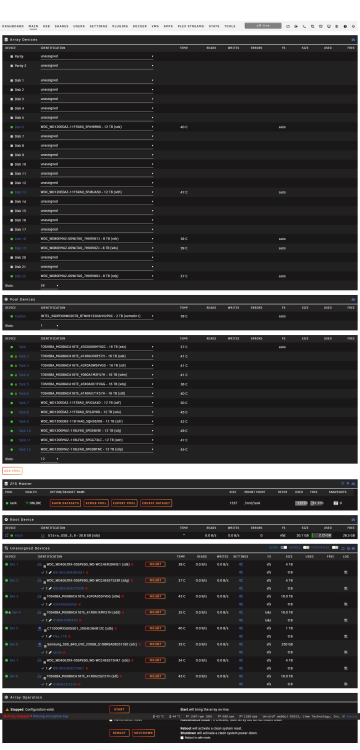
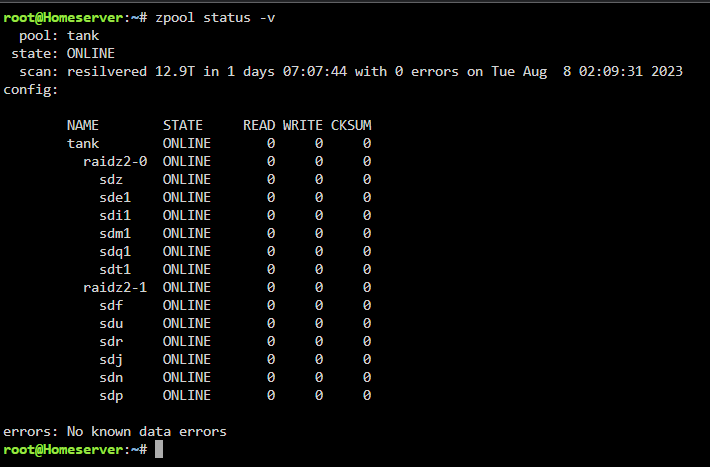
Hi guys, tl,dr: i have encrypted drives in one of my zfs pool which unraid seems to detect but doesn't give me the option to enter my passphrase. Neither does it seem to care if i unlock the drives via terminal manually (with which i could start the zfs pool and zfs detect all drives again), but unraid still doesn't let me start my array. long story: im in some weird kind of pickle here. I'm in the process of moving most of my data from standard unraid array to a zfs pool. I started out with a 6 x 16TB raidz2 pool with luks encryption. When i got to the point to add another 6 drive raidz2 vdev but with 12TB drives unraid said id couldnt do that for some reason. Thats where i just added the drives via the cli only to notice after the fact that this way none of the 6 new drives where encrypted like the first 6 drives. And also that unraid didn't seem to care about the change to the pool i made in cli and still only showed the first 6 encrypted drives but showed the expanded storage and also the scrub page showed the new drives. After this i thought it would probably be best to remove the encrypted drives from the pool and use zfs encryption in one of the future releases. Therefore i started to replace the 16TB encrypted drives with unencrypted drives which went really well for the first drive.... Then i had to stop the array to move some drives around again and make a new config to remove some drives from the unraid array. In this step i wanted to try to reimport also the pool since the first 16tb drive at the top of the pool (was dev4/sdd in unassigned devices) was already replace by a new unencrypted drive and therefore wasn't a member of the zfs pool anymore.... And now i am at the moment i already described in the tl,dr section... Does anybody now what i might have missed when manually unlocking the the encrypted drives or a way to tell unraid everything is ok. At the end a tip how to properly import such a drive pool in unraid in the future would be much appreciated, since i have to add another 6 drive raidz2 in the near future to get the needed storage space..... Thanks already in advance for the time reading this and i hope some can help me out here... homeserver-diagnostics-20230809-2302.zip
-
i just wanted to check back und mention that since i updated the firmware and the bios of my hba card the error didnt occour again. So until anything changes i mark @JorgeB answer to update the firmware as the solution. Thanks again for the fast response!
-
I've updated the firmware and the bios because i was already at it. I'll check back if it helped. Thanks already for the help again!
-
First thanks for the super fast reply!!! I've uploaded my new diagnostics with mover logger disabled and i also fixed all other fixcommonproblems (read/write slave for unassigned devices and mtu) homeserver-diagnostics-20221012-1857.zip
-
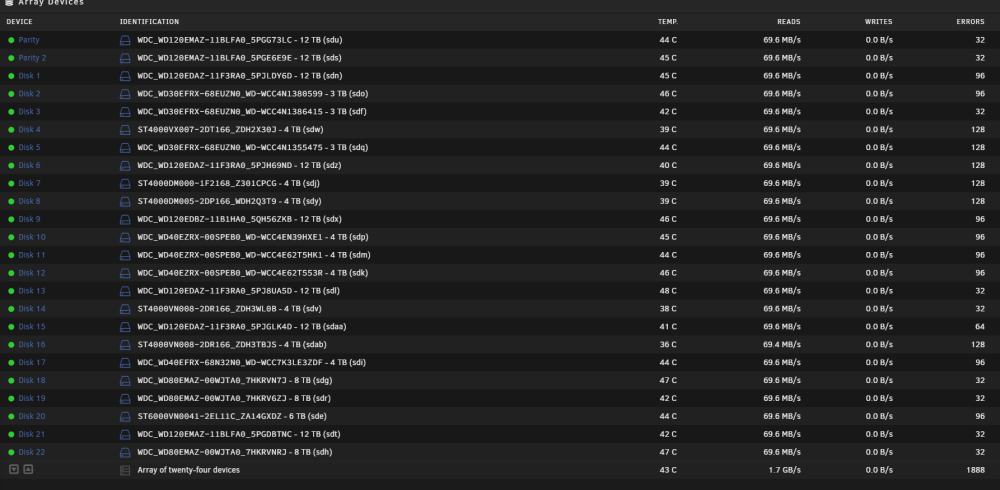
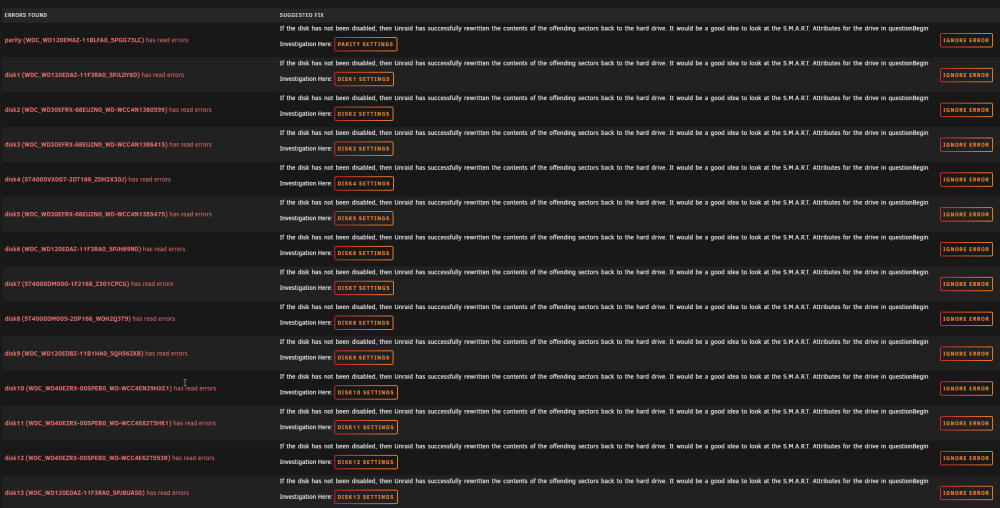
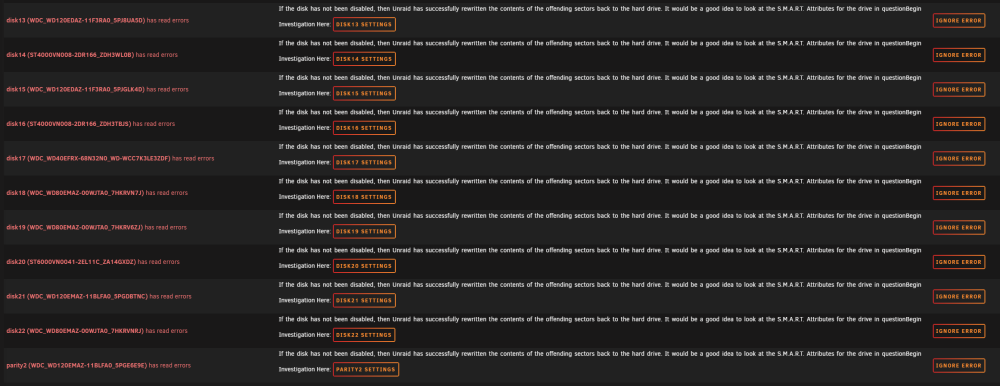
Today i noticed a error message from FixCommonProblems and then noticed read errors on every drive in the array. After checking the drives SMART Attributes i didn't notice any new reallocated sectors or anything like it. And personally i cant think of a reason to suspect any real HDD error. The only thing i could think of would be that my HBA is failing but then it would continue to fail i guess. Also this error occured out of the blue. I never had any problem like this and i am running unraid for years now. The only things i changed was i was switching to schedutil in cpu governor from performance, i activated spin down of drives (i set it from never to 30 min). Maybe one of you guys already had a similar problem and could give me any advice how move forward? My diagnostics file: homeserver-diagnostics-20221012-1718.zip
-
i just wanted to say thanks for this info. I also got it working now!
-
i really would appreciate if it would sometime in the future since coppits doesnt really gets updated anymore it seems and your webui is way better.
-
took over your changes and i can confirm with these changes the script actually detects how many drives are spun up correctly. (I'm using a Broadcom SAS 9305-24i HBA for the drives)
-
idk why but i sometimes get really high cpu usages in dashboard, which i cant track in top nor htop or any other monitoring tool i could think of (netdata/cadvisor). The problem is it seems its not only a visual anomaly because when the cpu usage hovers between 75-100% like here the docker page "hangs" for a few seconds and also the dockers seem to hange every few seconds . Does anybody have a way to track down which process produces this high cpu usage? How does the dashboard tetermine the cpu usage? thx in advance for your help!
-
Hello, it seems like the docker and apps tab dont get properly loaded anymore, this effects also the docker sektion of the dashboard tab. The Apps tab keeps showning "Updating Content" and the docker tab keeps looking for dockers. The dockers themself still run as like nothing happened but i dont have access to them trough the website anymore. homeserver-diagnostics-20180904-2259.zip





