





dv310p3r
Members
-
Joined
-
Last visited
Everything posted by dv310p3r
-
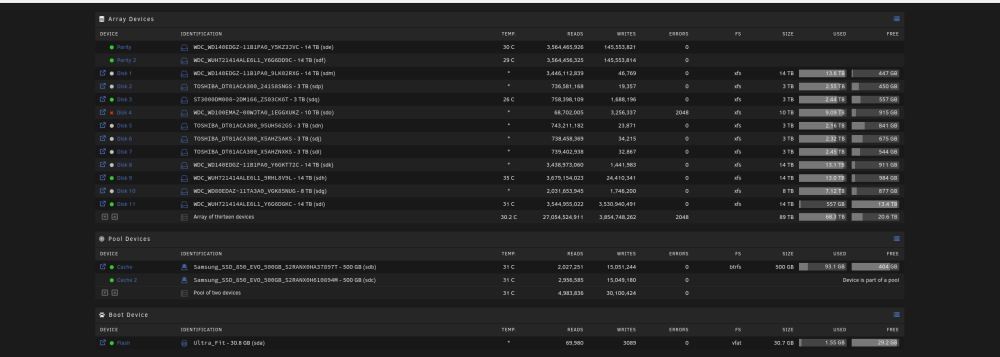
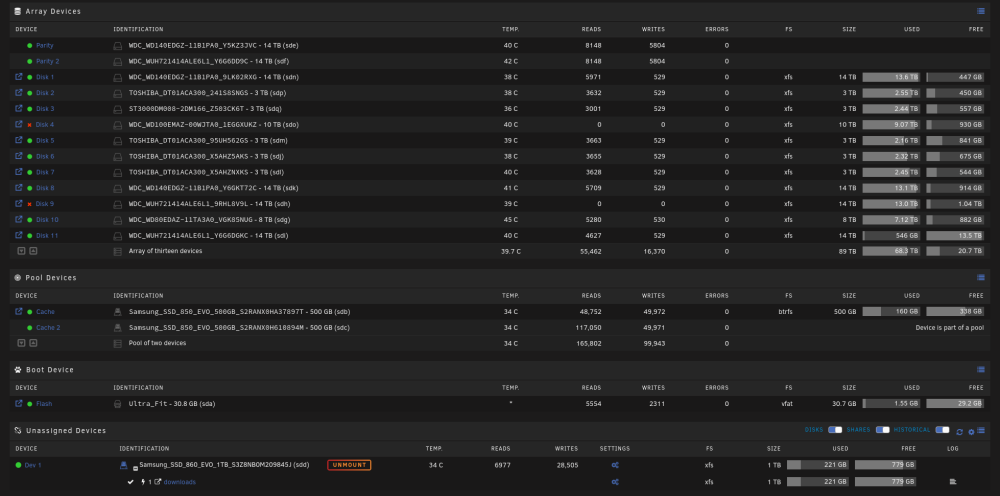
I had an array of 11 disks total, 1 parity and 10 disks. One of the drives failed on Sep 22, I didn't think much of it at the time and didn't even really troubleshoot it much. I had been runnng out of space so I decided to use this as an opportunity to upgrade to a bigger drive and while I'm at it, ad some more. So, I bought 3 14 tb drives (my parity is a 14 tb). I used the three drives to first, replace the bad drive, then I added one more drive as a parity so I'd have 2 parity drives, and then finally I added the third drive as an additional disk increasing my total drive space. Everything was fantastic till this Tuesday October 3, I had another drive reporting errors so the disks was taken off and data was being emulated. I figured, now I gotta start investigating. But, as life happens, I was a bit too busy. Anyway, I woke this morning and now I have a second drive failing. So, I'm here now, in desperate need of some guidance, because 1 drive failure can be expected, 2 can be a coincidence, 3 though... well that's a pattern, and likely a problem (or at leasts I thinks it is). I've attached the diagnostics effective this morning while the array was running, and I've attached a screenshot from how it was on Tuesday (10/03/23), and then one from this morning (10/05/23). I'm taking the array offline because well, I don't know I just feel safer that way, but of course, I'm here, so I'm not an expert. Any guidance would be helpful and if any additional logs / diagnostics, etc are needed, please let me know. server-name-diagnostics-20231005-0922.zip
-
Ok. So, it seems to be good now. I think it was a cloudflare thing. I had to turn on full end to end encryption in the cloudflare settings and then enable https in the nginxproxymanager, and it's working. So, thanks for the guidance.
-
Ah, yes, I understand what you mean now. And yes, if I have no Proxy Hosts configured in NPM and then try and go to mydomain.com, I get the congratulations page. DNS seems to be just fine.
-
Brave. Also the issue is that I do have to manually add www otherwise it doesn't work. There is an A record that points to my IP address. That's not an option. The host is a required field. Yes. If I go to the IP address shown in cloudflare it'll show the "Congratulations, You've successfully started the Nginx Proxy Manager." page. Also, if I go to www.mydomain.com, which is the host I configured in NPM, it takes me to the site no problem. So, I want to do a better job of explaining what's happening. In cloudflare right now, I have an A record that points to my IP, and a cname for www that targets the main domain. We'll say it's mydomain.com. In NPM on my unraid server, if I create a proxy host and put "mydomain.com" in the Domain Names input, the proxy doesn't work. Meaning, if I go to mydomain.com in a browser, I get a 500 error from cloudflare. At the same time I know NPM is running because I can go to the IP directly and see the congratulations page. Also, if I curl to the container from within the NPM console, it can communicate. Now, for the weird part. If I create a new Proxy Host and give it a domain name of www.mydomain.com OR... to clear up any confusion with WWW, it' has nothing to do with WWW, because if I put poop.mydomain.com or any other subdomain.mydomain.com... NPM works as expected. If I visit, poop.mydomain.com, or subdomain.mydomain.com, I see the properly served container (of course, as long as I created the correlating cname record in cloudflare). I hope that clarifies things.
-
I've been reading through all these posts, and not finding anything that'll fix my issue. And it doesn't seem to be nearly as complicated as all the stuff people here are having. I must be really missing something, but I cannot get Nginx Proxy manager to direct traffic to my main domain but it will work fine in sending traffic to containers or VM's if I use a subdomain. For example, if I make a proxy host sub.mydomain.com pointing to a container, it works. If however I make a proxy host mydomain.com pointing to a container. It does not work. I am not sure what I'm doing wrong.
-
ceres-station-diagnostics-20211227-1648.zip Attached.
-
I switched my AMD Ryzen 2700X to an Intel 10700 because I wanted to take advantage of QuickSync for my Plex Server. Since that switch I've been having serious issues. Here's my current hardware: Unraid Version - 6.9.2 Motherboard - MSI Z490-A PRO CPU - Core I7 10700K RAM - 32 GB Crucial Ballistix Sport LT 2666 MHz DDR4 DRAM DISKS - Unassigned Samsung SSD 860 Evo 1TB - used for downloads - Cache (two SSD 850 Evo 500 GB - Array (10 disks + 1 Parity total 11 disks) Parity is 14tb Disks are either 14tb, 8tb and 3 tb I've done no overclock, nor do I plan to. Issue #1: Since the switch over, after rebooting the system, sometimes it'll get an IP, and other times it'll get the auto assigned 169.... address. I have to restart it several times until it connects to the network. Issue #2: It's randomly freezing out of nowhere. The GUI won't load and after a restart it'll work again (unless it didn't get the right IP address). Sometimes it'll work for minutes, other times hours. Honestly, I have no idea what to do, or where to start. Any help would be greatly appreciated.
-
I've had unRAID since the end of 2016. My favorite aspect of it, is that in those 3 years, I've been running the same installation of it, without issue. I add new drives, no problem. Switch drives, no problem. I've changed my entire CPU / RAM / Motherboard 3 times, no problem. That damn thing just runs, and runs, and runs. I've done so much testing, creating VM's, Dockers, modifying, etc... and it keeps chugging along, letting me get my homelab kicks in, for very little time investment. Today I run my pfSense router on it, my HASS.io automation on it, and all my downloading, plex, etc. It just keeps running. I'm an evangelist of unRAID too. I've gotten at least 3 friends to use it. And they didn't believe it could do some of the things I said it could, like being a server and a gaming PC at the same time. I truly love my unRAID server. Thanks for it!

