





JonUKRed
Members
-
Joined
-
Last visited
Everything posted by JonUKRed
-
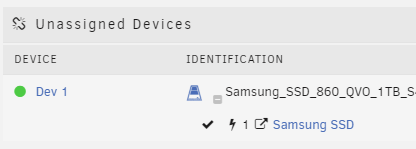
Afternoon, I have an 'electricity' icon my Samsung SSD (unassigned device) which I do not recognise, could anyone help with an explanation please. I did check Google but nothing jumping out at me. Thanks, Jon
-
I will ping it over, thanks!
-
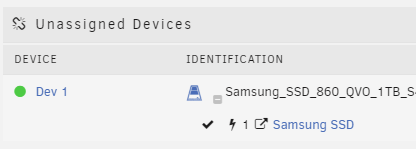
Afternoon, as the subject states, I have an icon next to my Samsung SSD (unassigned device) which I do not recognise, could anyone help with an explanation please. I did check Google but nothing jumping out at me. Thanks, Jon
-
Good afternoon all! I need some help please, I installed pihole around 2 weeks ago and has been working great, thank you!! I was in unraid yesterday and noticed much higher than normal writes to my cache (ssd). After some researching and analysis using iotop it seems 'loop2' (which I beleive is the docker) is the culprit, writing around 1.4GB per hour, see below snapshot of 25 minutes worth of monitoring. Since pihole was the only docker I had added recently I thought this may be the problem. I isolated the problem by stopping the docker, deleting the image, created new docker and added one docker template and monitor for 1 hour, then repeat. It was indeed pihole writing around 1.4GB/hour with a brand new docker image and no other dockers installed. I tried the following; - Stopped all logging in gui and also used 'pihole -l off' in terminal. - added the following to pihole-FTL.conf PRIVACYLEVEL=4 MAXDBDAYS=0 I see no stats and am pretty sure all logging is now off yet I still have this huge writes to the cache, confirmed also on cache smart report which back up what I'm seeing in iotop... Do you have any suggestions please as I'm pretty much all out of ideas! Many thanks in advance! Jon

-
24GB DDR4 2400 - Majority is used for VM's.
-
Works beautifully! Even for a novice like me! Always wanted my VM on a discrete ethernet card, now I have in less than 20 minutes The PCI device now even shows up in the GUI to passthrough - very clever! Thanks JonP!!!

