





Jobine
Members
-
Joined
-
Last visited
-
Couldn't the window maximize itself?
-
I'm doing the same thing, but at the cottage the LTE isn't working well, so I'd like to connect via wifi.
-
I deleted the file /mnt/user/System/docker.img and after the folder. It seems okay... Thank,
-
I'm not sure how to proceed How can I be sure to delete the correct one? system or System ?

-
total 75G drwxrwxrwx 1 nobody users 20 Jan 13 17:12 ./ drwxrwxrwx 1 nobody users 86 Jan 14 10:23 ../ -rw-r--r-- 1 nobody users 75G Jan 13 17:13 docker.img
-
Did you see the problem ? Thank,
-
Question... Everything works good with my iphone with 5G ou LTE. If I'm on the hotel wifi, nothing work. Any idea ? Thank,
-
Thank, serveur-diagnostics-20240114-1231.zip
-
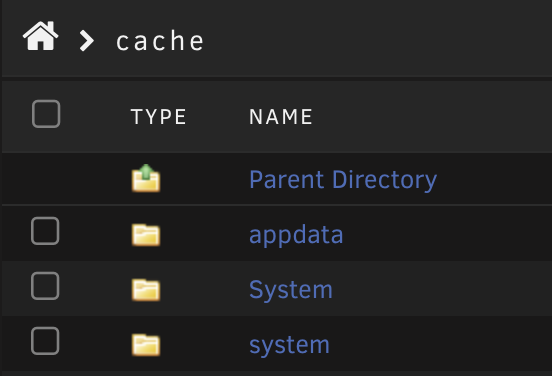
/mnt/cache/System: total 78643200 -rw-r--r-- 1 nobody users 80530636800 Jan 13 17:13 docker.img /mnt/cache/system: total 7759776 -rw-rw-rw- 1 nobody users 80530636800 Jan 14 10:18 docker.img /mnt/user/System: total 78643200 -rw-r--r-- 1 nobody users 80530636800 Jan 13 17:13 docker.img /mnt/user/system: total 7759776 -rw-rw-rw- 1 nobody users 80530636800 Jan 14 10:18 docker.img
-
Hi, FixProblems discovered a problem with my System share this share only contains my docker.img I copied the docker.img to the directory /mnt/cache/system/ and erase the /mnt/cache/System/ folder. After restarting the Array, the docker vDisk location is in /mnt/cache/system/docker.img, but the /mnt/cache/System/ directory is recreated. How can I fix this ? Thank,



-
The system seems to have created the system folder by default My docker.img is really in the /mnt/app/system/docker.img folder
-
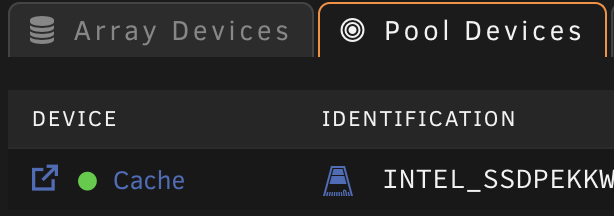
Only one pool And 2 system folders...
-
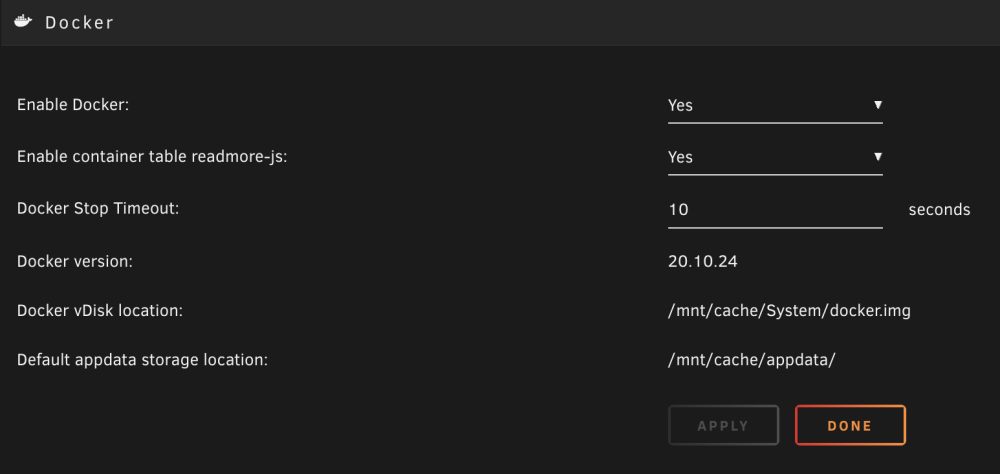
The docker vDisk location point to /mnt/app/system/docker.img My docker.img is in /mnt/cache/System/docker.img Everything work fine now
-
Thank serveur-diagnostics-20231228-1243.zip
-
After a power outage, I lost my USB key I did a scandisk and it is ok now After rebooting my server, but dockers do not appear And I only see this message "No Docker containers installed" but when I look in pool devices I see them all


