drogg
Members
-
Joined
-
Last visited
Everything posted by drogg
-
Is there something I can do to fix it?
-
Ran the script and still happening. Are there any logs I can attach that would help diagnose?
-
I _think_ I'm getting the hang of this, but my upload script seems to be stuck. I've checked the status of it every few hours using 'rclone about gdrive_media_vfs:' and nothing has uploaded in a while. When I try to run the upload script, it says "14.04.2020 14:47:30 INFO: Exiting as script already running." so it's not currently uploading anything. Any idea as to what I'm doing wrong here? Thanks for the incredible work on this!
-
Interesting. How difficult is it to fix that? I'm so confused as to why that would make a difference. Webui worked up until a few days ago (with VPN Enabled) and then suddenly stopped.
-
I try to connect via 192.168.0.103:8112 and get no webui if VPN is enabled. If it's disabled, I get the webui just like normal.
-
Inside the LAN currently. Supervisord.log attached (I assume you want the whole thing?)
-
Installs perfectly now!
-
Hey @jbrodriguez, love the iOS app! I'm trying to install the plugin for the server and I get the following output. Hoping you can help! plugin: installing: https://raw.githubusercontent.com/jbrodriguez/unraid/master/plugins/controlr.plg plugin: downloading https://raw.githubusercontent.com/jbrodriguez/unraid/master/plugins/controlr.plg plugin: downloading: https://raw.githubusercontent.com/jbrodriguez/unraid/master/plugins/controlr.plg ... done Warning: simplexml_load_file(): /tmp/plugins/controlr.plg:69: parser error : xmlParseEntityRef: no name in /usr/local/emhttp/plugins/dynamix.plugin.manager/scripts/plugin on line 214 Warning: simplexml_load_file(): nohup /usr/local/emhttp/plugins/&name;/scripts/start > /dev/null 2>&1 & in /usr/local/emhttp/plugins/dynamix.plugin.manager/scripts/plugin on line 214 Warning: simplexml_load_file(): ^ in /usr/local/emhttp/plugins/dynamix.plugin.manager/scripts/plugin on line 214 Warning: simplexml_load_file(): /tmp/plugins/controlr.plg:69: parser error : xmlParseEntityRef: no name in /usr/local/emhttp/plugins/dynamix.plugin.manager/scripts/plugin on line 214 Warning: simplexml_load_file(): nohup /usr/local/emhttp/plugins/&name;/scripts/start > /dev/null 2>&1 & in /usr/local/emhttp/plugins/dynamix.plugin.manager/scripts/plugin on line 214 Warning: simplexml_load_file(): ^ in /usr/local/emhttp/plugins/dynamix.plugin.manager/scripts/plugin on line 214 Warning: simplexml_load_file(): /tmp/plugins/controlr.plg:69: parser error : xmlParseEntityRef: no name in /usr/local/emhttp/plugins/dynamix.plugin.manager/scripts/plugin on line 214 Warning: simplexml_load_file(): nohup /usr/local/emhttp/plugins/&name;/scripts/start > /dev/null 2>&1 & in /usr/local/emhttp/plugins/dynamix.plugin.manager/scripts/plugin on line 214 Warning: simplexml_load_file(): ^ in /usr/local/emhttp/plugins/dynamix.plugin.manager/scripts/plugin on line 214 Warning: simplexml_load_file(): /tmp/plugins/controlr.plg:69: parser error : xmlParseEntityRef: no name in /usr/local/emhttp/plugins/dynamix.plugin.manager/scripts/plugin on line 214 Warning: simplexml_load_file(): nohup /usr/local/emhttp/plugins/&name;/scripts/start > /dev/null 2>&1 & in /usr/local/emhttp/plugins/dynamix.plugin.manager/scripts/plugin on line 214 Warning: simplexml_load_file(): ^ in /usr/local/emhttp/plugins/dynamix.plugin.manager/scripts/plugin on line 214 Warning: simplexml_load_file(): /tmp/plugins/controlr.plg:69: parser error : xmlParseEntityRef: no name in /usr/local/emhttp/plugins/dynamix.plugin.manager/scripts/plugin on line 214 Warning: simplexml_load_file(): nohup /usr/local/emhttp/plugins/&name;/scripts/start > /dev/null 2>&1 & in /usr/local/emhttp/plugins/dynamix.plugin.manager/scripts/plugin on line 214 Warning: simplexml_load_file(): ^ in /usr/local/emhttp/plugins/dynamix.plugin.manager/scripts/plugin on line 214 Warning: simplexml_load_file(): /tmp/plugins/controlr.plg:69: parser error : xmlParseEntityRef: no name in /usr/local/emhttp/plugins/dynamix.plugin.manager/scripts/plugin on line 214 Warning: simplexml_load_file(): nohup /usr/local/emhttp/plugins/&name;/scripts/start > /dev/null 2>&1 & in /usr/local/emhttp/plugins/dynamix.plugin.manager/scripts/plugin on line 214 Warning: simplexml_load_file(): ^ in /usr/local/emhttp/plugins/dynamix.plugin.manager/scripts/plugin on line 214 plugin: xml parse error
-
The latter. The webui just completely fails to load when the VPN is enabled. Things are still downloading/seeding just fine and AirVPN shows me as connected but I can't access the webui unless I disable the VPN.
-
Anyone know of a fix for the webui loading but not letting me past the login screen? AirVPN shows that I'm connected and my trackers are showing that I'm seeding. It's just locked me out of of the webui, even after entering the correct password. Works without a hitch if I disable the VPN.
-
One more issue and then I'm set. It's been running just fine, but suddenly I can't get past the login screen. If I switch the VPN to off, I can log in just fine. But when I turn it back on, I either get a super slow load or I'm unable to get past the login screen.
-
Edit: hard refresh fixed it. Thank you so much for your help!!
-
Still no dice. I'm going to remove and retry from scratch. EDIT: Nada. Can someone maybe post their Container page so I can just copy it? I'm not sure what I'm doing wrong.
-
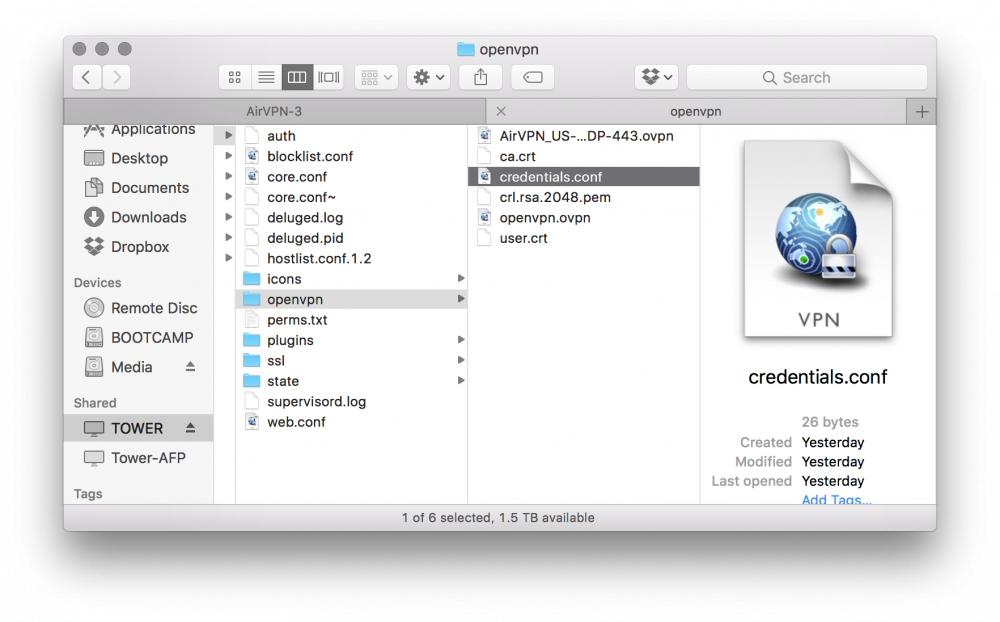
I was under the impression that I also needed the .crt file, which is why I'd checked the Advanced Options on AirVPN. So the only file that should be in there is the generated .ovpn file and not the rest of the files made by DelugeVPN?
-
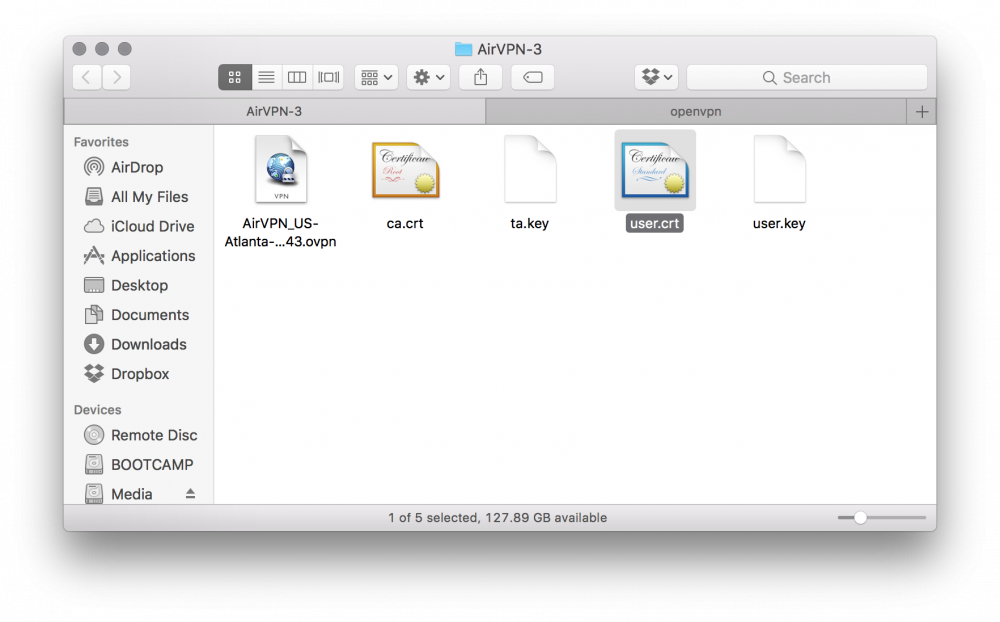
Here's what I got from AirVPN and what my app data folder looks like. Sorry if my noob is showing, just got started with Unraid!
-
Do I need to rename it or remove anything from the folder? I got a ca.crt and user.crt file from AirVPN.
-
Ok, updated those. Still no dice. Any other thoughts?
-
I'm trying to set this up with AirVPN and can't figure out what I'm doing wrong. The web interface won't launch if VPN enable is set to yes, but will open if set to no. I created the .ovpn file, but am I supposed to rename it "openvpn.ovpn" or just keep it the same name as the download? I have Key 1 set to yes, and Key 8 set to airvpn. Container path for /data is /mnt/user/downloads/. Screenshots attached!