





Carmico
Members
-
Joined
-
Last visited
Everything posted by Carmico
-
believe me that problem is not the filecrypt container link, the link works with other JD2 , just with JD2 on docker doesnt work , i read on JD forum that seems to be related to the FF linux version
-
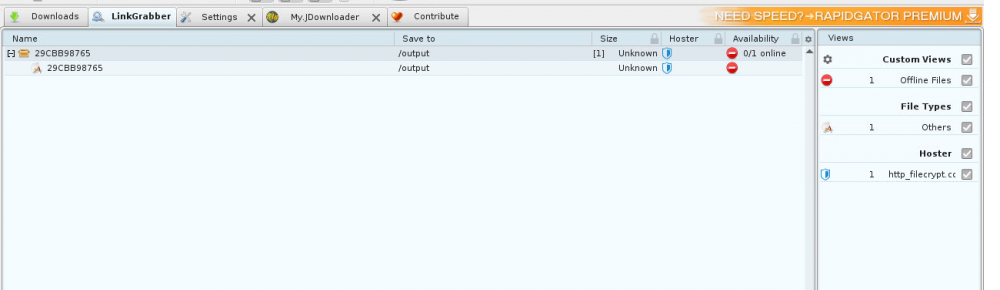
with this docker i have problems decrypting Filecrypt containers, if i add one, the links of the filecrypt html show as OFFLINE already updated JD2 and even reinstall the docker with JD2 directly on the pc, filecrypt containers works without problems , so i guess there is a problem with JD2 on the docker
-
i was confused now i know there's no Format Label, but Mount Point & Share got it, and modifed thanks!
-
it is possible to change Label to the partition of an unassigned device ?
-
i just copy the one in the root (same package) to the 5_DELL_IT , works 100%
-
server running, all OK
-
solved assignin a random sas address sas2flash -o -sasaddr 500605BXXXXXXXXXX
-
DONE flashed 5.1, 5.2 and 5.3 on efi, 100% complete but fuck, have another problem now!!! don't have anymore the SAS address ............................. because i just reformated with refus the whole package from the start to try the flash again , and lost everything of step 1 and step 2.... and now?! i don't see stickers on the card with sas address
-
yes, flashing step 5.1 now i think i found the problem, in the last package, there's no sas2flash.efi file in the 5_DELL_IT directory
-
i'm stucked here because "failed to initialize PAL" on step 5.3, this after step 3 and reboot... so boot on EFI Shell, take in -> fs0: ... but don't know what steps to do hereFireball3 , i got a Dell H310 i'm a little confused on what procedure to use and what version for IT mode, can you please confirm to me what is actually the right procedure and best version to flash? i read that P20 version has some problems/issues, by the way, you are using P19 version another thing, Official Dell H310 IT Mode Firmware seems to be the easiest and fastest method... but is based on an old lsi firmware version THANKS !!!

