





phileeny
Members
-
Joined
-
Last visited
Everything posted by phileeny
-
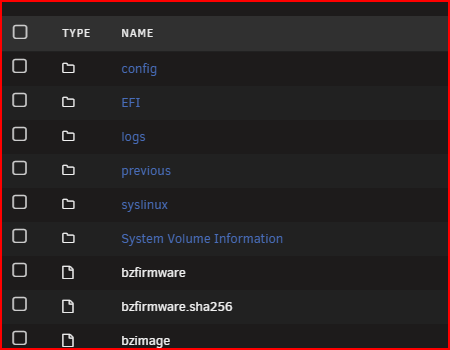
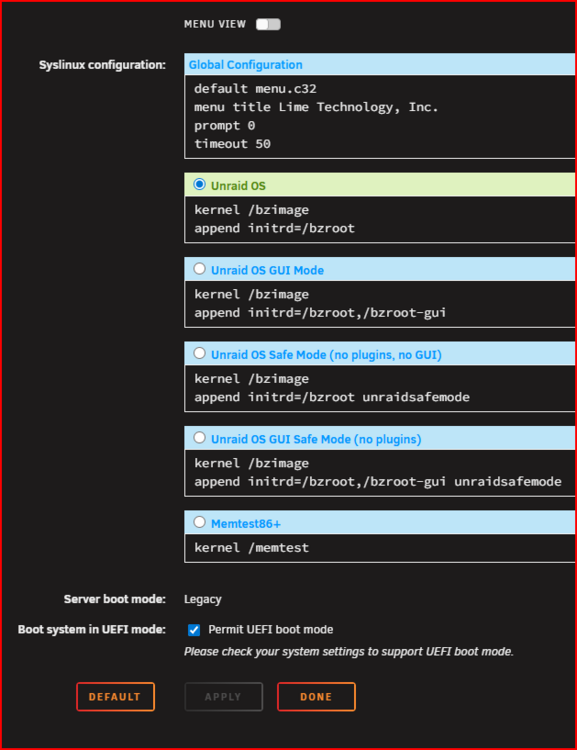
Done it Thank you, I went back in to the bios to check my setting for legacy/UEFI I changed the boot option to legacy only but my sandisk cruser edge 8.02 still didn't show only the UEFI one, then back in unraid I un-ticked Permit UEFI boot mode which renamed EFI to EFI~ then went back to the bios and my sandisk cruser edge 8.02 showed up in the boot option when I set the bios to legacy boot only again Thankyou for pointing me in the right direction.
-
I will try that, but my sandisk cruser edge 8.02 looks to be set to legacy boot, but the motherboard bios will not let me set default legacy boot so is there a way to change the sandisk cruser edge 8.02 to EUFI boot
-
legacy by default? yes I think. EFI folder on the flash drive without a trailing ‘~’ character
-
When I need to boot my system in to unraid I have two options "sandisk cruser edge 8.02" or "UEFI sandisk cruser edge 8.02" in my bios. My bios will only default to "UEFI sandisk cruser edge 8.02" I have to manually go in to the bios tell the system to use "sandisk cruser edge 8.02" each time Is there anything I can do change memory stick to use UEFI without changing my settings. Thanks
-
well it took me a while, I did a system clean and rebuild, and changed out some hardware, so hopefully it's working better now my new diagnostics file tvtower-diagnostics-20251107-2007.zip
-
I don't know what the above means. I was thinking it could be the controller, my other server has a Avago SAS 9305-24i bought new back in the day, and is solid as a rock. I was looking for a HBA like the Broadcom SAS 9305-24i from ebay but I don't trust some ebay sellers or any on amazon. maybe go for something like HBA 9500-16i
-
Sorry it finished before I got to download a new diagnostics but here it is anyway tvtower-diagnostics-20251027-0533.zip
-
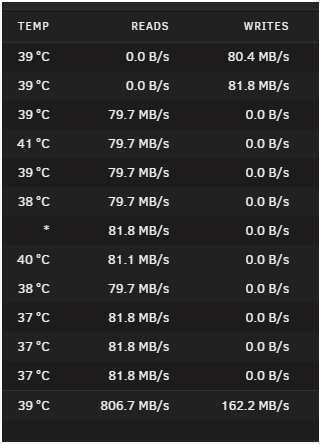
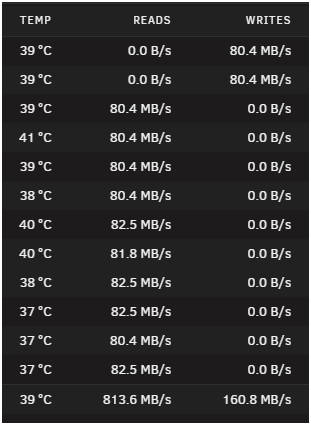
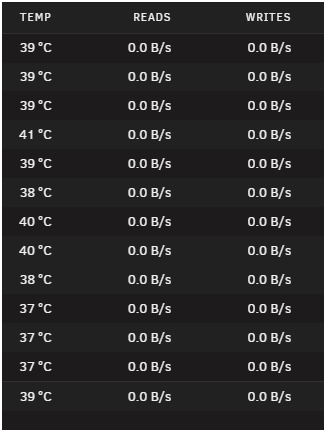
Again, Sorry for the delay in my reply as I'm a busy boy. I checked my cables and connections, my drives are in a 4u server case to a backplane, I did a new config as I needed to remove a drive I think was fake and it has been slow to rebuild the Parity, 2 days 1 hour estimated finish 3 to 12 hours, as you can see from the attached shots it reads and writes the Parity fine them stops for a bit, and the temp reading stops on some drives and it seems random it had been in Parity and different data drives, and some times in both. Do you think it could be a HBA controller issue?
-
Sorry for the delay in my reply, attached is my diagnostic file taken this morning after a server restart. I restarted the server a few days ago then reset permissions, I found that all my files on the server were set to read only on windows 11, sorted that the began to move files from windows to the server. Last night I tried to play a video file from disc 5 on the server, the video file didn't play but the error count in disc 5 was counting up, this morning I restarted the server and the video file played fine tvtower-diagnostics-20251015-0606.zip
-
I have had some issues with a HDD on my Server, now some files have had their attributes changed to archive when I look at the file properties in windows 11. On unraid I have run New Permissions but no joy, when I look at the files the owner is nobody permission is -rwxrw-rw- and when In go to action to change or delete the file nothing happens. I would like fix the permissions or delete the few offending files and reupload, any suggestions would be helpful.
-
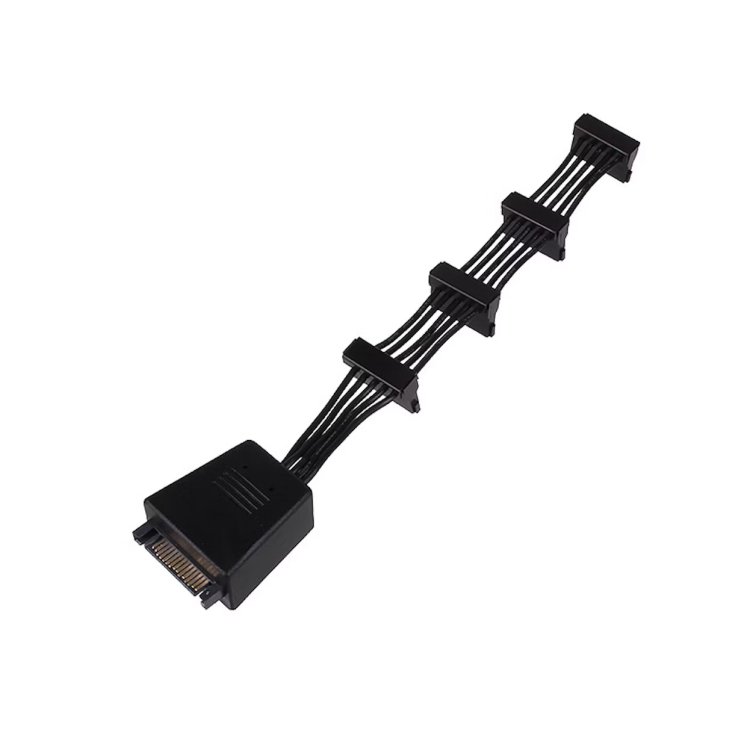
Its been a while, so just a quick update. I was going to buy some new 1x4 cables as per the suggestion then I remembered I had some older 1x4 cables I could try, and it turned out I had three of the Silverstone SST-CP06 power cables, these have two high quality 2200µF capacitors included on the cable to provide stable voltage to all connected devices, so I removed the two 1x5 sata power cables and fitted these, and for now all drives started first time.
-
Thanks I knew about the dodgy connectors, I will have a look at getting new cables to see if this solves my issue and get back to you.
-
So if I get a molex to 4 sata cable "beefy" as you say, and I would need three, would I connect all three to the same rail? also, any recommendations of a "beefy" cable.
-
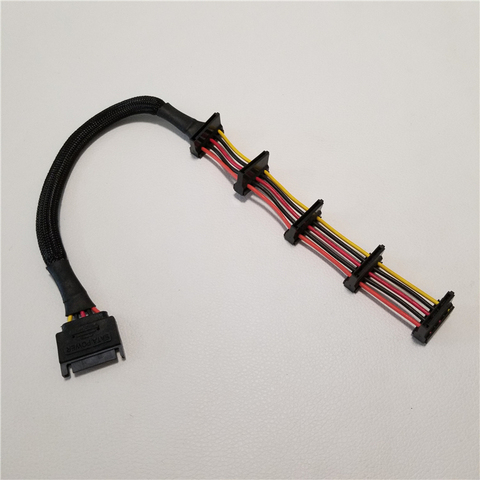
Sata to Sata like this
-
PSU is Corsair CX500M 500W, splitters yes x2 1 to 5 SATA
-
On the rare occasions I need to restart one on my servers it starts with missing HDDs, there are 10 HDDs, some 8TB some 3TB, I start the system and a few HDDs are missing so the array doesn't start, so I restart the system and a different set of HDDs are missing, sometimes its just one HDD and sometimes its five HDDs and always different HDDs. I tried one rail from the PSU to drive all 10 HDDs and two rails to drive five HDDs each but it still does the same. I had two controllers running four HDDs each with the rest running from the motherboard SATA controller and it still did the same, so I bought a 24 SATA controller but its still the same. After a few restarts it works fine, then the other day it just stopped, it had never just stopped before, I restarted the system and it came back with a corrupted USB stick. I turned it off to sort out later, when I got around to sorting it out, I restarted and it was back to random missing drives again and no corrupted USB stick. After a few restarts it is now back to running normally again. Where do I start to fix my problem? is it just a dodgy USB stick?
-
My unraid server is getting big and is full of HDDs from 1TB to 18TB and is always on with the HDDs spun down when not in use, it is used as my media server to my home cinema, data storage and backups etc, the reason it is on 24/7 is for self hosting duties, it is not overly loud but is at night so I want to shut it down when not needed. I am in the process of building a new computer to set up a new unraid server solely for self hosting duties. my question: would there be any harm to the main server or the HDDs turning it off for most of the week compared to leaving it on 24/7, my thinking is turned on maybe three days in a week. (an unraid system sleep option?)
-
In 2020 I build my second unraid server and called it "Dignity" built with old HDDs, a place for my old drives to go to die. It started with a 4TB as Parity but I soon changed that to a new Toshiba Enterprise 8TB as Parity, as of a week or so ago the server was as follows. New 8TB Parity 8 x 3TB + 2 x 4TB as data = 32TB 2 x 500GB as cache pool 6 x 1TB very old drives as second pool, I guess as raid 1 Over the months I was moving non-critical data from my main server (to save space) to the dignity server, I set the share to fill each drive first and I had filled drives 1 to 7 (5 x 3TB drives + 2 x 4TB drives) with the total of 22.3TB as the server started to fill drive 8 the next 3TB drive the move command failed, on looking at the "Dignity" server, oddly drive 1 the first full drive had gone to red cross emulated and disk 8 with just a few 100MBs came up with a number of errors. I restarted the server and drive 1 and 8 were missing, ok odd. I restarted the server again, drive 1 is still emulated and 8 was missing, ok. I restarted again, now all drives are back and drive 1 is emulated, what the f. I moved the little data off drive 8, now the question I need to ask myself, do I work to keep them running or just replace with a new 8TB Drive 1 is a Seagate Barracuda XT 17 Jan 2011 with 1y, 10m, 2d,11h run time Drive 8 is a WD Green 8th Sep 2013 with 1y, 5m 14d 3h run time Not my oldest drives in the system. I like to play but not loose data
-
I already have a backup, I'm just wanting to know if the "redundancy" will auto re-write after replacing a HDD.
-
Thanks for the quick answer JorgeB, The data is for a website I'm looking to build so it's good to know there's a "backup" so to speak. If I do end up adding a new HDD will the raid1 auto re-write the data?
-
I have some data on a a bunch of 1TB HDD's on my Computer and thought about moving it to my unraid server, so I took the data off the HDD's and installed the 6 1tb HDD's in my unraid server as a cache pool as I don't want them as part of the array, after formatting it came up as a total of 3 TB so I guess its raid 1? But before I move the data I have a couple of questions. If one of the six HDD's die can I still use the data? and just replace the dead HDD with the pool rebuild without loss of data? In unraid pools can I replace the dead HDD with a bigger HDD like in the array? If not why have pools and not second array?
-
I don't know the programming language to get under the hood so all this "docker exec -i Nextcloud sudo -u root php -f is lost on me but I'm learning, I figured -u is user. I have searched the forum and the web but all I get is more confused. I have nextcloud installed and running but I can't figure out CRON in nextcloud, it says CRON recommended Use system cron service to call the cron.php file every 5 minutes. Recommended for all instances. The cron.php needs to be executed by the system user "www-data". my nextcloud cron.php file is in location "/mnt/user/appdata/nextcloud/html/cron.php" but how do I run the file? I tried with User Scripts #!/bin/bash docker exec -i Nextcloud sudo -u root php -f /mnt/user/appdata/nextcloud/html/cron.php but this did nothing and I see crontab on websites, I did find it on terminal "crontab -e" but not sure what to type in and any thing I try I try is just a stab in the dark, I can't even get it to save or run. Could someone please help.
-
I don't know the programming language to get under the hood so all this "docker exec -i Nextcloud sudo -u root php -f" is lost on me but I'm learning, I figured -u is user. I have searched the forum and the web but all I get is more confused. I have nextcloud installed and running but I can't figure out CRON in nextcloud, it says CRON recommended Use system cron service to call the cron.php file every 5 minutes. Recommended for all instances. The cron.php needs to be executed by the system user "www-data". my nextcloud cron.php file is in location "/mnt/user/appdata/nextcloud/html/cron.php" but how do I run the file? I tried with User Scripts #!/bin/bash docker exec -i Nextcloud sudo -u root php -f /mnt/user/appdata/nextcloud/html/cron.php but this did nothing and I see crontab on websites, I did find it on terminal "crontab -e" but not sure what to type in and any thing I try I try is just a stab in the dark, I can't even get it to save or run. Could someone please help.
-
I have been using Piwigo for a few weeks, installed unraid docker and db and all works fine until I installed "Community" plugin, as I turn it on and click setting I get the following: Notice: Undefined index: in /gallery/include/functions_html.inc.php on line 125 Notice: Trying to access array offset on value of type null in /gallery/include/functions_html.inc.php on line 129 then the site goes down with this error: Notice: Trying to access array offset on value of type null in /gallery/admin/include/functions.php on line 1517 Notice: Trying to access array offset on value of type null in /gallery/admin/include/functions.php on line 1518 Notice: Trying to access array offset on value of type null in /gallery/admin/include/functions.php on line 1523 Notice: Trying to access array offset on value of type null in /gallery/admin/include/functions.php on line 1531 Notice: Trying to access array offset on value of type null in /gallery/admin/include/functions.php on line 1536 Warning: [mysql error 1064] You have an error in your SQL syntax; check the manual that corresponds to your MariaDB server version for the right syntax to use near '48) AND status = 'private'' at line 3 SELECT id FROM piwigo_categories WHERE id IN (,48) AND status = 'private' ; in /gallery/include/dblayer/functions_mysqli.inc.php on line 847 Fatal error: Uncaught Error: Call to a member function fetch_assoc() on bool in /gallery/include/dblayer/functions_mysqli.inc.php:908 Stack trace: #0 /gallery/admin/include/functions.php(2879): query2array() #1 /gallery/admin/include/functions.php(1583): add_permission_on_category() #2 /gallery/plugins/community/include/functions_community.inc.php(308): create_virtual_category() #3 /gallery/plugins/community/include/functions_community.inc.php(254): community_get_user_album() #4 /gallery/plugins/community/main.inc.php(49): community_get_user_permissions() #5 /gallery/include/functions_plugins.inc.php(264): community_init() #6 /gallery/include/common.inc.php(308): trigger_notify() #7 /gallery/index.php(11): include_once('/gallery/includ...') #8 {main} thrown in /gallery/include/dblayer/functions_mysqli.inc.php on line 908 I then have to go in to MariaDB to delete "Community" plugin to get site back up. Can anyone help with this error so I can get "Community" plugin to work or is there another way to let users upload pictures.
-
still testing it out but managed to get life location sorted, thanks.


