





snowmirage
Members
-
Joined
-
Last visited
Everything posted by snowmirage
-
Wanted to share my experience with my setup as I didnt find a lot of info when I was googling around / searching the forums. I have Unraid 6.8.3 running. And I'm using a Cyberpower (Cyber Power, got to get all those tags....) Model brg1500avrlcd I have it connected via USB cable to a USB 2.0 port on my X570 Gigabyte motherboard. I previously had a very large I think it was EATON UPS working with this install before changing the motherboard and processor. When I initially tried to get the new setup working, the built in UPS settings wouldn't work (kind of expected that, they seem to prefer other brands of UPS). When I would hit auto detect in the NUT settings it would find my ups, but when I'd turn on the service and hit apply the service wouldn't start it would still say "Status: Stopped" Reading through this thread, I did the following. Tried setting the built in UPS settings to those listed on the 1st page of this thread. To disable the built in UPS try settiing it to: Start APC UPS daemon: No UPS cable: Custom UPS type: Dumb That didn't seem to help. I uninstalled the NUT plugin and reinstalled that again didn't seem to help I think tried these commands and saw an error. root@phoenix:~# /etc/rc.d/rc.nut start Writing nut config Updating permissions... Network UPS Tools - UPS driver controller 2.7.4.1 Network UPS Tools - Generic HID driver 0.55 (2.7.4.1) USB communication driver 0.43 Using subdriver: CyberPower HID 0.5 Network UPS Tools upsd 2.7.4.1 fopen /var/run/nut/upsd.pid: No such file or directory listening on 0.0.0.0 port 3493 Connected to UPS [ups]: usbhid-ups-ups Network UPS Tools upsmon 2.7.4.1 fopen /var/run/nut/upsmon.pid: No such file or directory /etc/nut/upsmon.conf line 1: invalid directive MONITOR [email protected] 1 master Using power down flag file /etc/nut/no_killpower Fatal error: insufficient power configured! Sum of power values........: 0 Minimum value (MINSUPPLIES): 1 Edit your upsmon.conf and change the values. I uninstalled the NUT plugin again and removed the /boot/config/plugins/nut directory (not 100% sure that path is right but its the config/plugin(s) directory on the flash drive) it still had a config file in there. Then reinstalled NUT plugin > hit auto detect and BINGO! its working!
-
It appears something must have been corrupt in my queue directory. I renamed the original directory and when I started the container again the queue directory was recreated and so far it seems to be working. Hope the wall of text above helps save some poor soul the trouble I went through some day.
-
Still can't find the exact issue but I've narrowed it down to something in the mounted /data path If I start up a new fresh container with all the same settings including a copy of my nzbget.conf file as well as my openvpn files but change the location of that /data path in the docker config. Then nzbget runs and I don't see the above errors. Error reading diskstate for history Error reading diskstate for download queue and history I think I came across a post about those errors happening when there were zero size files some place due to a crash. Looking into that next.
-
Ok I might be on to something. The only log file I can find that seems like it might relate was /data/nzbget.log which was a whopping 15 GB In there I'm seeing this set of errors every 30 seconds or so when it tries to start the nzbget daemon The search for answers continues!

-
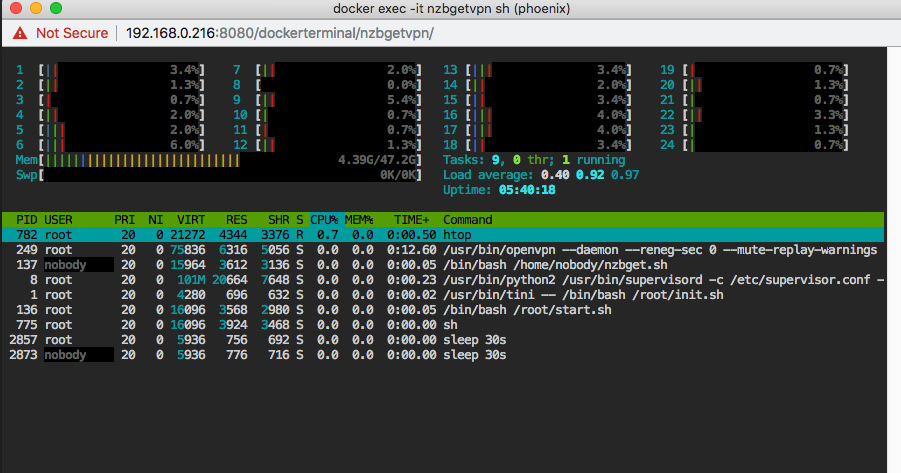
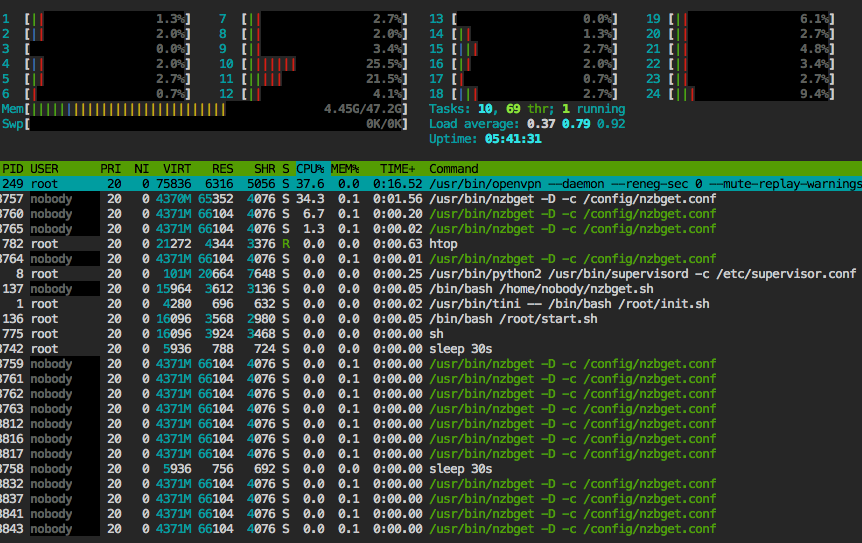
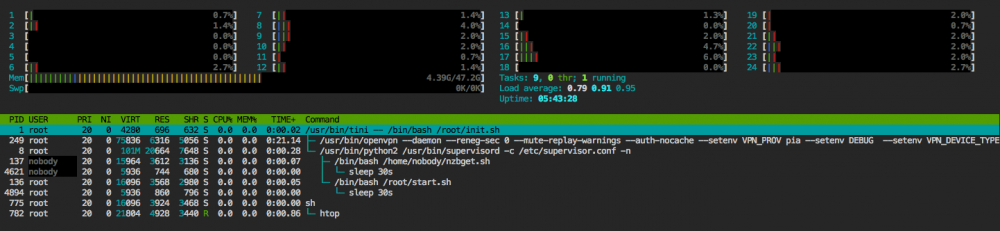
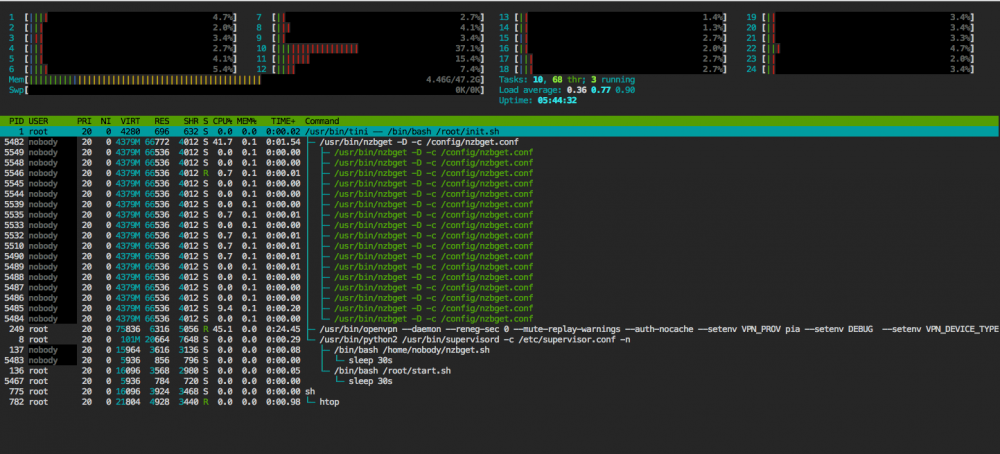
Spent a few hours today trying to dive deep into this to see what might be going on. It appears that the script in /home/noboday/nzbget.sh is what is kicking off the startup of nzbget In there it's doing a check to see if nzbget is running using "pgrep -x nzbget" seems like that makes sense. I started watching htop to see if the later command to start nzbget actually shows up in the process list. What seems odd to me is it shows up a LARGE number of times. Here is htop while we are hitting the sleep for 30 second time in the loop in /home/nobody/nzbget.sh Then every 30 seconds or so it seems to try to restart nzbget and I see lots of processes for /usr/bin/nzbget -D -c /config/nzbget.conf start up? Maybe this is normal I don't know? These are probably a little easier to read I'm still trying to figure out if and where there are logs for that nzbget start up command. Maybe if I can find them they'll give me a better idea whats going on but no luck so far.
-
I've had this nzbgetvpn container working for a while but it recently started failing to load. To be more specific I think its successfully starting, as I can occasionally get to the webui for a few seconds. But it appears to be in a loop either crashing or something but I don't see much in the logs other than this repeating every 30 seconds. 2018-11-30 09:38:43,621 DEBG 'nzbget-script' stdout output: [info] Nzbget not running [info] Attempting to start Nzbget... 2018-11-30 09:38:43,629 DEBG 'nzbget-script' stdout output: [info] Nzbget started 2018-11-30 09:39:13,765 DEBG 'nzbget-script' stdout output: [info] Nzbget not running [info] Attempting to start Nzbget... 2018-11-30 09:39:13,772 DEBG 'nzbget-script' stdout output: [info] Nzbget started 2018-11-30 09:39:43,911 DEBG 'nzbget-script' stdout output: [info] Nzbget not running [info] Attempting to start Nzbget... 2018-11-30 09:39:43,920 DEBG 'nzbget-script' stdout output: [info] Nzbget started I've attached the full log as well. Anyone have any ideas what might be happening here or what else I can check? log.rtf
-
Thanks cheesemarathon happy to help debug anyway I can
-
I've set this up following the guide here https://squishedmooo.com/the-new-and-easier-all-in-one-steamcache/ And the steam side of it seems to be working great so far. Searching around I have not seen anyone talk much about the Windows Update side, has anyone else tried it? I've verified the caching is working for steam by installing a game seeing the "MISS" lines in access.log, then uninstalling it and reinstalling then I see the HITS and much faster download speed. I did a couple fresh installs of windows 10 then started windows update (one install in a VM in Unraid, another in VirutalBox on my desktop) when the updates first start to install I can see in access.log some requests and the expected "MISS" lines. 192.168.0.16 / - - - [23/Aug/2018:13:49:45 -0700] "HEAD /c/msdownload/update/software/secu/2017/06/windows10.0-kb4022727-x64-express_cc430fa47ed63191874db142f794a36b33b04e44.cab HTTP/1.1" 200 0 "-" "Microsoft BITS/7.8" "MISS" "download.windowsupdate.com" "-" 192.168.0.16 / - - - [23/Aug/2018:13:49:45 -0700] "HEAD /c/msdownload/update/software/crup/2018/07/windows10.0-kb4023814-x64_8e16d67dbbc2eb1fa0ab97f7fa68575b3c71d02c.cab HTTP/1.1" 200 0 "-" "Microsoft BITS/7.8" "MISS" "download.windowsupdate.com" "-" 192.168.0.16 / - - - [23/Aug/2018:13:49:45 -0700] "GET /d/msdownload/update/software/crup/2016/03/cleanupcu_a316cb71c39b3bde4c7057716634196343d601c9.exe HTTP/1.1" 200 26424 "-" "Microsoft BITS/7.8" "HIT" "download.windowsupdate.com" "-" 192.168.0.16 / - - - [23/Aug/2018:13:49:45 -0700] "GET /d/msdownload/update/software/crup/2018/03/windows10.0-kb4033631-v2-x64-express_f3efe57c2251a16739767ea3e1cc0f45f53242ae.cab HTTP/1.1" 200 56062 "-" "Microsoft BITS/7.8" "HIT" "download.windowsupdate.com" "-" 192.168.0.16 / - - - [23/Aug/2018:13:49:45 -0700] "GET /c/msdownload/update/software/crup/2018/01/kb4056254_d2fbd6b44a3f712afbf0c456e8afc24f3363d10b.cab HTTP/1.1" 200 102545 "-" "Microsoft BITS/7.8" "HIT" "download.windowsupdate.com" "-" 192.168.0.16 / - - - [23/Aug/2018:13:49:45 -0700] "GET /c/msdownload/update/software/crup/2018/06/windows10.0-kb4134662-x64-express_a6673ecae85edf46b211ba7e0a706f24730765aa.cab HTTP/1.1" 200 28825 "-" "Microsoft BITS/7.8" "HIT" "download.windowsupdate.com" "-" 192.168.0.16 / - - - [23/Aug/2018:13:49:45 -0700] "GET /d/msdownload/update/software/crup/2016/06/windows10.0-kb3173427-x64-express_159d9916f459290dcad78c195a96ec6c52aa53b3.cab HTTP/1.1" 200 182181 "-" "Microsoft BITS/7.8" "HIT" "download.windowsupdate.com" "-" 192.168.0.16 / - - - [23/Aug/2018:13:49:45 -0700] "GET /c/msdownload/update/software/crup/2018/04/windows10.0-kb4021701-v2-x64-express_ce096a72fca7310529093ca81cc00983462fba34.cab HTTP/1.1" 200 306662 "-" "Microsoft BITS/7.8" "HIT" "download.windowsupdate.com" "-" 192.168.0.16 / - - - [23/Aug/2018:13:49:45 -0700] "HEAD /c/msdownload/update/software/uprl/2018/08/windows-kb890830-x64-v5.63_e000b1f0c6233836117cdb4a4f51857228308afc.exe HTTP/1.1" 200 0 "-" "Microsoft BITS/7.8" "HIT" "download.windowsupdate.com" "-" 192.168.0.16 / - - - [23/Aug/2018:13:49:45 -0700] "HEAD /d/msdownload/update/software/crup/2016/06/windows10.0-kb3173427-x64-express_159d9916f459290dcad78c195a96ec6c52aa53b3.cab HTTP/1.1" 200 0 "-" "Microsoft BITS/7.8" "HIT" "download.windowsupdate.com" "-" 192.168.0.16 / - - - [23/Aug/2018:13:49:45 -0700] "HEAD /c/msdownload/update/software/crup/2017/07/windows10.0-kb4033631-x64-express_fa00a38bc4d04262e7dda3dca974ecb08393414c.cab HTTP/1.1" 200 0 "-" "Microsoft BITS/7.8" "MISS" "download.windowsupdate.com" "-" 192.168.0.16 / - - - [23/Aug/2018:13:49:45 -0700] "HEAD /d/msdownload/update/software/crup/2016/03/windows10.0-kb3125217-x64_94d4773d1e8fb9bfa8847627c71b9f4088d1fc5e.cab HTTP/1.1" 200 0 "-" "Microsoft BITS/7.8" "MISS" "download.windowsupdate.com" "-" 192.168.0.16 / - - - [23/Aug/2018:13:49:45 -0700] "HEAD /d/msdownload/update/software/crup/2018/04/windows10.0-kb4091461-v2-x64-express_71278455f721d6c09ca53a31a306de602f03bb55.cab HTTP/1.1" 200 0 "-" "Microsoft BITS/7.8" "MISS" "download.windowsupdate.com" "-" 192.168.0.16 / - - - [23/Aug/2018:13:49:45 -0700] "HEAD /d/msdownload/update/software/updt/2016/07/windows10.0-kb3161102-x64_5d8bf62de2a4e651f8523d63589d0d2961bb2ad1.cab HTTP/1.1" 200 0 "-" "Microsoft BITS/7.8" "MISS" "download.windowsupdate.com" "-" 192.168.0.16 / - - - [23/Aug/2018:13:49:45 -0700] "HEAD /d/msdownload/update/software/crup/2018/08/windows10.0-kb4023057-x64_12a576d5971e26cd4f2eea81ec6ff5acd8b7cf0e.cab HTTP/1.1" 200 0 "-" "Microsoft BITS/7.8" "MISS" "download.windowsupdate.com" "-" 192.168.0.16 / - - - [23/Aug/2018:13:49:46 -0700] "HEAD /c/msdownload/update/software/secu/2017/06/windows10.0-kb4022730-x64_ac8f551161d557c8515acbfab76cc700ff168481.cab HTTP/1.1" 200 0 "-" "Microsoft BITS/7.8" "MISS" "download.windowsupdate.com" "-" 192.168.0.16 / - - - [23/Aug/2018:13:49:46 -0700] "GET /d/msdownload/update/software/crup/2016/03/windows10.0-kb3125217-x64_94d4773d1e8fb9bfa8847627c71b9f4088d1fc5e.cab HTTP/1.1" 200 24690 "-" "Microsoft BITS/7.8" "HIT" "download.windowsupdate.com" "-" 192.168.0.16 / - - - [23/Aug/2018:13:49:46 -0700] "GET /d/msdownload/update/software/updt/2016/07/windows10.0-kb3161102-x64_5d8bf62de2a4e651f8523d63589d0d2961bb2ad1.cab HTTP/1.1" 200 146631 "-" "Microsoft BITS/7.8" "HIT" "download.windowsupdate.com" "-" 192.168.0.16 / - - - [23/Aug/2018:13:49:46 -0700] "GET /d/msdownload/update/software/crup/2018/08/windows10.0-kb4023057-x64_12a576d5971e26cd4f2eea81ec6ff5acd8b7cf0e.cab HTTP/1.1" 200 686520 "-" "Microsoft BITS/7.8" "HIT" "download.windowsupdate.com" "-" 192.168.0.16 / - - - [23/Aug/2018:13:49:46 -0700] "GET /c/msdownload/update/software/crup/2017/07/windows10.0-kb4033631-x64-express_fa00a38bc4d04262e7dda3dca974ecb08393414c.cab HTTP/1.1" 200 39182 "-" "Microsoft BITS/7.8" "HIT" "download.windowsupdate.com" "-" 192.168.0.16 / - - - [23/Aug/2018:13:49:46 -0700] "GET /d/msdownload/update/software/crup/2016/06/windows10.0-kb3173427-x64-express_159d9916f459290dcad78c195a96ec6c52aa53b3.cab HTTP/1.1" 200 182181 "-" "Microsoft BITS/7.8" "HIT" "download.windowsupdate.com" "-" 192.168.0.16 / - - - [23/Aug/2018:13:49:46 -0700] "GET /c/msdownload/update/software/crup/2018/07/windows10.0-kb4023814-x64_8e16d67dbbc2eb1fa0ab97f7fa68575b3c71d02c.cab HTTP/1.1" 200 6058938 "-" "Microsoft BITS/7.8" "HIT" "download.windowsupdate.com" "-" 192.168.0.16 / - - - [23/Aug/2018:13:49:46 -0700] "GET /d/msdownload/update/software/crup/2018/04/windows10.0-kb4091461-v2-x64-express_71278455f721d6c09ca53a31a306de602f03bb55.cab HTTP/1.1" 200 28312 "-" "Microsoft BITS/7.8" "HIT" "download.windowsupdate.com" "-" 192.168.0.16 / - - - [23/Aug/2018:13:49:47 -0700] "GET /c/msdownload/update/software/secu/2017/06/windows10.0-kb4022727-x64-express_cc430fa47ed63191874db142f794a36b33b04e44.cab HTTP/1.1" 200 25392379 "-" "Microsoft BITS/7.8" "HIT" "download.windowsupdate.com" "-" 192.168.0.16 / - - - [23/Aug/2018:13:49:47 -0700] "GET /c/msdownload/update/software/uprl/2018/08/windows-kb890830-x64-v5.63_e000b1f0c6233836117cdb4a4f51857228308afc.exe HTTP/1.1" 200 46625016 "-" "Microsoft BITS/7.8" "HIT" "download.windowsupdate.com" "-" 192.168.0.16 / - - - [23/Aug/2018:13:49:48 -0700] "GET /c/msdownload/update/software/secu/2017/06/windows10.0-kb4022730-x64_ac8f551161d557c8515acbfab76cc700ff168481.cab HTTP/1.1" 200 21536171 "-" "Microsoft BITS/7.8" "HIT" "download.windowsupdate.com" "-" 192.168.0.16 / - - - [23/Aug/2018:13:52:11 -0700] "GET /SIH/amd64/siheng_10240.18000.cab HTTP/1.1" 200 96481 "-" "Windows-Update-Agent/10.0.10011.16384 Client-Protocol/1.32" "MISS" "download.windowsupdate.com" "-" The updates seems to just hang downloading shortly after 3 or 6 % Maybe something has changed with the update process since that section was created but I was just curious if I might have something wrong or if its also not working for anyone else.

