Sabot
Members
-
Joined
-
Last visited
Everything posted by Sabot
-
Howdy all, It seems that my nextcloud is fragile! I was not even working on nextcloud and it broke. In fact, I was learning how to setup a Windows VM. I don't know what I did but now it won't start. Looking at the logs I see this: Doctrine\DBAL\Exception: Failed to connect to the database: An exception occurred in the driver: SQLSTATE[HY000] [2002] Host is unreachable in /config/www/nextcloud/lib/private/DB/Connection.php:139 I see others have had this error but didn't see if they figured out how to fix this.
-
Solved: Found this... Navigate to the Tools > System Devices page and locate your GPU in the list: IOMMU group 13:[10de:1f06] 29:00.0 VGA compatible controller: NVIDIA Corporation TU106 [GeForce RTX 2060 SUPER] (rev a1) [10de:10f9] 29:00.1 Audio device: NVIDIA Corporation TU106 High Definition Audio Controller (rev a1) [10de:1ada] 29:00.2 USB controller: NVIDIA Corporation TU106 USB 3.1 Host Controller (rev a1) Make sure you have the checkboxes ticked for these three items and then click the button at the bottom to bind those to VFIO at boot. Now reboot your system and your GPU pass through should work.
-
Howdy, Working my way through my first Windows 11 VM. I am stuck at the following error when I try to start the VM: Execution error internal error: qemu unexpectedly closed the monitor: 2022-08-29T22:20:30.694930Z qemu-system-x86_64: -device vfio-pci,host=0000:0b:00.0,id=hostdev0,bus=pci.4,addr=0x0: vfio 0000:0b:00.0: group 16 is not viable Please ensure all devices within the iommu_group are bound to their vfio bus driver. Here is the log: 2022-08-29 22:39:48.262+0000: Starting external device: TPM Emulator Please ensure all devices within the iommu_group are bound to their vfio bus driver. 2022-08-29 22:39:48.413+0000: shutting down, reason=failed
-
Solved. Once I found where the IOMMU setting was in my BIOS, I was able to enable and it fixed my issue. As far as I know, this doesn't apply to the B450. This only applies to the B450M. They're two different boards. It's under Advanced > AMD CBS > NBIO Common Options > IOMMU.
-
Howdy all, I am setting up my first Windows VM (Spaceinvader One) when I get to the drop down graphic card menu, it doesn't show my graphic card. Only VNC is showing. I feel that I am missing something easy but I just can't put my finger on it. I just installed the graphic card today. Below is the ending of my system devices. It shows the graphic card. [10de:1e04]0b:00.0 VGA compatible controller: NVIDIA Corporation TU102 [GeForce RTX 2080 Ti] (rev a1) [10de:10f7]0b:00.1 Audio device: NVIDIA Corporation TU102 High Definition Audio Controller (rev a1) [10de:1ad6]0b:00.2 USB controller: NVIDIA Corporation TU102 USB 3.1 Host Controller (rev a1) [10de:1ad7]0b:00.3 Serial bus controller: NVIDIA Corporation TU102 USB Type-C UCSI Controller (rev a1) [1022:148a]0c:00.0 Non-Essential Instrumentation [1300]: Advanced Micro Devices, Inc. [AMD] Starship/Matisse PCIe Dummy Function [1022:1485]0d:00.0 Non-Essential Instrumentation [1300]: Advanced Micro Devices, Inc. [AMD] Starship/Matisse Reserved SPP [1022:1486]0d:00.1 Encryption controller: Advanced Micro Devices, Inc. [AMD] Starship/Matisse Cryptographic Coprocessor PSPCPP [1022:149c]0d:00.3 USB controller: Advanced Micro Devices, Inc. [AMD] Matisse USB 3.0 Host Controller [1022:1487]0d:00.4 Audio device: Advanced Micro Devices, Inc. [AMD] Starship/Matisse HD Audio Controller
-
SOLVED I’ve been searching and testing various commands. Even as frustrating as this has been, it’s the best way for me to learn. I just found this command, and it worked for me: root@a168f31971fd:/config/www/nextcloud# occ app:list root@a168f31971fd:/config/www/nextcloud# occ app:disable fulltextsearch fulltextsearch 24.0.0 disabled So so simple, yet I made it difficult!
-
Thank you for confirming where I should be. 👍 Now I need to figure out how to run the app commands.🤔
-
Howdy all, HTTP ERROR 500 - After installing App After installing a search app via the plugin within nextcloud, I received an error message in nextcloud that the server was unstable. I power-cycled the nextcloud docker (in unraid), and now I see this error message. I believe that I need to use the terminal in the Nextcloud Docker in UnRaid to uninstall the app? Problem is, I don't know how. I am struggling just to find the directory of nextcloud. Well after a few hours of cramming , i finally I believe found the nextcloud directory in the Docker terminal. I am confused what this means: root@a168f31971fd: and a168f31971fd The directory is: a168f31971fd:/config/www/nextcloud# I tried to run the following command: a168f31971fd:/config/www/nextcloud# sudo -u www-data php occ app:disable fulltextsearch sudo: unknown user: www-data sudo: error initializing audit plugin sudoers_audit I installed Unraid and then nextCloud last week. It's been a fast pace learning curve. Not knowing commands or even how to navigate the file system really suxs. Being that I am such a newbie, I want to learn. I am soaking up all the information on this forum and the web. Please forgive my ignorance. I am in the process of learning about nextcloud file structure and Linux in general. Do you have recommendations on a tutorial, video, or the like that would guide a person with little to no knowledge?
-
That fixed it. Thank you!
-
Here you go. servernas-diagnostics-20170425-1445.zip
-
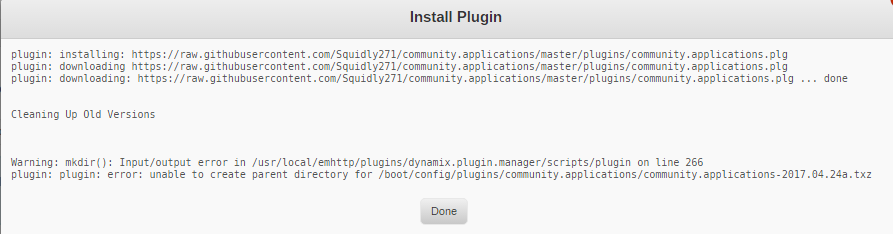
I am new and currently using the trial version. I don't know if this impacts this add-in or not. I am getting " Warning: mkdir(): Input/output error in /usr/local/emhttp/plugins/dynamix.plugin.manager/scripts/plugin on line 266plugin: plugin: error: unable to create parent directory for /boot/config/plugins/community.applications/community.applications-2017.04.24a.txz: " upon installation. Suggestions?