





smakdafrog
Members
-
Joined
-
Last visited
-
Did you ever find a solution for this? I'm experiencing the same thing after an update this morning. Appdata is pointed at /mnt/cache/appdata/radarr ********* 19-12-16 20:41:47.5|Info|Bootstrap|Starting Radarr - /opt/radarr/Radarr.exe - Version 0.2.0.1450 19-12-16 20:41:48.3|Info|AppFolderInfo|Data directory is being overridden to [/config] 19-12-16 20:41:48.4|Fatal|ConsoleApp|EPIC FAIL! [v0.2.0.1450] NzbDrone.Core.Configuration.InvalidConfigFileException: /config/config.xml is empty. Please delete the config file and Radarr will recreate it. at NzbDrone.Core.Configuration.ConfigFileProvider.LoadConfigFile () [0x0003c] in C:\projects\radarr-usby1\src\NzbDrone.Core\Configuration\ConfigFileProvider.cs:321 at NzbDrone.Core.Configuration.ConfigFileProvider+<>c__DisplayClass45_0.<GetValue>b__0 () [0x00000] in C:\projects\radarr-usby1\src\NzbDrone.Core\Configuration\ConfigFileProvider.cs:227 at NzbDrone.Common.Cache.Cached`1[T].Get (System.String key, System.Func`1[TResult] function, System.Nullable`1[T] lifeTime) [0x0006a] in C:\projects\radarr-usby1\src\NzbDrone.Common\Cache\Cached.cs:81 at NzbDrone.Core.Configuration.ConfigFileProvider.GetValue (System.String key, System.Object defaultValue, System.Boolean persist) [0x00022] in C:\projects\radarr-usby1\src\NzbDrone.Core\Configuration\ConfigFileProvider.cs:225 at NzbDrone.Core.Configuration.ConfigFileProvider.get_LogLevel () [0x00000] in C:\projects\radarr-usby1\src\NzbDrone.Core\Configuration\ConfigFileProvider.cs:181 at NzbDrone.Core.Instrumentation.ReconfigureLogging.Reconfigure () [0x00000] in C:\projects\radarr-usby1\src\NzbDrone.Core\Instrumentation\ReconfigureLogging.cs:22 at Radarr.Host.Bootstrap.Start (Radarr.Host.ApplicationModes applicationModes, NzbDrone.Common.EnvironmentInfo.StartupContext startupContext) [0x00000] in C:\projects\radarr-usby1\src\NzbDrone.Host\Bootstrap.cs:61 at Radarr.Host.Bootstrap.Start (NzbDrone.Common.EnvironmentInfo.StartupContext startupContext, Radarr.Host.IUserAlert userAlert, System.Action`1[T] startCallback) [0x00075] in C:\projects\radarr-usby1\src\NzbDrone.Host\Bootstrap.cs:39 at NzbDrone.Console.ConsoleApp.Main (System.String[] args) [0x00029] in C:\projects\radarr-usby1\src\NzbDrone.Console\ConsoleApp.cs:35
-
Where is the country DB? I'm only seeing the Cities one under var/lib/libmaxminddb/GeoLite2-City.mmdb
-
Even for just the website? (not actual download/upload traffic). Figured if I went to domain.com/deluge, my external IP hitting that site should be able to get logged correctly because its going through Nginx reverse proxy to get there. I mainly just want to stop anyone from brute forcing their way into my deluge client.
-
I'm trying to do something similar here, but have been unable to get it to work. I'm trying to get Fail2ban working with DelugeVPN, using LetsEncrypt reverse proxy. Everything is setup and functional, but in the DelugeVPN logs, I get 172.17.0.0/16 ips listed from the docker bridge. ****** 2018-06-25 13:55:28,812 DEBG 'deluge-web-script' stderr output: [ERROR ] 13:55:28 auth:330 Login failed (ClientIP 172.17.0.1) ****** I've set up the real ip stuff that I've seen in this thread ****** server { listen 443 ssl; server_name deluge.domain.com; set_real_ip_from 172.17.0.0/16; real_ip_header X-Forwarded-For; real_ip_recursive on; location / { proxy_pass http://192.168.50.50:8112/; } } ****** Not sure how to get the clients actual IP to populate in the delugevpn logs instead of the bridge IPs. Anyone have an idea?
-
Appreciate the fast response. Bummer tho! Glad it's not totally a one off issue. Great work on the container, thanks again! Sent from my SM-G930V using Tapatalk
-
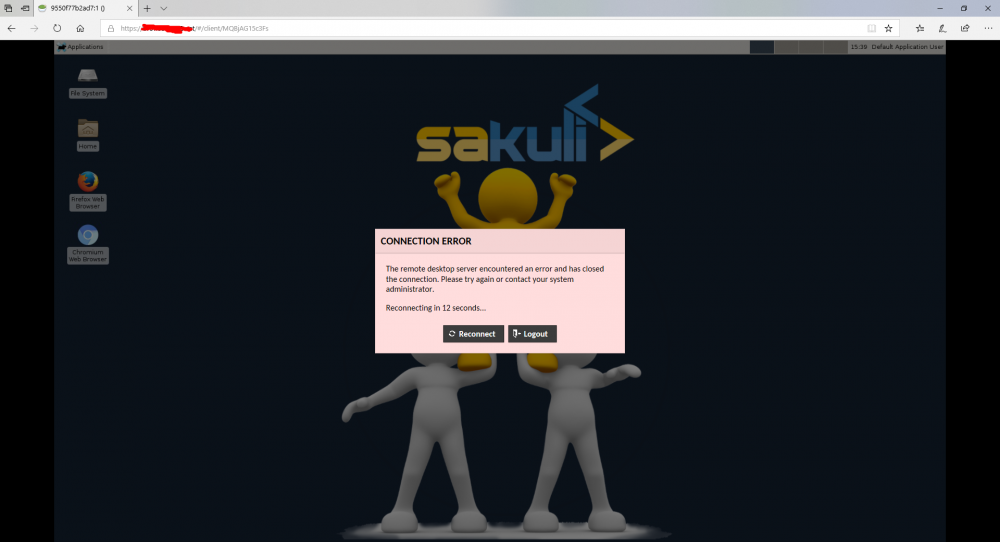
I'm using Unraid with Nginx reverse proxy, I've spun up VNCWebBrowser and your ApacheGuacamole container. Everything is communicating, however, I get (frequent) intermittent disconnects when the session is established, seems to happen only when I'm typing or clicking. I've tried using VNC (port 5901) locally, as well as the HTML5 (port 6901), that works fine, its only when I'm accessing that container via ApacheGuacamole that I experience the disconnects. Not really sure where to go from here, any help would be appreciated. Please let me know if I can provide anything else. I have 2 different Nginx confs: ###################################################################### Conf1 map $http_upgrade $connection_upgrade { default upgrade; '' close; } server { listen 80 default_server; server_name _; return 404; } server { listen 443 ssl default_server; root /config/www; index index.html index.htm index.php; server_name _; add_header Strict-Transport-Security "max-age=31536000"; ##SSL## #... #... ##END SSL## #VNC Web Browser location ^~ /guacamole/ { proxy_pass http://192.168.15.5:8086/guacamole/; } location ^~ /guacamole/websocket-tunnel { proxy_pass http://192.168.15.5:8086/guacamole/websocket-tunnel; proxy_http_version 1.1; proxy_set_header Upgrade $http_upgrade; proxy_set_header Connection $http_connection; #proxy_set_header Connection "upgrade"; proxy_buffering off; proxy_set_header X-Forwarded-For $proxy_add_x_forwarded_for; access_log off; } } Conf2 # GUACAMOLE CONTAINER server { listen 80; server_name guacamole.*; return 404; } server { listen 443 ssl http2; server_name guacamole.*; ##SSL## #... #... add_header Strict-Transport-Security "max-age=63072000; includeSubDomains; preload"; add_header X-Content-Type-Options nosniff; add_header X-XSS-Protection "1; mode=block"; add_header X-Robots-Tag none; #SET THIS TO index IF YOU WANT GOOGLE TO INDEX YOU SITE! add_header Content-Security-Policy "frame-ancestors https://*.$server_name https://$server_name"; #add_header X-Frame-Options "ALLOW-FROM https://*.$server_name" always; add_header X-Frame-Options "ALLOW-FROM https://*.$server_name" always; add_header Referrer-Policy "strict-origin-when-cross-origin"; proxy_cookie_path / "/; HTTPOnly; Secure"; more_set_headers "Server: Classified"; more_clear_headers 'X-Powered-By'; ##END SSL## location / { proxy_pass http://192.168.15.5:8086/; proxy_buffering off; proxy_set_header Upgrade $http_upgrade; proxy_set_header Connection $http_connection; proxy_set_header X-Real-IP $remote_addr; proxy_set_header X-Forwarded-For $proxy_add_x_forwarded_for; proxy_set_header X-Forwarded-Proto $scheme; proxy_http_version 1.1; proxy_no_cache $cookie_session; } } Here are the logs from the disconnects, they errors vary depending on which url (conf) I'm trying to access. Conf1 error log Jun 20, 2018 3:54:42 PM org.webjars.servlet.WebjarsServlet doGet INFO: Webjars resource requested: /META-INF/resources/webjars/lodash/2.4.1/dist/lodash.min.js Jun 20, 2018 3:54:42 PM org.webjars.servlet.WebjarsServlet doGet INFO: Webjars resource requested: /META-INF/resources/webjars/angular-translate-interpolation-messageformat/2.8.0/angular-translate-interpolation-messageformat.min.js Jun 20, 2018 3:54:42 PM org.webjars.servlet.WebjarsServlet doGet INFO: Webjars resource requested: /META-INF/resources/webjars/angular/1.3.16/angular.min.js Jun 20, 2018 3:54:42 PM org.webjars.servlet.WebjarsServlet doGet INFO: Webjars resource requested: /META-INF/resources/webjars/angular-route/1.3.16/angular-route.min.js Jun 20, 2018 3:54:42 PM org.webjars.servlet.WebjarsServlet doGet INFO: Webjars resource requested: /META-INF/resources/webjars/jquery/2.1.3/dist/jquery.min.js Jun 20, 2018 3:54:42 PM org.webjars.servlet.WebjarsServlet doGet INFO: Webjars resource requested: /META-INF/resources/webjars/angular-touch/1.3.16/angular-touch.min.js Jun 20, 2018 3:54:42 PM org.webjars.servlet.WebjarsServlet doGet INFO: Webjars resource requested: /META-INF/resources/webjars/filesaver/1.3.3/FileSaver.min.js Jun 20, 2018 3:54:42 PM org.webjars.servlet.WebjarsServlet doGet INFO: Webjars resource requested: /META-INF/resources/webjars/messageformat/1.0.2/messageformat.min.js Jun 20, 2018 3:54:42 PM org.webjars.servlet.WebjarsServlet doGet INFO: Webjars resource requested: /META-INF/resources/webjars/blob-polyfill/1.0.20150320/Blob.js Jun 20, 2018 3:54:42 PM org.webjars.servlet.WebjarsServlet doGet INFO: Webjars resource requested: /META-INF/resources/webjars/angular-translate/2.8.0/angular-translate.min.js Jun 20, 2018 3:54:42 PM org.webjars.servlet.WebjarsServlet doGet INFO: Webjars resource requested: /META-INF/resources/webjars/angular-module-shim/0.0.4/angular-module-shim.js Jun 20, 2018 3:54:42 PM org.webjars.servlet.WebjarsServlet doGet INFO: Webjars resource requested: /META-INF/resources/webjars/angular-translate-loader-static-files/2.8.0/angular-translate-loader-static-files.min.js Jun 20, 2018 3:54:42 PM org.webjars.servlet.WebjarsServlet doGet INFO: Webjars resource requested: /META-INF/resources/webjars/angular-cookies/1.3.16/angular-cookies.min.js 15:54:42.965 [http-nio-8080-exec-3] WARN o.a.i.d.pooled.PooledDataSource - Execution of ping query 'SELECT 1' failed: Communications link failure The last packet successfully received from the server was 1,407,658 milliseconds ago. The last packet sent successfully to the server was 7 milliseconds ago. 15:54:42.966 [http-nio-8080-exec-3] WARN o.a.i.d.pooled.PooledDataSource - Execution of ping query 'SELECT 1' failed: Communications link failure The last packet successfully received from the server was 1,389,637 milliseconds ago. The last packet sent successfully to the server was 0 milliseconds ago. 15:54:48.585 [http-nio-8080-exec-7] INFO o.a.g.r.auth.AuthenticationService - User "smakdafrog" successfully authenticated from 172.17.0.1. 15:54:49.270 [http-nio-8080-exec-13] INFO o.a.g.tunnel.TunnelRequestService - User "smakdafrog" connected to connection "1". 15:54:57.540 [http-nio-8080-exec-14] INFO o.a.g.tunnel.TunnelRequestService - User "smakdafrog" disconnected from connection "1". Duration: 8269 milliseconds 15:54:59.061 [http-nio-8080-exec-9] INFO o.a.g.tunnel.TunnelRequestService - User "smakdafrog" connected to connection "1". Conf2 error log 15:39:37.544 [http-nio-8080-exec-14] INFO o.a.g.r.auth.AuthenticationService - User "smakdafrog" successfully authenticated from [199.102.91.33, 172.17.0.1]. 15:39:38.369 [http-nio-8080-exec-1] INFO o.a.g.tunnel.TunnelRequestService - User "smakdafrog" connected to connection "1". 15:39:52.413 [http-nio-8080-exec-8] INFO o.a.g.tunnel.TunnelRequestService - User "smakdafrog" disconnected from connection "1". Duration: 14038 milliseconds 15:40:07.633 [http-nio-8080-exec-1] INFO o.a.g.tunnel.TunnelRequestService - User "smakdafrog" connected to connection "1". 15:52:38.722 [http-nio-8080-exec-16] INFO o.a.g.tunnel.TunnelRequestService - User "smakdafrog" disconnected from connection "1". Duration: 751088 milliseconds 15:52:38.742 [http-nio-8080-exec-16] WARN o.a.i.d.pooled.PooledDataSource - Execution of ping query 'SELECT 1' failed: Communications link failure The last packet successfully received from the server was 751,058 milliseconds ago. The last packet sent successfully to the server was 15 milliseconds ago. 15:52:54.077 [http-nio-8080-exec-4] INFO o.a.g.tunnel.TunnelRequestService - User "smakdafrog" connected to connection "1". 15:53:11.657 [http-nio-8080-exec-2] INFO o.a.g.tunnel.TunnelRequestService - User "smakdafrog" disconnected from connection "1". Duration: 17580 milliseconds 15:53:26.934 [http-nio-8080-exec-9] INFO o.a.g.tunnel.TunnelRequestService - User "smakdafrog" connected to connection "1". 15:53:49.633 [http-nio-8080-exec-6] INFO o.a.g.tunnel.TunnelRequestService - User "smakdafrog" disconnected from connection "1". Duration: 22699 milliseconds 15:53:51.547 [http-nio-8080-exec-12] INFO o.a.g.tunnel.TunnelRequestService - User "smakdafrog" connected to connection "1".
-
-
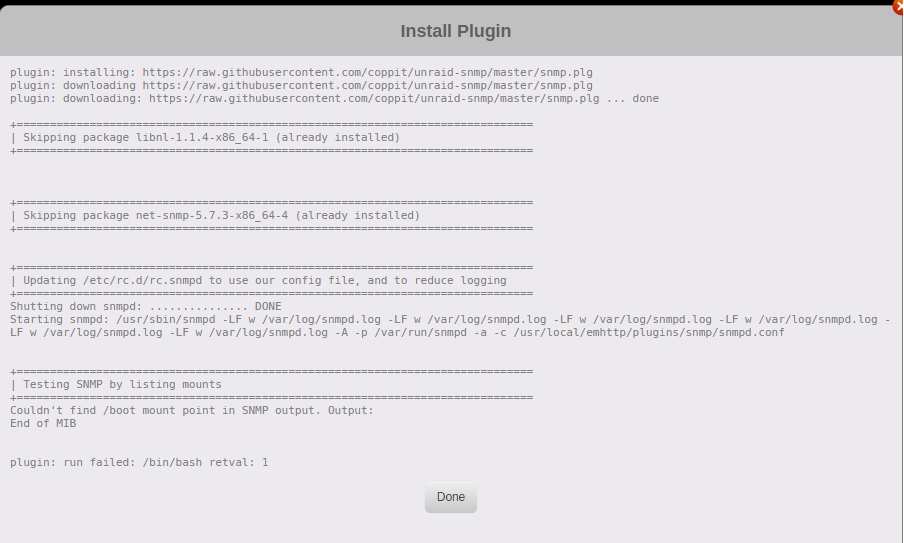
I've tried to install this plugin, but each time I get the following error. Couldn't find /boot mount point in SNMP out. Output: End of MIB plugin: run failed: /bin/bash retval: 1 Anyone familiar with this error or how to fix it? I've scoured the internet, I have perl installed.
-
On a slightly different note, I was never able to get my Win10 vm to boot until I changed the CPU Mode to emulated instead of host pass through (Intel Pentium G4560). Id still like to get that working at some point but I haven't seen anyone have the same issue as me. This also is the same CPU I'm trying to pass the iGPU from. Sent from my SM-G930V using Tapatalk
-
I'll have to give this another shot then, tried this a few months back and could never get it working. Thanks! Sent from my SM-G930V using Tapatalk
-
What if your trying to use the integrated GPU as the pass through? Is there any way to release that for the vm at all? Sent from my SM-G930V using Tapatalk

