





Chandler
Members
-
Joined
-
Last visited
Everything posted by Chandler
-
@JPDVM2014 hey, just wanted to let you know that listenarr updated their repo to no longer be a project under the creator. The repo is now under their org “listenarrs” rather than “therobbiedavis”. There are some big security exploits that they have found recently and fixed but have only been published on their new repo. The template should now have this as the repo: ghcr.io/listenarrs/listenarr:canary
-
Thanks! Just wanted to make sure there wasn't anything else I missed.
-
Last night I noticed issues with my server and came to find all my shares missing and dockers appeared to be running even though they weren't. I checked the logs and found this: Oct 13 19:09:01 Tower shfs: shfs: ../lib/fuse.c:1450: unlink_node: Assertion `node->nlookup > 1' failed. Oct 13 19:09:01 Tower rsyslogd: file '/mnt/user/Logs/syslog-192.168.1.17.log'[2] write error - see https://www.rsyslog.com/solving-rsyslog-write-errors/ for help OS error: Transport endpoint is not connected [v8.2102.0 try https://www.rsyslog.com/e/2027 ] Oct 13 19:09:01 Tower rsyslogd: file '/mnt/user/Logs/syslog-192.168.1.17.log': open error: Transport endpoint is not connected [v8.2102.0 try https://www.rsyslog.com/e/2433 ] I tried stopping and restarting the array but that didn't work. Next was a full server restart and everything appeared to be back to normal. Does anyone know what caused this or if there is anything else in my diagnostics that could help?
-
Seems to be a solution, though not the ideal one 😅 Is there another better solution or do these drives just suck lol
-
Thanks for that. Silly that Seagate has this issue. I went through and completed all these steps after I rebuilt the disabled drive. EPC and low current spin up are off on all my ST8000VN004 drives. My drives are still getting the read errors though. Any more ideas? Here is a new diagnostics if that helps. tower-diagnostics-20220107-1445.zip
-
I believe so, I have redundant 920W PSUs. Do you see something in the diagnostics that indicate a power issue?
-
Hello, recently I have been getting read errors on a few disks. Been using the same setup for years now, slowly adding drives over time and never had this issue before. One drive already became disabled due to this and I rebuilt it successfully. Now another drive has become disabled because of this. The drives it has been happening on are mostly newer ones. However, the second one to become disabled because of this, I have been using for over a year. I've read that this is more commonly caused by a bad connection instead of the drive. I'm wondering where I should start or if anyone has any tips for me on this. I have a 4U supermicro chassis and my drives are plugged into a backplane (BPN-SAS-846A). I believe I have 3 LSI 9210-8I that the backplane is plugged into. Since this is a more recent issue is it possible my issue could be caused by one of the LSI cards that I am now starting to use more due to the new drives?
-
Got it, thanks! I had found a similar post and the solution was upping from 30 to 60 seconds. Mine was at 90 so I figured it was fine. But I added 3 to the array and 1 to the parity earlier this month and I think that is roughly when this started happening so it makes sense!
-
Yes, I looked there first but I didn't see anything stand out. That's why I attached them to the original post.
-
Parity checks have started happening after every reboot which usually means there was an unclean shutdown.. I can't seem to figure out what is causing an unclean shutdown or if that is the issue. I've attached a diagnostics from the flash drive.
-
Sorry, I was meaning I was trying to set these up for use with Organizr. I have not actually put them in Organizr yet so we can take that out of the equation. All I have done is enable the confs, make sure they are pointing to the right containers/ports, and entering mydomain.com/container and I received all those errors in my post. I fixed Tautulli. Had to add tautulli to the https root in its config. For Jackett, I have made no modifications to the subfolder conf other than renaming it to remove the sample portion. I don't get the usual 404 nginx error... Fixed Jackett, needed to redefine the base url in its gui. I guess the grayed out one didn't count. This leaves Ombi, Radarr, and Sonarr. I am not sure what to do with Ombi yet but Radarr and Sonarr I think I need to modify the confs.. It looks like it is definitely hitting them when I go to mydomain.com/radarr but then Radarr redirects it to mydomain.com/login?returnUrl=/radarr because I have forms authentication enabled. How do I get it to not redirect there? Basically it needs to redirect to mydomain.com/radarr/login?returnUrl=/ instead. Sonarr and Radarr are also now working since I added base urls to them too.. Now I just have an issue with Ombi. Heading to mydomain.com/ombi greets me with this:
-
I am trying to setup various dockers with the default subfolder confs for use with OrganizrV2. Some of the default configs are working and some aren't. ApacheGuacamole - works Deluge - works Jackett - This page can't be found Ombi - Appears to work but sits at a white page with the text "Loading..." (The subdomain conf for Ombi works though) Plex - works Radarr & Sonarr - I have forms authentication enabled and going to either of these turns the url into login?returnUrl=/radarr instead of /radarr causing it to not work Sabnzbd - works Tautulli - 404 not found the path '/tautulli' was not found I have made sure that all containers are on the same network and that the container names match what the conf is looking for. I do not see any errors for these in the error log file either. Any ideas for these issues?
-
Hello, I had updated to Unraid 6.8 which broke the --network extra param I was using so after a bunch of looking around and digging I finally got it to work.. with most dockers. The issue I have ran into is getting it to work with dockers that have the same container ports. For example, right now I am trying to get it to work with OrganizrV2 which has port 80 and port 443 as its ports. The solution I found for getting it to work with other dockers was to, in the conf, instead of using the docker name I had to use the IP of the letsencrypt docker. If I try to point the Organizr with the letsencrypt IP I get endless redirects and it fails because letsencrypt is using port 80 and port 443. This does not give me any errors in the logs. So I tried putting the container name in the conf instead of the IP and I get an operation timed out: 2020/02/04 18:23:20 [error] 397#397: *3 organizrv2 could not be resolved (110: Operation timed out), client: 192.168.1.1, server: organizr.*, request: "GET / HTTP/2.0", host: This is my conf for OrganizrV2: server { listen 443 ssl; listen [::]:443 ssl; server_name organizr.*; include /config/nginx/ssl.conf; client_max_body_size 0; location / { include /config/nginx/proxy.conf; resolver 127.0.0.11 valid=30s; set $upstream_organizr organizrv2; proxy_pass http://$upstream_organizr:80; proxy_buffering off; } }

-
Well whether I put 443 or 4436 in the conf, neither work. Same error with each.
-
Because the default port in the conf is not what my container is running on.
-
Hi, I have LetsEncrypt working with a few dockers already. However, with Pydio, I get *1 pydio could not be resolved (3: Host not found). Here is my conf: # make sure that your dns has a cname set for pydio and that your pydio container is not using a base url server { listen 443 ssl; listen [::]:443 ssl; server_name pydio.*; include /config/nginx/ssl.conf; client_max_body_size 0; # enable for ldap auth, fill in ldap details in ldap.conf #include /config/nginx/ldap.conf; location / { # enable the next two lines for http auth #auth_basic "Restricted"; #auth_basic_user_file /config/nginx/.htpasswd; # enable the next two lines for ldap auth #auth_request /auth; #error_page 401 =200 /login; include /config/nginx/proxy.conf; resolver 127.0.0.11 valid=30s; set $upstream_pydio pydio; proxy_pass https://$upstream_pydio:4436; } } The only thing I changed in here was the port. The name of the container matches the conf case sensitive. The network type is the same as the other dockers that are working. Any ideas?
-
Ok I fixed the name conflicts. Accidentally included subdomains.conf twice in the default. Any idea on the Tautulli not redirecting to https when attempting to reach from http?
-
Alright, I've been reading through this forum getting all the answers to my problems so far. I was able to figure it out and get everything in a working state. I just have just a few questions now -- On startup I see the alert about the LuaJIT version issue, is that a problem? I also see the warnings for conflicting server names. How do I fix that? I have only used the default templates and only edited them where necessary. Certificate exists; parameters unchanged; starting nginx [cont-init.d] 50-config: exited 0. [cont-init.d] 99-custom-files: executing... [custom-init] no custom files found exiting... [cont-init.d] 99-custom-files: exited 0. [cont-init.d] done. [services.d] starting services [services.d] done. nginx: [alert] detected a LuaJIT version which is not OpenResty's; many optimizations will be disabled and performance will be compromised (see https://github.com/openresty/luajit2 for OpenResty's LuaJIT or, even better, consider using the OpenResty releases from https://openresty.org/en/download.html) nginx: [error] lua_load_resty_core failed to load the resty.core module from https://github.com/openresty/lua-resty-core; ensure you are using an OpenResty release from https://openresty.org/en/download.html (rc: 2, reason: module 'resty.core' not found: no field package.preload['resty.core'] no file './resty/core.lua' no file '/usr/share/luajit-2.1.0-beta3/resty/core.lua' no file '/usr/local/share/lua/5.1/resty/core.lua' no file '/usr/local/share/lua/5.1/resty/core/init.lua' no file '/usr/share/lua/5.1/resty/core.lua' no file '/usr/share/lua/5.1/resty/core/init.lua' no file '/usr/share/lua/common/resty/core.lua' no file '/usr/share/lua/common/resty/core/init.lua' no file './resty/core.so' no file '/usr/local/lib/lua/5.1/resty/core.so' no file '/usr/lib/lua/5.1/resty/core.so' no file '/usr/local/lib/lua/5.1/loadall.so' no file './resty.so' no file '/usr/local/lib/lua/5.1/resty.so' no file '/usr/lib/lua/5.1/resty.so' no file '/usr/local/lib/lua/5.1/loadall.so') nginx: [warn] conflicting server name "ombi.*" on 0.0.0.0:443, ignored nginx: [warn] conflicting server name "sl.*" on 0.0.0.0:443, ignored nginx: [warn] conflicting server name "tautulli.*" on 0.0.0.0:443, ignored nginx: [warn] conflicting server name "ombi.*" on [::]:443, ignored nginx: [warn] conflicting server name "sl.*" on [::]:443, ignored nginx: [warn] conflicting server name "tautulli.*" on [::]:443, ignored Server ready In my default site config I enable the http redirect to https server { listen 80; listen [::]:80; server_name _; return 301 https://$host$request_uri; } This works for all dockers except for Tautulli. When I go to the http for that I get page not found, any ideas?
-
Sorry, forgot to post back here after trying on the PC. It did work on my PC but also the chrome browser on my phone as well as th chrome browser on my other iPad. It seems to just be this iPad where I get the error. It isn't that big of a deal but any idea why that might be happening? It's weird how it works on my other iPad but not this one.
-
Just switched over to your docker from sparky's and when I load up the web interface I am greeted with this. Any ideas?
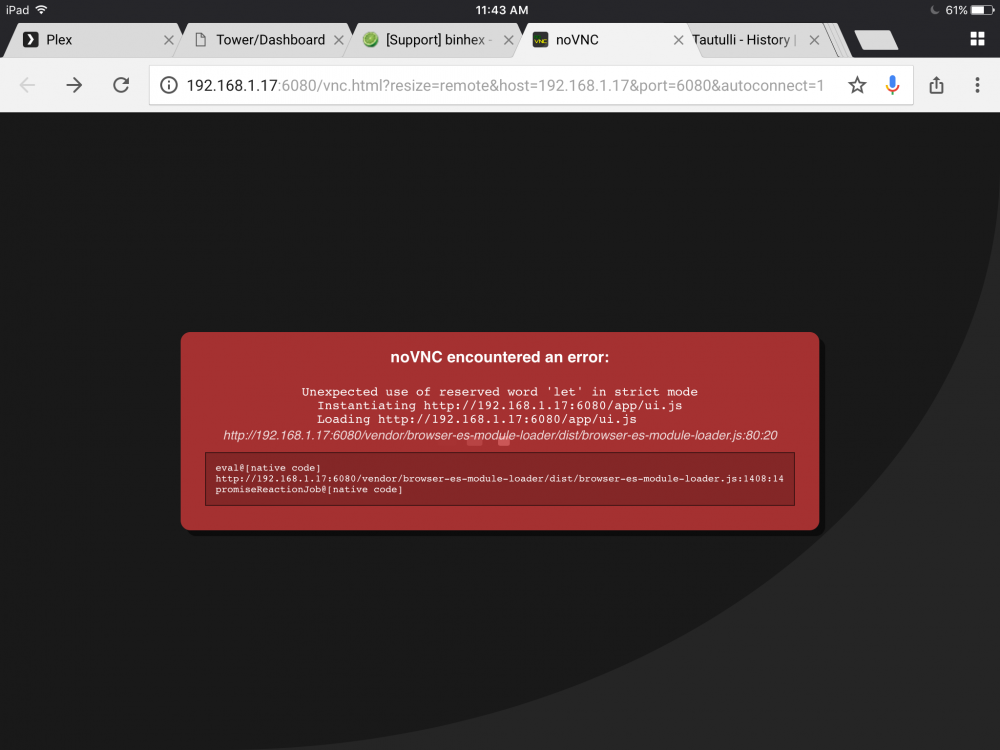
-
Hi I am not too sure if this is an issue with the docker or just an issue with Plex in general but often times when I have remote access enabled after a while my entire internet connection will have high ping on just about everything anyone tries to do which eventually leads up to my entire connection dropping for 5-15 minutes. I have tried researching it a bit and it seemed like the only fix was to disable the dlna setting and when I went to do that I only found that it was already disabled. The fix for my ping and internet connection dropping is always solved when I either turn off remote access or completely turn off the docker. Any ideas or should I head over to the Plex forums?
-
I've tried all kinds of reboots. No luck.
-
The only time it has ever worked for me was when I initially installed everything a few months back. Recently when adding a 3TB drive, it didn't work but I decided I wouldn't bother with it and just install it without preclear. But now that I am adding another 8TB drive, I would feel a lot safer preclearing it first
-
Hi, I've been trying to preclear my new drive but the plugin just seems to sit on starting preclear. I've tried reinstalling it a few times but that hasn't done anything. Here's the downloaded log. From what I could find within it is that it couldn't find the SMART parameters then it found them and nothing else happens. When I try to just show log in the browser, it never loads, just sits with the blank white window. TOWER-preclear.disk-20171022-1314.zip
-
You can just move your whole appdata folder over to the cache drive to speed up all your dockers. If you do move the whole appdata folder over make sure you reflect those changes in the share so tell it to use cache only. And it also wouldn't be a bad idea to set up the community applications backup plugin to backup your appdata folder to the array every so often. You can add a folder that is stored on another PC. You'll have to SMB/NFS share the folder to your server and then map the folder into the plex docker just like how you did earlier to see your media within plex.


